Page 8 of 8 CI-247_03
LEARNING THE DEVICE
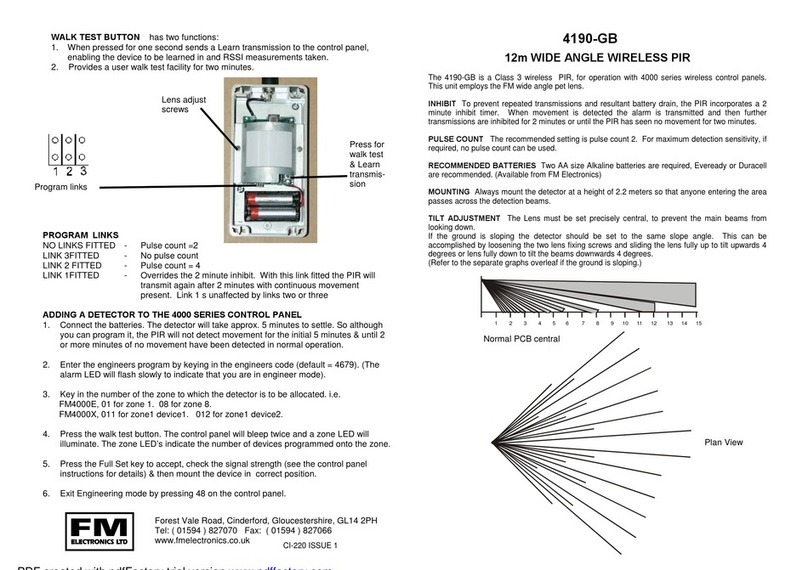
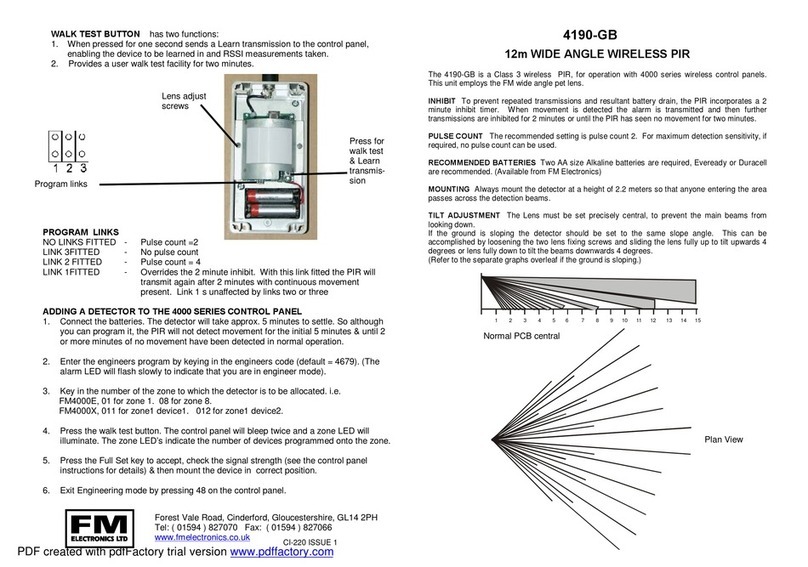
Put the control panel or interface into Learn mode (see unit instructions) loosen the
cover screw until the tamper switch clicks and the tamper operates. The detector will
then send a learn signal to control panel or interface.
WALK TESTING
To select walk test
Loosen the cover screw to operate the tamper switch, a tamper alarm will be
signalled.
Whilst in walk test the two red walk test LED’s are enabled. (Top LED illuminates
when the top sensor is activated and the bottom LED for the bottom sensor.
To come out of walk test
Tighten the cover screw, the tamper restore will be signalled.
The LED’s are now disabled, but the sensor remains in walk test for up to 5 more
minutes.
Normal operation
The detector will have a two minute inhibit after an alarm activation. The detector will
only activate when 2 minutes or more has elapsed without activation.
BATTERY REPLACEMENT
Two AA Alkaline batteries are located inside the top sensor housing. The battery will
normally last for a minimum of two years. If the battery needs replacing the detector
will signal a low battery to the alarm control unit.
The unique features of FM Detectors ensure:
a) A constant 5v is maintained to the radio transmitter, ensuring consistent RF
transmission power regardless of battery voltage.
b) The detector will continue to work at 100% performance for two months after a
low battery is indicated.
South Walk, Vantage Point Business Village, Mitcheldean, Gloucestershire,
GL17 0DD Tel. 01594 827070 email. sales@fmelectronics.co.uk www.fmelectronics.co.uk
FM Electronics is the Manufacturing division of FM Security Ltd