FriendlyARM MINI2440 User manual

MINI2440 User Manual

1. OVERVIEW.........................................................................................................................................................5
1.1 DESCRIPTION...................................................................................................................................................5
1.1.1 Topview of Board....................................................................................................................................6
1.1.2 Hardware Features ................................................................................................................................6
1.1.3 Material list on CD ................................................................................................................................8
1.2 HARDWARE RESOURCE....................................................................................................................................8
1.2.1 Memory Map and Chip Selection...........................................................................................................8
1.2.2 Jumpers..................................................................................................................................................9
1.2.3 Interfaces..............................................................................................................................................10
1.3 LINUX FEATURES...........................................................................................................................................10
1.4WINDOWS CE FEATURES...............................................................................................................................11
2. HOW TO USE MINI2440..................................................................................................................................12
2.1 HARDWARE SETUP.........................................................................................................................................12
2.1.1 Boot Mode............................................................................................................................................12
2.1.2 External connection .............................................................................................................................12
2.1.3 Hypterminal Setup................................................................................................................................13
2.2 BIOS FUNCTION............................................................................................................................................13
2.2.1 Enter BIOS...........................................................................................................................................13
2.2.2 Install USB Driver ...............................................................................................................................14
2.2.3 Main Menu Function............................................................................................................................15
2.2.4 Partition Sub Menu Function...............................................................................................................17
2.2.5 Linux Parameter Setup.........................................................................................................................20
2.3 TEST PROGRAM WITHOUT OS........................................................................................................................22
2.3.1 Download 2440test ..............................................................................................................................22
2.3.2 Hardware Test ......................................................................................................................................23
2.4 LINUX FUNCTION...........................................................................................................................................29
2.4.1 MP3 Play .............................................................................................................................................29
2.4.2 Stop a Program ....................................................................................................................................29
2.4.3 Use U-Disk and Mobile Harddisk........................................................................................................29
2.4.4 Use SD Card ........................................................................................................................................31
2.4.5 Transfer file with PC............................................................................................................................31
2.4.6 LED Control.........................................................................................................................................31
2.4.7 Button Test............................................................................................................................................32
2.4.8 Serial 2 and 3 Test................................................................................................................................32
2.4.9 Beeper test............................................................................................................................................33
2.4.10 LCD Backlight....................................................................................................................................34
2.4.11 I2C Test...............................................................................................................................................34
2.4.12 Telnet..................................................................................................................................................35
2.4.13 Telnetd................................................................................................................................................36
2.4.14 How to modify MAC address..............................................................................................................36

2.4.15 Ftpd....................................................................................................................................................38
2.4.16 Remote LED control...........................................................................................................................39
2.4.17 NFS ....................................................................................................................................................39
2.4.18 RTC Setup ..........................................................................................................................................40
2.4.19 Non-valitaile Data in Flash................................................................................................................40
2.4.20 Automatic Script When Power Up......................................................................................................40
2.4.21 How to do Screen Shoot .....................................................................................................................40
2.5WINDOWS CE FUNCTION...............................................................................................................................41
2.5.1 USB Keyboard Simulation....................................................................................................................41
2.5.2 LED Test...............................................................................................................................................42
2.5.3 Screen Rotation....................................................................................................................................43
2.5.4 COM Debugger....................................................................................................................................44
2.5.5 Use U-Disk...........................................................................................................................................44
2.5.6 Use SD/MMC Card..............................................................................................................................45
2.5.7 Use Windows Media Player .................................................................................................................46
2.5.8 Use Super Player .................................................................................................................................46
2.5.9 Ethernet Test.........................................................................................................................................47
2.5.10 Telnet..................................................................................................................................................47
2.5.11 Ftp ......................................................................................................................................................48
2.5.12 Web Server..........................................................................................................................................49
2.5.13 Touch Screen Calibration...................................................................................................................49
2.5.14 ActiveSync with PC............................................................................................................................51
2.5.15 Wireless Lan Card Test.......................................................................................................................51
2.6 H-JTAG INSTALLATION FOR NOR FLASH PROGRAMMING..............................................................................53
3. OS INSTALLATION .........................................................................................................................................56
3.1 BACKUPAND RESTORE SYSTEM ....................................................................................................................56
3.2 INSTALL LINUX..............................................................................................................................................60
3.2.1 Nand Flash Make Partition..................................................................................................................61
3.2.2 BIOS Recovery.....................................................................................................................................61
3.2.3 Install Kernel........................................................................................................................................63
3.2.4 Install yaffs...........................................................................................................................................64
3.2.5 Start OS................................................................................................................................................65
3.3 INSTALL WINCE .............................................................................................................................................65
3.3.1 Nand Flash Make Partition..................................................................................................................65
3.3.2 BIOS Recovery.....................................................................................................................................66
3.3.3 Install EBoot ........................................................................................................................................67
3.3.4 Install Kernel........................................................................................................................................68
APPENDIX: OS INSTALLATION BY COMMAND LINE ..............................................................................70
1. HOW TO ENTER COMMAND LINE MODE ............................................................................................................70
1.1 From BIOS main menu............................................................................................................................70
1.2 From Nand Flash boot............................................................................................................................70
2. LINUX INSTALLATION ......................................................................................................................................71

2.1 Nand Flash Make Partition.....................................................................................................................71

2.2 BIOS Recovery........................................................................................................................................72
2.3 Install Linux ............................................................................................................................................73
2.4 Install yaffs..............................................................................................................................................74
2.5 Start OS...................................................................................................................................................75
3.WINCE INSTALLATION......................................................................................................................................75
3.1 Nand Flash Make Partition.....................................................................................................................75
3.2 BIOS Recovery........................................................................................................................................76
3.3 Install EBoot ...........................................................................................................................................77
3.4 Install Kernel ..........................................................................................................................................78

1. Overview
1.1 Description
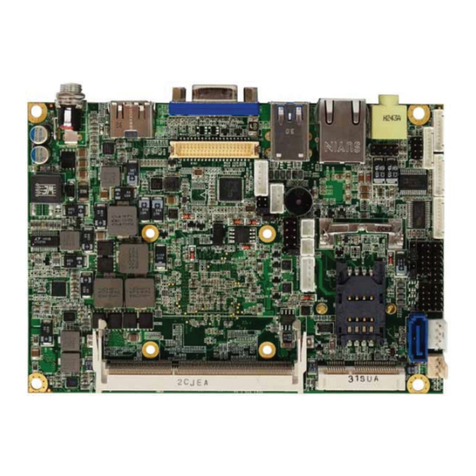
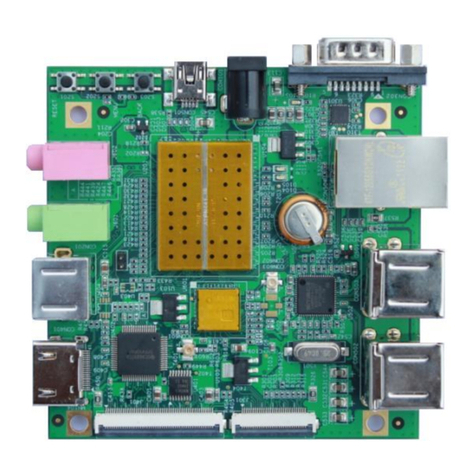
MINI2440 is a single board computer based on Samsung S3C2440 microprocessor.

1.1.1 Topview of Board
1.1.2 Hardware Features
CPU
- Samsung S3C2440A,400MHz,Max. 533Mhz
SDRAM
- 64M SDRAM
- 32bit DataBus
- SDRAM Clock 100MHz

Flash
- 64M Nand Flash,
- 2M Nor Flash,BIOS installed
LCD
- 4 wire resistive touch screen interface
- Up to 4096 color STN,3.5 inches to12.1 inches, up to 1024x768 pixels
- Up to 64K color TFT,3.5 inches to 12.1 inches, up to1024x768 pixels
Interface and Resource
- 1 10/100M Ethernet RJ-45(DM9000)
- 3 Serial Port
- 1 USB Host
- 1 USB Slave Type B
- 1 SD Card Interface
- 1 Stereo Audio out,1 Micro In;
- 1 20-Pin JTAG
- 4 USER LEDs
- 6 USER buttons
- 1 PWM Beeper
- 1 POT can be used for A/D converter adjust
- 1 AT24C08 for I2C test
- 1 20-Pin Camera Interface
- 1 Battery for RTC
- Power In(5V), with switch and lamp
Oscillator Frequency
- 12MHz
RTC
- Internal
Expand Interface
- 1 34-Pin 2.0mm GPIO
- 1 40-Pin 2.0mm System Bus
Dimension
- 100 x 100(mm)
OS Support
- Linux 2.6.29
- Windows CE.Net 5.0

1.1.3 Material list on CD
(1) H-JTAG Debugger
(2) Windows Flash Programmer SJF2440
(3) Linux Nand Flash Programmer Jflash-2440(source code included)
(4) Serial tool CRT, dnw
(5) Bitmap to C Language transfer tool
(6) USB Driver(WindowXP/2000)
(7) vivi source code(linux bootloader)
(8) LED test program(ADS1.20 project)
(9) 2440test program(ADS1.20 project), include :
key test, RTC test, ADC test, IIS Audio play(wav), IIS Audio record,
touch screen test, I2C test, Samsung 3.5"LCD, 640x480 TFT test
(10) WindowsCE BSP and sample project file
(11) Linux tool and kernel source code :
- arm-linux-gcc-4.3.2 with EABI
- yaffs2 file system image maker – mkyaffs2image
- linux-2.6.29 for MINI2440 kernel source code(include DM9000,LCD driver, Audio,
Touch screen, YAFFS Source code, SD Card, RTC, Expand serial driver,
USB Camera,USB Mouse and Keyboard, U-Disk)
(12) Qtopia 2.2.0 source code,web browser source code
(13) Schematic(Protel99SE/PDF)
(14) User Manual(English)
1.2 Hardware Resource
1.2.1 Memory Map and Chip Selection
S3C2440 support 2 boot mode: Nand Flash boot and Nor Falsh boot. Memory map and chip
selection is different based on different boot mode:

For Nand Flash Boot, 4k Bytes BootSram mapped to nGCS0 space
For Nor Flash Boot, Nor Flash mapped to nGCS0 space
SDRAM address space: 0x30000000-0x34000000
1.2.2 Jumpers
MINI2440 has 1 Jumper, J2:
(1) J2 Power voltage selection for LCD module
NEC LCD 3.5(240x320) :5V

1.2.3 Interfaces
1.3 Linux Features
Version
- Linux 2.6.29
File system
- yaffs2
- cramfs
- Ext2
- Fat32
- NFS
Basic driver(with source code)
- 3 serial driver
- DM9000 driver
- Audio driver
- RTC driver
- LED driver
- USB Host driver
- LCD driver
Table of contents
Other FriendlyARM Single Board Computer manuals