6© 2018 Fryee® Amplification. All rights reserved. Specifications subject to change without notice.
POWER SUPPLY, GROUND LIFT AND PASSIVE USE
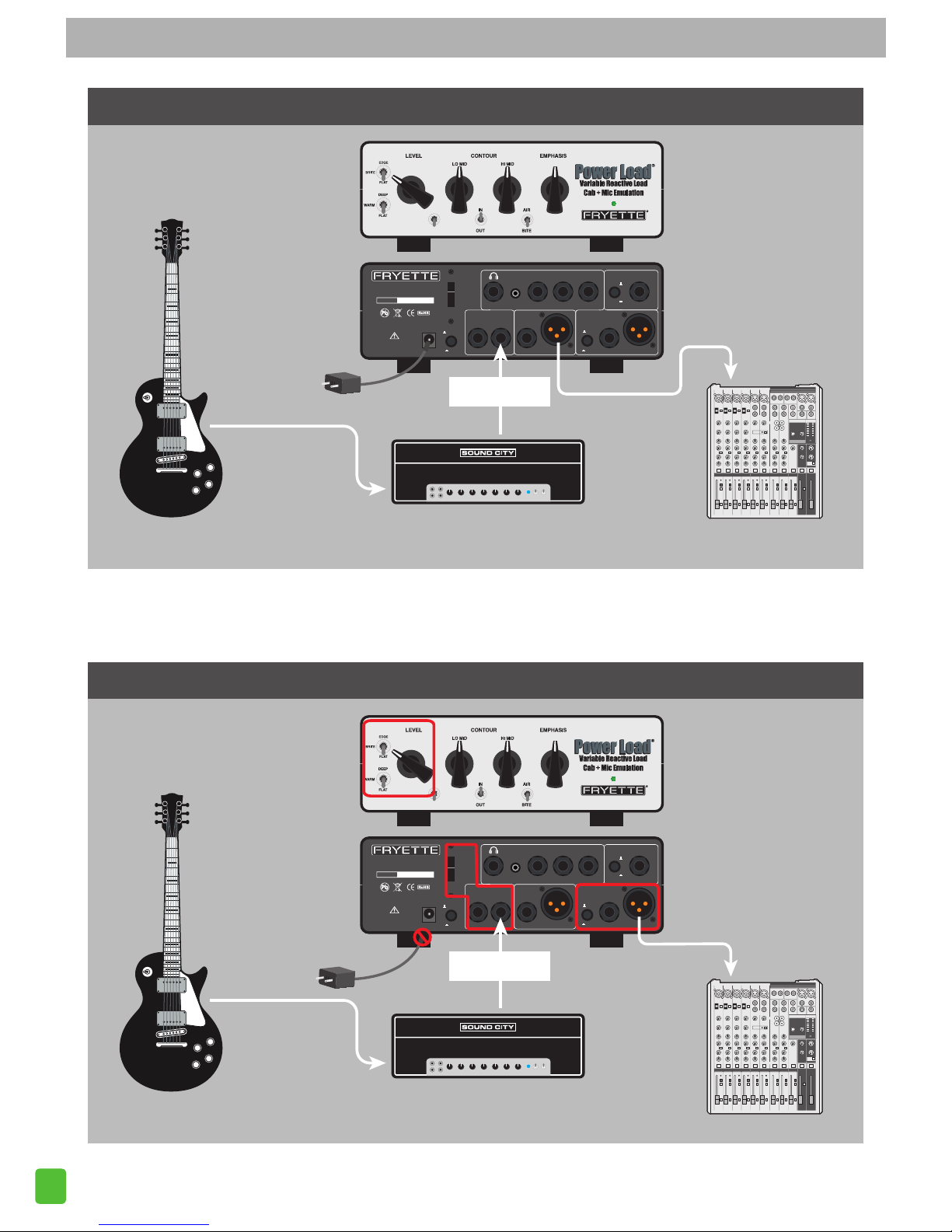
10. The Power Load™ functions with or without the included 12VDC Power Supply. The reactive load, voicing
switches, level control and fan can operate without any external power supply. So, if you are using an
external Impulse Response or any other type of external speaker simulator, you do not need to use the
power supply. For Passive functionality, use DIRECT OUT 1.
The CAB + MIC emulation section does require the 12VDC power supply. For Active CAB + MIC emulation
functionality, use DIRECT OUT 2.
11. GROUND LIFT – This switch separates the internal circuit ground from chassis and power ground in
order to eliminate possible ground loops between the Power Load™ and other equipment. Select the
position which yields quietest operation.
CONNECTING YOUR AMP
12. AMP IMPEDANCE SWITCH – 2/4, 8 or 16 ohms. This sets the impedance of the internal reactive load for
optimum performance from your amplifier. Simply set the impedance selector switch for the impedance
required by your amplifier.
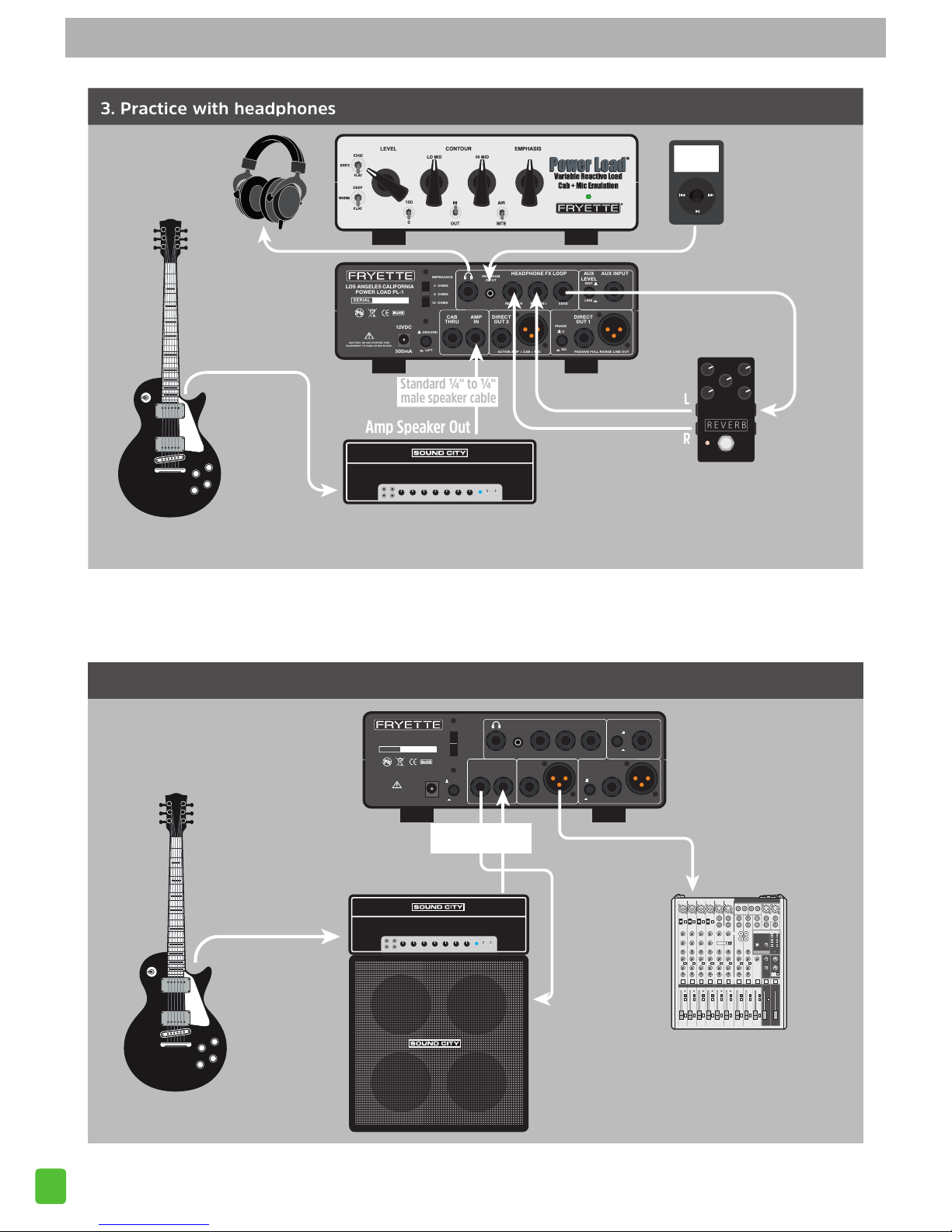
13. AMP IN – Connect the speaker output from the amplifier that you want to use – the load amplifier – here.
Set the Impedance Select switch to the desired seing to match your amplifier. The total power handling
capacity of the reactive load is as follows:
Amp In (Max Continuous):
200W @ 2, 4 & 16 Ohms.
150W @ 8 Ohms
NOTE: The Power Load™ is fan cooled and the fan will start to spin slowly once the incoming power
level reaches roughly 20 was. The fan speed will increase up to its maximum once you are driving
the Power Load™ to 100 was or more continuously.
14. CAB THRU – This sends the output of your amplifier to your guitar speaker cabinet. The impedance
of the cabinet should match the impedance of the amplifier, and the AMP IMPEDANCE switch on the
Power Load™ should also match the impedance of the amp.
NOTE: Set this impedance to match both the speaker and the load amplifier. Most cabs have a fixed
impedance and you usually have a choice of impedance on your amplifier. Therefore it is best to
choose the amplifier impedance that will match your speaker cab. This will assure that your amplifier
and speaker are matched correctly.
OUTPUT SECTION
15. DIRECT OUT 2: YOUR AMP + CAB + MIC EMULATION - This is your selectable Cab + Mic emulated output.
The Direct Out 2 features a ¼” unbalanced and an XLR balanced low impedance output. This section is
aected by the Cab + Mic emulation, when it is engaged on the front panel.
16. DIRECT OUT 1: PASSIVE, FULL RANGE OUTPUT - This is the sound of your amp, direct, without the Cab +
Mic emulation. The Direct Out 1 features a ¼” unbalanced and an XLR balanced low impedance output.
This section is ONLY aected by the Reactive Load Voicing Switches and Level control on the front panel.
This is designed for direct recording your raw amp performance and can be used with an Impulse Response
digital cab sim or other external speaker simulator for re-amping.
17. PHASE REVERSE SWITCH – Reverses the phase of the audio signal 180 degrees, for the DIRECT OUT 1
outputs only.
REAR PANEL OVERVIEW – CONTINUED