Battery Checker
BR-3000 Instruction Manual
Thank you for purchasing a BR-3000.
The BR-3000 can check the state of various battery
packs used as the power source of R/C receivers, etc.
Battery pack total voltage display and remaining
capacity (criteria) are displayed on a bar graph and in
%. The voltage of each cell of a lithium battery pack
can also be displayed.
To sufficiently display its performance and for safe
use, please read this manual before using the
BR-3000.
Functions of the BR-3000
The display functions of the BR-3000 are shown below. However, the functions that can be
displayed vary depending on the type of battery pack.
*The BR-3000 operates on the power supplied from the connected battery.
Usage Precautions
Name of Each Part/Connection Method
Usage Method
[Lithium battery pack]
The total voltage, remaining capacity (criteria), cell voltage, minimum cell voltage, maximum
cell voltage, and cell voltage difference of lithium battery packs can be checked by the
following method:
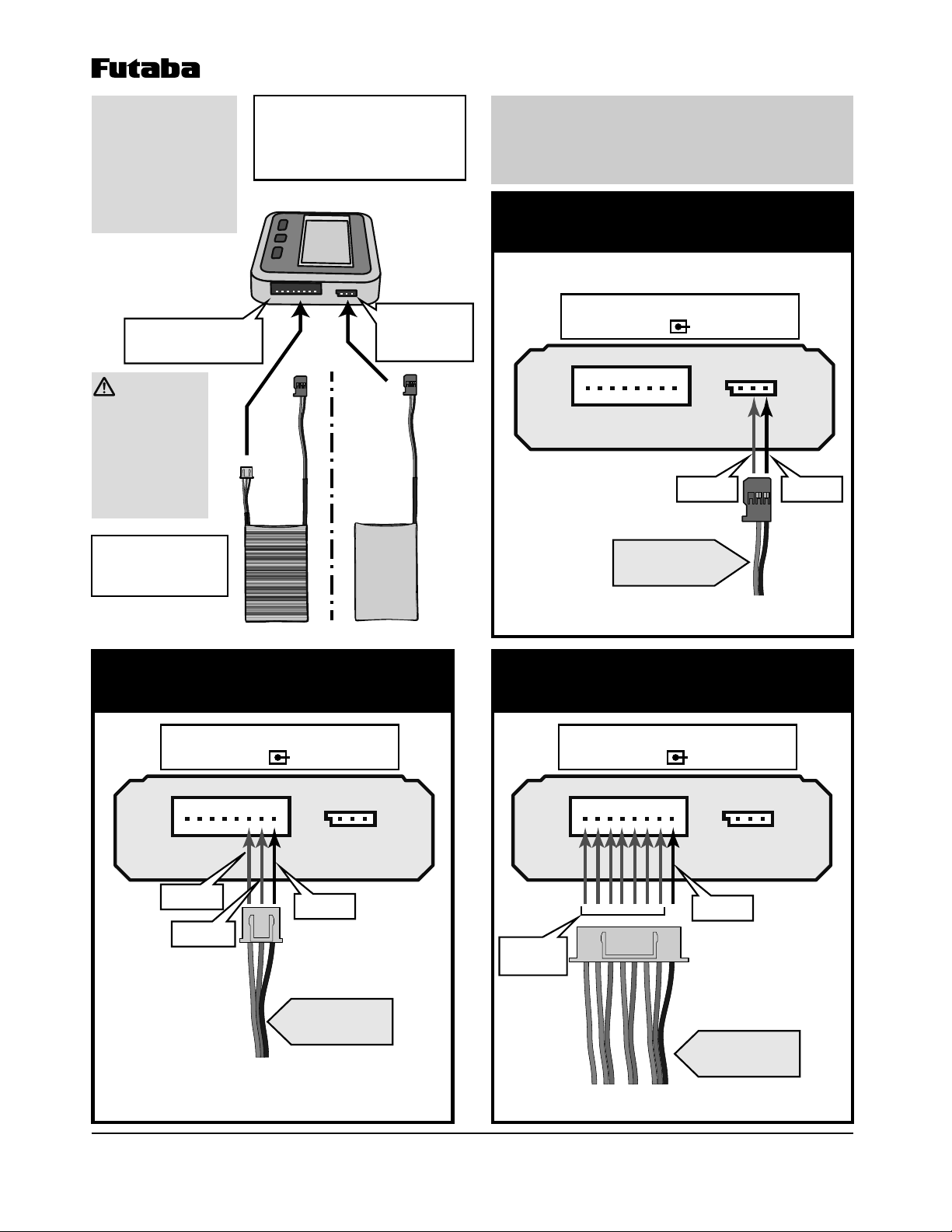
1Connect the battery pack to the 8-pin connector.
2Select the type of battery pack with the TYPE button. (LiPoÆLiFeÆLiIon)
[Nickel cadmium/nickel metal hydride battery pack]
The total voltage and remaining capacity (criteria) of nickel cadmium and nickel metal hydride
battery packs can be checked by the following method. However, each cell cannot be displayed.
1Connect the battery pack to the 3-pin connector.
2Select the cell number by pressing the CELL button matched to the connected
battery pack.
Never connect the battery in reverse.
• Reverse connection may damage the inside of the BR-3000.
Never get the BR-3000 wet.
• The BR-3000 houses precision electronic circuits which may malfunction if water or other solution
enters the case. If the BR-3000 should get wet, always send it for repair.
Do not use the BR-3000 by placing it on a combustible material.
• There is the danger of abnormal heating of the battery for some reason.
Do not store the BR-3000 within the reach of children.
Be careful not to cause a short circuit by pinching the cord of the battery pack.
• Shorting may cause abnormal heating or sparking of the battery.
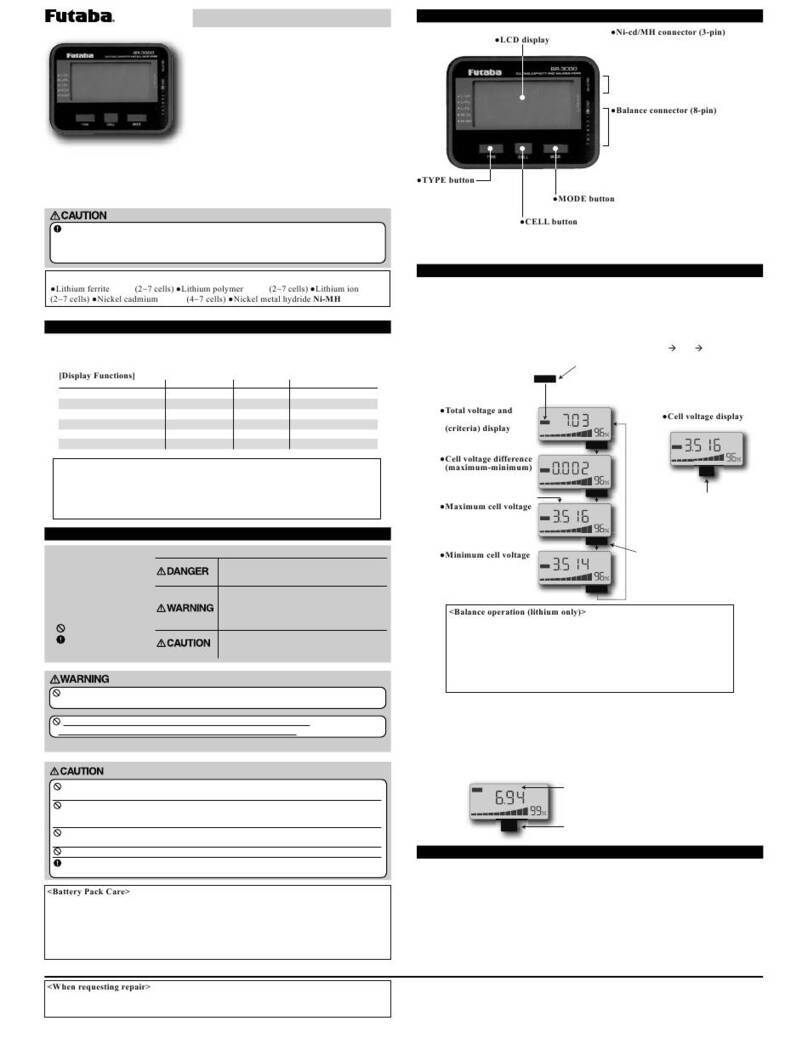
Ɣ/&'GLVSOD\
Ɣ%DODQFHFRQQHFWRUSLQ
Connector for lithium battery packs.
*The “-“ side of the battery pack balance
connector connects to the GND terminal of
the BR-3000.
*Ordinary balance connectors can be
directly connected. However, provide a
conversion adaptor for connectors with
difference specifications and split packs.
Ɣ1LFG0+FRQQHFWRUSLQ
Connector for nickel cadmium/nickel
metal hydride battery packs.
*The “-“ side of the battery pack connector
connects to the matching terminal at the
top of the BR-3000. (The center is the “+”
terminal.)
Ɣ7<3(EXWWRQ
Selects the type of
connected battery
pack.
(Lithium only)
Ɣ02'(EXWWRQ
Used when switching the display mode. (Lithium only)
Ɣ&(//EXWWRQ
Used when selecting the display screen of each cell. (Lithium)
Selects the cell number of the connected battery pack. (Nickel
cadmium/nickel metal hydride)
V
Total
2S
LiFe
V
Max-Min
2S1S
LiFe
V
Max
2S
LiFe
V
Max
2S
LiFe
V
Min
1S
LiFe
TYPE
MODE
MODE
MODE
MODE
CELL
Ɣ7RWDOYROWDJHDQG
remaining capacity
FULWHULDGLVSOD\
screen
Ɣ&HOOYROWDJHGLVSOD\
screen
Ɣ&HOOYROWDJHGLIIHUHQFH
PD[LPXPPLQLPXP
display screen
Ɣ0D[LPXPFHOOYROWDJH
display screen
Ɣ0LQLPXPFHOOYROWDJH
display screen
*The display screen of each cell
can be switched by pressing the
CELL button.
*The remaining capacity display
is based on the selected cell
voltage.
*Select the type by pressing the TYPE button. If a
battery type different from the connected battery pack
was displayed, select the correct type with the TYPE
button. If the battery type is different, the remaining
capacity (criteria) will not be correctly displayed.
*The display mode can be switched
by pressing the MODE button.
(Cell number)
%DODQFHRSHUDWLRQOLWKLXPRQO\!
Balance operation automatically starts about 5 seconds after the battery is
connected. When the voltage difference between cells reaches 5mV or less,
balance operation ends and then the BR-3000 enters the sleep mode and “----“
appears on the screen.
*The sleep mode can be exited by button operation.
*When the balance operation continues even if about 30 minutes pass, confirm the
voltage of each cell. An internal cell might be defective.
*The remaining capacity (criteria) display is based on voltage at no load. Since it may differ largely from
actual remaining capacity according to the battery type, use it as a criteria only.
*From the standpoint of the battery characteristics, immediately after charging and discharging, the
remaining capacity display will change until the battery stabilizes. The voltage stabilizes about 30
minutes after charging and discharging.
In addition, because of the different discharge characteristics, when the specified capacity was checked
after use, a remaining capacity lower than the actual remaining capacity may be displayed even for the
same type of battery. Judge the remaining capacity with the stable state value as a criteria.
*When the remaining capacity (criteria) display reaches 20% or less, recharge the battery.
*When the remaining capacity (criteria) display exceeds 95%, since the battery is almost fully charged,
refrain from charging it. Overcharging will cause the battery to deteriorate.
%DWWHU\3DFN&DUH!
For safety and to extract maximum performance from the battery pack used, observe the
following points:
• Discharge and store the battery pack in accordance with the battery instruction manual.
• Do not discharge a battery more than 80%. (Remaining capacity no less than 20%)
• Use the specified charger to charge the battery pack.
CELL
V
Total
5S
Nixx (Cell number)
*Select the cell number by pressing the CELL
button. If the cell number is different from that of
the connected battery, the remaining capacity
(criteria) will not be correctly displayed.
[BR-3000 Ratings]
• Applicable battery packs: (See the above.)
• Voltage display error: ±1.5%
• Display range
Total voltage: (Ni type) 4.0~17V, (Li type) 5~34V
Cell voltage: (Li type) 1.1~4.9V
• Case size:
85x63x15mm (excluding projecting parts)
• Weight: 52.6g
• Operating temperature: -10~+45˚C
• Storage temperature: -20~+60˚C
Total voltage
Remaining capacity (criteria)
Cell voltage
Minimum cell voltage
Maximum cell voltage
Cell voltage difference
Li-Fe/Li-Po/Li-Ion
X
X
X
X
X
X
Ni-Cd/Ni-MH
X
X
---
---
---
---
Bar graph, % display
Each cell
Maximum-minimum
>'LVSOD\)XQFWLRQV@
(X: Yes, ---: No)
Notes: Always read this manual before using the BR-3000.
Store this manual where it can be used at any time.
1M23N26001
©Copyright 2018. No part of this manual may be reproduced in any form without prior permission. The
contents of this manual are subject to change without prior notice. While this manual has been carefully written,
there may be inadvertent errors or omissions. Please contact our service center if you feel that any corrections or
clarifications should be made.
FUTABA CORPORATION oak kandakajicho 8F 3-4 Kandakajicho, Chiyoda-ku, Tokyo 101-0045, Japan
TEL: +81-3-4316-4820, FAX: +81-3-4316-4823
©FUTABA CORPORATION 2018, 5 (3)
The BR-3000 Battery Checker can only be used with the battery packs shown in
“Corresponding Battery Packs” below. It cannot handle batteries of other cell sizes and
types. The checker display is based on voltage. Since the voltage changes with the battery
itself and the ambient temperature, use the remaining capacity display as a criteria only.
Corresponding Battery Packs:
Ɣ/LWKLXPIHUULWHLi-FeaFHOOVƔ/LWKLXPSRO\PHULi-PoaFHOOVƔ/LWKLXPLRQLi-Ion
aFHOOVƔ1LFNHOFDGPLXPNi-CdaFHOOVƔ1LFNHOPHWDOK\GULGH1L0+ (4~7 cell)
(Specifications and ratings are subject to change without notice.)
Special Markings;
Pay special attention to the
safety at the parts of this
manual that are indicated
by the following marks.
Symbol:
; Prohibited
; Mandatory
Mark Meaning
Procedures which may lead to a dangerous
condition and cause death or serious injury to the
user if not carried out properly.
Procedures which may lead to a dangerous
condition or cause death or serious injury to the
user if not carried out properly, or procedures
where the probability of superficial injury or
physical damage is high.
Procedures where the possibility of serious injury
to the user is small, but there is a danger of injury,
or physical damage, if not carried out properly.
Do not use the BR-3000 near objects that may ignite.
• Ignition by sparking when the battery is connected and disconnected is extremely dangerous.
Do not connect a battery pack to the 2 connectors at the same time.
• The battery may short circuit and cause abnormal heating and sparking.
:KHQUHTXHVWLQJUHSDLU!
Before requesting repair, read this instruction manual again and check the BR-3000. When
there is an abnormality, request repair to your local Futaba dealer.
*Buzzer display: When battery pack
connected, at button operation
*The remaining capacity
display is based on the
maximum cell voltage.
*The remaining capacity
display is based on the
minimum cell voltage.
Remaining capacity display