manuals.online logo
Brands
  1. Home
  2. •
  3. Brands
  4. •
  5. Gateway
  6. •
  7. Server
  8. •
  9. Gateway GT150 F1 User manual

Gateway GT150 F1 User manual

Other Gateway Server manuals

Gateway GR380 F1 User manual

Gateway

Gateway GR380 F1 User manual

Gateway ALR 7300 Assembly Instructions

Gateway

Gateway ALR 7300 Assembly Instructions

Gateway E-9525R User manual

Gateway

Gateway E-9525R User manual

Gateway 7250R User guide

Gateway

Gateway 7250R User guide

Gateway ALR 8200 Assembly Instructions

Gateway

Gateway ALR 8200 Assembly Instructions

Gateway 7400 User guide

Gateway

Gateway 7400 User guide

Gateway E-9520T User manual

Gateway

Gateway E-9520T User manual

Gateway 6400 User guide

Gateway

Gateway 6400 User guide

Gateway 920 User manual

Gateway

Gateway 920 User manual

Gateway ALR 9000 Assembly Instructions

Gateway

Gateway ALR 9000 Assembly Instructions

Gateway 9315 User manual

Gateway

Gateway 9315 User manual

Gateway 7450R User guide

Gateway

Gateway 7450R User guide

Gateway 920 User manual

Gateway

Gateway 920 User manual

Gateway 935 series User manual

Gateway

Gateway 935 series User manual

Gateway E-9722R User manual

Gateway

Gateway E-9722R User manual

Gateway 9210 User manual

Gateway

Gateway 9210 User manual

Gateway 995 User manual

Gateway

Gateway 995 User manual

Gateway 8450R Operator's manual

Gateway

Gateway 8450R Operator's manual

Gateway 9415 User manual

Gateway

Gateway 9415 User manual

Gateway ALR 8300 Assembly Instructions

Gateway

Gateway ALR 8300 Assembly Instructions

Gateway E-9525R User manual

Gateway

Gateway E-9525R User manual

Gateway 930 series User guide

Gateway

Gateway 930 series User guide

Gateway 960 User manual

Gateway

Gateway 960 User manual

Gateway 9515 User manual

Gateway

Gateway 9515 User manual

Popular Server manuals by other brands

HP Tc2120 - Server - 256 MB RAM installation guide

HP

HP Tc2120 - Server - 256 MB RAM installation guide

Lenovo ThinkServer RD230 manual

Lenovo

Lenovo ThinkServer RD230 manual

Avocent CPS810 Installer/user guide

Avocent

Avocent CPS810 Installer/user guide

Dell PowerEdge R6615 Installation and service manual

Dell

Dell PowerEdge R6615 Installation and service manual

FreeWave HT2+ installation guide

FreeWave

FreeWave HT2+ installation guide

GIGA-BYTE TECHNOLOGY G492-Z50 user manual

GIGA-BYTE TECHNOLOGY

GIGA-BYTE TECHNOLOGY G492-Z50 user manual

Lanner HTCA-E400 user manual

Lanner

Lanner HTCA-E400 user manual

Bull NovaScale T840 E2 user guide

Bull

Bull NovaScale T840 E2 user guide

Asus RS740-E70RS24-EG Configuration guide

Asus

Asus RS740-E70RS24-EG Configuration guide

Meinberg LANTIME M300/TCR manual 

Meinberg

Meinberg LANTIME M300/TCR manual 

HP ProLiant SL335s G7 Maintenance and service guide

HP

HP ProLiant SL335s G7 Maintenance and service guide

ZyXEL Communications VANTAGE RADIUS 50 user guide

ZyXEL Communications

ZyXEL Communications VANTAGE RADIUS 50 user guide

Lantronix xDirect-IAP quick start guide

Lantronix

Lantronix xDirect-IAP quick start guide

Fujitsu PRIMEQUEST 2400E3 General description

Fujitsu

Fujitsu PRIMEQUEST 2400E3 General description

IBM 9040-MR9 manual

IBM

IBM 9040-MR9 manual

IBM 306m - eServer xSeries - 8849 user guide

IBM

IBM 306m - eServer xSeries - 8849 user guide

green hippo Hippotizer Nevis+ quick start guide

green hippo

green hippo Hippotizer Nevis+ quick start guide

IBM 8203-E4A Brochure & specs

IBM

IBM 8203-E4A Brochure & specs

manuals.online logo
manuals.online logoBrands
  • About & Mission
  • Contact us
  • Privacy Policy
  • Terms and Conditions

Copyright 2025 Manuals.Online. All Rights Reserved.

1
GT150 F1 specifications
Product overview
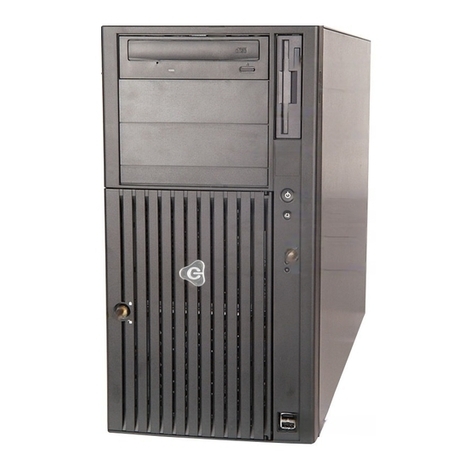
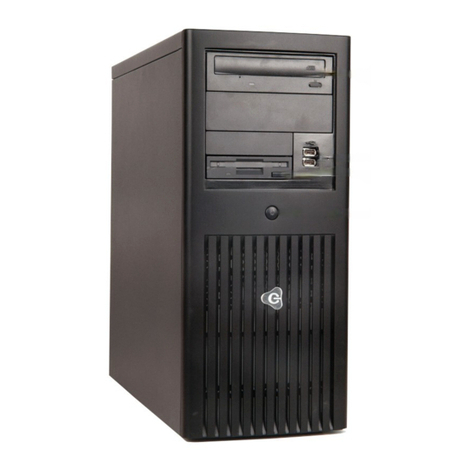
The Gateway GT150 F1 is solid tower or 4U rack mountable dual-socket server featuring powerful
computing and limited expandability. With up to 2 Intel Xeon 5600/5500 series processors, 12 DIMMs of
memory and a choice of 4 3.5" or 8 2.5" HDDs, this server offers everything you need and nothing you
don't.
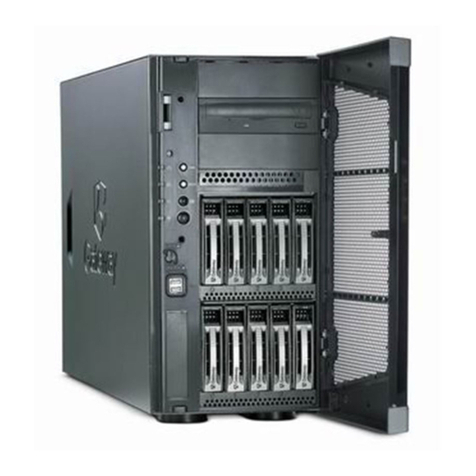
Internal view
1 1 x 560 W 80 PLUS
®
gold-level efficient fixed power supplies
2 2 x Intel® Xeon® X5600 series processors
3 12 x DDR3 ECC registered / unbuffered DIMMs
4 N+1 redundant cooling fans (internal), and 1 rear cooling fan (rear)
5 6 x PCIe expansion slots
6 3 x 5.25” media expansion bay
8 8 x 2.5” hot-swappable hard drive bays or
4 x 3.5” hot-swappable hard drive bays
Note: Availability may vary by region
2
GT150 F1 specifications
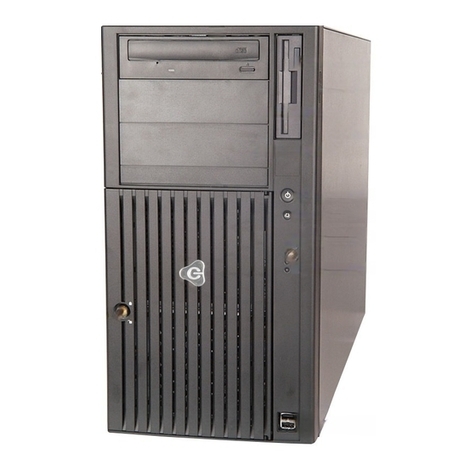
Front View
4U Rackmount View
Rear View
Front I/O
1 2 x USB ports
2 ID LED button
3 Network, hard drive and power status indicators
Rear I/O
1 PS2 mouse and keyboard ports
3
GT150 F1 specifications
2 4 x USB ports
3 2 x Gigabit LAN port (RJ-45)
4 Video port
5 Serial port
6 System ID LED
7 Management port (RJ-45)
What's New
•New Intel® Xeon® 5600 Series processors
Intel Xeon X5675, X5672, E5649, E5645, E5607, E5606, E5603
•Fixed power supply with 80 PLUS®gold-level efficiency
•Smart Server Manager v1.1 with improved management functionality
Product Specifications
Processors and Chipset
•Up to two Intel® Xeon® 5500/5600 series processors
•Chipset: Intel® 5520
Memory
•Memory capacity:
Registered DIMM: 1, 2, 4, 8, 16 GB
Unbufferred DIMM: 1, 2, 4 GB
•Maximum capacity: up to 192 GB registered DIMMs when fully populated with 2 DIMMs per channel in
12 slots
•Maximum capacity: up to 48 GB unbuffered DIMMs when fully populated with 2 DIMMs per channel in
12 slots
Network Controllers
•Integrated dual-port Intel® 82576EB Gigabit Ethernet Controller (2 ports total)
Storage
•Hard disk form factor: 2.5” or 3.5”
•Type: SAS / SATA / SSD with hot-plug capability
•3.5” Maximum capacity:
Up to 8 TB SATA HDD (2 TB 3.5" x 4 HDDs)
Up to 2.4 TB SAS (600 GB 3.5” x 4 HDDs)
•2.5” Maximum capacity:
Up to 8 TB SATA HDD (1 TB 2.5" x 8 HDDs)
Up to 9.6 TB SAS (600 GB 2.5” x 8 HDDs)
Storage Controllers
•Integrated Intel®ICH10R Serial ATA host controller (six 3 Gb/s SATA ports) with software RAID 0, 1, 5,
10 support
•Optional PCIe 4-/8-port SAS RAID card
Expansion slots
•2 x PCIe® 2.0 x8 (x 16 connector)
•2 x PCIe® 2.0 x4 (x8 connector)
•1 x PCIe® 1.0 x4 (x8 connector)
•1 x Flex I/O (PCIe® x8)
4
GT150 F1 specifications
Management
•Gateway Smart Server Manager
•System ID LED buttons, System Health LED
•Gateway Smart Console for server management and KVM over IP remote management
Deployment/Serviceability
•Gateway Smart Setup
•BIOS Update Tool
•IPMI Firmware Update Tool
Operating Systems
•Windows Server®2008
•Windows Server 2008 R2
•Windows Server 2003
•Red Hat Enterprise Linux 5.4
•SuSE Linux Enterprise Server 11
•VMware ESXi™4
•VMware ESX™4
Input/output interface
Front
•One Power/off button
•LED indicators: power, HDD activity, LAN port 1 through 2, ID, and System status
Rear
•PS2 keyboard port
•PS2 mouse port
•4 x USB 2.0 ports
•BMC Management port
•Serial port
•Video port
•2 x Gigabit port
•ID LED
Optical drive
•5.25” SATA DVD Super multi
•5.25” tape drive
Chassis/Form Factor
•Tower/ 4U rack mountable
Power Supply
•1 x 560 W 80 PLUS® gold-level efficient, fixed power supply
Regulatory Compliant Standards
EMC
•FCC (Class A)
•CE (Class A)
•BSMI (Class A)
5
GT150 F1 specifications
Safety
•UL/cUL
•CB
Nemko/GS
Environmental Specifications
Dimensions 434 (H) x 648 (D) x 178 (W) mm (17.2 x 25.5 x 7 inches)
Weight Maximum 39 kg (88.1 lbs)
Minimum (includes a single HDD, CPU and
RAM, and PSU)
28.5 kg (62.8 lbs)
System inlet
temperature
Operating 10°- 35°C (50°- 95°F)
Non-operating -40°- 70°C (-40°- 158°F)
Relative
humidity
Operating 8 - 90 %
Non-operating 5 - 95 %
Acoustics Idle
LWAd 6.2 BA
LpAm 43.6 dBA
Operating
LWAd 6.0 BA
LpAm 43.9 dBA
Power Rated Steady –state power 560 W
Maximum Peak Power 600 W
BTU rating 1910 BTU/hr at 100 - 240 VAC
6
GT150 F1 specifications
Technical specifications
PCIe®specifications
The primary I/O bus for the main board is PCIe Gen2. The following table lists the characteristics of the
PCI-E bus segments. Details about each bus segment follow the table.
NOTE: The signaling bit rate of PCI Express is 2.5Gbit/s one direction per lane for Gen 1 and 5.0Gbit/s one
direction per lane for Gen 2.
Expansion
slot
Number Type Bus width1 Voltage Connector Location Length
PCIe x16 2 PCIe Gen2 x8 3.3V x16 Onboard Full height
PCIe x8 2 PCIe Gen2 x4 3.3V x8 Onboard Full height
PCIe x8 1 PCIe Gen1 x4 3.3V x8 Onboard Full height
Flex I/O 1 PCIe Gen2 x8 3.3V x8 Onboard Full height
NOTE:
1. Indicates the number of physical electrical lanes running to a PCIe® connector.
2. Default bus assignment (in decimal). Inserting cards with PCI™ bridges may alter the actual bus
assignment number.
3. Slots are enumerated differently based on the operating system. Microsoft® operating systems
enumerate Device ID by bus starting from the lowest bus to the highest.
Onboard storage specifications
Item Description
Controller Intel®82801JR (ICH10R) I/O Controller Hub
Simultaneous drive transfer channels 6 onboard SATA ports
Max throughput per channel 3 Gb/s
Data transfer method •Non-RAID mode
•RAID mode
Drive type supported Serial ATA
RAID levels support •RAID 0, 1, 10, 5 (Intel software RAID)
•RAID 0, 1, 10 (Adaptec software RAID)
NOTE: Intel software RAID only supports Windows OS
RAID function support Supports multiple logical volumes
Setup through ROM based Array Configuration Utility
Installation scripting support
NOTE: This controller does not support LED functions
RAID OS support
•
Windows Server 2008
•Windows Server 2008 R2
•Windows Server 2003
•Red Hat Enterprise Linux 5.4
•SuSE Linux Enterprise Server 11
7
GT150 F1 specifications
Additional features •NCQ (Native Command Queuing)
•AHCI (Advanced Host Controller Interface)
Onboard LAN specifications
Item Description
Controller Intel®82576EB Gigabit Ethernet Controller
(2 ports total)
Network interface 10Base-T / 100Base-TX / 1000Base-T
Compatibility standards •IEEE 802.3 Ethernet interface for 10BASE-T
•IEEE 802.3ab Ethernet interface for 1000BASE-T,
•IEEE 802.3u Ethernet interface for 100BASE-TX
Manageability •NC-SI, SMBus
•PXE, iSCSI boot
Virtualization acceleration Intel
®
I/O Acceleration Technology
Virtual Machine Device Queues (VMDq)
PCI-SIG SR-IOV implementation
Connector RJ-45
Supported cable type CAT 5e wire
Memory specifications and population
Item Description
Supported memory types •Registered DDR3 1066 / 1333 MHz
•Unbuffered DDR3 1066 / 1333 MHz
NOTE: Gateway does not qualify mixed memory configurations of
memory type, capacity or make.
Population Gateway’s validated memory populations are listed below.
NOTE: Support for 8 / 16 GB DIMMs may vary by regional
availability.
Single processor configuration guide
NOTE: Quad Rank DIMMs and Unbuffered DIMMs can only use a maximum of 6 slots
DIMM # DIMM 1B DIMM 1A DIMM 2B DIMM2A DIMM3B DIMM3A
1 X
2 X X
3 X X X
4 X X X X
6 X X X X X X
8
GT150 F1 specifications
Dual processor configuration guide
NOTE: Quad Rank DIMMs and Unbuffered DIMMs can only use a maximum of 6 slots per CPU (12 slots
total)
DIMM CPU 1 CPU 2
# 1B 1A 2B 2A 3B 3A 1B 1A 2B 2A 3B 3A
2 X X
3 X X X
4 X X X X
6 X X X X X X
8 X X X X X X X X
9 X X X X X X X X X
12 X X X X X X X X X X X X
* support depends on 8GB/16GB DIMM available
Mirroring mode:
•For mirroring mode, the memory contains a primary image and a copy of the primary image. Therefore,
the effective size of memory is reduced by at least one-half.
•Follow the population rules described in independent mode.
•Mirroring mode needs the channel 1 & channel 2 with identical DIMM. DIMM slot populations within a
channel do not have to be identical but the same DIMM slot location across channel 1 and channel 2
must be the same. DIMM1A and DIMM2A should be the same type, size and manufacturer. DIMM1B
and DIMM2B memory should be the same type, size and manufacturer.
•Same rule is applied to the CPU2.
•Please refer to the User Guide for complete population for both single and dual processor
configurations.

Lockstep mode:
•In Lockstep Channel Mode, each memory access is a 128-bit data access that spans Channel 1 and
Channel 2. This is done to support SDDC for DRAM devices with 8-bit wide data ports. The same
address is used on both channels such that an address error on any channel is detectable by bad
ECC. Lockstep Channel mode is the only RAS mode that supports x8 SDDC.
•Follow the population rules described in independent mode.
•Lockstep mode needs the channel 1 & channel 2 with identical DIMM. DIMM slot populations within a
channel do not have to be identical but the same DIMM slot location across channel 1 and channel 2
must be the same. DIMM1A and DIMM2A should be the same type, size and manufacturer. DIMM1B
and DIMM2B memory should be the same type, size and manufacturer.
•Same rule is applied to the CPU2.
•Please refer to the User Guide for complete population for both single and dual processor
configurations.

9
GT150 F1 specifications
.
Sparing mode:
•In this mode, if system detects degrading memory and system still not crash, the data in failed channel
will be copied to spare channel. Failed channel is then isolated and spare channel becomes active. But if
any uncorrectable error happens before the isolation, it will still cause the system stop normal operation.
•Follow the population rules described in independent mode.
•Sparing mode need all three channels with identical DIMMs. 1A, 2A and 3A should be the same type,
size and manufacturer. 1B, 2B and 3B memory should be the same type, size and manufacturer. Same
rule is applied to CPU2.
•Memory sparing mode is only supported by Intel Xeon 5600 series processor. Intel Xeon 5500 series
processor does NOT support the memory sparing mode.
•Please refer to the User Guide for complete population for both single and dual processor
configurations.
Memory Identification
Generally, there are some memory information printed on the label of DIMM, but different vendor may have
different format. For example:

4GB 2Rx4 PC3-10600R xx xx xxx
1. Density
1GB, 2GB, 4GB, 8GB, 16GB
2. Rank
1R = Single Rank
2R = Dual Rank
4R = Quad Rank
Note: if any quad rank DIMM is used, maximum only 2 DIMM per channel can be supported
3. Bit Organization
This platform supports x4 and x8
Note: It’s not recommend to mix DIMM with different bit organization in one system
4. Speed
PC3 – 6400 => DDR3- 800
PC3 – 8500 => DDR3- 1066
PC3 – 10600 => DDR3- 1333
10
GT150 F1 specifications
Power specifications
560W Power Supply
Operational Input
Voltage Range
(Vrms)
100 to 240
Frequency
Range (Nominal)
(Hz)
60/50
Nominal Input
Voltage (Vrms)
100 120 208 200 220 230 240
Max. Rated Output
Wattage (Watts)
560 560 600 600 600 600 600
Nominal Input
Current (A rms)
6.5 6.5 3.5 3.5 3.5 3.5 3.5
Max. Rated Input
Wattage Rating
(Watts)
670 650 690 690 690 680 680
Max. Rated VA
(Volt-Amp)
677 657 719 719 719 709 709
Efficiency (%) at
Max. Rated Output
Wattage
84 87 87 87 87 89 89
Power Factor 0.99 0.99 0.96 0.96 0.96 0.96 0.96
Leakage Current
(mA)
0.5 0.5 1.0 1.0 1.0 1.0 1.0
Max. Inrush
Current (A peak)
Less
than 30A
Less than
30A
Less than
30A
Less than
30A
Less than
30A
Less than
30A
Less than
30A
Max. Inrush
Current Duration
(mS)
3.5 3.5 2.5 2.5 2.5 2.5 2.5
Max. British
Thermal Unit
Rating (BTU/hr)
2285 2285 2353 2353 2353 2319 2319