Grace m108 User manual

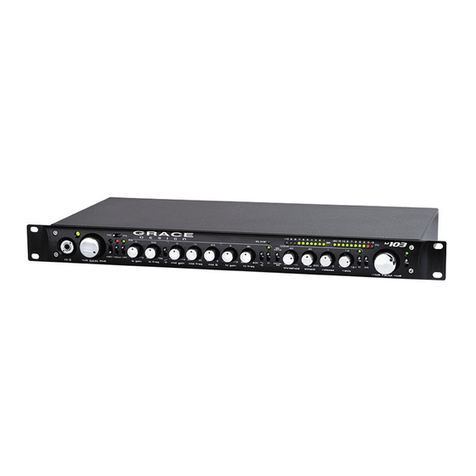
m108 microphone preamplifier / ADC
Owner's Manual - PREL M NARY / July 25th, 2016
Grace Design, Lyons, CO / 1.303.823.8100
www.gracedesign.com / info@gracedesign.com
Contents
1. Welcome.............................................................................................................................................................................. 2
2. mportant Safety nformation...................................................................................................................................... 2
3. Overview and Features.................................................................................................................................................. 3
4. nstallation.......................................................................................................................................................................... 4
5. Basic Operation................................................................................................................................................................. 6
6. Using the m108 Mixer.................................................................................................................................................. 10
7. Navigating and Using the Setup Menu................................................................................................................. 12
8. Dante Configuration..................................................................................................................................................... 20
9. Control from Protools®................................................................................................................................................. 23
10. USB Setup...................................................................................................................................................................... 24
11. Block Diagram.............................................................................................................................................................. 26
12. Cable Diagrams............................................................................................................................................................ 27
13. Warranty nformation................................................................................................................................................ 28
14. Manual Revision History........................................................................................................................................... 28
m108 Owner's Manual page 1

1. Welcome
Thanks for purchasing the m108 mic preamplifier. t has been painstakingly designed and built to pro-
vide you with a beautiful sounding, configurable and reliable mic preamp / ADC / interface. We worked
very hard to ensure that anyone with modest audio production and engineering abilities can turn it on,
plug in a microphone, connect it to a workstation and record. But of course, it also has a very deep and
useful feature set of which all users should educate themselves. Not only will this enable you to operate
the m108 more efficiently, but will free you up to focus on the music and the recording. So please famil-
iarize yourself with the setup and operational details contained in this manual. And as always with this or
any other Grace Design products, please don't hesitate to reach out if you have any questions. We are
available by telephone Monday – Friday, 9AM to 5PM MST, or by email at info@gracedesign.com. Also,
other information including technical documents and firmware can always be found on our website –
www.gracedesign.com. Thanks for reading and enjoy your m108!
2. mportant Safety nformation
2.1 GENERAL
• ndoor use only
• Ordinary Protection: This equipment should not be exposed to dripping or splashing.
• Avoid placing objects filled with liquids, such as vases or glasses, on this equipment.
• Class Equipment (grounded type)
• Electrical rating: 90-240V~ 50-60Hz 10W
• Mains supply voltage fluctuations are not to exceed ±10% of the nominal supply voltage.
• Pollution Degree 2
• nstallation (Over voltage) Category for transient overvoltages.
• Maximum Relative Humidity: <80%
• Operation temperature range: 10 °C to 40 °C
• Storage and transportation temperature range –40 °C to 70 °C
• Maximum altitude: 3000m (9843 ft)
• Equipment suitable for continuous operation
2.2 SAFETY MARKING SYMBOLS
This symbol, located on the equipment and in this manual, refers to important instructions.
Read this manual thoroughly before operating this equipment.
This symbol, located on the equipment and in this manual, indicates the potential for electrical
shock hazard.
2.3 SERVICE INFORMATION
m108 Owner's Manual page 2

The Grace Design m108 contains no user serviceable components. Contact Grace Design for repair and
upgrade information. n the event that your Grace Design m108 needs to be returned to the factory,
contact us for a return authorization number.
3. Overview and Features
3.1 Features
• 8 channels of transparent, musical mic preamplifier
• Wide gain range: -6 to 69dB
• 8 channels of balanced analog preamp outputs
• Ribbon mic mode
• 8 channel ADC outputs via AES, ADAT (SMUX), USB Class 2, and DANTE™
• External Word clock in and out
• Reference DAC and headphone amplifier for low-latency monitoring of preamp channels, USB play-
back from a computer, or DANTE™ audio streams.
• Channel 1 & 2 balanced H -Z inputs on front panel
• High contrast, wide viewing angle OLED display for all system parameters and setup menu
• Combination RS 485/422 serial / M D ports for control from existing m802 RCU or Protools™
• m108 Controller App for Mac OS and Windows computers
• RJ45 Ethernet port with web server for network control using standard web browser
• Expansion slot for optional Audinate / DANTE™ network audio card
• Cooling fan for reliable operation in the harshest environments
• Built in 100-240VAC universal AC power supply
• 5 year transferable warranty
• Made in the USA
3.2 Front pane connections and contro s
1. Hi-Z balanced inputs, CH 1 and 2
2. 1/4” Headphone Jack
3. Encoder: headphone / CR output level control and MUTE – press and hold to enter mixer control
4. 48V phantom power switch / mixer channel mute
5. Phase reverse switch / mixer channel solo / press and hold to enable ribbon mode
m108 Owner's Manual page 3
61 2 3
5
8 109
4
7

6. PEAK CLR / press and hold to enter setup menu
7. GROUP / mixer channel pan control
8. OLED display screen - all system parameters and setup menu
9. ED T encoder, navigates and controls all system functions
10.Power switch
3.3 Rear Pane Connections
1. EC 90 - 250VAC power input
2. Ethernet Control Port
3. Serial Control DB9: RS485 / RS 422 - M D N / M D OUT
4. Option card slot
5. Word Clock BNC N / THROUGH / OUT
6. ADAT Lightpipe output
7. USB 2.0 audio interface
8. Analog Out DB25 (Tascam pinout)
9. AES3 Out DB25 (Tascam pinout)
10. Microphone nputs XLR
4. nstallation
4.1 Unboxing Your m108
YOUR m108 BOX WILL CONTAIN
• The m108 preamp
• 6’ AC power cable which connects to the108's universal power supply
• A bag with rubber feet and rack screws
• A USB type A to type B cable
• The owner’s manual and warranty registration card
OPEN AND INSPECT THE BOX
Please take care when removing the m108 from its OEM packaging. Our packaging is designed with ‘Kor-
m108 Owner's Manual page 4
1 2 3 5 6 8 10
9
4 7

rvu©’ suspension inserts, which provide the best protection from the dubious underworld of freight
handling – so save your packaging material. nner boxes will contain all the items listed above. f you
think you are missing anything, give your dealer or us a call and we’ll get you taken care of right away.
REGISTER YOUR UNIT
We strongly urge you to fill out your warranty registration card. The m108 is covered by a 5 year transfer-
able warranty. Registering your unit will help us contact you if there are important updates and simpli-
fies warranty service. So please take a few minutes to complete and send in the enclosed card, or simply
fill out the warranty registration form on our website. We always keep your information private. Thank
you!
4.2 Connecting the m108
POWER CONNECTIONS
The m108 has a built-in universal power supply which accepts line voltages of 90 to 240VAC. We
include a power cable specified for the country where it was ordered, so it should be supplied cor-
rectly. f not, please contact your dealer or distributor for help. For safety, it is recommended that
the AC power cable be connected to a grounded outlet.
AUDIO CONNECTIONS
Microphone nputs: Female XLR, pin 2 positive, pin 3 negative and pin 1 ground. 48V phantom power is
supplied on pins 2 and 3. With a gain range from -6dB to 69dB these inputs can be used for any type of
microphone or as line level inputs.
Analog Balanced Line Outputs: DB25 Tascam pinout (See CABLE D AGRAMS chapter 13). These outputs
are always active. ADC full scale (0dBFS) is referenced to a signal level of +24dBu
AES3 Digital Outputs: DB25 Tascam pinout (See CABLE D AGRAMS chapter 13) These outputs are active
when the ADC is on.
ADAT Lightpipe Outputs: Optical Jacks. These provide 8 channels of audio data on each (at 44.1kHz and
48kHz). At 88.2kHz and 96kHz the ADAT S-MUX is enabled and channels 1-4 are transmitted on ADAT
output 1, while channels 5-8 are transmitted on ADAT output 2. 176.4kHz and 192kHz sample rates are
not supported over the ADAT interface.
USB Class 2 Audio nterface: USB Type B 8 channel audio output to host computer and 2 channel input
from host computer. Use a standard USB type A -to- type B cable (included with your m108). The type A
connector is to be plugged in to the HOST computer and the type B connector to the m108 input. PCM
44.1kHz – 192kHz/24 bit is supported. Please refer to USB audio setup on Chapter 11. This jack is also
used for m108 firmware upgrades.
Option Card DANTE™ Module: This option provides the m108 with a Dante interface. Two gigabit ether-
net ports are provided for redundant Dante networks. The Dante interface provides 8 channels of out-
puts and inputs at sample rates up to 192kHz to other Dante enabled devices. Detailed instructions for
operation are in chapter 8.
Option Card Control Room Outputs: 1/4" TRS Jacks. Tip positive, Ring negative, and Sleeve ground. Pro-
vides a single pair of balanced stereo analog speaker outputs, which connect to your stereo monitor sys-
tem (power amp or powered speakers). Connections are made with standard balanced TRS cables. The
output volume of this output is controlled by the Headphone volume control on the front panel.
WORDCLOCK N: BNC 75Ω or 47kΩ (setup menu selected). The m108 can accept a standard 5V/75Ω
Word Clock signal from an external clock generating unit. This might be a stand-alone clock source or
m108 Owner's Manual page 5

via, for example, the Word Clock output from your digital audio workstation. The m108 locks to the in-
coming word clock with an ultra low jitter PLL. The PLL has a fast lock mode which rapidly acquires lock
and then switches to a high jitter rejections mode with a loop bandwidth of 0.5Hz. This provides excep-
tional jitter rejection for the ADC and DAC sample clocks. n the event of a dropout or loss of incoming
word clock signal, the intelligent PLL will remain at the last known valid frequency. When the signal is re-
stored the PLL will smoothly re-acquire lock.
WORDCLOCK OUT: BNC 75Ω. The Word Clock output allows the user to synchronize other digital audio
equipment to the m108. When the menu setting "clock output" is set to external, this connector output
is a buffered copy of the signal on the wordclock N jack. This mode is useful for "daisy chaining" multiple
m108s together in a system. When "clock output" is set to internal this connector outputs a buffered
copy of the internal m108 wordclock. The output is buffered and is designed to drive a 75Ω line.
REMOTE – RS485 / RS422: DB9. This is a galvanically isolated serial port for controlling the m108. With
updated firmware, the m802RCU can control the m108 allowing m108 preamplifiers to be added to an
existing m802 system. For wiring diagrams, see chapter 13.
M D N – M D OUT: DB9. The m108 can be controlled directly from AV D ProTools® HD, via these jacks
and compatible AV D /O hardware. For wiring instructions, cable diagrams, chapter 13.
ETHERNET: RJ45. This is a standard 100 Base-T Ethernet interface and is used to connect the m108 to a
TCP/ P network for the purpose of control via the m108. The m108 contains a web server with which al-
lows for web browser based control.
5. Basic Operation
5.1 The EDIT encoder
This is a rotary push-button encoder which is used to navigate and control system parameters. n the
main Preamplifier Control mode and Mixer Control mode it selects preamplifier channels and adjusts pa-
rameters. This encoder is also used for controlling the mixer functions and navigating the setup menu.
5.2 The VOL / MUTE (mix)
This push-button encoder is used to control the level of the headphone and control room outputs (if CR
option card is installed). Turing the knob clockwise increases the level in 1dB steps. A single press will
mute the outputs. Pressing it again will un-mute the outputs.
When the headphone level change is enacted , a temporary flyout window appears on the left side of
the display. This window shows the headphone source and level. When level adjustment is complete, the
flyout window automatically disappears. Pressing and holding this knob will enter the m108 mixer.
5.3 The Frontpane Hardware Switches
The labeling convention for these switches is as follows:
UPPERCASE - Preamplifier mode function
lowercase - Mixer mode function
(parenthesis) - Push-Hold function
The four hardware switches between the VOL / MUTE knob and the OLED display enact the following
m108 Owner's Manual page 6

functions:
• 48V/mute - pressing this switch will turn on the phantom power supply for a selected mic preamp
channel. n mixer mode this switch is used to mute the selected mixer channel.
• Ø (ribbon mode) / solo - pressing this switch will reverse the signal polarity of a selected mic
preamp channel. Pressing and holding this switch will activate ribbon mic mode. n mixer mode this
switch is used to solo the selected mixer channel.
• PEAK CLR / (setup) - pressing this switch will clear all the peak status indicators across all 8 mic
preamp channels – or pressing and holding this switch will enter the m108 into Setup Menu mode.
• GROUP / pan - pressing this switch will activate group mode. Pressing and holding this switch while
turning the ED T knob adds (or subtracts) sequential channels to a group.
5.4 The m108 OLED disp ay screen
This screen has three main display modes:
• Preamplifier mode
• Mixer mode
• Setup mode
The default display mode at power up will be the Preamplifier Control Mode. This screen is user config-
urable via the 7 'display modes' in the setup menu, detailed in chapter 7. The factory default screen at
power up (titled 'system' in the setup menu) will show the 8 mic preamp channels, and a system status
window on the right shows basic ADC and wordclock status.
The Mixer mode is activated by pushing and holding the VOL/MUTE (mix).
The Setup mode is activated by pushing and holding the PEAK CLR/(setup) button.
Mic Preamp Operating Screen
1. Channel number
2. Level meter
3. 48V icon
4. Hi-Z input icon
5. Over indicator
6. Phase reverse con
m108 Owner's Manual page 7
1 2 3
5
6 8 9
4 7

7. Gain level
8. Ribbon mode con
9. ADC status display
Mixer Operating Screen
1. Channel number / name
2. Channel level display
3. Channel pan display
4. Mute
5. Solo
6. 2ch monitor level
7. Master level
8. Monitor Source select
9. Headphone Source select
Setup Menu Screen
Setup menu items 1 – 16 (see chapter 7)
m108 Owner's Manual page 8
1 2 3 5
6 8 9
4
7

5.5 Setting mic preamp ifier gain
1. Use the rotary encoder to select a channel.
2. The current channel number becomes reversed (backlit in yellow) and the larger channel number will be
displayed on the far right side of the screen.
3. A single press of the ED T encoder now enters gain adjust mode, which is indicated by the backlit channel
number becoming brighter.
4. Turn the ED T encoder clockwise to increase the mic preamplifier gain, or counter-clockwise to decrease the
mic preamplifier gain.
5. When the desired gain level is achieved, press the ED T encoder again to exit gain adjust mode, which is
indicated by the backlit channel dimming to its normal brightness.
6. The settings for a channel can be adjusted with the +48, PHASE, or DATA controls. pressing the +48V or PHASE
button toggles that function on or off for that channel.
7. Pressing the ED T knob enters the Gain Adjust mode. While in Gain Adjust mode, the numeric gain display
characters at the top of the screen are highlighted and the rotary encoder adjusts the gain up or down in 1dB
steps. Pressing the ED T control again exits the Gain Adjust mode and returns to the Channel Select mode.
The bar graph meter at the right edge of each channel section is a dBFS level meter which indicates ADC
output levels from –60 to 0dBFS.
Note: f you would like a larger view of the selected channel, press and hold the ED T encoder. This will
enter you into 'channel' view, which shows an exploded version of a single channel, with a large level
meter, the full channel name and a large gain setting number. Press and hold the ED T encoder again to
return to the previous screen.
5.6 Activating 48V phantom power
To activate 48V phantom power on a preamp channel, use the ED T knob to select the channel and press
the 48V panel switch to the left of the screen. 48V power ON will be indicated by the lightning bolt
power icon in the middle of the channel column. Pressing the 48V panel switch again with the channel
selected will deactivate 48V phantom power.
5.7 Activating Phase Reverse
To reverse the signal polarity on a preamp channel, use the ED T knob to select the channel and press
the Ø panel switch to the left of the screen. Phase reverse will be indicated by the Ø icon in the middle of
the channel column. pressing the Ø panel switch again with the channel selected will deactivate phase
reversal.
5.8 Ribbon Mic Mode
To activate Ribbon Mic Mode on a preamp channel, use the ED T knob to select the channel and press
and hold the Ø panel switch to the left of the screen. Ribbon mic mode will be indicates by the 'R' icon in
the middle of the channel column. Ribbon Mic Mode prevents 48V phantom power from being inadver-
tently applied to a mic input to which a ribbon microphone is connected.
5.9 Peak C ear
The m108 signal meters will display a small line to indicate the highest level (peak) a particular channel
has achieved. There are 3 modes for displaying these peaks which can be select in the setup menu
(chapter 7) 'off, decay, and hold'. f either the decay or hold settings are chosen, then the peak indicator
m108 Owner's Manual page 9

will remain lit until it is manually cleared with this switch or automatically after a period of time (decay).
As well as signal peaks, the signal level meter will display a bright square next to the gain level number
to indicate an OVER at the ADC. f this is shown, a level adjustment should be made. OVER indicators will
remain on until cleared with the peak clear switch.
5.10 Channe Group Mode
The Group mode allows between 2 to 8 adjacent mic preamp channels to be grouped together for gain
change operations. To enter group mode, press the GROUP switch. Any defined channel groups will ap-
pear without vertical dividing lines.
To define a group, place the cursor on the left most channel of the channels to be grouped and turn the
ED T knob clockwise while pressing and holding the GROUP switch. You will notice that the vertical di-
viding lines between channels disappear as channels are added to a group.
Once in Group mode, gain changes are made in the same manner as in normal Channel select mode. To
remove a group, place the cursor on the right most channel of the channels in the group and turn the
ED T knob counter clockwise while pressing and holding the GROUP switch. You will notice that the ver-
tical dividing lines between channels reappear as channels are removed from a group.
Groups are limited to adjacent channels only and groups cannot span between preamplifier units. Also,
only gain can be adjusted when in Group mode. To toggle the status of Phantom power or Phase on a
channel, you must exit Group mode.
5.11 Using the HI-Z inputs
Channels 1 and 2 can be used as high impedance instrument inputs, for plugging an instrument or line
level source directly into the front panel. These 1/4” inputs sense if a cable is plugged in and will auto-
matically activate the H -Z input. When active, the channel display on the OLED screen will show a 1/4”
plug icon. This input has 10M Ohm input impedance.
6. Using the m108 Mixer
The m108 mixer is used to mix and monitor the 8 mic preamp channels as well as 2 incoming auxiliary
channels from the USB interface or an installed option module. Monitoring the mixer output is done
with the headphone output or the optional stereo CR (control room) output module.
To enter the m108 mixer, press and hold the VOL / MUTE (mix) encoder knob. The mixer screen will ap-
pear. This screen has 3 pages which automatically change as the cursor travels across them from side to
side. They are:
1. mixer channels 1-4
2. mixer channels 5-8
m108 Owner's Manual page 10
Other manuals for m108
2
Table of contents
Other Grace Amplifier manuals