manuals.online logo
Brands
  1. Home
  2. •
  3. Brands
  4. •
  5. Grundig
  6. •
  7. LED TV
  8. •
  9. Grundig 32 VLE 434 BA User manual

Grundig 32 VLE 434 BA User manual

Other manuals for 32 VLE 434 BA

1

This manual suits for next models

1

Other Grundig LED TV manuals

Grundig 32 VLE 8041 S User manual

Grundig

Grundig 32 VLE 8041 S User manual

Grundig 65 GOS 9799 FINE ARTS OLED User manual

Grundig

Grundig 65 GOS 9799 FINE ARTS OLED User manual

Grundig 48 VLE 5421 BG User manual

Grundig

Grundig 48 VLE 5421 BG User manual

Grundig 65 GOB 9089 User manual

Grundig

Grundig 65 GOB 9089 User manual

Grundig 46 VLE 8270 BH User manual

Grundig

Grundig 46 VLE 8270 BH User manual

Grundig New-York -55- CLE -9170 -SL User manual

Grundig

Grundig New-York -55- CLE -9170 -SL User manual

Grundig 22GFB5620 User manual

Grundig

Grundig 22GFB5620 User manual

Grundig GHW 5740 Operating and maintenance manual

Grundig

Grundig GHW 5740 Operating and maintenance manual

Grundig 43 VLX 7710 BP User manual

Grundig

Grundig 43 VLX 7710 BP User manual

Grundig 22 VLE 2100 DVD User manual

Grundig

Grundig 22 VLE 2100 DVD User manual

Grundig Vision ECO 37-6950 T User manual

Grundig

Grundig Vision ECO 37-6950 T User manual

Grundig FineArts -55 -FLE -9170 -SH User manual

Grundig

Grundig FineArts -55 -FLE -9170 -SH User manual

Popular LED TV manuals by other brands

Samsung UE65C8000XK user manual

Samsung

Samsung UE65C8000XK user manual

VESTEL SATELLITE 22PF5045 operating instructions

VESTEL

VESTEL SATELLITE 22PF5045 operating instructions

Tokai TTE-48B4444K user manual

Tokai

Tokai TTE-48B4444K user manual

LG 55UR640S Easy setup guide

LG

LG 55UR640S Easy setup guide

LG 43UF680T-TA owner's manual

LG

LG 43UF680T-TA owner's manual

Bush DLED55UHDSFIRE instruction manual

Bush

Bush DLED55UHDSFIRE instruction manual

Logik L24FED12 instruction manual

Logik

Logik L24FED12 instruction manual

Samsung QE65QN85CATXXN user manual

Samsung

Samsung QE65QN85CATXXN user manual

Samsung 7 Series user manual

Samsung

Samsung 7 Series user manual

Insignia NS-42D240A13 brochure

Insignia

Insignia NS-42D240A13 brochure

Philips 32PFL3207H/12 Specifications

Philips

Philips 32PFL3207H/12 Specifications

LG 49UB850V owner's manual

LG

LG 49UB850V owner's manual

TCL Roku TV 55C807 user guide

TCL

TCL Roku TV 55C807 user guide

LG 43UF690V-ZC manual

LG

LG 43UF690V-ZC manual

Samsung UN50ES6900 Product highlights

Samsung

Samsung UN50ES6900 Product highlights

Philips 55PUT7805 user manual

Philips

Philips 55PUT7805 user manual

Vidao 58V850R user manual

Vidao

Vidao 58V850R user manual

LG 55UF671V owner's manual

LG

LG 55UF671V owner's manual

manuals.online logo
manuals.online logoBrands
  • About & Mission
  • Contact us
  • Privacy Policy
  • Terms and Conditions

Copyright 2025 Manuals.Online. All Rights Reserved.

TV Service Manual
Zusätzlich erforderliche Unterlagen für den Komplettservice
Additionally required Service Documents for the Complete Service
Service
Manual
Sicherheit
Safety
Materialnr./Part No.
720108000001
Chassis U4
32 VLE 434 BA MEU000
NUR FÜR INTERNEN GEBRAUCH
FOR INTERNAL USE ONLY
Materialnummer / Part Number 720100565000
Änderungen vorbehalten / Subject to alteration
TCC 1113 MP • Prepared in Germany
http://www.grundig.com
GRUNDIG Service Chassis U4
1 - 2
General Section
General Notes
Before opening the cabinet disconnect the mains plug!
Attention: Observe the ESD safety regulations
Wiring
Before disconnecting any leads and especially the earth connecting
leads observe the way they are routed to the individual assemblies.
On completion of the repairs the leads must be laid out as originally
fitted at the factory to avoid later failures or disturbances.
Carrying out Measurements
Whenmakingmeasurementsonsemi-conductors with an oscilloscope,
ensure that the test probe is set to 10:1 dividing factor. If the previous
measurement was made on AC input, please note that the coupling
capacitor in the oscilloscope will be charged. Discharge via the item
being checked can damage the components.
Measured Values and Oscillograms
The measured values given in the circuit diagrams and oscillograms
are approximates!
Change of the Chassis Board
After changing the chassis board all settings in the service mode must
be done according to the table "Basic Settings" (point 1 in chapter
"Service and Special Functions" on page 1-10).
Special Functions
Parental Control
The personal pin can be changed with master pin 2356.
Allgemeiner Teil
Allgemeine Hinweise
Vor dem Öffnen des Gehäuses den Netzstecker ziehen!
Achtung: ESD-Vorschriften beachten
Leitungsverlegung
Bevor Sie die Leitungen und insbesondere die Masseleitungen lösen,ist
die Leitungsverlegung zu den einzelnen Baugruppen zu beachten.
Nach erfolgter Reparatur ist es notwendig, die Leitungsführung wieder
in den werkseitigen Zustand zu versetzen um evtl. spätere Ausfälle
oder Störungen zu vermeiden.
Durchführen von Messungen
Bei Messungen mit dem Oszilloskop an Halbleitern sollten Sie nur
Tastköpfe mit 10:1 -Teiler verwenden.Außerdem ist zu beachten, dass
nach vorheriger Messung mit AC-Kopplung der Koppelkondensator
des Oszilloskops aufgeladen sein kann.Durch die Entladung über das
Messobjekt können Bauteile beschädigt werden.
Messwerte und Oszillogramme
Bei den in den Schaltplänen und Oszillogrammen angegebenen
Messwerten handelt es sich um Näherungswerte!
Austausch der Chassisplatte
Nach Austausch der Chassisplatte müssen alle Einstellungen im
Service Mode nach Tabelle "Grundeinstellwerte" (Punkt 1 im Kapitel
"Service- und Sonderfunktionen" auf Seite 1-10) eingestellt werden.
Spezial-Funktionen
Kindersicherung
Mit der Master-Pin 2356 kann die Einstellung der persönlichen Pin
geändert werden.
Table of Contents Page
General Section .................................. 1-2…1-10
General Notes ...............................................................................1-2
Special Functions ..........................................................................1-2
Product and Display Variants.........................................................1-3
Technical Data...............................................................................1-4
Operating Hints..............................................................................1-7
Service and Special Functions ....................................................1-10
Layout of the PCBs
and Circuit Diagrams ......................... 2-1…2-20
Chassis Board ZU4190R-1............................................................2-1
– Block Circuit Digaram ................................................................2-8
– Power Supply ............................................................................2-8
– LED-Power...............................................................................2-10
– Tuner........................................................................................2-10
– VGA .........................................................................................2-10
– SCART, YUV............................................................................2-11
– HDMI........................................................................................2-12
– Scaler.......................................................................................2-13
– Scaler Ram / LVDS..................................................................2-15
– Amplifier...................................................................................2-16
Power Supply FSP059-3F01 .......................................................2-17
IR / LED Board ............................................................................2-20
Spare Parts Lists .................................. 3-1…3-2
Inhaltsverzeichnis Seite
Allgemeiner Teil .................................. 1-2…1-10
Allgemeine Hinweise .....................................................................1-2
Spezial-Funktionen........................................................................1-2
Geräte- und Display-Varianten ......................................................1-3
Technische Daten..........................................................................1-4
Bedienhinweise .............................................................................1-5
Service- und Sonderfunktionen ...................................................1-10
Platinenabbildungen
und Schaltpläne.................................. 2-1…2-20
Chassisplatte ZU4190R-1 .............................................................2-1
– Blockschaltplan..........................................................................2-8
– Netzteil.......................................................................................2-8
– LED-Power...............................................................................2-10
– Tuner........................................................................................2-10
– VGA .........................................................................................2-10
– SCART, YUV............................................................................2-11
– HDMI........................................................................................2-12
– Scaler.......................................................................................2-13
– Scaler-RAM / LVDS .................................................................2-15
– Verstärker.................................................................................2-16
Netzteil FSP059-3F01 .................................................................2-17
IR-/LED-Platte .............................................................................2-20
Ersatzteillisten ...................................... 3-1…3-2
Es gelten die Vorschriften und Sicherheitshinweise ge-
mäßdem Service Manual"Sicherheit",Materialnummer
720108000001, sowie zusätzlich die eventuell abwei-
chenden, landesspezifischen Vorschriften!
The regulations and safety instructions shall be valid
as provided by the "Safety" Service Manual, part
number 720108000001, as well as the respective
national deviations.

GRUNDIG Service Chassis U4
1 - 3
Hotel Mode
Maximum volume is limited and Menu "
SOURCE SETUP
" is no available
at activated hotel mode. After switch on the TV set, all user settings
(e.g. signal source, language) are set back to values by activation of
the Hotel Mode.
Call up: M–> 8500 –> 9"
System Configuration
" –> OK –> 89 "
Hotel
"
–> /-"On".
Switching off the Hotel Mode temporarily
At this function the activated hotel mode is deactivated until the set
is switched off (standby).
Call up: M–> 4658 –> 89 "
HOTEL TV SETTINGS
"–> OK
Following adjustment are available in the additionally menu
HOTEL
TV SETTINGS
:
– Maximum Volume
– Start-Up Volume
– First Power (Standby / Power On)
Cloning Function
It is possible to copy following data to an external USB stick and back
to TV set:
–
Channel/Video Set.
Programme tables and settings of signal
sources - they are transferable into further TV
set of same version.
–
Service Set.
TV adjustments of service and special func-
tions without panel values.
–
User Set.
User settings.
–
ALL
In case of service: If the defective chassis
board are still operate, it is possible to save all
adjustments / settings and copy into new chas-
sis board.
Copy data to USB stick:
Connect empty USB memory –> M–> 8500 –> 89 "
Cloner Configu-
ration
"–> 4658 –> 9"
Copy
" –> /-
TV to USB
–> 9"
Copy Item
" –>
/-
Channel/Video Set.
,
Service Set.
,
User Set
or
ALL
–> 9"
Start Cloning
"
–> start with - –> "
Success
" is showing at the end.
Copy data from USB stick into TV set:
If necessary switch off Hotel Mode temporarily (see above) –> M–>
8500 –> 89 "
Cloner Configuration
"–> 4658 –> 9"
Copy
" –> /-
USB
to TV
–> 9"
Copy Item
" –> /-
Channel/Video Set.
,
Service Set.
,
User
Set
or
ALL
–> 9"
Start Cloning
" –> start with - –> "
Success
" is showing
at the end.
Hotel-Mode
Bei aktiviertem Hotel-Mode ist die maximale Lautstärke begrenzt und
das Menü "
INSTALLATION
" ist nicht mehr vorhanden.
Aufruf: M–> 8500 –> 9"
System Configuration
" –> OK –> 89 "
Hotel
"
–> /-"Ein".
Hotel-Mode temporär ausschalten
Bei aktiviertem Hotel-Mode ist die maximale Lautstärke begrenzt
und das Menü "
INSTALLATION
" ist nicht mehr vorhanden. Alle kun-
denspezifischen Einstellungen (z.B. Signalquelle, Sprache) werden
beim Einschalten des Gerätes auf die eingestellten Werte bei der
Aktivierung des Hotel-Modes zurückgesetzt.
Aufruf: M–> 4658 –> 89 "
HOTEL-TV-EINSTELLUNGEN
" –> OK
In dem zusätzlich erscheinenden Menü
HOTEL-TV-EINSTELLUNGEN
sind folgende Einstellungen möglich:
– Maximale Lautstärke
– Einschaltlautstärke
– Erstes Einschalten (Standby / Einschalten)
Cloning-Funktion
Mitdieser Funktion könnenfolgendeDaten auf den extern angeschlos-
senen USB-Speicher gesichert und zurück kopiert werden:
–
Channel/Video Set.
Programmtabellen und Einstellungen der Si-
gnalquellen - diese sind auch übertragbar auf
ein weiteres Gerät gleicher Serie.
–
Service Set.
Geräte-Einstellwerte der Service- und Sonder-
Funktionen ohne Display-Einstellwerte.
–
User Set.
Kundenspezifische Einstellungen.
–
ALLES
Für den Servicefall: sollte die defekte Chassis-
platte noch so weit funktionieren, können alle
Einstellwerte gespeichert werden um diese
dann in die neue Chassisplatte zu übertragen.
Daten auf USB-Stick kopieren:
Leeren USB-Speicher anschließen –> M–> 8500 –> 89 "
Cloner
Configuration
"–> 4658 –> 9"
Kopieren
" –> /-
TV to USB
–> 9"
Copy
Item
" –> /-
Channel/Video Set.
,
Service Set.
,
User Set
oder
ALLES
–> 9
"Start Cloning" –> starten mit - –> am Ende wird "
Success
" angezeigt.
Daten von USB-Stick in das Gerät zurück speichern:
GegebenenfallsHotel-Modekurzzeitigausschalten (s.o.)–>USB-Stick
anschließen –> M–> 8500 –> 89 "
Cloner Configuration
"–> 4658 –>
9"
Kopieren
" –> /-
USB to TV
–> 9"
Copy Item
" –> /-
Channel/
Video Set.
,
Service Set.
,
User Set
oder
ALLES
–> 9"Start Cloning" –>
starten mit - –> am Ende wird "
Success
" angezeigt.
Geräte- und Display-Varianten
Display- und Product Code
Je nach Verfügbarkeit werden Displays
verschiedener Hersteller eingebaut. Dies
führt zu unterschiedlichen Chassis-Be-
stückungen, sowie zu Änderungen in der
Software. Bei Ersatzteilbestellungen und
Software-Updates achten Sie bitte auf das
eingebaute Display, sowie auf den "Product
Code". Angaben dazu finden Sie auf der
Geräterückseite. Sollte in der Ersatzteilliste
des Service Manuals Ihr "Product Code"
oder Ihre Display-Variante nicht aufge-
führt sein, können Sie eine aktualisierte
Version auf dem GRUNDIG Service-Portal
"http://service.grundig.de" finden.
Überprüfen Sie vor Platinen-Tausch, ob die
Aufkleber der Platinen identisch sind (z.B.
PCB Code).
Product and Display Variants
Display- und Product Code
Depending on availability displays of differ-
ent manufacturer are built in. This results
in different chassis mountings as well as a
different software.On spare parts orders as
well as software updates take care of the fit-
ted display as well as of the "Product Code".
Therefore you can find information on the
labelson the rear side.If your"Product Code"
or display variant is not mentioned in the
spareparts list of the service manual, please
look for a current version at the GRUNDIG
service portal "http://service.grundig.de".
Before changing any board please check
whetherthe labels on the boards are identical
(eg. PCB Code).
Product Code Chassis
Serialnummer /
Serial Number
Display Type
Display Code PCB Code
Bestellnummer / Order Number
Technische Daten / Technical Data
32 VLE 434 BA
Order No.
Product Code
Approbations
IM-Languages
Remote control
EAN
Color
DISPLAY
Panel
Backlight
Wide-screen format
Dynamic contrast
Picture Perfection rate
Physical display resolution max. pixel
PICTURE
Motion Picture Improvement
Motion Adaptive Deinterlacing
Full HD
HD-TV 1080p
Line Flicker Reduction
Digital Color Transition Improv. (DCTI)
Digital Combfilter
Digital Luminance Transition Improv. (DLTI)
Picture Noise Reduction
Preset picture modes
Aspect ratios (Format switching)
Auto 16:9 selection via Scart
Sharpness control
Blue Background
CHASSIS
TV-Chassis
Tuner
Scaler
Keyboard
ELECTRONIC
DLNA
Stand by indicator
EPG (Electronic Programme Guide)
Manual & autom. labeling of prog.
Programmable off timer
Programmable on timer
Intelligent channel search (Zapping funct.)
Programme Edit
Programme memory TV/AV (opt.)
Teletext/Fasttext/Toptext
Teletext options
Childlock
Menue languages OSD
OSD-style
Service mode
Game mode
Hotel mode
Digi Link (HDMI CEC 1.3)
TUNING
Autom.Tuning System with country selection
Frequency Based Auto Search
Automatic Micro-search
Manual fine tuning
Direct channel selection
Direct frequency selection
PAL/SECAM/BG/DK/I/L'/L
NTSC-Playback via Scart (3,58/4,43)
Cable TV / Hyperband (S1-S41)
AUDIO
Mono/Stereo/Nicam
AV Stereo
Loudspeaker
SRS
Dolby digital
Subwoofer
Balance Adjustment
AVL (Audio Volume Level)
Equalizer
Space Sound Effect
Sound preset
NV!
USB part
Recording
Repeat
File browser
Video file resolution (max.)
Supported files
Supported subtitles
DVB reception
POWER SUPPLY / CABINET
Power voltage
Range of regulation
Power switch
Integrated supply
Energy class
Power consumption
Cabinet (WxHxD, cm)
Cabinet with stand (WxHxD, cm)
Weight
REAR PANEL CONNECTIONS
Euro-AV-Socket AV1
S-Video
Camera-AV
YUV input / progressive
PC-input
PC-Audio in
DVI
HDMI
HD ready including HDCP
Common Interface
Headphones
Digital Audio out optical (SPDIF)
Audio out
USB
Antenna for terrestrial reception
Power supply plug
SUPPLIED ACCESSORIES
Remote control (incl. battery)
Power cord
Instruction manual
Wall fixture
Stand
Cleaning tissue
MEU000
MEU
CE
D,GB
RC 23
40 13833-63688 5
glossy black
32" / 80cm
EDGE LED

Dynamic Contrast Plus
100Hz
WXGA 1366 x 768 (HD Ready)

3D DeInterlacer




3D


user, vivid, natural, movie, sports
Auto (WSS), 4:3 / 16:9 / 14:9 / LetterBox / Subtitle / Panorama



U4
PLL frequency synthesizer tuning
MStar Maria-10
7 keys: +/- Programm, Source / Menu, +/- Volume, stand-by

blue LED






100 Analog

/

/

250 pages

24 languages, D, GB, F, I, E, P, NL, DK, S, FIN, N, TR, GR, AL, CZ, SK, SLO, H, RUS, RO, BG, HR, MAC, AR
Grundig-style


Simple hotel mode possible via service adjustment

full automatic sorting





Only PAL, SECAM, BG, DK



/

/


2 wide band at the front side
TruSurround HD




5 Band

cinema, music, sport, speech, user
2 x 7/14W nominal/music power (R/L)



1920 x 1080
MP3, JPG, BMP, MOV, MPG, MP4, AVI
SRT

230V, 50Hz; in accordance to IEC 65
140V - 265V


A
41W, 0,50W Standby, 60kWh annual on-mode energy consumption
73,8x45,3x8,5cm
73,8x50x18,6cm
ca. 8kg
Full wired
via Euro AV
3x Cinch socket in
Video-in: 3 x Cinch, Audio-in: 2 x Cinch
WXGA


3x
via HDMI

3.5mm jack


USB 2.0
1 x Coaxial-socket for TV-tuner-in, according to DIN 45325

RC 23


Prepared for VESA standard adaptor 200 x 100


Chassis U2GRUNDIG Service
1 - 4
Chassis U4GRUNDIG Service
1 - 4
Bedienhinweise Dieses Kapitel enthält Auszüge aus der Bedienungsanleitung. Weitergehende Informationen entnehmen Sie bitte der gerätespezifischen Bedienungsanleitung, die Sie unter www.grundig.de, Menüpunkt Downloads/Bedienungsanlei-
tungen herunterladen können.
Chassis U4GRUNDIG Service
1 - 5
Chassis U4GRUNDIG Service
1 - 6
Hinweis – Kindersicherung:
Mit dem PIN-Code 2356 können Sie die Einstellungen ändern.
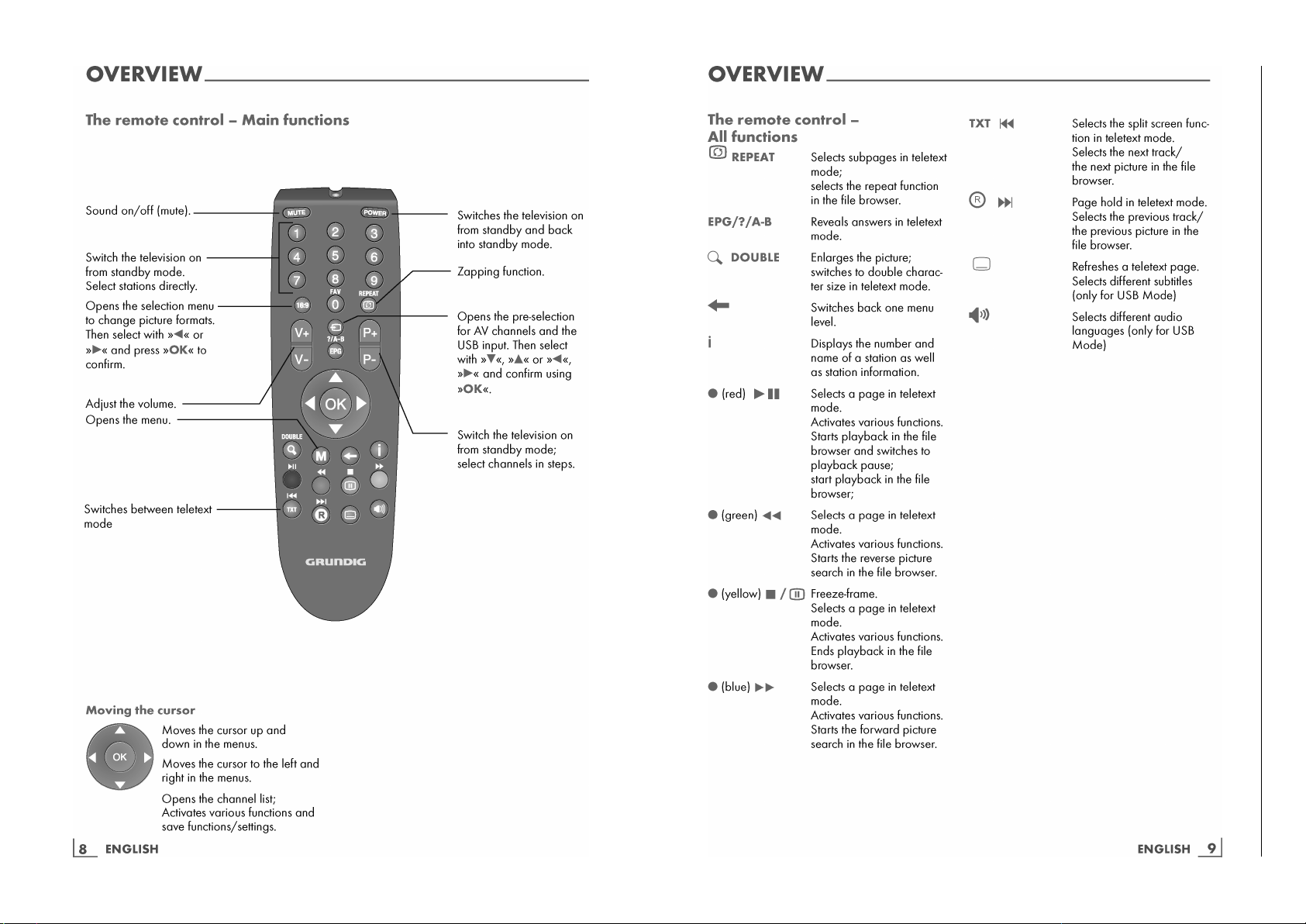
Operating Hints This chapter contains excerpts from the operating instructions. For further particulars please refer to the appro-
priate user instructions which can be downloaded by www.grundig.com, submenu Downloads/Manuals.
Chassis U4GRUNDIG Service
1 - 7
Chassis U4GRUNDIG Service
1 - 8
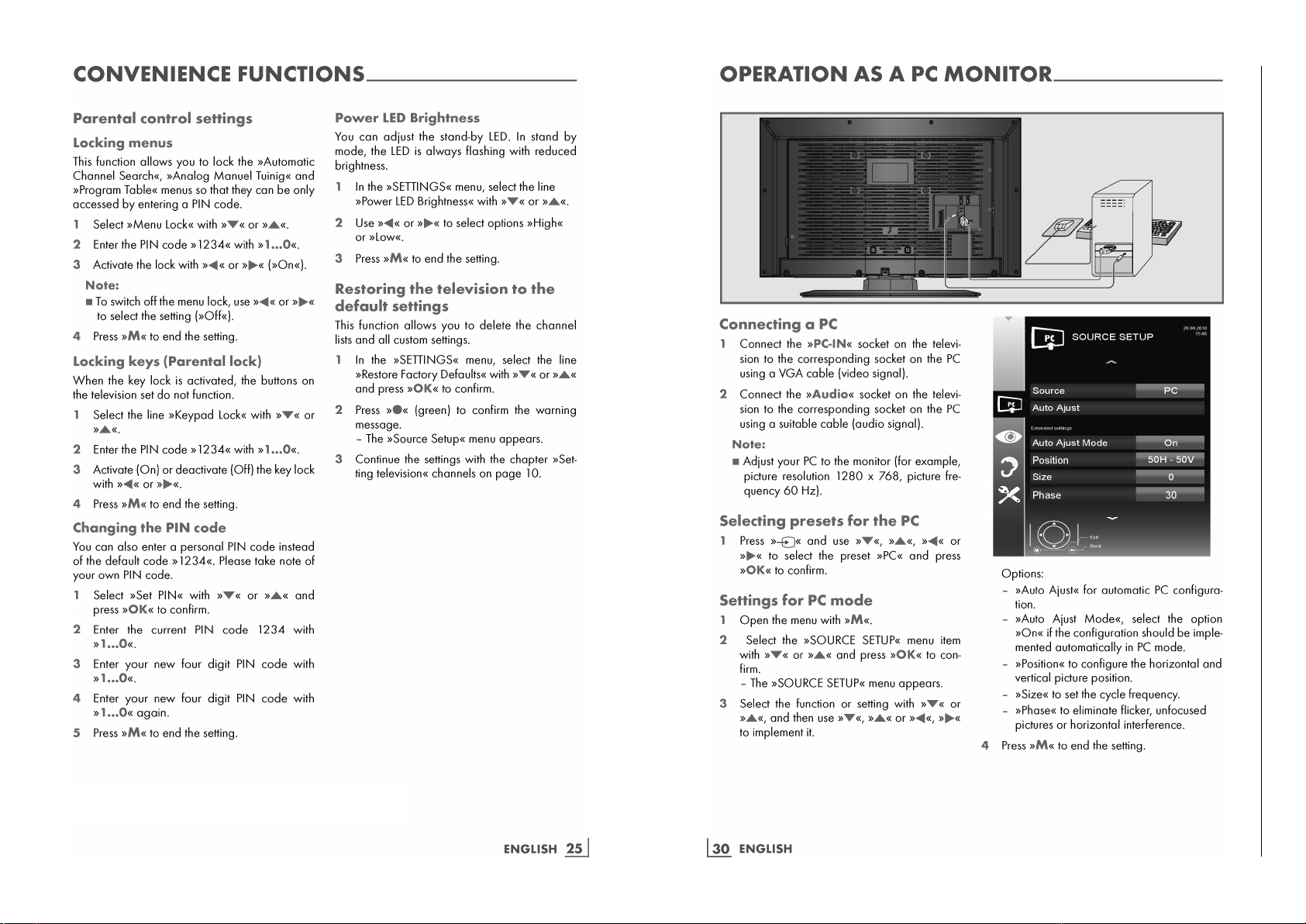
Note – Parental control:
Instead of the PIN Code 2356, you can enter a new personal code.
Chassis U4GRUNDIG Service
1 - 9
Service- und Sonderfunktionen
Tastenfunktionen RC23
M
Aufrufen/Beenden des COMFORT GUIDE /
Beenden des Service Mode
33
33
44
44
Menü-Zeile (Menüpunkt) wählen
OK
Aufrufen der Menüs
11
11
22
22
Wert ändern
Untermenü: Zurück zum Hauptmenü
Service-Mode aktivieren
– Taste
M
drücken.
– Zahlenfolge 8500 eingeben.
Service-Mode beenden
– Taste
M
drücken.
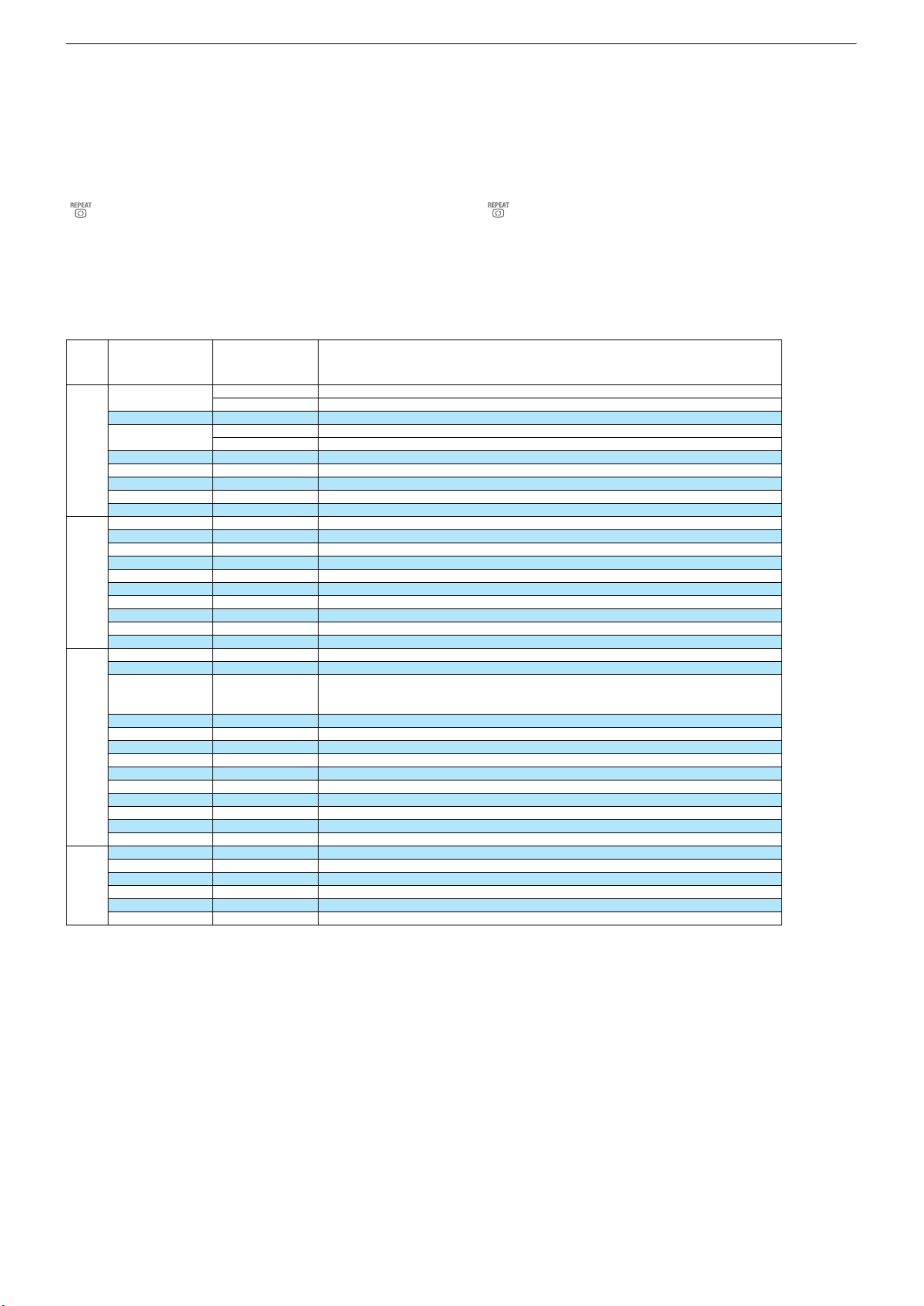
1. Grundeinstellwerte
Service and Special Functions
Functions of the buttons RC23
M
Call up/exit the COMFORT GUIDE /
exit the Service Mode
33
33
44
44
Call up the dialogue line (point of menu)
OK
Call up the Menus
11
11
22
22
Changing the settings
Submenu: Back to main menu
Calling up the Service Mode
– Press button
M
.
– Enter the code number 8500.
Exit the Service Mode
– Press button
M
.
1. Basic Settings
32 VLE 434 BA

System Configuration
TV Mode
Customer
Factory
HDCP Verify
Plug Play
On
SRS TSHD
Off
On/Off
Blue Back
Hotel
On/Off
On/Off
Mirror
Panel Energy Class
On/Off
Default/ Class A - D
Source Configuration Code
2356
TV
USB
Avail/Navail
Avail/Navail
PC
HDMI1
Avail/Navail
Avail/Navail
HDMI2
HDMI3
Avail/Navail
Avail/Navail
AV (Cinch)
Scart
Avail/Navail
Avail/Navail
TV Configuration
Code 2356
Component
S-VHS (Hosiden/Scart)
Avail/Navail
Avail/Navail
Tuner
Remote Control
Keypad
Eco TV
6 Button + 1 STD,
3 Button + 1 STD,
1 STD, Joystick
On/Off
Headphone
Shop Mode
On/Off
On/Off
Hidev Mono
Speaker Output Power
On/Off
Off, 3 / 5 / 7 / 10W
Keypad LED High
Keypad LED LOW
6…12
0…6
EMC Adjust-
ments
Code 2356
HP ST Amp
Brand Selection
On/Off
Grundig
Component Mux
AGC VHF
On/Off
0…15
AGC SECAM VHF
AGC UHF
0…15
0…15
AGC SECAM UHF
AGC LPrime
0…15
0…15
SSC Configuration
Menü
Menu
33
33
44
44
Menüpunkt
Point of Menu
OK
Einstellung
Adjustment
11
11
22
22
X
prüft HDCP im EEPROM / verifies HDCP in EEPROM
ATS Reset: Netz ein –> Automatischer Sendersuchlauf / Power on –> automatic programme search
X
On
On
Off
entsprechend dem Bild einstellen / adjust dependent of the picture
Class A
Avail
Avail
Avail
Avail
Avail
Avail
Avail
Avail
Avail
Avail
Eingebauten Tuner wählen / Select used tuner
Fernbedienung wählen / Select used remote control
6 Button
+ 1 STD
On
On
Off
Off
7W_12V
9
3
Off
Grundig
Off
8
10
10
10
10
Chassis U4GRUNDIG Service
1 - 10
Alle weiteren Menüs werden über die Gerätesoftware programmiert und dürfen nicht verstellt werden.
All other menus are programmed by the software of the set and must not be adjusted.
2. Software-Versionsnummer
Die Software-Versionsnummer wird unten im Menü Einstellungen
und im Service Menü angezeigt.
z.B.: U4ARAG.-.-.-.-.V00.012.00
2. Software Version Number
The software version number is shown on the lower part of the opti-
ons menu and the service menu.
e.g.: U4ARAG.-.-.-.-.V00.012.00