manuals.online logo
Brands
  1. Home
  2. •
  3. Brands
  4. •
  5. Gyration
  6. •
  7. Remote Control
  8. •
  9. Gyration GP240-001 User manual

Gyration GP240-001 User manual

Other Gyration Remote Control manuals

Gyration GYR3101 User manual

Gyration

Gyration GYR3101 User manual

Gyration Media Center Remote User manual

Gyration

Gyration Media Center Remote User manual

Gyration GP2000-001 User manual

Gyration

Gyration GP2000-001 User manual

Gyration GYR4101US User manual

Gyration

Gyration GYR4101US User manual

Gyration GYR4101US User manual

Gyration

Gyration GYR4101US User manual

Gyration ULTRA R4000 User manual

Gyration

Gyration ULTRA R4000 User manual

Gyration GP2100-001 User manual

Gyration

Gyration GP2100-001 User manual

Popular Remote Control manuals by other brands

Bircher Reglomat RC Duo 2 user guide

Bircher Reglomat

Bircher Reglomat RC Duo 2 user guide

Emerson RCBT100 owner's manual

Emerson

Emerson RCBT100 owner's manual

BILDA Element-6 user manual

BILDA

BILDA Element-6 user manual

Absima CR7P manual

Absima

Absima CR7P manual

Mitsubishi Electric PAR-32MAAG Instruction book

Mitsubishi Electric

Mitsubishi Electric PAR-32MAAG Instruction book

RCA RCRTBL08BE1 quick start guide

RCA

RCA RCRTBL08BE1 quick start guide

US Electronics NOVARI user guide

US Electronics

US Electronics NOVARI user guide

Panasonic EUR7622KB0 Operation guide

Panasonic

Panasonic EUR7622KB0 Operation guide

Bang & Olufsen Beo4 user manual

Bang & Olufsen

Bang & Olufsen Beo4 user manual

Marantz RC101 user guide

Marantz

Marantz RC101 user guide

FUTABA 9ZAP - PART2 manual

FUTABA

FUTABA 9ZAP - PART2 manual

HR Matic HR MULTI 3 quick start guide

HR Matic

HR Matic HR MULTI 3 quick start guide

Anritsu MP1777A Operation manual

Anritsu

Anritsu MP1777A Operation manual

Niles WVC100 Installation & operating guide

Niles

Niles WVC100 Installation & operating guide

Bang & Olufsen BEO6 Getting started

Bang & Olufsen

Bang & Olufsen BEO6 Getting started

GE 94901 instruction manual

GE

GE 94901 instruction manual

FUTABA R7108SB Full manual

FUTABA

FUTABA R7108SB Full manual

Invacare G91S user manual

Invacare

Invacare G91S user manual

manuals.online logo
manuals.online logoBrands
  • About & Mission
  • Contact us
  • Privacy Policy
  • Terms and Conditions

Copyright 2025 Manuals.Online. All Rights Reserved.

GyroRemote
Professional Series
100-ft. Range

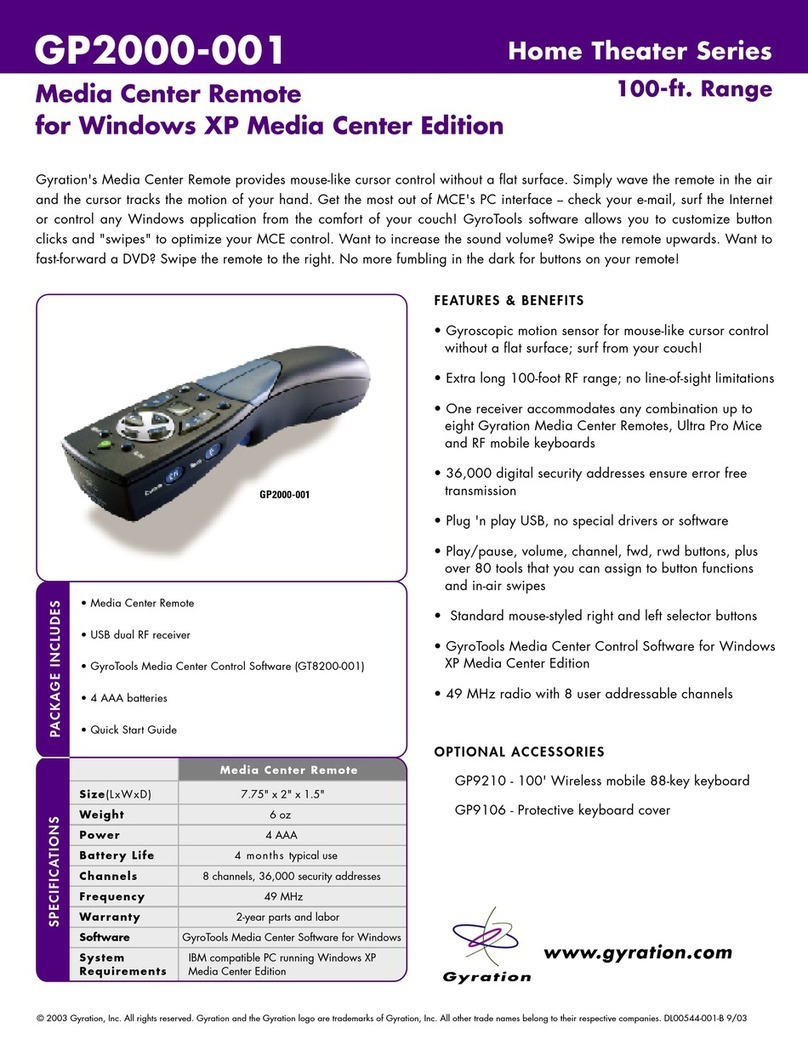
GP240-001
Ideal for higher education, conference rooms, executive briefing rooms, training centers, professional presenters and
PowerPoint users. GyroRemote is the most advanced presentation remote available. Confidently control PowerPoint or any
windows application from anywhere in the room using simple hand gestures. Use this remote's cursor control to launch and
control supporting applications such as multimedia players or Internet browsers or any other Windows application. Included
with your GyroRemote is GyroTools Presentation Effects software for Windows which allows you to add dynamic effects to
your presentation on-the-fly.
FEATURES & BENEFITS
• 100-ft RF range with no line-of-sight limitations allows
you to confidently roam around a room and interact
with your audience
• Solid-state motion sensor provides effortless, in-air
cursor control. Simply wave GyroRemote in the air and
the cursor tracks the motion of your hand!
• Ergonomic design and no need to point reduces fatigue 
 and discomfort
• Receiver connects to computer via USB port
• Control your presentation and apply advanced
techniques using subtle movements without distracting
your audience from your message
• Multi-receiver functionality allows you to install up to
eight remotes, mice and keyboards on one computer,
two of which may be used simultaneously
• 36,000 digital security addresses provide error free
transmission
• Conveniently located, software assignable buttons put
your favorite GyroTools at your fingertips for easy
access during your presentation
AVAILABLE ACCESSORIES:
GP220 - 100' mobile 88-key keyboard
• GyroRemote Presentation Remote Control
• USB dual RF receiver
• GyroTools Presentation Effects Software (GT510-001)
• 4 AAA batteries
PACKAGE INCLUDES
www.gyration.com
SPECIFICATIONS
Size(LxWxD)  7.75" x 2" x 1.5"
Weight 6ounces
Power 4 AAA
Battery Life 6 months typical presentation use
Channels 8 channels, 36,000 security addresses
Frequency  49 MHz
Warranty  2-year parts and labor
Software GyroTools Presentation Effects for Windows
System IBM compatible PC running Windows 98 SE,
Requirements 2000, ME or XP
GP240 Remote
GP240-001
© 2003 Gyration, Inc. All rights reserved. Gyration and the Gyration logo are trademarks of Gyration, Inc. All other trade names belong to their respective companies. DL00539-001-A 9/03

www.gyration.com
ã2003 Gyration, Inc. All rights reserved. Gyration and the Gyration logo are trademarks of Gyration, Inc. All other trade names belong to their respective owners. DL00552-001-A
Bring your presentations to life with over 80 powerful special effects and presentation management tools. Assign your
favorite tools to button clicks or in-air gestures and use your GyroRemote or Ultra Mouse to easily draw lines, highlight text
or zoom to portions of the screen without leaving slide show mode!
GyroTools Presentation
Effects Software
Professional Series
GT510-001
FEATURES & BENEFITS
• Convenient interface allows you to easily assign your
favorite tools to your GyroRemote or Ultra Mouse
• Tools can be assigned to buttons click sequences, in-air
gestures and shakes, and other events for easy access
during your presentation
• Use "gestures" to make your point - wiggle your remote or
mouse to display an on-screen timer or control sound
volume. Any of the GyroTools can be assigned to in-air
horizontal, vertical or diagonal gestures.
• For Windows 98 SE, 2000, Me or XP
General
Launch Program
Display Configuration Screen
Change Profile
Screen Saver
Capture Image
Clipboard
Pen
Highlighter
Internet
Activate/Refresh
Go to URL
Forward/Backward
Home
Search
Favorites
Add to Favorites
New Window
Print
Stop
Down/Up
Page Down/Up
Input
Center Cursor
Wheel
Keyboard/Keypad
Keystroke
Page Up/Down
Enter
Escape/Delete
Presentation
Clear Screen
Digital/Analog Clock
Countdown Timer
Display Image
Hide and Reveal
Clipart Pointer
Geometric Pointer
Spot Light
Subliminal Message
Ticker Tape
Zoom Screen
Laser Pointer
Text Stamp
Windows
Cut/Copy/Paste
Close Application
Close Document
Top of Document
Bottom of Document
Previous/Next Page
Minimize All
Restore All
Next Window
Previous Window
Next Document
Previous Document
Help
Sensitive Help
Start Menu
Power Point
Power Pen/Pointer
Powershape
Powertext
Black/White Screen
Jump to Slide
Next/Previous Slide
First/Last Slide
Exit Slideshow
Multimedia
Volume Control
Play/Pause
Next/Prev/Last Track
Play/Stop
Play Sound/Movie
TOOLS INCLUDED WITH GYROTOOLS PRESENTATION EFFECTS SOFTWARE: