5
7. Bluetooth®pairing
Note - pairing
•Ensure that the Bluetooth®-enabled device is switched on and that the Bluetooth® function
is activated.
•Please refer to the operating instructions of your device for more information.
•When the product is switched on for the rst time, pairing begins automatically.
•The product and the device should not be more than 1 metre apart. The shorter the distance, the
better.
•Switch the product on using the MFB button (2).
•This product has an integrated Bluetooth®function that allows streaming (e.g. from a
•smartphone) to the product. The product also has a further function that enables transmission to
Bluetooth®devices (such as Bluetooth®headphones/speakers).
7.1 RX receive mode
You can pair your devices with the product using Bluetooth®and use it as a playback device. You can
control playback directly on the terminal device. When used as a receiver, up to 8 transmitters can be
stored, the audio signal from which can each be received by a Bluetooth®device.
Connection to the device
To connect to your device, connect it using the 3.5 mm AUX cable and the audio input (4) on
the product.
Select RX mode by pushing the switch (1) to the right.
Press the MFB button (2) twice.
•If the LED (3) is ashing alternately red and blue:
the product is searching for a Bluetooth®connection.
•If the LED (3) lights up blue:
the product is already paired with a Bluetooth®device.
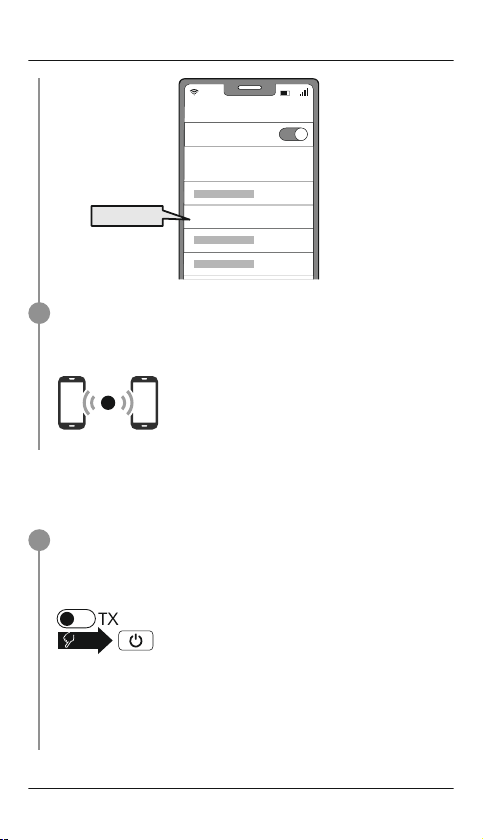
Search using your device for the product (only required on the rst connection)
Open the Bluetooth®settings on your device and wait until the list of found Bluetooth®
devices shows Hama BT-Senrex.
Select Hama BT-Senrex and wait until product is listed as connected in your device's
Bluetooth®settings.
Note - Bluetooth®password
Some devices require a password in order to connect to another Bluetooth®device.
•Enter the password 0000 to connect the headphones if your device prompts you to
enter one.
1
2
2x