Heath Zenith 7776 User manual

© 2015 HeathCo LLC 207671-01A
Wireless Plug-In
Night Light Chime
Figure 1
Note: The night light
feature is controlled by
a photocell and turns on
and off automatically as
the surrounding light level
changes.
Photocell
Orange Tab
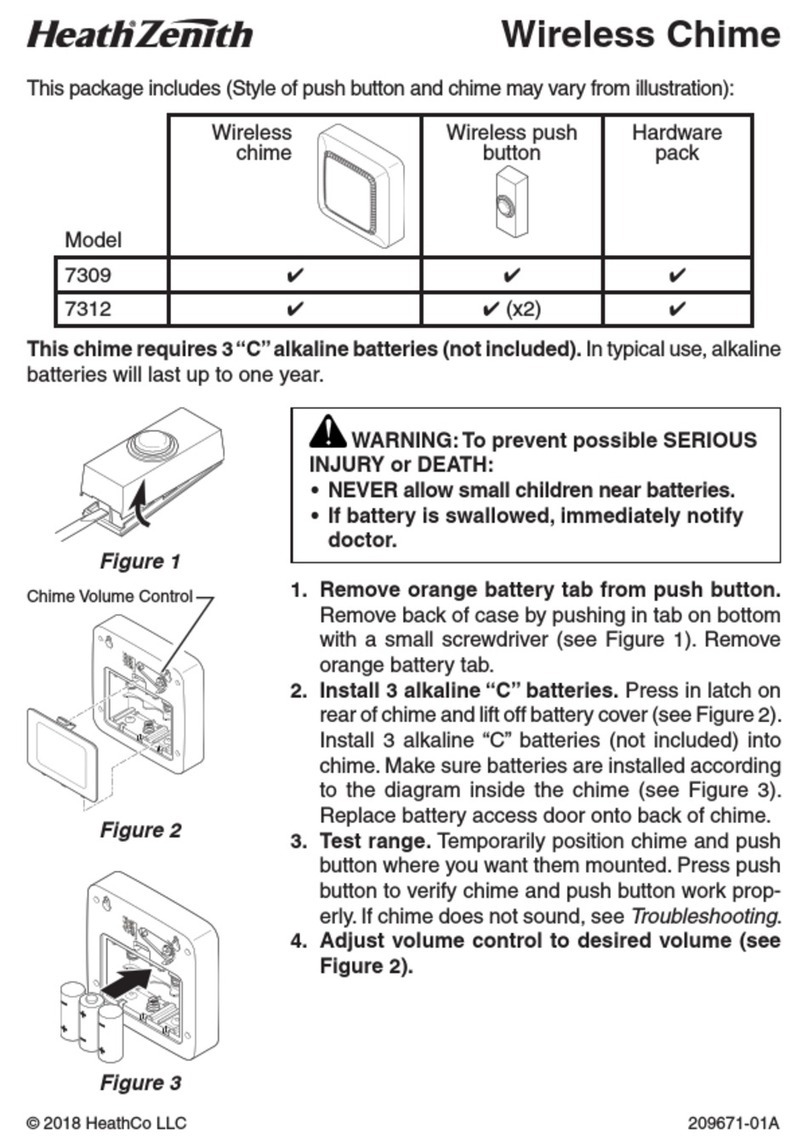
This package includes (Style of push button and chime may vary from illustration):
Model
Wireless
strobe
chime
Wireless push
button
Hardware
pack
7776 ✔ ✔ ✔
1. Remove orange battery tab from push
button. Remove back of case by pushing in
tab on bottom with a small screwdriver (see
Figure 1). Remove orange battery tab.
2. Plug in wireless chime.
3.
Test range. Temporarily position push button
where you want it mounted.Press push button
to verify chime and push button work properly.
If chime does not sound, see Troubleshooting.
4. Adjust volume control to desired volume
(see Figure 2).
WARNING: To prevent possible
SERIOUS INJURY or DEATH:
• NEVER allow small children near
batteries.
• If battery is swallowed, immediately
notify doctor.
Figure 2
Chime Volume
Control

Helpful Videos – www.hzsupport.com Helpful Answers – 1-800-858-8501
2
5. Mount push button. Use either screws or
double sided tape to mount push button.
• Screw Mounting: To mount with screws,
remove back of case by pushing in tab on
bottom with a small screwdriver (see Figure
1). Note: Remove material in screw holes
(if needed) before mounting with screws.
Attach back of case to door jamb or wall (see
Figure 3). Snap front of push button on.
• Tape Mounting: When attaching push but-
ton using double sided tape, make sure the
surface of the door jamb or wall is clean.
Figure 3

3
Helpful Videos – www.hzsupport.com Helpful Answers – 1-800-858-8501
PRESS/HOLD TUNE: 1 SEC
SYNC: 3 SEC RESET: 10 SEC
Inside Push Button
Chime
Tune Settings
Tune Setting Table
Tune Push Button Chime
Ding Jumper - ON ———
Ding-Dong or
Westminster
Jumper - OFF Press button on chime. Listen
for single “Beep” tone. Release
button. Listen for selected tune.
Repeat to select different tune.
The chime has different selectable tunes: Ding
(one note tune), Ding-Dong (two note tune), or
Westminster (eight note tune). The factory set-
ting is for the Westminster tune. This tune can
be changed by following the instructions in the
Tune Setting Table.
Note: All chime models are designed to work
with up to 10 push buttons (sold separately). All
chimes are designed to play only two different
tunes no matter how many push buttons are used.

Helpful Videos – www.hzsupport.com Helpful Answers – 1-800-858-8501
4
Troubleshooting
1. PROBLEM: Chime does not sound or rang one time and quit.
A. POSSIBLE CAUSE: Push button battery is not installed correctly.
A. CORRECTIVE ACTION: Make sure battery is installed according to the
diagram inside the push button.
B. POSSIBLE CAUSE: Push button battery is dead.
B. CORRECTIVE ACTION: Check charge of push button battery and replace
if necessary.
C. POSSIBLE CAUSE: Chime is not receiving power.
C. CORRECTIVE ACTION: Make sure the plug-in chime has power.
D. POSSIBLE CAUSE: Push button and chime are not synced.
D. CORRECTIVE ACTION: Sync the push button and chime.
• Press and hold the button on the chime until the chime sounds a
“Beep-Beep”.
• Press the push button within 30 seconds. The chime will sound a
“Beep-Beep” tone to indicate the push button is synced.
• Press the push button to ensure operation.
2. PROBLEM: Push button battery seems okay, but the chime does not work
after installation.
A. POSSIBLE CAUSE: Chime or push button is mounted on metal or near
metal studs. Note: Metal reduces transmission range.
A. CORRECTIVE ACTION: Use 1/4 in. to 1/2 in. (6 to 13 mm) wood shims
to move chime or push button away from metal surface.
B. POSSIBLE CAUSE: Chime is mounted near concrete floor or wall.Note:
Concrete may reduce range.
B. CORRECTIVE ACTION: Move chime away from concrete surface.
C. POSSIBLE CAUSE: Chime and push button are installed too far apart.
C. CORRECTIVE ACTION: Locate chime closer to push button.

5
Helpful Videos – www.hzsupport.com Helpful Answers – 1-800-858-8501
3. PROBLEM: Chime sounds when not intended (false triggers).
POSSIBLE CAUSE: Chime is receiving interference from another wire-
less device.
CORRECTIVE ACTION: Reset chime and push button.
• Remove push button batteries. Wait 30 seconds.
• Press and hold the push button for 10 to 15 seconds within 60 seconds
after installing battery into the push button.
• Press and hold the button on the chime until the chime sounds a
“Beep-Beep-Beep-Beep”.
• To re-sync the push button and chime, press and hold the button on
the chime until the chime sounds a “Beep-Beep”.
• Press the push button within 30 seconds. The chime will sound a
“Beep-Beep” tone to indicate the push button is synced.
• Press the push button to ensure operation.
Note: The push button and chime come synced from the factory. The range of
the wireless chime can vary with location, temperature, and battery condition.

Helpful Videos – www.hzsupport.com Helpful Answers – 1-800-858-8501
6
Please contact us for assistance
before returning product to the
store or to HeathCo LLC.
If you experience a problem, follow
this guide.You may also contact us be-
tween 8:00 AM to 5:00 PM CST (M-F).
When contacting Technical Service,
please include the following informa-
tion: Name, Street Address, Daytime
Phone Number, Email Address, Model
Number, Date of Purchase, Place of
Purchase, Product Issue, and DATED
SALES RECEIPT FOR WARRANTY
REQUESTS.
Technical Service
No Service Parts Available for this
Product
HeathCo LLC
2445 Nashville Road
Bowling Green, KY 42101
ATTN: Technical Service
Internet: www.hzsupport.com
Phone:1-800-858-8501 (English Only)
Fax: 1-800-846-8500
Regulatory Information
This device complies with Part 15 of the FCC Rules and RSS-210 of Industry
Canada. Operation is subject to the following two conditions: (1) this device may
not cause harmful interference, and (2) this device must accept any interference
received, including interference that may cause undesired operation.
The user is cautioned that changes or modifications not expressly approved by
the party responsible for regulatory compliance could void the user’s authority
to operate the equipment.

7
Helpful Videos – www.hzsupport.com Helpful Answers – 1-800-858-8501
HeathCo LLC reserves the right to discontinue and to change specifications
at any time without notice without incurring any obligation to incorporate new
features in previously sold products.
ONE YEAR LIMITED WARRANTY
This is a “Limited Warranty” which gives you specific legal rights. You
may also have other rights which vary from state to state or province
to province.
For a period of one year from the date of purchase, any malfunction
caused by factory defective parts or workmanship will be corrected at
no charge to you.
Not Covered - Repair service, adjustment and calibration due to misuse,
abuse or negligence, light bulbs, batteries, and other expendable items
are not covered by this warranty. Unauthorized service or modification of
the product or of any furnished component will void this warranty in its
entirety.This warranty does not include reimbursement for inconvenience,
installation, setup time, loss of use, unauthorized service, or return ship-
ping charges.
This warranty covers only HeathCo LLC assembled products and is not
extended to other equipment and components that a customer uses in
conjunction with our products.
THIS WARRANTY IS EXPRESSLY IN LIEU OF ALL OTHER WARRAN-
TIES, EXPRESS OR IMPLIED, INCLUDING ANY WARRANTY, REPRE-
SENTATION OR CONDITION OF MERCHANT ABILITY OR THAT THE
PRODUCTS ARE FIT FOR ANY PARTICULAR PURPOSE OR USE, AND
SPECIFICALLY IN LIEU OF ALL SPECIAL, INDIRECT, INCIDENTAL, OR
CONSEQUENTIAL DAMAGES.
REPAIR OR REPLACEMENT SHALL BE THE SOLE REMEDY OF THE
CUSTOMER AND THERE SHALL BE NO LIABILITY ON THE PART
OF HEATHCO LLC FOR ANY SPECIAL, INDIRECT, INCIDENTAL, OR
CONSEQUENTIAL DAMAGES, INCLUDING BUT NOT LIMITED TO ANY
LOSS OF BUSINESS OR PROFITS, WHETHER OR NOT FORESEE-
ABLE. Some states or provinces do not allow the exclusion or limitation of
incidental or consequential damages, so the above limitation or exclusion
may not apply to you.
Please keep your dated sales receipt, it is required for all warranty
requests.

Vídeos prácticos – www.hzsupport.com Respuestas prácticas – 1-800-858-8501
8
© 2015 HeathCo LLC 207671-01 S
Control del
volumen de la
campana
Timbre inalámbrico
enchufable de luz
para la noche
Nota: La función de luz de la noche está controlada por una fotocélula y se
enciende y apaga automáticamente a medida que cambia el nivel de luz que
la rodea.
Fotocélula
Lengüeta
anaranjada
Figura 1
Figura 2
1. Retire la pestaña naranja de la batería del
botón pulsador. Extraer la parte posterior de
la caja presionando la aleta en el botón con
un destornillador pequeño (vea la Figura 1).
Quite la aleta anaranjada de la batería.
2. Campana inalámbrica enchufable.
3. Pruebe el alcance. Ponga provisionalmente
el pulsador en la posición donde lo quiera
instalar. Presione el pulsador para verificar
que la campanay el pulsador funcionen
apropiadamente. Si la campana no suena,
vea Análisis de Averías.
4.
Ajuste el control del volumen al volumen
deseado (vea la Figura 2).
ADVERTENCIA: Para prevenir una
posible LESIÓN SERIA o LA MUERTE:
• NUNCA deje que los niños estén cerca
de las baterías.
• Si se traga una batería, notifique inme-
diatamente al doctor.
Este paquete tiene (El estilo del pulsador y de la campana puede variar de
la ilustración):
Modelo
Campana
inalámbrica
con luz
estroboscópica
Pulsador
inalámbrico
Paquete de
ferretería
7776 ✔ ✔ ✔

9
Vídeos prácticos – www.hzsupport.com Respuestas prácticas – 1-800-858-8501
5. Instale el pulsador. Use ya sean tornillos o
cinta adhesiva por ambas caras para instalar
el pulsador.
• Montaje con tornillos: Para montar con
tornillos, quite la parte de atrás de la caja
empujando hacia adentro la lengüeta de
abajo con un destornillador pequeño y
girando la cuchilla (vea la Figura 1). Nota:
Quite la suciedad de los orificios para
tornillos (si es necesario) antes de poner
los tornillos. Coloque la parte de atrás de
la caja contra la jamba o la pared (vea la
Figura 3). Encaje a presión la parte frontal
del pulsador.
• Montaje con cinta adhesiva: Cuando
fije el pulsador usando cinta adhesiva por
ambas caras, asegúrese que la superficie
de la pared o la del batiente de la puerta
estén limpias.
Figura 3

Vídeos prácticos – www.hzsupport.com Respuestas prácticas – 1-800-858-8501
10
Tabla de programación de melodías
Campana
Programación del tono
La campanilla tiene diferentes melodías que se
pueden seleccionar: Ding (melodía de una nota),
Ding-Dong (melodía de dos notas), o Westmins-
ter (melodía de ocho notas). La calibración de
fábrica es el tono Westminster. Esta melodía se
puede cambiar siguiendo las instrucciones de la
Tabla de Programación de Melodías.
Nota: Todos los modelos de campanillas están
diseñados para trabajar hasta con 10 botones
pulsadores (se venden por separado). Todas
las campanillas están diseñadas para reproducir
solo dos melodías diferentes, sin importar cuán-
tos botones pulsadores se utilicen.
Ajustes Botón
pulsador
Campanilla
Ding Puente:
ENCENDIDO
———
Ding-Dong o
Westminster
Puente:
APAGADO
Presione el botón de la campanilla. Escuche
un tono único de “bip”. Libere el botón.
Escuche el tono seleccionado. Repita para
seleccionar un tono diferente.
PRESS/HOLD TUNE: 1 SEC
SYNC: 3 SEC RESET: 10 SEC
Dentro del Pulsador
Other manuals for 7776
1
Table of contents
Languages:
Other Heath Zenith Intercom System manuals