manuals.online logo
Brands
  1. Home
  2. •
  3. Brands
  4. •
  5. HP
  6. •
  7. Monitor
  8. •
  9. HP E241e User manual

HP E241e User manual

Other HP Monitor manuals

HP Z24n G3 Manual

HP

HP Z24n G3 Manual

HP P720 User manual

HP

HP P720 User manual

HP OMEN 27i Manual

HP

HP OMEN 27i Manual

HP Compaq L1702 User manual

HP

HP Compaq L1702 User manual

HP L1910i User manual

HP

HP L1910i User manual

HP M27fwa Assembly instructions

HP

HP M27fwa Assembly instructions

HP Pavilion F1903 Installation guide

HP

HP Pavilion F1903 Installation guide

HP L1902 User manual

HP

HP L1902 User manual

HP L1908wi - Widescreen LCD Monitor User instructions

HP

HP L1908wi - Widescreen LCD Monitor User instructions

HP NP447A User manual

HP

HP NP447A User manual

HP Z24nf Installation instructions

HP

HP Z24nf Installation instructions

HP L2105TM User manual

HP

HP L2105TM User manual

HP Designjet 130 Series Use and care manual

HP

HP Designjet 130 Series Use and care manual

HP L1908wm - 19" LCD Monitor User instructions

HP

HP L1908wm - 19" LCD Monitor User instructions

HP Passport 1912nm User manual

HP

HP Passport 1912nm User manual

HP U160 User manual

HP

HP U160 User manual

HP X27c Manual

HP

HP X27c Manual

HP L1706 User instructions

HP

HP L1706 User instructions

HP B6191-90029 User manual

HP

HP B6191-90029 User manual

HP ProDisplay P19A User manual

HP

HP ProDisplay P19A User manual

HP w15e - Widescreen LCD Monitor User manual

HP

HP w15e - Widescreen LCD Monitor User manual

HP P24v G4 Manual

HP

HP P24v G4 Manual

HP Q2159 - Compaq - 21.5" LCD Monitor How to use

HP

HP Q2159 - Compaq - 21.5" LCD Monitor How to use

HP E34m G4 Assembly instructions

HP

HP E34m G4 Assembly instructions

Popular Monitor manuals by other brands

Linear Acoustic LQ-1000 user guide

Linear Acoustic

Linear Acoustic LQ-1000 user guide

AOC I2579V user manual

AOC

AOC I2579V user manual

ViewSonic VX1945WM - ViewDock - 19" LCD Monitor null

ViewSonic

ViewSonic VX1945WM - ViewDock - 19" LCD Monitor null

ViewSonic VA705M null

ViewSonic

ViewSonic VA705M null

BenQ FP757 null

BenQ

BenQ FP757 null

ViewSonic VA703MB - 17" LCD Monitor null

ViewSonic

ViewSonic VA703MB - 17" LCD Monitor null

Gateway FPD1520 user guide

Gateway

Gateway FPD1520 user guide

Furuno Mu 120c Operator's manual

Furuno

Furuno Mu 120c Operator's manual

Asus VB171D - 17" LCD Monitor Service manual

Asus

Asus VB171D - 17" LCD Monitor Service manual

Dell S2230MX Setting up

Dell

Dell S2230MX Setting up

Philips 107C64 user manual

Philips

Philips 107C64 user manual

Dell S2409WFP user guide

Dell

Dell S2409WFP user guide

EverFocus EN-7517E instruction manual

EverFocus

EverFocus EN-7517E instruction manual

Panasonic TH152UX1 - 152" PLASMA TV Service manual

Panasonic

Panasonic TH152UX1 - 152" PLASMA TV Service manual

Dell Precision 7680 Connection guide

Dell

Dell Precision 7680 Connection guide

LG 50PM1M -  - 50" Plasma Panel Service manual

LG

LG 50PM1M - - 50" Plasma Panel Service manual

Bosch DDU 9 manual

Bosch

Bosch DDU 9 manual

Acer A231HL user manual

Acer

Acer A231HL user manual

manuals.online logo
manuals.online logoBrands
  • About & Mission
  • Contact us
  • Privacy Policy
  • Terms and Conditions

Copyright 2025 Manuals.Online. All Rights Reserved.

Datasheet
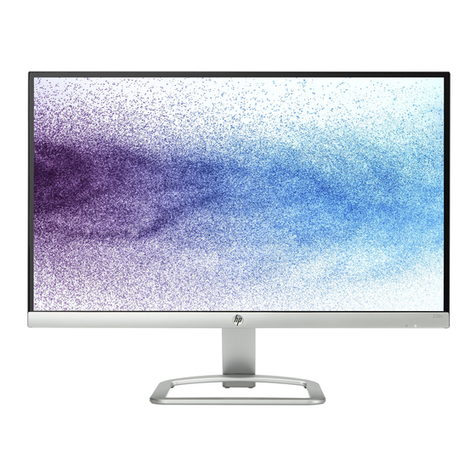
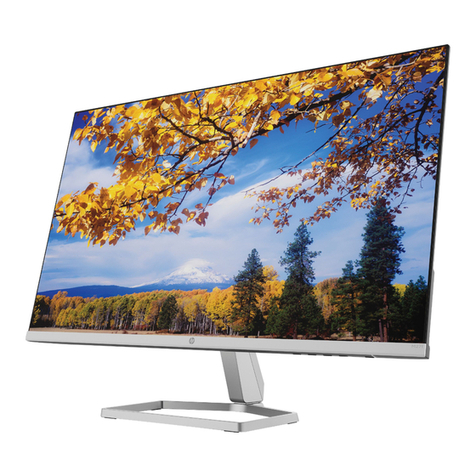
HP EliteDisplay E241e 61 cm (24'') IPS LED Backlit
Display
IPS Gen 2, aesthetic design, customizable comfort, and energy smarts
Get business-class In-Plane
Switching (IPS) Gen 2 technology,
extra-wide viewing angles, a grey
design that meets
recommendations of Germany's
BGI 650, and extraordinary comfort
and energy savings with the HP
EliteDisplay E241e 24-inch IPS LED
Backlit Monitor.
Now see everything.
●Enjoy an incredible 178-degree viewing angles and stunning color integrity from IPS Gen 2 technology that lets
you share your 61 cm (24'') diagonal screen with everyone in the room.
Power through your day in comfort.
●Find your sweet spot with customizable settings—the most adjustability available on an HP business display.
The display also meets TCO Certified Edge requirements for innovative products at the forefront of
environmental and ergonomic stand design.
Designed with the environment in mind.
●Reduce power consumption with an intelligent, energy-efficient, low-halogen1design that uses IPS Gen 2, is
ENERGY STAR® and TCO qualified and EPEAT® Silver registered,2and includes mercury-free display backlights and
arsenic-free display glass.
●View all the stunning details on a narrow-bezel 24-inch diagonal display with 1920 x 1080 full HD resolution3,
250 cd/m2 brightness, 1000:1 contrast ratio, 4M:1 dynamic contrast ratio, and 8 ms response time.4
●Enjoy future-ready and legacy connectivity from a range of inputs that include DisplayPort 1.2, DVI, VGA, and an
integrated USB hub that enables easy peripheral connectivity at the display.
●The internal supply and compact footprint let you design a tidy multi-monitor5workspace and put all of your
projects front and center on the desk. No more resizing windows to fit your work.
●Personalize your workspace with HP Display Assistant software and deter theft with a user-designated PIN that
deactivates the monitor when disconnected from your PC without approval.
●Rest assured that your IT investment is supported by a three-year standard limited warranty. To extend your
protection beyond the standard warranties, select optional HP Care Pack Services.6

Datasheet
HP EliteDisplay E241e 61 cm (24'') IPS LED Backlit Display Specifications Table
Product Number G7D44AA; G7D44AT
Product Color Ergo Grey (meets recommendations of the Germany's BGI 650)
Display size (diagonal) 61 cm (24")
Viewing Angle 178° horizontal; 178° vertical
Brightness 250 cd/m²1
Contrast Ratio 1000:1 static; 4000000:1 dynamic1
Response Ratio 8 ms grey to grey1
Aspect Ratio 16:10
Native Resolution 1920 x 1200
Resolutions Supported 1920 x 1200; 1920 x 1080; 1600 x 1200; 1600 x 900; 1680 x 1050; 1440 x 900; 1280 x 1024; 1280 x 800; 1280 x 720; 1024 x 768; 800 x 600; 640 x
480
Display Features Plug and Play; Anti-glare; User programmable; Language selection; On-screen controls
User Controls Menu; Minus ("-"); Plus ("+") /Input; OK/Auto; Power
Input signal 1 VGA; 1 DVI-D (with HDCP support); 1 DisplayPort 1.2 (with HDCP support)
Ports and Connectors 3 USB 2.0 (one upstream, two downstream)
Input power Input voltage: 90 to 265 VAC
Power consumption Power consumption Description: 40 W (maximum), 35 W (typical), < 0.5 W (standby); Screen resolution: 1920 x 1200
Dimensions with Stand (W x D
x H)
55.6 x 27.62 x 51.656 cm


Dimensions without Stand (W
xDxH)
55.6 x 5.5 x 36.26 cm
Weight 6.58 kg
Ergonomic features Tilt: -5 to +30°; Swivel 360°; Height: 0-150mm
Certification and Compliance TCO Certified Edge; TÜV-GS; UL; C-Tick; VCCI; E-Standy; NOM; PSB; ICE; China Energy Label Grade 1; SmartWay - NA only - Energy logistics; Meets
recommendations of the Germany's BGI 650
Environmental Arsenic-free display glass; Mercury-free display backlights; Low halogen2
Energy Efficiency Compliance ENERGY STAR® qualified
What's in the box Monitor; VGA cable; USB cable; DisplayPort cable; AC power cable; Printed documentation and CD (includes User Guide, warranty, drivers); HP Display
Assistant software
Warranty 3-year limited warranty. Terms and conditions vary by country. Certain restrictions
Datasheet
HP EliteDisplay E241e 61 cm (24'') IPS LED Backlit Display
Accessories and services (not included)
HP Dual Output USB
Graphics Adapter
Increase screen real estate and productivity with a dual-monitor setup with the HP Dual Output USB Graphics Adapter,
featuring DVI-I and DisplayPort outputs to drive displays at high resolutions through a single USB 3.0 B connection to
your PC.
Product number: C5U89AA
HP Integrated Work Center
Stand for Ultra Slim Desktop
and Thin Client
The HP Integrated Work Center Stand is designed to help maximize the use of limited desk space without compromising
performance or productivity by accommodating an HP Compaq 6005 Pro, or 8000 Series HP Ultra-slim Desktop PC or an
HP Thin Client and most HP 17 to 24-inch (43.18 to 60.96 cm) diagonal LCD monitors (please refer to compatibility in the
Quick Spec) with VESA standard mounting brackets.
Product number: E8H16AA
HP Quick Release A secure and easy-to-use mounting solution for your VESA-compliant HP thin clients, compatible HP flat panel monitors
and other HP desktop products. Attach to any a compatible stand, bracket or wall mount and make the most of your
workspace.
Product number: EM870AA
HP Integrated Work Center 3
for Small Form Factor
Maximize your work space with the HP Integrated Work Center for Small Form Factors v3. Customize an “all-in-
one” solution by combining an HP Small Form Factor or Workstation with an LED monitor up to 24 diagonal inches.
Product number: F2P06AA
HP Integrated Work Center
for Desktop Mini and Thin
Client
Make the most of small work spaces with an HP IWC Desktop Mini/Thin Client that lets you create a compact desktop
solution by combining a display with an HP Desktop Mini, HP Thin Client or HP Chromebox1 and giving you convenient
front access to all of its inputs.
Product number: G1V61AA
HP LCD Speaker Bar Attach seamlessly to the front bezel of your monitor to add full multimedia support features, including stereo speakers
with full sound range and an external jack for headphones.
Product number: NQ576AA
5-year Next Business Day
Onsite
Receive 5 years of next business day onsite repair from an HP-qualified technician for your computing device, if the issue
cannot be solved remotely
Product number: U7935E
Learn more at
www.hp.eu/hpoptions
Datasheet
HP EliteDisplay E241e 61 cm (24'') IPS LED Backlit Display
Messaging Footnotes
1External power supplies, power cords, cables and peripherals are not Low Halogen. Service parts obtained after purchase may not be Low Halogen.
2EPEAT® registered where applicable. EPEAT registration varies by country. See www.epeat.net for registration status by country.
3High-definition content required.
4All performance specifications represent the typical specifications provided by HP's component manufacturers; actual performance may vary either higher or lower.
5Each monitor sold separately.
6HP Care Pack Services are sold separately. Service levels and response times for HP Care Pack Services may vary depending on your geographic location. Service starts from date of hardware purchase. Restrictions and
limitations apply. See www.hp.com/go/cpc for details.
Technical specifications disclaimers
1All specifications represent the typical specifications provided by HP's component manufacturers; actual performance may vary either higher or lower.
2External power supplies, power cords, cables and peripherals are not Low Halogen. Service parts obtained after purchase may not be Low Halogen.
Learn more at
www.hp.eu/monitors
Engage HP Financial Services
Explore monthly payment options and technology refresh plans that can provide more flexibility to help you meet your IT goals. More information on www.hp.com/go/hpfs.
Sign up for updates
www.hp.com/go/getupdated
The product could differ from the images shown. © 2015 Hewlett-Packard Development Company, L.P. The information contained herein is subject to change
without notice. Specific features may vary from model to model. The only warranties for HP products and services are set forth in the express warranty
statements accompanying such products and services. Nothing herein should be construed as constituting an additional warranty. HP shall not be liable for
technical or editorial errors or omissions contained herein.
4AA5-2039EEE, June 2015