Huawei WS331c User manual

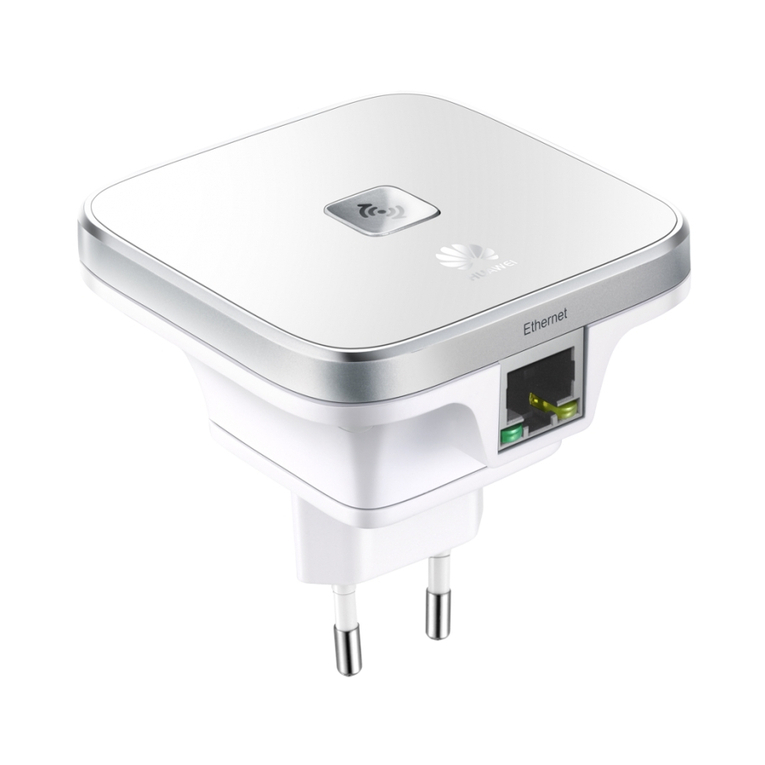
Step 1: Plug the WS331c into a power socket near the wireless router
Indicator Status WS331c Status
Steady white Normal
Fast blinking Starting
Off Power off
WS331c 300Mbps
Range Extender Quick Start
How to restore default settings: When the WS331a is powered on, use a needle to press and hold the Reset key for 2
seconds or more until the indicator becomes off. For the full user guide, visit http://consumer.huawei.com/en/.

Step 2: Wirelessly connecting WS331c to the wireless router
Method 1: Automatic Connection through WPS Button
21
Method 2: Manual Connection through the WS331c Web Page
You can configure the WS331c using a phone, tablet, or laptop. This guide uses a phone as an example.
Check the WS331c's Wi-Fi
network name (unencrypted
by default), and then wirelessly
connect your phone to the Wi-Fi
network.
1On your phone, open a browser
and enter 192.168.3.1 or
mediarouter.home to access
the WS331a configuration
screen. Then enter the login
password (default value: admin).
Remember password
Login Password
Log in
2Touch Internet Connection
Wizard. Complete the
configuration by following
the Internet Connection
Wizard.
3
/TZKXTKZ)UTTKIZKJ
)UTLOM[XK=O,O
*U]TRUGJ8[SGZK'VV
3GTGMK_U[XXU[ZKXGT_ZOSKGT_]NKXK

Safety Information

1
1
Safety information
This section contains important information about the operation of your device. It also contains
information about how to use the device safely. Read this information carefully before using
your device.
Electronic device
Do not use your device if using the device is prohibited. Do not use the device if doing so causes
danger or interference with other electronic devices.
Interference with medical equipment
•
Follow rules and regulations set forth by hospitals and health care facilities. Do not use your
device where prohibited.

2
•
Some wireless devices may affect the performance of hearing aids or pacemakers. Consult
your service provider for more information.
•
Pacemaker manufacturers recommend that a minimum distance of 15 cm be maintained
between a device and a pacemaker to prevent potential interference with the pacemaker. If
using a pacemaker, hold the device on the side opposite the pacemaker and do not carry the
device in your front pocket.
Areas with flammables and explosives
•
Do not use the device where flammables or explosives are stored (in a gas station, oil depot,
or chemical plant, for example). Using your device in these environments increases the risk of
explosion or fire. In addition, follow the instructions indicated in text or symbols.

3
•
Do not store or transport the device in containers with flammable liquids, gases, or
explosives.
Operating environment
•
Avoid dusty, damp, or dirty environments. Avoid magnetic fields. Using the device in these
environments may result in circuit malfunctions.
•
Keep the device away from electronic appliances that generate strong magnetic or electric
fields, such as a microwave oven or refrigerator.
•
During thunderstorms, power off your device to protect against lightning strikes.
•
Do not use your device during thunderstorms to protect your device against any danger
caused by lightning.

4
•
Ideal operating temperatures are 0°C
to
40°C. Extreme heat or cold may damage your device
or accessories.
•
Keep the device and accessories in a well-ventilated and cool area away from direct sunlight.
Do not enclose or cover your device with towels or other objects. Do not place the device in a
container with poor heat dissipation, such as a box or bag.
•
To protect your device or accessories from fire or electrical shock hazards, avoid rain and
moisture.
•
Keep the device away from sources of heat and fire, such as a heater, microwave oven, stove,
water heater, radiator, or candle.
•
Observe local laws and regulations, and respect the privacy and legal rights of others.

5
•
Do not block device openings. Reserve a minimum of 10 cm around the device to dissipate
heat.
•
Stop using your device or applications for a while if the device is overheated. If skin is
exposed to an overheated device for an extended period, low temperature burn symptoms,
such as red spots and darker pigmentation, may occur.
•
Do not touch the device's antenna. Otherwise, communication quality may be reduced.
•
Do not allow children or pets to bite or suck the device or accessories. Doing so may result in
damage or explosion.
•
The device should be installed and operated with a minimum distance of 20 cm between the
radiator and your body.

6
•
Keep the device in a place with good reception. The distance between the device and other
metal materials (such as metal brackets or metal doors and windows) should be greater than
25 cm and the distance between the device should be greater than 30 cm.
Child's safety
•
Comply with all precautions with regard to child's safety. Letting children play with the device
or its accessories may be dangerous. The device includes detachable parts that may present a
choking hazard. Keep away from children.
•
The device and its accessories are not intended for use by children. Children should only use
the device with adult supervision.

7
Power adapter safety
•
The power plug is intended to serve as a disconnect device.
•
For pluggable devices, the socket-outlet shall be installed near the devices and shall be easily
accessible.
•
Unplug the power adapter from electrical outlets and the device when not in use.
•
Do not drop or cause an impact to the power adapter. If it is damaged, take it to an
authorized service center for inspection.
•
If the power cable is damaged (for example, the cord is exposed or broken), or the plug
loosens, stop using it at once. Continued use may lead to electric shocks, short circuits, or
fire.
Other manuals for WS331c
1
Table of contents
Other Huawei Extender manuals