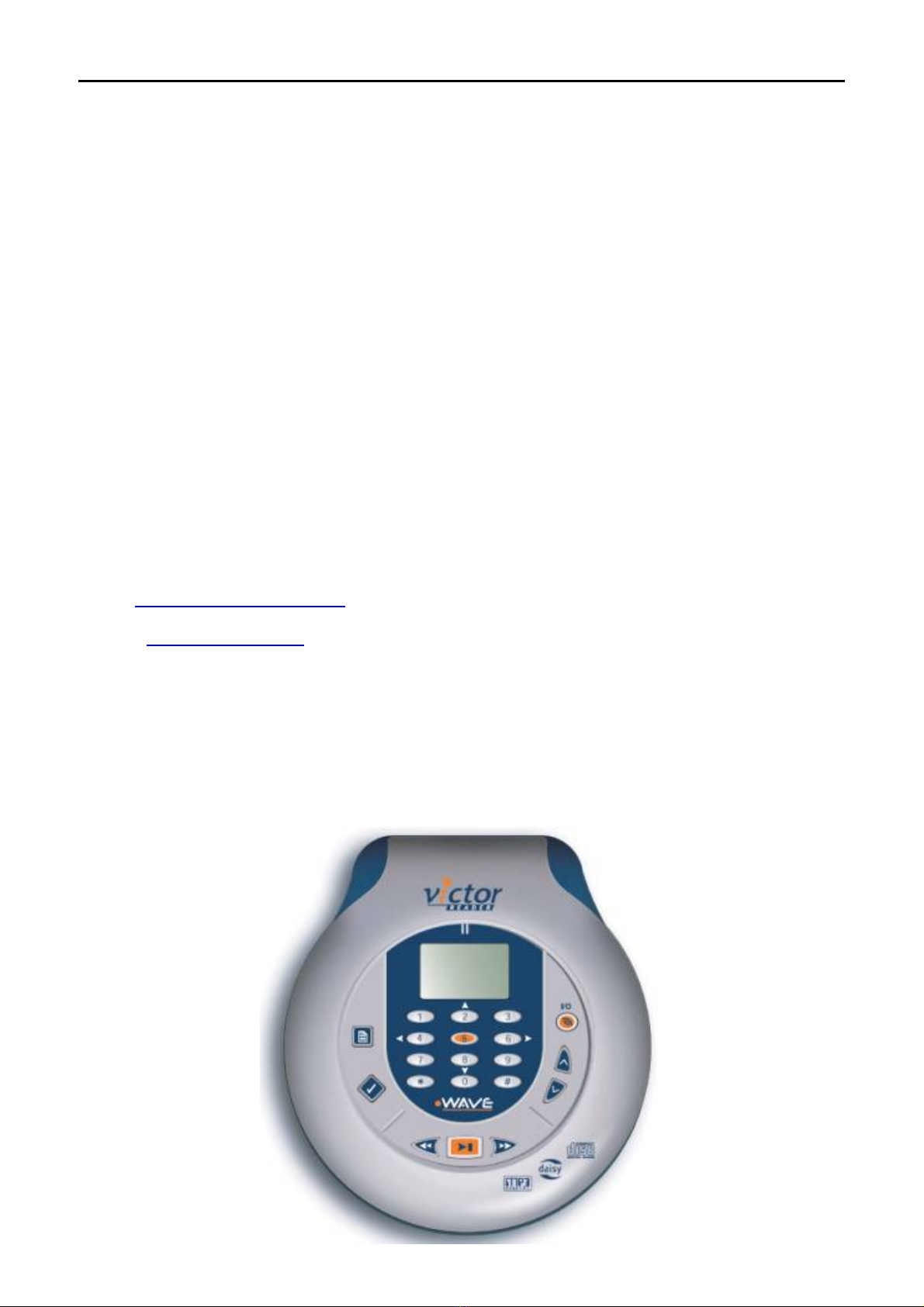
The third group of buttons contains the Go-to-Page key and the Bookmark key. The Go-to-Page key
located at nine o’clock, with square shaped form, can be visually identified by a book page icon. The
bookmark key is located at eight o’clock with a diamond shape and can be visually identified by a check
mark.
On the right side of Victor Reader Wave, you will find three jacks, one port and one lock switch. From
back to front, the first jack, is the Power Jack used to connect the unit to an electrical outlet using the
AC/DC adapter. The second jack is the Line Out jack, which is used to plug the unit into a sound
system. The third is an unused rectangular shaped port. Next to this port is the earphones or external
speaker jack. And finally, a switch to lock the keys. Slide the lock switch towards you to unlock or away
from you to lock the keys.
On the front side of the unit you will find the button to open the clam shell CD lid.
Under the unit is the battery compartment. Please note that you can use retail rechargeable batteries or
AA alkaline batteries but only batteries supplied by HumanWare will recharge in the unit. However, there
is no safety issue if you accidentally plug the unit into the power mains with non HumanWare batteries as
the recharge circuit is disabled for retail batteries. Make sure that the flat end of the batteries is placed
against the spring in the battery compartment.
This completes the physical description of Victor Reader Wave. Now let's see how Victor Reader Wave
is operated.
To turn Victor Reader Wave on, press the oval shaped I/O button located at two o’clock. Victor displays
the HumanWare logo, player name Wave and firmware version on the LCD screen. You will then hear
the message Welcome to Victor, followed by the CD title drop- or NO DISK message if the drive is
empty.
Except in Key Describer Mode, a CD must be loaded in the drive in order to activate any other Wave
functions.
To turn Victor Reader Wave off, press and hold the I/O button. Victor then displays POWER OFF and
emits a beep just before powering off.
Let’s look at the Info key. This allows you to know where you are in the book and gives you different
book and Victor Reader Wave information. Simply press the Info key (key 0) you hear Info and then use
the Previous Element (key 4) and Next Element (key 6) keys to move back and forward through the
information.
Now we come to adjusting the reading volume and speed. These two functions have preset default
values at start-up. Once the Victor Reader is powered on, the I/O button switches to a Volume and
Speed Toggle button, to adjust the volume, press the Volume and Speed Toggle until you hear
“volume”. Then press the Up or Down key (located at three and four o’clock). To adjust the speed,
press the Volume and Speed Toggle key (located at two o’clock) until you hear, “speed”. Then press
the Up or Down key (located at three and four o’clock).
Please note that you can also use your Victor Reader Wave to play MP3 and audio CDs. To learn about
all of Victor Reader Wave's features in more detail, please refer to the User's guide which will play next.
In future sessions you may skip the Getting Started and go directly to the User’s Guide by pressing the
Next Element key (# 6 key).
We've come to the end of the Victor Reader Wave Getting Started session. HumanWare wishes you
many pleasant hours of reading as you come to know Victor Reader Wave better.
User’s Guide
About Victor Reader Wave
HumanWare is proud to introduce Victor Reader Wave, the powerful portable
digital talking book player.