Warning
lBesuretotighten thepropeller manually,andensuretheinstallation ofpropellersiscorrectandtight.
lBesuretoinstall thebatteryon theaircraftcorrectlyandinstall theMicro-SDcard
lWhen8or moreGPSsatellitesarefound, theflightmodewill switchtoGPSmode,andtheuser canselectone-key
takeoff or landingfunction.
lWhen notin Pmode,theaircraftwill onlymaintainaltitude,notposition.
8. Flying
lOne-keyTakeoff/Landing
When8or moreGPSsatellitesarefound, theflightmodewill switchtoGPSmode,andtheuser canselectone-key
takeoff or landingfunction.
lManualTakeoff/Landing
Takeoff
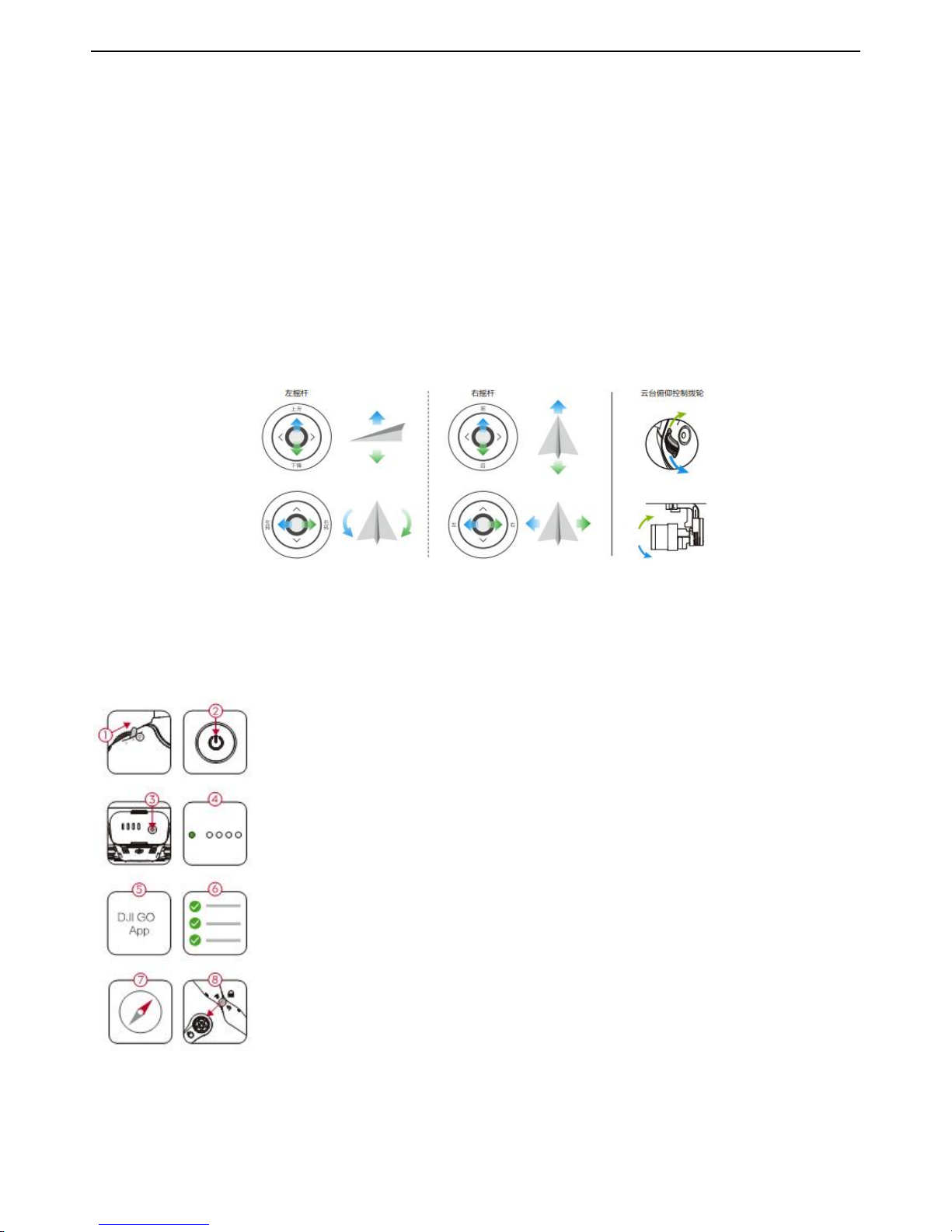
Startmotor bypushingbothcontrolsticks totheinside(or outsideorleftorright) corners.Releasethesticks oncethe
1. Toggle the flight modeswitchonyourremotecontrollertothe Pmode. (P mode is positioning
mode; Amode is ALTHold mode,and Fmode isfunctionmode).
2. Turnonthe remotecontroller.
3. Turnonthe intelligent flight battery.
4. Ensurethatthe remotecontroller hasconnectedtothe aircraft. (The flightbatteryindicatoron
remotecontroller displaysthebatterypowernormally,indicating the connectionis successful. )
5. Turnonthe mobile deviceWi-Fifunction,waiting for30 seconds,and selectGLINT2_×××××
×from Wi-Filist. Input the default connectionpassword: 12345678
6. Turnon GLINT2.0 APP,tap”connect”toenterintotheoperationpage,ifitdisplay “connect
successfully”onyourscreen,itmeansthatthe remotecontroller andmobiledeviceconnect
successfully.
7. Open GLINT2.0 APP,tap“generalsetting”,and select “calibration”in thelist.
8. Select “remotecontroller calibration”in calibrationpage,tap ”calibrate”toenterintothe remote
controller calibration.
9. Toggle remotecontroller stick,and follow onscreen instructionswithin APP tocalibrate.
10. Calibratethecompass,toggleS1from1mode to3mode,and returnbackto1mode,rapidly
continuous toggle 5times,orenterintothe GLINT2.0 APPsoperationpage,tapthegeneralsetting
button,selectcompass calibration.If the aircraft statusindicatorblinksgreen rapidly,itmeans to
start thehorizontalcalibrationof compass. Calibratethe compass asfollows:
a) Placethe flightonaflatsurface,rotateataslowlyspeed taking thecenterofflightasaxis,the
continuously flashes green turnintointermittent flashes.
b) Placethe aircraft nosedownandrotateitverticallyataslowlyspeed,untilthe flashingof
greendisappear.
C) Completecalibration,ifthe aircraft statusindicatorgoesbacktonormalflying status,itmeans
the compass calibrationis successful.
11. Install thepropellers.The positivepropellerswithCWcharactersshould bemountedonpositive
motorsM1 and M2. The oppositepropellers withCCWcharactersshould bemounted oncounter
motorsM3 and M4.
Tapand slide toconfirmautomatic
takeoff.The aircraft willautomatically
takeoff and hoverat 1.2 meters.
Tapand slide toconfirmautomatic
landing.Theaircraft willautomatically
land andstopthe motor.