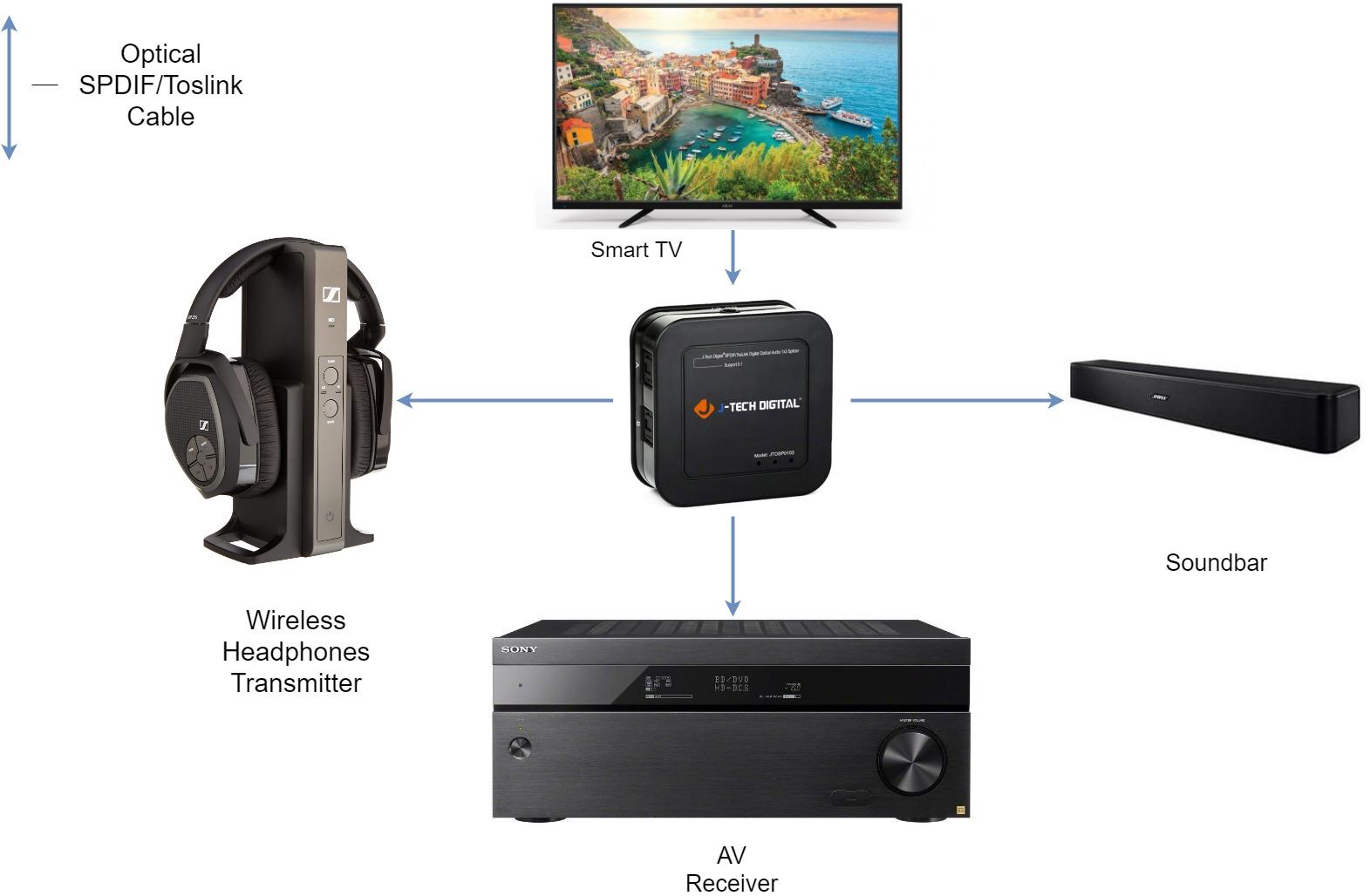
Connection Diagram
What You’ll Need:
•1 x J-Tech Digital JTDSP0103
•4 x Optical Audio SPDIF/Toslink Cables
Setup Instructions:
1. Connect an optical audio cable to the Digital Audio Output port of your source device and
to the “In” port of the JTDSP0103 (In the connection diagram above, the Smart TV is the
source device)
2. Connect an optical audio cable to Output Port “A” on the JTDSP0103 and to the Digital
Audio Input port of your audio device (Wireless Headphones Transmitter/AV
Receiver/Soundbar)
3. Repeat step 2 and utilize Output Port “B”& “C” on the JTDSP0103 for connecting
additional audio devices
*Note –All connected audio devices must support the same audio
format (PCM/Dolby Digital/DTS etc.) that your source device is outputting in order
to achieve simultaneous audio output
J-Tech Digital Support Team
1-888-610-2818
support@jtechdigital.com