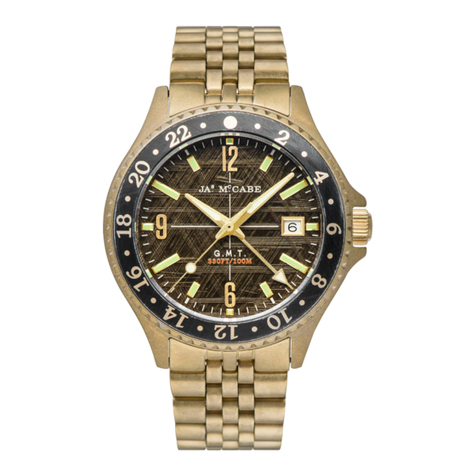
JAMES MCCABE BAJA User manual

INSTRUCTION
MANUAL
Baja
Chronograph Watch
Mecha-Quartz Chronograph
This watch is powered by a Japanese made
“Mecha-Quartz” movement. It combines a battery
regulated engine with a mechanical chronograph
module. The result is a watch which delivers the
meticulous pinpoint precision of a quartz movement
along with the crisp, flyback handfeel and visual
charm of mechanical watches.
For more details on operating this Chronograph
please refer to the enclosed booklet or visit
mccabewatches.com
Baja

8
60
40 20
STOPWATCH
MINUTE
HAND
DATE
MINUTE HAND
STOPWATCH
SECOND
HAND
SECOND HAND
HOUR HAND
PUSH
BUTTON A
PUSH
BUTTON B
SCREW-
DOWN
CROWN
1
PLEASE READ THE FOLLOWING
BEFORE UNSCREWING THE CROWN:
SCREW-DOWN CROWN
Screw-down crowns are used to ensure water
resistance. ALWAYS be certain that your crown is
securely screwed down ( Position [0] is secured.
Positions [1], [2] and [3] are not secured for water
resistance ).
Do NOT unscrew your crown while you are in any
environment where moisture is present.
0 1 2 3
(1st click) (2nd click)
CLOSED
Securely screwed
+ Water Resistance
OPENED
Not secured
For Water Resistance

HOW TO SET THE TIME
1. Unscrew the crown and pull it out to position [3].
2. Turn the crown to set the correct time.
3. Push the crown in then screw it securely.
* Take a.m./p.m. into consideration when setting
the hour and minute hands to the desired time.
* When the crown is at the position [3], do not
press any button, otherwise the chronograph
hands will move.
0
3
1 2
0
32
USING THE SCREW-DOWN CROWN
DO NOT PULL THE CROWN UNLESS IT IS
FIRST:
NOTE: Failure to SECURELY screw down the crown
after setting the watch may aect its water
resistance.
TO UNSCREW: Turn the
crown anti-clockwise until it
turns freely without tension.
GENTLY pull the crown out to
the other desired positions for
watch setting (see specific
operating instructions on the
following pages).
TO SCREW: Push the crown
ALL THE WAY IN (towards the
watch) THEN begin to turn
clockwise until it is securely
screwed down.
0
1

HOW TO SET THE DATE
1. Unscrew the crown and pull it out to position [2].
2. Turn the crown clockwise to set the correct date.
3. Push the crown in then screw it securely.
* Do not set the date between 9:00 P.M. and 3:00
A.M. , otherwise the day may not change properly.
If it is necessary to set the date during the time
period, first change the time to any time outside
it, set the date and then reset the correct time.
0
2
0
4
STOPWATCH FUNCTION
• The measurement of time is indicated by the
stopwatch hands that move independently of the
center hands.
• The stopwatch can measure up to 60 minutes.
STANDARD MEASUREMENT
5
START STOP RESET
88 8

If the stopwatch hands are not in the [0] position
(12 o’ clock position), follow the procedure below to
set them to the [0] position.
If the stopwatch is in use, press the buttons in the
following order to reset, and then, check if the
hands return to [0] position.
• If the stopwatch is counting: A -> B
• If the stopwatch is stopped: B
If either of the stopwatch hands are not in the [0]
position, reset them following the procedure below.
1. Unscrew the crown and pull it out to position[3] .
2. Press button Aor Bto reset all stopwatch hands
to [0] position.
*The stopwatch minute hand moves corresponding-
ly with the stopwatch second hand.
Restart and stop of the stopwatch can be repeated
by pressing the button A.
ACCUMULATED ELAPSED TIME
MEASUREMENT
STOPWATCH HANDS POSITION
ADJUSTMENT
Tips: The hands move quickly if the respective
buttons are kept pressed.
3. Push the crown in and screw it securely.
STOPRESET
6 7
START STOP RESTART
8 8
8
8
8

If the stopwatch hands are not in the [0] position
(12 o’ clock position), follow the procedure below to
set them to the [0] position.
If the stopwatch is in use, press the buttons in the
following order to reset, and then, check if the
hands return to [0] position.
• If the stopwatch is counting: A -> B
• If the stopwatch is stopped: B
If either of the stopwatch hands are not in the [0]
position, reset them following the procedure below.
1. Unscrew the crown and pull it out to position[3] .
2. Press button Aor Bto reset all stopwatch hands
to [0] position.
*The stopwatch minute hand moves corresponding-
ly with the stopwatch second hand.
Tips: The hands move quickly if the respective
buttons are kept pressed.
3. Push the crown in and screw it securely.
8
WATER RESISTANCE
Note that the water resistance chart serves only as a
guide (please refer to the water resistance chart on the
next page). Actual water resistance may vary depending
on a number of factors including water temperature,
water salinity, and use under water.
The water resistance of your timepiece may eventually
be compromised over time with general wear and tear
and use of your timepiece under adverse conditions.
Always remember to employ the screw down crown if
available to maintain the water resistance of your
timepiece. Warranty may be voided if the screw down
crown has not been properly employed.
Note that you should never wear your watch in a jacuzzi
or steam room where steam may enter the case despite
the water tight seals used to protect your watch. This
may cause condensation inside your watch which may
eect and damage the inner workings of your watch.

30M/
3ATM 50M/
5ATM 100M/
10ATM 150M/
15ATM 200M/
20ATM
WATER RESISTANCE
CHART
SPLASH/
SHOWERING
SWIMMING/
BATHING
BRIEF SWIMMING/
WATER SPORTS
PROLONGED
SWIMMING/
FREE DIVING
SCUBA
DIVING
PROFESSIONAL
DEEP SEA DIVING
Table of contents
Other JAMES MCCABE Watch manuals