manuals.online logo
Brands
  1. Home
  2. •
  3. Brands
  4. •
  5. JME
  6. •
  7. Drone
  8. •
  9. JME FM4000 Safety guide

JME FM4000 Safety guide

Popular Drone manuals by other brands

Foxtech GAIA 160MP user manual

Foxtech

Foxtech GAIA 160MP user manual

Ryze Tello quick start guide

Ryze

Ryze Tello quick start guide

PowerVision PowerRay user manual

PowerVision

PowerVision PowerRay user manual

Force1 rogue F72 user manual

Force1

Force1 rogue F72 user manual

Zerotech DOBBY user manual

Zerotech

Zerotech DOBBY user manual

Walkera ZHUN quick start guide

Walkera

Walkera ZHUN quick start guide

Arris M900 user manual

Arris

Arris M900 user manual

Potensic D58 Operation Guidance

Potensic

Potensic D58 Operation Guidance

Protocol VIDEODRONE AP instruction manual

Protocol

Protocol VIDEODRONE AP instruction manual

dji Matrice M210 quick start guide

dji

dji Matrice M210 quick start guide

Storm DJI Flamewheel F450 RTF manual

Storm

Storm DJI Flamewheel F450 RTF manual

SYMA X440 user manual

SYMA

SYMA X440 user manual

XIRO Xplorer G Calibration guide

XIRO

XIRO Xplorer G Calibration guide

Freefly ALTA Setup guide

Freefly

Freefly ALTA Setup guide

Twodots TVVIN BOARD quick guide

Twodots

Twodots TVVIN BOARD quick guide

Parrot Bebop quick start guide

Parrot

Parrot Bebop quick start guide

Potensic ATOM SE user manual

Potensic

Potensic ATOM SE user manual

SYMA X5UW(720P) user manual

SYMA

SYMA X5UW(720P) user manual

manuals.online logo
manuals.online logoBrands
  • About & Mission
  • Contact us
  • Privacy Policy
  • Terms and Conditions

Copyright 2025 Manuals.Online. All Rights Reserved.

How to connect RC to drone
1. Open RC and drone
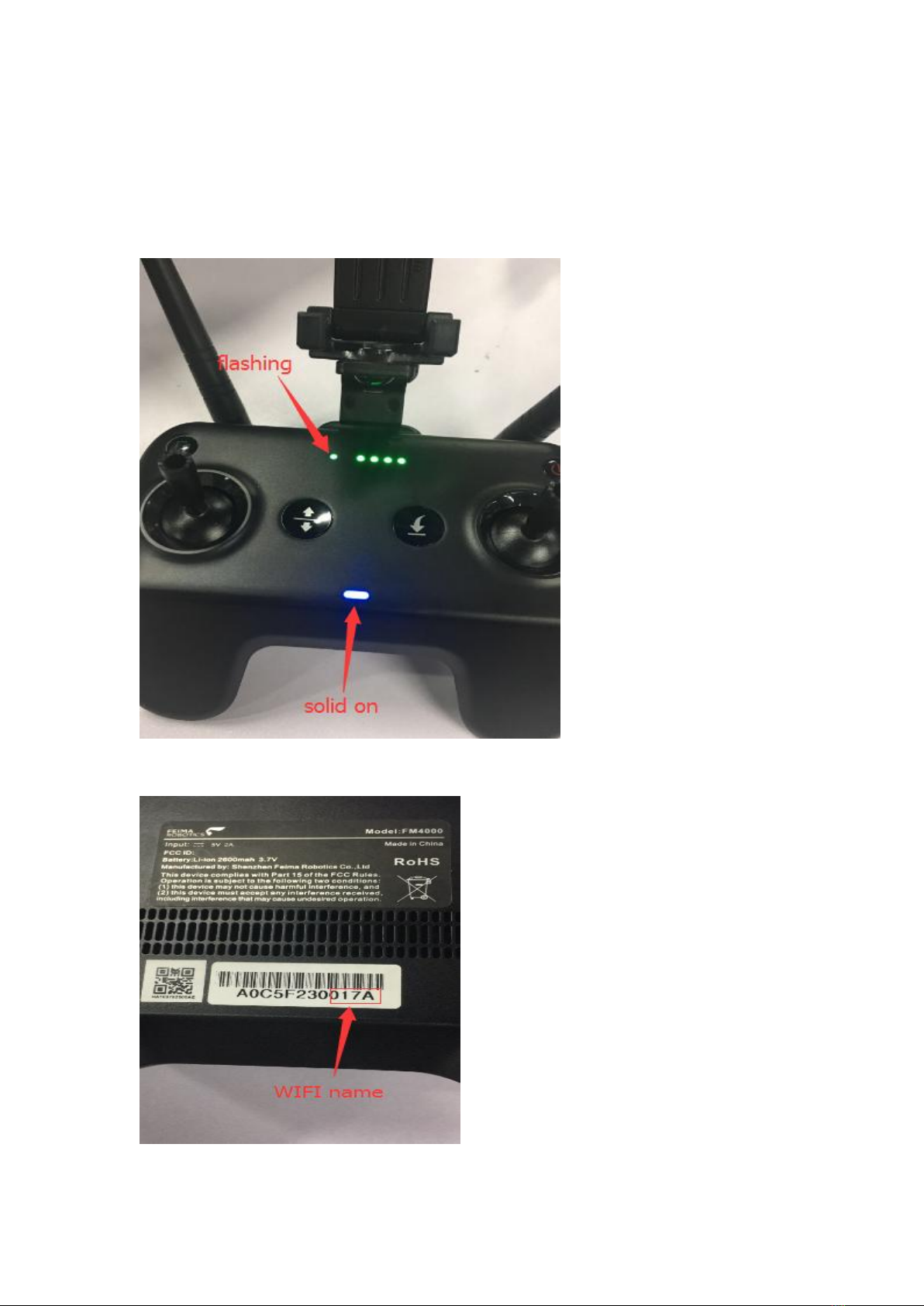
Waiting the remote control status indicator, the blue light is solid on and the power indicator
light is flashing(see image below), Indicates that the remote control is in a normal connection
state,then connect to the WIFI of RC with your mobile phone
The WIFI name of the remote control is shown on the back of the remote control. JME_RC_XXXX,
The WIFI name of this remote controller is JME_RC_017A, as shown in the image below

Tips:If the remote control indicator blue lights flash slowing, it means than the remote control
is in the state of the aircraft scanning, the phone can't search the remote WIFI, please press the
upper left corner media button10 seconds (see image below), restart the remote control, after
restart, the remote control indicator will solid on
2. Open J.ME FLY
Enter setting remote ,You can see RC SSSID and RC Password
3. Enter drone SSID and drone password
click save configuration save configuration and restart WIFI
Tips: Please remember the drone SSID in advance, For example, this drone SSID is JME_0507
4. After save configuration and restart WIFI
the remote control status indicator flashing about 30 seconds,then turn green solid on, it means
that the RC has connected to the drone completely.
5. Keep the drone and the RC in opening state,research and connect RC WIFI in your mobile
phone (see below)
6.Finally, open your JME FLY and you will find that you can control your drone with your RC.