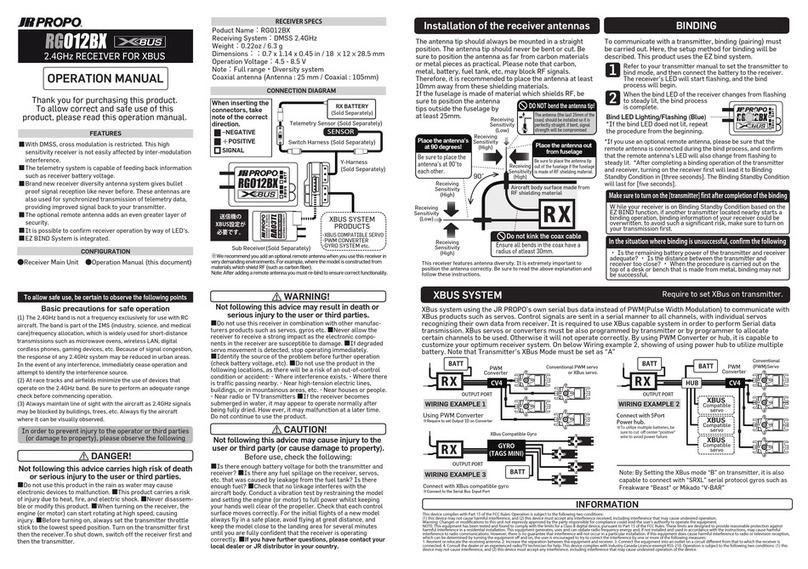
JR ProPo 16BPX PRO User manual

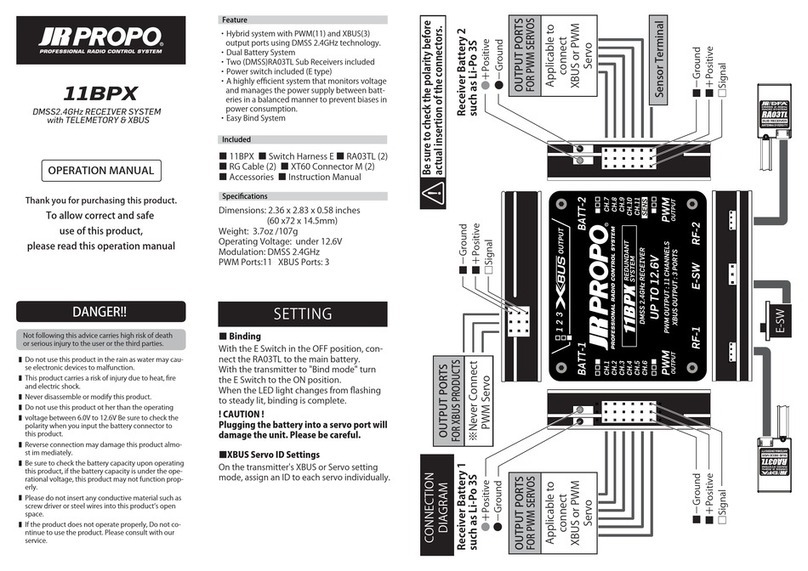
・HybridsystemwithPWM(11)andXBUS(16)
outputportsusingDMSS2.4GHztechnology.
・DualBatterySystem
・Two(DMSS)RA03TLSubReceiversincluded
・Powerswitchincluded(Etype)
・Ahighlyefficientsystemthatmonitorsvoltage
andmanagesthepowersupplybetweenbatt-
eriesinabalancedmannertopreventbiasesin
powerconsumption.
・EasyBindSystem
■16BPXPRO■SwitchHarnessE
■RA03TLx2■RGCablex2
■ConnecterforBattery(2)
■InstructionManual
■Binding
!CAUTION!
Pluggingthebatteryintoaservoportwill
damagetheunit.Pleasebecareful.
WiththeESwitchintheOFFposition,con-
necttheRA03TLtothemainbattery.
Withthetransmitterto"Bindmode"turn
theESwitchtotheONposition.
WhentheLEDlightchangesfromflashing
tosteadylit,bindingiscomplete.
■XBUSServoIDSettings
Onthetransmitter'sXBUSorServosetting
mode,assignanIDtoeachservoindividually.
Dimensions:2.36x3.54x0.58inches
(60x90x14.5mm)
Weight:3.05oz/86.5g
OperatingVoltage:under12.6V
Modulation:DMSS2.4GHz
PWMPorts:11XBUSPorts:16
DANGER!!
Donotusethisproductintherainaswatermaycau-
seelectronicdevicestomalfunction.
Thisproductcarriesariskofinjuryduetoheat,fire
andelectricshock.
Neverdisassembleormodifythisproduct.
Donotusethisproductotherthantheoperating
voltagebetween6.0Vto12.6VBesuretocheckthe
polaritywhenyouinputthebatteryconnectorto
thisproduct.
Reverseconnectionmaydamagethisproductalmo-
stimmediately.
Besuretocheckthebatterycapacityuponoperating
thisproduct,ifthebatterycapacityisundertheope-
rationalvoltage,thisproductmaynotfunctionprop-
erly.
Pleasedonotinsertanyconductivematerialsuchas
screwdriverorsteelwiresintothisproductʼsopen
space.
Iftheproductdoesnotoperateproperly,Donotco-
ntinuetousetheproduct.Pleaseconsultwithour
service.
■
■
■
■
■
■
■
■
■
Notfollowingthisadvicecarrieshighriskofdeath
orseriousinjurytotheuserorthethirdparties.
OPERATIONMANUAL
16BPX
PRO
DMSS2.4GHz RECEIVER SYSTEM
with TELEMETORY & XBUS
SETTING
■−Ground
■+Positive
□Signal
■+Positive
■+Positive
Besuretocheckthepolaritybefore
actualinsertionoftheconnectors.
●−Ground
●+Positive
ReceiverBattery2
suchasLi-Po3S
ReceiverBattery1
suchasLi-Po3S
●−Ground
□Signal
■−Ground
■+Positive
●+Positive
□Signal
OUTPUTPORTS
FORPWM SERVOS
SensorTerminal
PWM サーボ
並びに
XBus サーボ
接続可能
PWM サーボ
並びに
XBus サーボ
接続可能
CONNECTION
DIAGRAM
※PWM サーボ
直接接続不可
OUTPUTPORTS
FORXBUSPRODUCTS
Feature
Included
Specifications
OUTPUTPORTS
FORPWM SERVOS
E-Switch
Adapter
Thankyouforpurchasingthisproduct.
Toallowcorrectandsafe
useofthisproduct,
pleasereadthisoperationmanual
Besuretoset”MODE-A”
onTXXBUSsetting

使用者もしくは第三者への危害・財産への損害
を未然に防止するため、必ずお守りいただく
ことを次の表記で区分し説明します。
・DMSS2.4GHzシステムを用いPWM出力とXBus
出力をそれぞれ16ポート搭載したハイブリッド
システム
・デュアルバッテリーシステム搭載
・DMSS用サブアンテナRA03TLを2個搭載
・電子スイッチ搭載
・イージーバインドシステム搭載
・バッテリの電圧を監視しバランスよく電源を
切り替え電源消費の偏りを防ぐ高効率システム
■製品本体 ■スイッチハーネスE
■RA03TLx2 ■RGケーブルx2
■バッテリ用コネクタx2■取扱説明書
■バインド
スイッチEをOFFの状態でサブレシーバー
”RA03TL”とメインバッテリを接続します。
送信機の【BIND】を開始し、スイッチEを
ONにしてLEDが点灯になれば完了です。
※点滅の場合は再度作業を行ってください。
サーボ出力端子にバッテリーを接続しな
いでください。基板が破損します。
■XBusサーボID設定
送信機のXBus機能またはサーボ設定器で
1台つづ順番にIDを設定してください。
品名:16BPXPRO
寸法:2.36x3.54x0.58in/60x90x14.5
mm
重量:3.05oz/86.5g
動作電圧:12.6V以下
通信方式:DMSS2.4GHz
接続ポート:PWM/11ports・XBUS/16Ports
ご使用前にお読みください
分解、改造等をしないでください。
リード線やコネクタにキズがついた場合は使用しない
でください。
水に濡らさないでください。
結露の生じる環境では使用しないでください。
余ったハーネスの確実に固定してください。ハーネス
が絡まって事故の原因となる可能性があります。
振動の多い場所への固定は確実に行なってください。
この表示で「注意事項」を説明します。
この表示で「義務事項」を説明します。
この表示で
「禁止事項」
を説明します。
飛行中は電池残量に十分注意してください。
ご使用前に各部のガタつき、ネジの緩み等無いこと
を確認してください。
定格電圧以外で使用すると破損の原因となります。
接続するサーボ等の定格電圧に注意してください。定
格電圧以外で使用すると、破損の原因となります。
このたびは、弊社製品お買い上げいただき
誠にありがとうございます。
本製品を正しく安全にご使用いただくためにも
取扱説明書を必ずお読みください。
16BPX
PRO
DMSS2.4GHz RECEIVER SYSTEM
with TELEMETORY & XBus
発売元:小西模型株式会社(RCDEPOT)
〒270-0239千葉県野田市泉1-3-17
TEL:04-7197-2948 FAX:04-7127-8010
【RCDEPOTラジオサービスセンター】
TEL:04-7157-0159
■修理アフターサービスに関するお問合せ
man16BPX-PRO
設定手順
−端子
+端子
RX 用バッテリー
接続ケーブル②
接続の際は各コネクタの向き
に十分注意してください。
−端子
+端子
RX 用バッテリー
接続ケーブル①
+端子
−端子
シグナル端子
−端子
+端子
シグナル端子
※PWM サーボ
直接接続不可
XBUS対応サーボ
専用出力ポート
PWM サーボ用
出力ポート
テレメトリセンサ
専用ポート
PWM サーボ
並びに
XBus サーボ
接続可能
PWM サーボ用
出力ポート
PWM サーボ
並びに
XBus サーボ
接続可能
接続図
−端子
+端子
シグナル端子
ESW
アダプタ
XBUSを”MODE-A”に設
定してご使用ください。
Other JR ProPo Receiver manuals