Chapter 14 Connecting the Switch to the Network . . . . . . . . . . . . . . . . . . . . . . . . . . . . . . 157
Connecting a Device to a Network for Out-of-Band Management . . . . . . . . . . . . 157
Connecting a Device to a Management Console by Using an RJ-45
Connector ....................................................158
ConnectingaFiber-OpticCable.......................................159
Chapter 15 Performing Initial Configuration . . . . . . . . . . . . . . . . . . . . . . . . . . . . . . . . . . . . 161
EX4200DefaultConfiguration........................................161
Connecting and Configuring an EX Series Switch (CLI Procedure) . . . . . . . . . . . 165
Connecting and Configuring an EX Series Switch (J-Web Procedure) . . . . . . . . . 168
Configuring the LCD Panel on EX Series Switches (CLI Procedure) . . . . . . . . . . . 173
Disabling or Enabling Menus and Menu Options on the LCD Panel . . . . . . . . 173
Configuring a Custom Display Message . . . . . . . . . . . . . . . . . . . . . . . . . . . . . 174
Part 4 Installing, Maintaining, and Replacing Components
Chapter 16 Replacing Cooling System Component . . . . . . . . . . . . . . . . . . . . . . . . . . . . . . 179
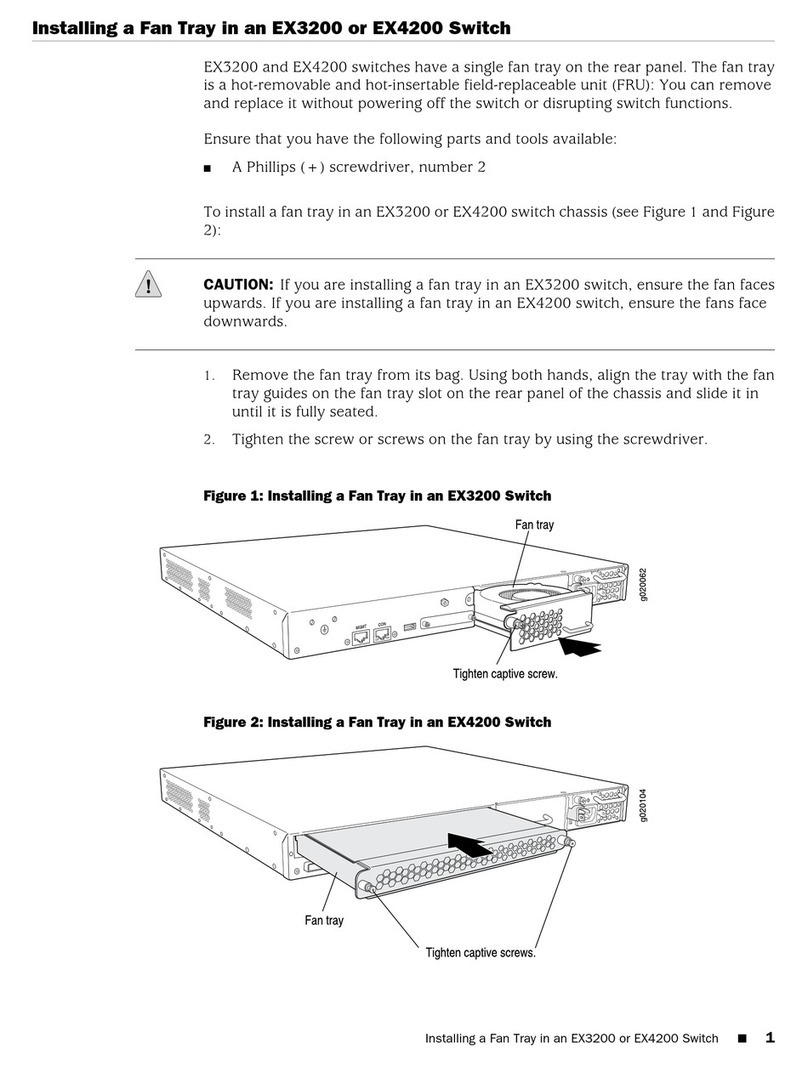
Installing a Fan Tray in an EX4200 Switch . . . . . . . . . . . . . . . . . . . . . . . . . . . . . . . 179
Removing a Fan Tray from an EX4200 Switch . . . . . . . . . . . . . . . . . . . . . . . . . . . 180
Chapter17 Replacing Power Supply..........................................183
Installing a Power Supply in an EX4200 Switch . . . . . . . . . . . . . . . . . . . . . . . . . . 183
Removing a Power Supply from an EX4200 Switch . . . . . . . . . . . . . . . . . . . . . . . 185
Chapter18 ReplacingUplinkModule..........................................187
Installing an Uplink Module in an EX4200 Switch . . . . . . . . . . . . . . . . . . . . . . . . . 187
Removing an Uplink Module from an EX4200 Switch . . . . . . . . . . . . . . . . . . . . . 189
Chapter19 ReplacingTransceiver.............................................193
InstallingaTransceiver..............................................193
RemovingaTransceiver.............................................195
Chapter 20 Maintaining and Replacing Fiber-Optic Cable . . . . . . . . . . . . . . . . . . . . . . . . 199
ConnectingaFiber-OpticCable......................................199
Disconnecting a Fiber-Optic Cable from a Device . . . . . . . . . . . . . . . . . . . . . . . . 200
MaintainingFiber-OpticCables.......................................201
Chapter 21 Replacing a Member Switch to Virtual Chassis . . . . . . . . . . . . . . . . . . . . . . 203
Adding a New EX4200 Switch to an Existing EX4200 Virtual Chassis (CLI
Procedure) ...................................................203
Adding a New Switch to an Existing Virtual Chassis Within the Same Wiring
Closet....................................................203
Adding a New Switch from a Different Wiring Closet to an Existing Virtual
Chassis...................................................205
Adding a New Switch to an Existing Preprovisioned Virtual Chassis Using
Autoprovisioning ...........................................207
Replacing a Member Switch of a Virtual Chassis Configuration (CLI
Procedure) ...................................................209
Remove, Repair, and Reinstall the Same Switch . . . . . . . . . . . . . . . . . . . . . 209
Remove a Member Switch, Replace It with a Different Switch, and Reapply
theOldConfiguration........................................210
Copyright © 2017, Juniper Networks, Inc.vi
EX4200 Switch Hardware Guide