JVC RK-C42WBT3 Quick start guide
RK-C42WBT3
Thank you for purchasing this Wall Mounting Unit.
We recommend that you read this manual thoroughly before use in order to familiarize yourself with this unit.
Please store this manual in a safe place after reading it.
•Mounting a plasma display television requires specific technical knowledge. Do not attempt to mount the unit by yourself.
•Please be aware that screw holes and anchor bolts will remain in the wall surface if the Wall Mounting Unit is removed
after having been mounted to the wall.
Long-term use of the plasma display may result in discoloration of the wall surface due to heat/air emitted by the display.
Wall Mounting Unit
Assembly and Mounting Instructions
For Assembly By Authorized Service Personnel Only
Consult authorized service personnel for the installation of this unit. Installation
instructions must be followed precisely in order to prevent accidents. We are
selling this product with the understanding that it will be assembled and installed
by properly trained and qualified service personnel.
We are not liable for any damage caused by faulty assembly,
faulty wall mounting, insecure wall mounting, misuse,
alterations, or natural disasters.
This unit weighs approx. 60 kg (approx. 132 lbs.) including plasma display
monitor. Incomplete or inadequate mounting of this unit to the wall may cause
it to fall down, resulting in potentially fatal accidents.
Please consult authorized service personnel for the installation of this unit.
Danger
2
Assembly and Mounting Warnings
●Consult authorized service personnel for the installation and attachment of this unit to the wall.
This unit weighs approx. 60 kg (approx. 132 lbs.), including display monitor. Improper assembly or
installation may cause the unit to fall when it is mounted, which may result in fatal accidents. To
prevent this happening, check the strength of the materials in the mounting surface, and have at least
two persons carry out the installation in a suitable location. Check the material strength again after
mounting as well.
●Using display monitors other than those authorized by Victor with the unit may result in damage or
bodily injury due to the display monitor and stand toppling over.
●Assemble all bolts, nuts and screws securely. Failure to do so may result in display monitor and wall
mounting falling down, potentially causing damage or bodily injury.
●Avoid placing heavy objects on the power cord, as damage to the power cord may result, causing fire
or electric shock.
●This unit does not come with anchor bolts for securing it to walls, etc. Be sure you have materials on
hand as appropriate for the mounting location.
Safety Precautions
Improper handling in disregard of these notices may result in danger of death or bodily harm.
Improper handling in disregard of these notices may result in bodily injury and even death.
Mishandling of the unit in disregard of these notices may result in bodily injury or damage to
the unit.
The following section describes the symbols used in this manual. Read this section prior to using the product for correct usage.
The following items contain information for your safety. Follow these precautions precisely.
Warning and Caution are defined as follows:
Danger
Warning
Caution
The indicates caution (including warning or danger).
The indicates a prohibition, with the specific action indicated either in the circle itself (the
symbol at left means "Do Not Disassemble"), or in the accompanying text.
Explanation of symbols
Examples:

3
Warning
Mounting the Wall Unit
TheWallMountingUnitshouldbemountedtoawallthatcanadequately
hold the total weight of the plasma display and the Wall Mounting Unit
over a long period of time and which can adequately withstand
earthquakes, conceivable vibrations, and other external forces.
Improper installation may cause the plasma display to fall down, resulting
in physical injury.
Mounting On Wooden Walls
The weight of the unit should be borne by the wall posts or studs, and
these should be reinforced if insufficiently strong. Do not install the Wall
Mounting Unit on walls made of plasterboard or thin plywood. Use the
commercially sold screws best suited for the wall structure and material.
Mounting On Concrete Walls
Use commercially sold wall anchors capable of supporting the weight of
the plasma display.
Do not install the Wall
Mounting Unit in a
location which is hot or
humid or which may
become wet, as the
presence of excessive
moisture may lead to
fire or electric shock.
Do not install the Wall
Mounting Unit near the
blower or air inlet of an air
conditioner.
Do not install the unit in a
location with a large
amount of dust, soot, or
cigarette smoke, as this
may lead to fire.
Do not block the
ventilation holes, and be
sure to leave sufficient
space around the unit
for ventilation.
Inadequate ventilation may
cause the unit interior to
overheat, leading to fire.
Plasterboard/Thin Plywood
Do not install the Wall
Mounting Unit in a
location subject to
frequent vibration, impact
or other external forces.
The unit may fall down or
be damaged, causing
physical injury.
Do not install the unit in a
location where people
may hang on it or lean
against it.
Doing so may cause the
unit to fall down or be
damaged, resulting in
injury.
Do not install the unit in
a location exposed to
direct sunlight or strong
light, as viewing the
plasma display in an
overly bright
environment can be
tiring for the eyes.
Do not install the Wall
Mounting Unit on a
non-vertical wall.
The unit interior may
overheat, resulting in fire,
or the unit may fall down,
causing physical injury.
At least
15 cm
At least
20 cm
4
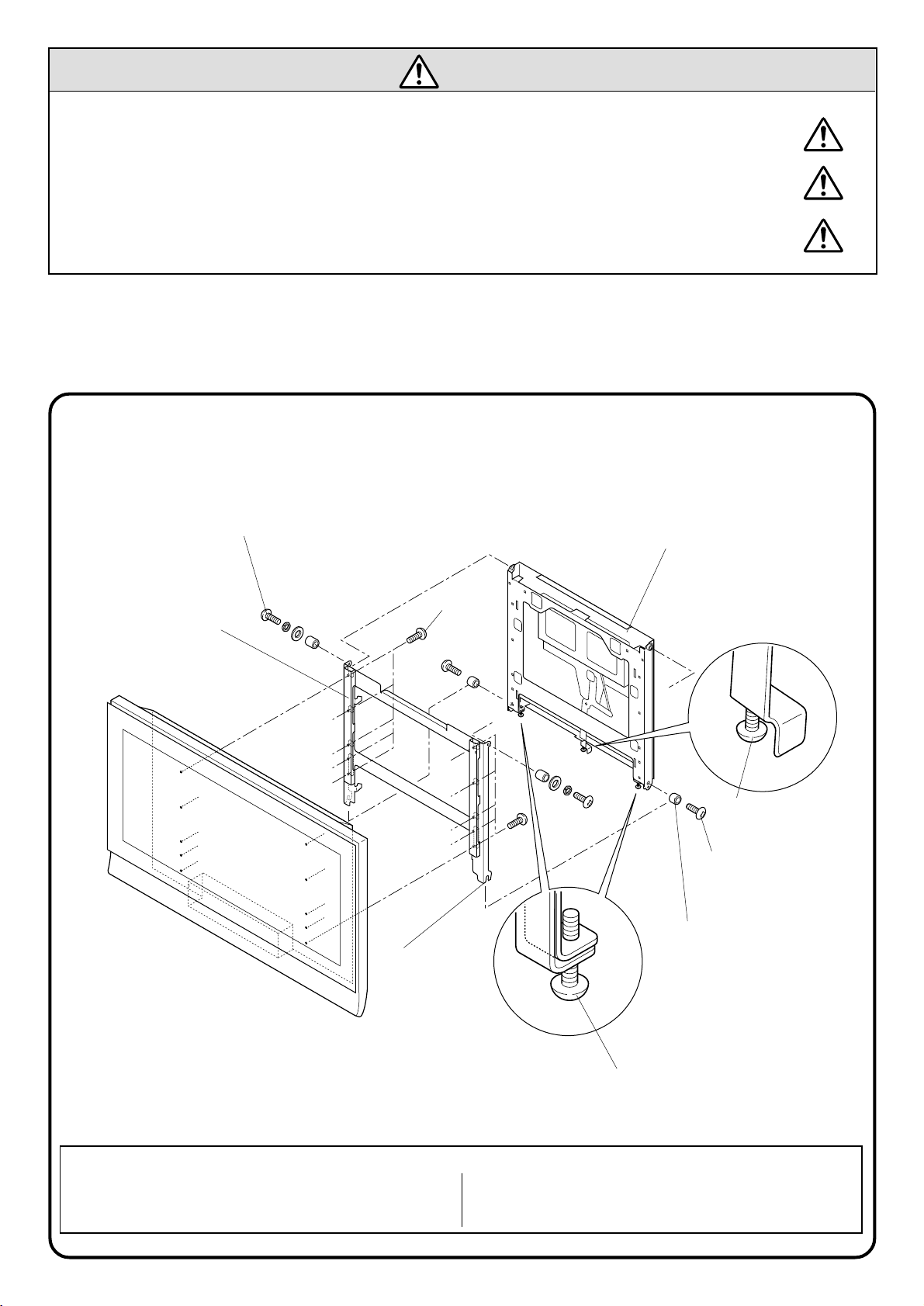
Frame Fastening Screws left/right
(Spacer Ring + Flat Washer + Spring Washer)
Frame Rotation Shaft
Screws (left/right)
Spacer Rings (left/right)
Frame Attachment Lever Screws
Angle Adjustment Lever
Frame
Rotation Jaw
Plasma Display
w
q
e X 10
r Angle Adjustment
Lever Lock Screw
Caution
●Consult authorized service personnel for electrical work. Using power cords damaged during
installation (i.e., exposed or severed wiring) may result in fire or electric shock.
●Conduct the work with adequate working space. Damage or bodily injury may result from
working under unsuitable conditions.
●Avoid mounting this unit in areas where there is electrical wiring or water pipes, as fire or
electric shock may result.
<Names of Parts>
<Components List>
qFrame................................................................... 1
wWall Mounting Unit...............................................1
Tools Required for Assembly:
1. Type 2 Philips Screwdriver (+)
2. Type 2 Philips Screwdriver (+) with 300mm (approx. 12-inch) or longer shaft
Parts bag
contains:
eScrew (M5 X 30).......................... 10
rScrew (M5 X 20)............................ 1

5
<Before Attaching Plasma Display>
2. Push in the heads of the left and right Frame Removal Lever Screws aand lift up section bto remove the
Frame qfrom the Wall Mounting Unit w.
The Wall Mounting Unit is sold with Frame qand Wall Mounting Unit wfixed together. The following steps should
be performed before attaching the plasma display.
1. Take the left and right Frame Fastening Screw Components and remove the Fastening Screw, Spacer Ring, Flat
Washer, and Spring Washer.
*These Frame Fastening Screws, Spacer Rings, Flat Washers, and Spring Washers will be used when attaching
the plasma display to the Wall Mounting Unit. Be sure to keep them in a safe place.
Frame Fastening Screw
Spring Washer
Flat Washer
Spacer Ring
qFrame
wWall Mounting Unit
qFrame
wWall Mounting Unit
Frame Removal
Lever Screws

6
Instructions for Assembly
1. Attach the Wall Mounting Unit wto the surface of the wall.
The unit should be attached using the method most suited to the wall structure.
*When anchor nuts/bolts are to be inserted into the wall before mounting, either align the actual Wall
Mounting Unit wwith the wall to determine the positioning of the holes or calculate the positioning of the
holes using a dimensional drawing of the unit before installing the anchor nuts/bolts.
2. Attach Frame qto the plasma display.
The screws (M5X30) eshould be used to attach the Frame qto a plasma display.
*A soft mat or similar material should be laid out to prevent damage to the plasma display during attachment to
the unit.
Fasten all bolts and screws securely. Failure to do so may cause the plasma display and Wall Mounting
Unit to fall down, causing potentially fatal accidents.
Improper positioning/installation of the Wall Mounting Unit on the wall may cause the unit to fall down.
Check the structure, material, and strength of the mounting surface thoroughly and carry out installation
in a suitable location. Failure to do so may cause the plasma display and Wall Mounting Unit to fall
down, leading to potentially fatal accidents.
Mounting the Plasma Display
Danger
Position of Wall
Mounting Holes wWall Mounting Unit
Wall Surface Side
(Wall Mounting Unit)
eScrews (M5X30) x 10
Align the first Mounting Hole
Plasma Display

7
3. Identify the Rotation Shaft Screws of the Wall Mounting Unit.
Check that the left and right Rotation Shaft Screws are secure, as the Rotation Jaw of the Frame (attached to
the plasma display) will be inserted into the Rotation Shaft Screw Component of the Wall Mounting Unit w.
Avoid inserting fingers into the gap between the Frame and the Wall Mounting Unit when
putting these together, as fingers will get trapped, causing injury.
<Instructions for Assembly, cont’d>
Caution
4. Attach the plasma display to the Wall Mounting Unit.
*This task must be performed by at least two persons.
Insert the Rotation Jaw of the Frame q(attached to the plasma display) securely into the Rotation Shaft
Screw Component of the Wall Mounting Unit, then raise up the plasma unit on this axis and push it into place
- it should lock with a clicking sound. Before releasing the unit, check that the plasma display is securely fitted
and does not rattle and loose.
wWall Mounting Unit
Rotation Shaft Screw Component
Rotation Shaft
Screw
Spacer Ring
Rotation Jaw
q Frame Rotation Jaw
8
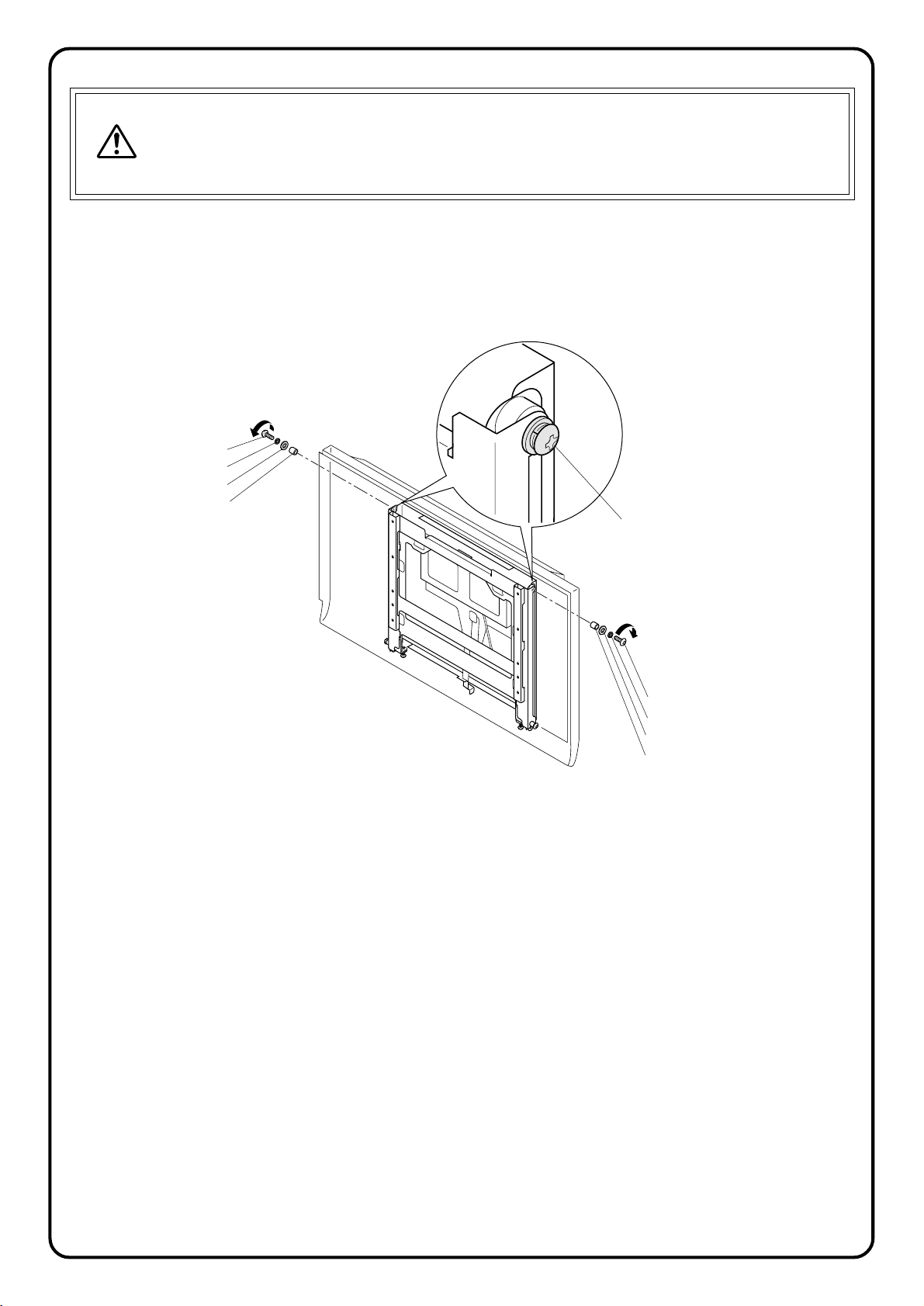
5. Fix the Frame and Wall Mounting Unit.
Combine the Frame Fastening Screws, Spacer Rings, Flat Washers, and Spring Washers (from the two pairs of
Frame Fastening Screw Components that were put aside when detaching the Frame qfrom the Wall Mounting
Unit w) as shown below and fasten them securely using a screwdriver.
*Confirm that all of the parts are securely fastened and do not rattle and loose.
Frame Fastening Screw
Spring Washer
Flat Washer
Spacer Ring
Avoid inserting fingers into the gap between the Frame and the Wall Mounting Unit when
putting these together, as fingers will get trapped, causing injury.
<Instructions for Assembly, cont’d>
Caution
Frame Fastening
Screw Component
Frame Fastening Screw
Spring Washer
Flat Washer
Spacer Ring

9
<Instructions for Assembly, cont’d>
Adjusting the Angle of the Plasma Display
*The angle of the Wall Mounting Unit can be adjusted to 0°, 5°, 10°, 15°, and 20°.
1. Adjust the angle of the plasma display.
Brace the upper middle part of the plasma display with one hand and push the Angle Adjustment Lever to the
left with the other hand. The plasma display will tip forward. Release the Angle Adjustment Lever when the
desired angle setting is reached.
Caution Grip the plasma display firmly while adjusting the angle, as the display could tip over and cause
injury.
2. Fix the Angle Adjustment Lever.
Once the plasma display has been set at the desired angle, fasten the Angle Adjustment Lever with the screw
(M5X20) r.
*Check to make sure that the Angle Adjustment Lever is securely fastened and the plasma display does not
rattle and loose.
*Note: do not fasten the Angle Adjustment Lever if the power cord or system cables have yet to be attached.
rScrew (M5X20) x 1
Angle Adjustment
Lever

10
2. Place one hand on top of the plasma display to steady it and with the other hand set the Angle Adjustment Lever
to 20°.
*If the Angle Adjustment Lever has already been fastened, perform this task after removing the Angle
Adjustment Lever Lock Screw.
<Instructions for Assembly, cont’d>
Connecting the Power Cord and System Cables
If the Frame Fastening Screws are not
securely fastened the plasma display
may fall, causing potentially fatal injury.
Grip the plasma display as you adjust
the angle, as the plasma display may
tip over and cause injury.
20°
Grip the plasma display firmly while connecting the power cord/system cables, as the display
may tip over and cause injury.
Caution
Caution
Caution
1. Check the Frame Fastening Screws.
Check that the two Frame Fastening Screws on the upper left and right sides of the Wall Mounting Unit are
securely fastened.
Angle Adjustment Lever
Lock Screw
Frame Fastening Screws
Table of contents
Other JVC TV Mount manuals