junction box, tools: screwdriver, wire cutter, voltmeter, tor
-que wrench, socket and wrench for installing hardware,
etc.
After the installation of the power station is completed, ple
-ase install a ground wire on the photovoltaic support, inst
-all and use a lightning protection and / or surge suppress
-ion equipment protection system in the AC junction box. It
is very important to have a switch device that automatically
protects against lightning strikes and surges.
6、
When installing the inverter handshake cable, please plan th
-at your AC branch circuit cannot exceed the current limit, so
that the maximum number of micro-inverters in each branch
can be reasonably allocated.
7、
8、
*Each region may be different. Please refer to local requirem
-ents to define the number of micro-inverters per branch in
your area.
Implement all national electrical codes (NEC), ANSI / NFPA
70 in accordance with all local electrical codes and all relev
-ant regulations.
Please note that only qualified personnel can install and / or
9、
Please make sure that the installation operation is performed
12、
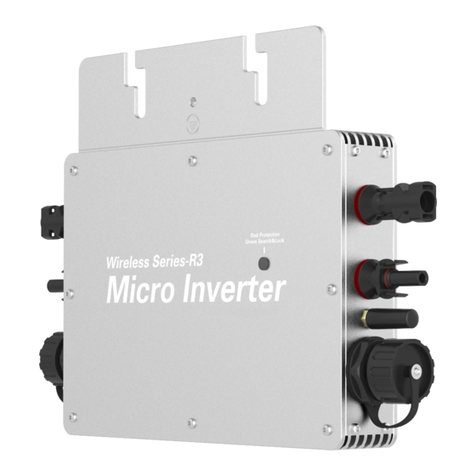
WVC Series micro inverter
Inverter model Number of branches
30PCS
30PCS
25PCS
15PCS
12PCS
8PCS
6PCS
5PCS
WVC-295
WVC-300
WVC-350
WVC-600
WVC-700
WVC-1200
WVC-1400
WVC-2000
4PCS
WVC-2400
4PCS
WVC-2800
Inverter model Connector
Photovoltaic module
WVC-295
WVC-300
WVC-350
WVC-600
WVC-700
WVC-1200
WVC-1400
WVC-2000
1*MC4
1*MC4
1*MC4
2*MC4
2*MC4
4*MC4
4*MC4
4*MC4
The number of mat
-ched photovoltaic
modules is 60 strin
-gs / 72 strings / 90
strings. The open c
-ircuit voltage Voc
is between 30-60V
WVC-2400 4*MC4
WVC-2800 4*MC4
WVC series micro-inverter installation guide
Preparation before installation:
1、Please visit our company's official website www.inverter.com,
then open the website and register anaccount on it, and create a
power station on the account to reverse the WVC series. The inver-
ter is monitored or controlled. For detailed operation, please ref-
er to the instructions in the inverter monitoring section.
2、
The device for data collection with the inverter communication
is WiFi-MODEM, and the communication method between WiFi
-MODEM and inverter is long-distance wireless transmission (o
-pen field 1800 meters, air baud rate 00bps). Operating frequen
-cy range (433.4-473.0MHz Up to 100 communication channels)
Maximum 100mW (20dBm) transmit power (8 levels of power can
be set) Four working modes, suitable for different applications,
please refer to the WiFi-MODEM manual for details.
3、
Please refer to the following list and compare the electrical par
-ameters of the solar modules in the table to select the inverter
model.
To properly install and use WVC series micro inverters, please read and follow this guide and all warnings and ins -tructions in
WVC micro inverters. The “Installation and Operation Manual” can be downloaded from the official website of inverter Energy:
www.inverter.com.Safety warnings are listed on the back of this guide. All models of WVC Series Mic -ro inverter listed in this
guide have a ground wire in the AC cable, no additional ground electrode is required(EGC), there are thr -ee wires in-side the AC
cable with equipment, which are Blown zero line N (Blue) ground wire / safety line G (Yellow & green). Ea -ch micro-inverter is
equipped with an AC cable with a length of 3 * 4 * 2 meters. The current of each AC cable branch cannot be greater than 40A. For
the number of connected branches of each branch, refer to the following installat-ion guide.
Important information: WVC series micro-inverters use IP65 waterproof rating. When installing, please try to install it in a
place where there is no rain, nor in a place where the sun is exposed to ensure ventilation and heat dissipation.
4、In addition to WVC series micro-inverters,you must also
5、
Check if you still have the following related equipment: AC
purchase photovoltaic brackets / AC boxes / electrical
cables and other related materials. The current of each
channel of the WVC series micro-inverters at the branch
of the installed circuit cannot exceed 40 Amp, if the rated
current is exceeded, it may lead to an unsafe factor.
replace micro-inverters.
10、
Please do not try to repair micro-inverter. It does not cont-
ain user-serviceable parts. If it fails, please contact customer
service to obtain the ID number and start the replacement pr-
ocess. Tampering or opening the micro inverter will invalid-ate
the warranty.
11、
Before installing or using Micro Inverter, please read all instr-
uctions and technical instructions and the warning mark sys-
tem and photovoltaic array on Microinverter.
before the AC power is disconnected, and do not install the
micro-inverter with power on.
13、
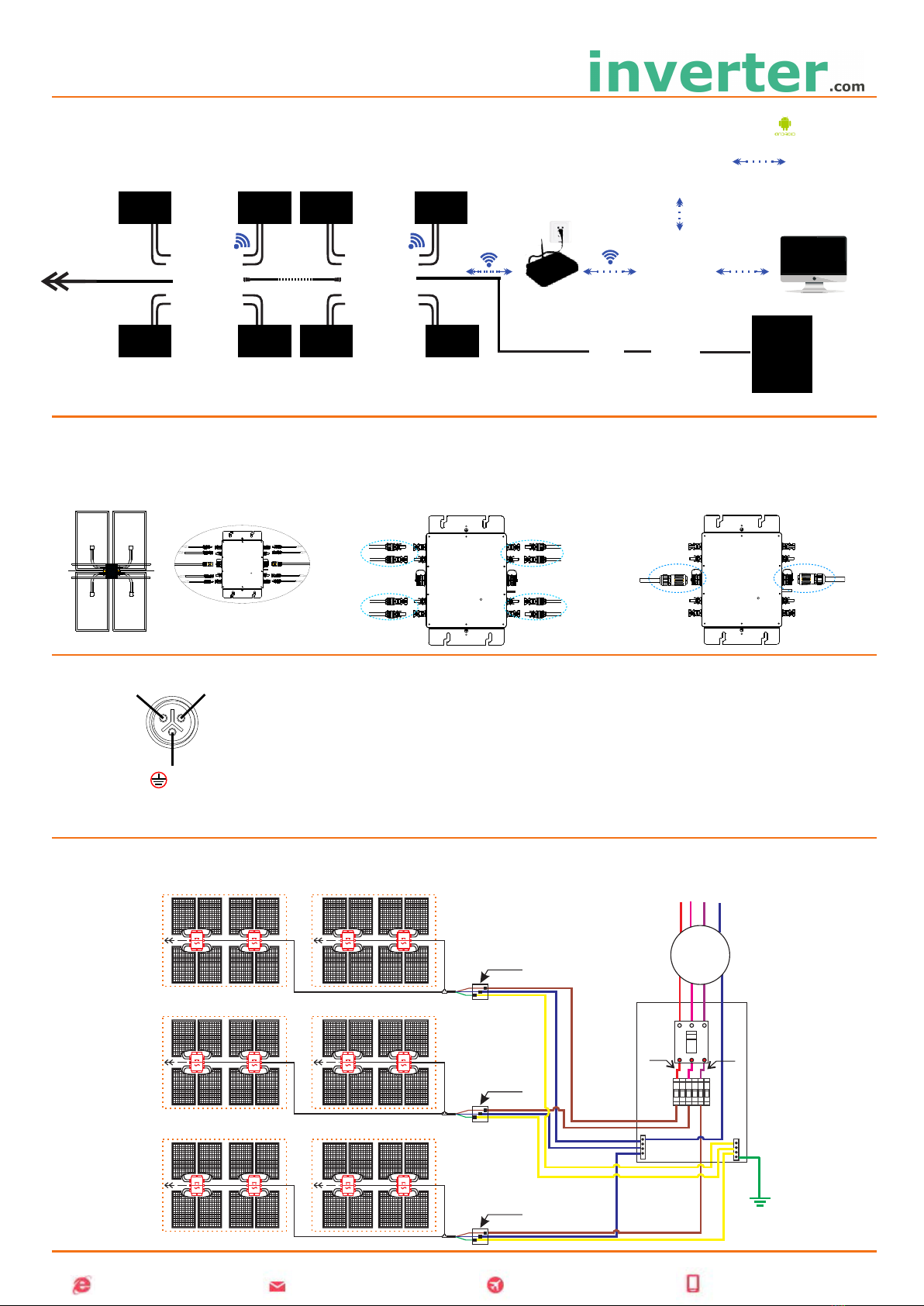
Please install micro inverter series products as shown
in the following figure.