manuals.online logo
Brands
  1. Home
  2. •
  3. Brands
  4. •
  5. Kokoon
  6. •
  7. Headphones
  8. •
  9. Kokoon nightbuds User manual

Kokoon nightbuds User manual

Other Kokoon Headphones manuals

Kokoon Relax User manual

Kokoon

Kokoon Relax User manual

Kokoon Relax User manual

Kokoon

Kokoon Relax User manual

Popular Headphones manuals by other brands

Bose SoundSport owner's guide

Bose

Bose SoundSport owner's guide

Renkforce RF-WH-150 operating instructions

Renkforce

Renkforce RF-WH-150 operating instructions

Blu ARIA POD+ quick guide

Blu

Blu ARIA POD+ quick guide

Jabra Elite Active 45e Get started

Jabra

Jabra Elite Active 45e Get started

Denver TWE-36MK2 user manual

Denver

Denver TWE-36MK2 user manual

Grandstream Networks GUV3060 quick start guide

Grandstream Networks

Grandstream Networks GUV3060 quick start guide

iMoshion TWS In-Ear Headset user manual

iMoshion

iMoshion TWS In-Ear Headset user manual

Sven AP-B250MV user manual

Sven

Sven AP-B250MV user manual

BUXTON BTW 3800 user manual

BUXTON

BUXTON BTW 3800 user manual

HiFuture Voyager user manual

HiFuture

HiFuture Voyager user manual

Philips UpBeat SHB2505 user manual

Philips

Philips UpBeat SHB2505 user manual

Denon AH-C260 owner's manual

Denon

Denon AH-C260 owner's manual

WATSON KH2130B instruction manual

WATSON

WATSON KH2130B instruction manual

Pure Acoustics Golf TWS20 user manual

Pure Acoustics

Pure Acoustics Golf TWS20 user manual

Srhythm Soulmate Series user manual

Srhythm

Srhythm Soulmate Series user manual

Motorola Talkabout MHP71 user manual

Motorola

Motorola Talkabout MHP71 user manual

Sony MDR-NC8 Specifications

Sony

Sony MDR-NC8 Specifications

AUSounds AU-Stream quick start guide

AUSounds

AUSounds AU-Stream quick start guide

manuals.online logo
manuals.online logoBrands
  • About & Mission
  • Contact us
  • Privacy Policy
  • Terms and Conditions

Copyright 2025 Manuals.Online. All Rights Reserved.

hps://help.kokoon.io/manual
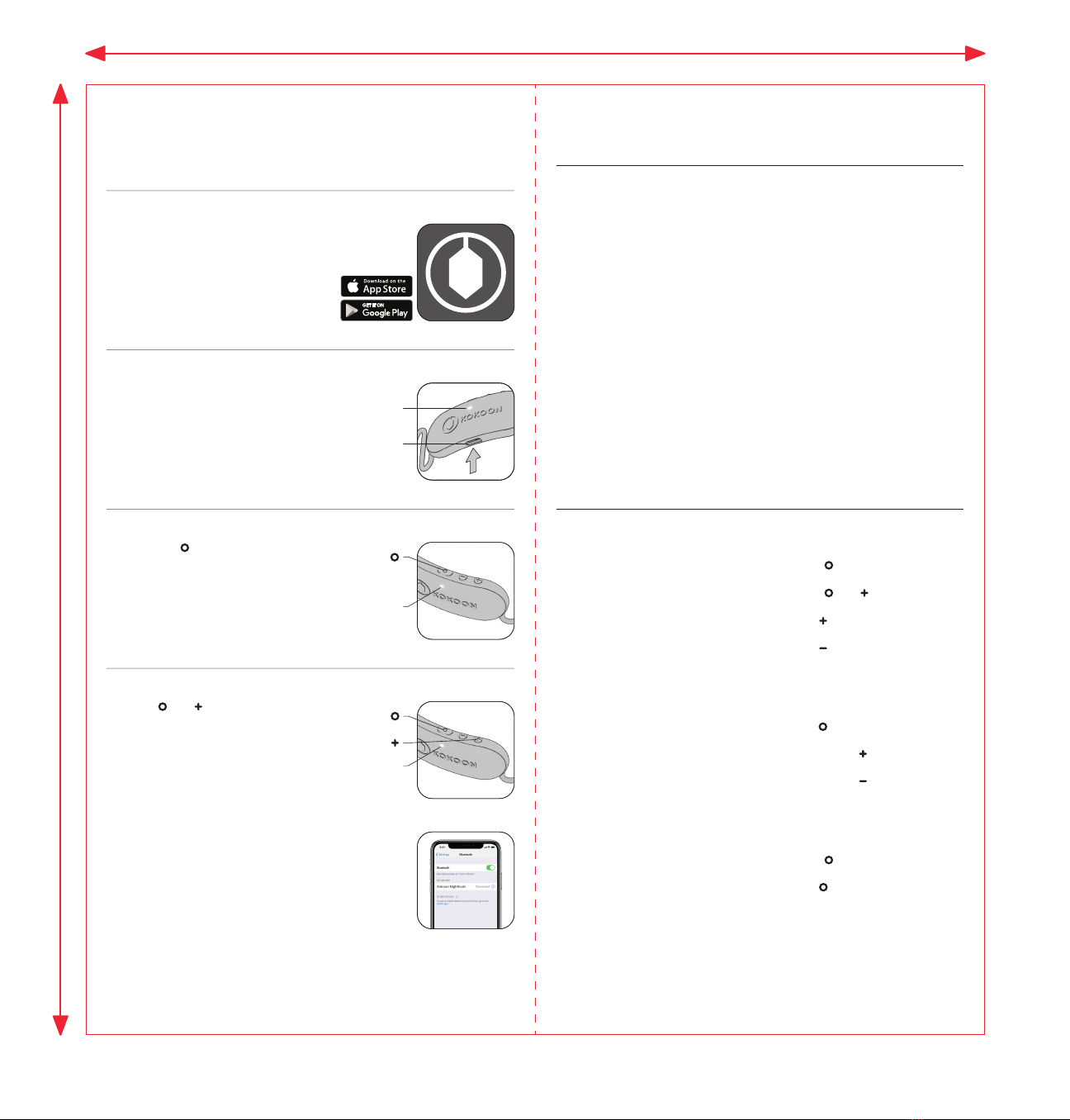
4. Pairing*
1. MyKokoon app
2. Charging
3. Powering on
Connecting for the first time
Connect the headphones to a power
source, using the USB-C cable.
> LED flashes green when charging
> LED solid green when fully charged
Hold the buon for 2 sec to turn the
headphones on.
> LED single white pulse.
Hold and buons simultaneously for
1.5 sec to enter pairing mode.
> LED flashes blue when in pairing mode.
Turn on Bluetooth® on your phone. Select
“Kokoon Nightbuds” in your Bluetooth®
seings.
> LED single blue pulse (3 sec) once
connected.
> Begin your journey to beer sleep.
*pairing only required for first connection
Install and open the MyKokoon app.
LED
LED
USB-C
LED
LED indicator
Flashing LED Solid LED
White Powering o Powering on
Green Charging Fully charged
Blue
Buon action summary
For full manual:
hps://help.kokoon.io/manual
Using app or media
Incoming call or in a call
Press for 2 sec
Press for 1 sec
Click once
Click once
Double click
Double click
Press and for 1.5 sec
Click incrementally
On / O
Reject call / End call
Answer call
Play / Pause
Skip forward
Skip backward
Pairing mode
Volume up
Volume down Click incrementally
Pairing mode (ready to
pair with a new device)
Headphones connected
to phone
General
203mm
192mm

nightbuds
Experience sleep like never before
hps://kokoon.io
Your place to pause
Quick start guide
For full manual:
hps://help.kokoon.io/manual
192mm
203mm