manuals.online logo
Brands
  1. Home
  2. •
  3. Brands
  4. •
  5. Lake Shore
  6. •
  7. Controllers
  8. •
  9. Lake Shore DRC-93C User manual

Lake Shore DRC-93C User manual

Other Lake Shore Controllers manuals

Lake Shore 805 User manual

Lake Shore

Lake Shore 805 User manual

Lake Shore DRC-70 User manual

Lake Shore

Lake Shore DRC-70 User manual

Lake Shore 325 User manual

Lake Shore

Lake Shore 325 User manual

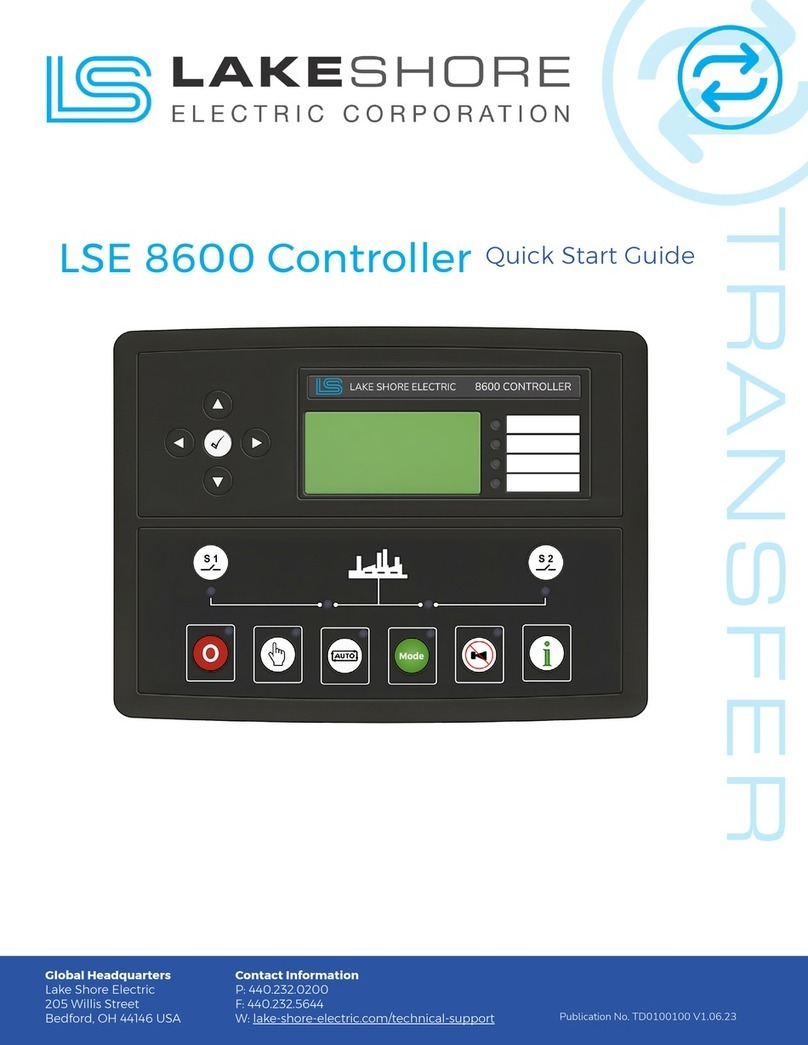
Lake Shore 8600 User manual

Lake Shore

Lake Shore 8600 User manual

Popular Controllers manuals by other brands

Sunricher SR-ZV9003T3-RGBW-US Installation

Sunricher

Sunricher SR-ZV9003T3-RGBW-US Installation

Ksenia intro Installation and configuration manual

Ksenia

Ksenia intro Installation and configuration manual

Inovance CAN200 Series manual

Inovance

Inovance CAN200 Series manual

Gauzy LC6 FLEX Controller Installation and operation guide

Gauzy

Gauzy LC6 FLEX Controller Installation and operation guide

Viking SLP-1 Technical practice

Viking

Viking SLP-1 Technical practice

CKD KBX-30E-U Series instruction manual

CKD

CKD KBX-30E-U Series instruction manual

Sharp Energy Sun Flux User manual & installation guide

Sharp Energy

Sharp Energy Sun Flux User manual & installation guide

Yamaha RCX40 user manual

Yamaha

Yamaha RCX40 user manual

AB Quality PowerFlex 400 Frames D-H Service bulletin

AB Quality

AB Quality PowerFlex 400 Frames D-H Service bulletin

Yamaha MJC8 owner's manual

Yamaha

Yamaha MJC8 owner's manual

AL-KO ATC operating instructions

AL-KO

AL-KO ATC operating instructions

Savant SmartControl 2 Deployment guide

Savant

Savant SmartControl 2 Deployment guide

GameSir T3S user manual

GameSir

GameSir T3S user manual

Kostal inveor operating manual

Kostal

Kostal inveor operating manual

Emerson Yarway 20-55 Operating and safety instructions

Emerson

Emerson Yarway 20-55 Operating and safety instructions

CoCo ACM-LV24 Quick installation guide

CoCo

CoCo ACM-LV24 Quick installation guide

Brooks SLA5810/20 Installation and operation manual

Brooks

Brooks SLA5810/20 Installation and operation manual

SIGMA TEK SR 011 Technical manual

SIGMA TEK

SIGMA TEK SR 011 Technical manual

manuals.online logo
manuals.online logoBrands
  • About & Mission
  • Contact us
  • Privacy Policy
  • Terms and Conditions

Copyright 2025 Manuals.Online. All Rights Reserved.

USER’S MANUAL
Model
DRC-93C
Temperature Controller
Obsolete
Notice:
This manualdescribesan obsolete Lake Shore product. This manual is a copy from our archives
and may not exactly match your instrument. Lake Shore assumes no responsibilityfor this manual
matching your exact hardware revisionor operationalprocedures. Lake Shore is not responsible
for any repairs made
to
the instrumentbased on informationfrom this manual.
Lakeshore.
Lake Shore Cryotronics, Inc.
575
McCorkle Blvd.
Westerville, Ohio 43082-8888 USA
E-Mail Addresses:
[email protected]
[email protected]
Visit Our Website:
www.
lakeshore.com
Fax: (614) 891-1392
Telephone: (614) 891-2243
Methods and apparatus disclosed and described herein have been developed solely on company funds of Lake Shore Cryotronics, Inc.
No
government
or
other contractual support
or
relationshipwhatsoever has existed which in any way affects or mitigates proprietary
rights of Lake Shore Cryotronics, Inc. in these developments. Methods and apparatus disclosed herein may be subject to
U.S.
Patents
existing or applied for. Lake Shore Cryotronics, Inc. reserves the right to add, improve, modify, or withdraw functions, design
modifications, or products at any time without notice. Lake Shore shall not be liable
for
errors
contained herein or for incidental or
consequentialdamages in connectionwith furnishing, performance, or use of this material.
Obsolete
Manual
March
1988
SERIAL
NUMBER
MB
SOFTWARE
DB
SOFTWARE
I
N
S
T
RU C
T
I
O
N
M
A N U A
L
MODEL DRC-93C
TEMPERATURE CONTROLLER
Input Card Configuration
Input
A
Input
B
9210-3
Standard
3
volt Configuration
-6 6
Volt Diode Configuration
9215-15
-150 150
Nanofarad Configuration
-6
6
Volt Configuration
-P2
-P3
-R1
27
ohm
Rh-Fe conversion module
Standard
15
Nanofarad Capacitance Input
9220-3
Standard
3
volt Configuration
100
ohm
platinum conversion module
1000
ohm
platinum conversion module
93
05
Thermocouple Input Card
9317C
Ultra-low
(0.3K)
Germanium input Card
9318C
Germanium/Carbon Glass Input Card
No Input Card
Precision Option
(s)
8223 RS-232C
Interface
8001 8002
8225
Analog Output Interface
(0-10
volt) Output Power Option
8229
Scanner Input Option
9126
High Resolution Set Point
W6
0
This manual applies directly to instruments with Serial Number
17000
and higher.
COPYRIGHT
1988,
Lake Shore Cryotronics, Inc.
Westerville, Ohio U.S.A.
WARRANTY
Lake Shore Cryotronics, Inc., the manufacturer, warrants this product to
the owner for a period of
12
months from the date of shipment. During the
warranty period, under authorized return of instruments or component
parts to Lake Shore freight prepaid, the company will repair, or at its
option replace, any part found to
be
defective in material or
workmanship, without charge to the Owner for parts, service labor or
associated customary shipping cost. Replacement or repaired parts will
be warranted for only the unexpired portion of the original warranty.
All products are thoroughly tested and calibrated to published
specifications prior to shipment. Calibration Certifications are offered
for six month periods only. Where such documentation must be updated, a
re-certification service is offered by Lake Shore Cryotronics, Inc. at a
reasonable cost.
LIMITATION
OF
WARRANTY
This warranty does not apply to defects resulting from improper or
inadequate maintenance, unauthorized modification or misuse, operation
outside of the environmental specifications for any product or part or
buyer-supplied software or interfacing.
THIS WARRANTY IS
IN
LIEU OF
ANY
OTHER WARRANTIES, EXPRESSED OR IMPLIED,
INCLUDING MERCHANTABILITY OR FITNESS FOR A PARTICULAR PURPOSE, WHICH
ARE
EXPRESSLY EXCLUDED.
THE
OWNER AGREES
THAT
LAKE
SHORE'S LIABILITY WITH
RESPECT
TO
THIS PRODUCT
SHALL
BE
SET
FORTH
IN THIS WARRANTY,
AND
INCIDENTAL OR CONSEQUENTIAL DAMAGES
ARE
EXPRESSLY EXCLUDED.
CERTIFICATION
Lake Shore Cryotronics, Inc. certifies that this product has been
inspected and tested in accordance with its published specifications and
that this product met its published specifications at the time of
shipment.
The accuracy and calibration of this product at the time of shipment are
traceable to the United States National Bureau of Standards.
COPYRIGHT
3/88
LSCI

TABLE
OF
CONTENTS
Model DRC-93C Temperature Controller
SECTION
I
-
GENERAL INFORMATION
1.1
INTRODUCTION
........................
1-1
1.2
DESCRIPTION.
........................
1-1
1.3
SPECIFICATIONS
.......................
1-3
1.4
OPTIONS..
.........................
1-3
SECTION
II
-
INSTALLATION
2.1
INTRODUCTION
........................
2-1
2.2
INITIAL INSPECTION
.....................
2-1
2.3
PREPARATION FOR USE
.....................
2-1
2.3.1
Power Requirements
..................
2-1
2.3.2
PowerCord.
.....................
2-1
2.3.3
Grounding Requirements
................
2-1
2.3.4
BenchUse
......................
2-2
2.3.5
RackMounting
....................
2-2
2.3.6
Sensor Input Connections
...............
2-2
2.3.7 J3
Sensor Output Monitors
..............
2-3
2.3.8
SENSOR ID Switches
..................
2-3
2.3.9
Heater Power
.....................
2-4
2.3.9.1
MAX
HEATER POWER Limit
...........
2-4
2.3.9.2
Current or Power Output Display
.......
2-4
2.4
REMOTE SENSOR ID Connector
.................
2-4
2.5
IEEE-488 INTERFACE Connector
................
2-5
2.6
OPTIONS..
.........................
2-5
2.7
ENVIRONMENTAL REQUIREMENTS
.................
2-5
2.7.1
Operating Temperature
................
2-5
2.7.2
Humidity/Altitude
..................
2-5
2.8
REPACKAGING FOR SHIPMENT
..................
2-5
SECTION
III
-
OPERATING INSTRUCTIONS
3.1
INTRODUCTION
.........................
3-1
3.2
INSTRUMENT CONFIGURATION
...................
3-1
3.2.1
Input Card Configurations
...............
3-1
3.2.2
Single Input Card
...................
3-1
3.2.3
Dual Input Cards
....................
3-1
3.2.4
Old Version Input Cards
................
3-1
3.3
CURVE ENTRY..
........................
3-1
3.4
PRECISION OPTIONS
.......................
3-2
3.4.1
The Model
8000
Precision Option
............
3-2
3.4.2
The Model
8001
Precision Option
............
3-2
3.4.3
The Model
8002-05
Precision option
...........
3-2
COPYRIGHT
3/88
LSCI

i
TABLE OF CONTENTS. CONT'D
3.5
CONTROL FUNDAMENTALS
.....................
3-2
3.6
CONTROLS AND INDICATORS
....................
3-2
FRONT
PANEL DESCRIPTION
3.7
POWERON
...........................
3-2
3.7.1
Power Up Sequence
...................
3-2
3.7.2
Power-up Status
....................
3-3
3.7.3
Blue Legend Keys
....................
3-3
3.7.2
Black Legend Keys
...................
3-5
3.8
TEMPERATURE BLOCK
.......................
3-5
3.8.1
Sample and Control Sensor Inputs
............
3-5
3.8.3 8229
Scanner Input Option
...............
3-6
3.8.2
Upper and Lower SENSOR Number
.............
3-5
3.8.4
SCAN
Function
.....................
3-6
3.8.5
The SCAN Dwell Time
..................
3-6
3.8.6
Upper and Lower Display Units
.............
3-6
3.8.6.1
Units Select
.................
3-6
3.8.6.2
Sensor Units Mode
...............
3-7
3.8.6.2.1Voltage
Units
............
3-7
3.8.6.2.2
Resistance Units
..........
3-7
3.8.6.2.3
Capacitance Units
..........
3-7
3.8.7
Display Resolution
...................
3-7
3.8.7.1
Temperature Display Resolution Set
......
3-8
3.8.8
Filtering the
A
and B Inputs
..............
3-9
3.8.9
Math Functions
.....................
3-9
3.9
SENSOR
CURVE
SELECTION
....................
3-10
3.9.1
Standard and Precision Option Curves
..........
3-10
3.9.1.1
The Precision Option
.............
3-10
3.9.1.2
Display of Accessed Curve Number
.......
3-10
3.9.1.3
Addition
of
8229
Scanner Option
........
3-11
3.9.1.4
Changing the Curve used by a Sensor
......
3-11
3.9.2
External Scanners Models
8085
.............
3-11
3.9.2.1
Selection of the
REMOTE
POSITION DATA
.....
3-11
3.9.2.2
The Correlation Table
.............
3-12
3.9.2.3
Modifying the Correlation Table from
the Front Panel
................
3-12
3.9.3
Programming Curves from the Front Panel
........
3-13
3.9.3.1
Accessing Stored Curve Data
..........
3-13
3.9.3.2
Entering New Curves
..............
3-14
3.9.3.3
Editing Existing Curve Data
..........
3-15
3.9.3.4
Summary of Curve Programming from the
Front Panel
..................
3-15
ii COPYRIGHT
3/88
LSCI
TABLE OF CONTENTS, CONT'D
3.10
SET
POINT
AND
CONTROL
BLOCK
..................
3-16
3.10.1 SETPOINT
........................
3-16
3.11.2 GAIN
..........................
3-16
3.11.3 RATE.
.........................
3-16
3.11.4 RESET
.........................
3-17
3.11.5
MANUAL
HEATER POWER
..................
3-17
3.11 HEATER POWER
.........................
3-17
3.11.1 HEATER
%
........................
3-17
3.11.2 The HEATER
POWER
RANGE
.................
3-17
3.12 LOCAL/REMOTE
BLOCK
......................
3-19
3.12.1
LOCAL
.........................
3-19
3.12.2 REMOTE
.........................
3-19
REAR
PANEL DESCRIPTION
3.13 REMOTE SENSOR ID
.......................
3-19
3.14 HEATER
CURRENT
LIMIT
.....................
3-19
SECTION IV
-
REMOTE OPERATION
.....................
4-1
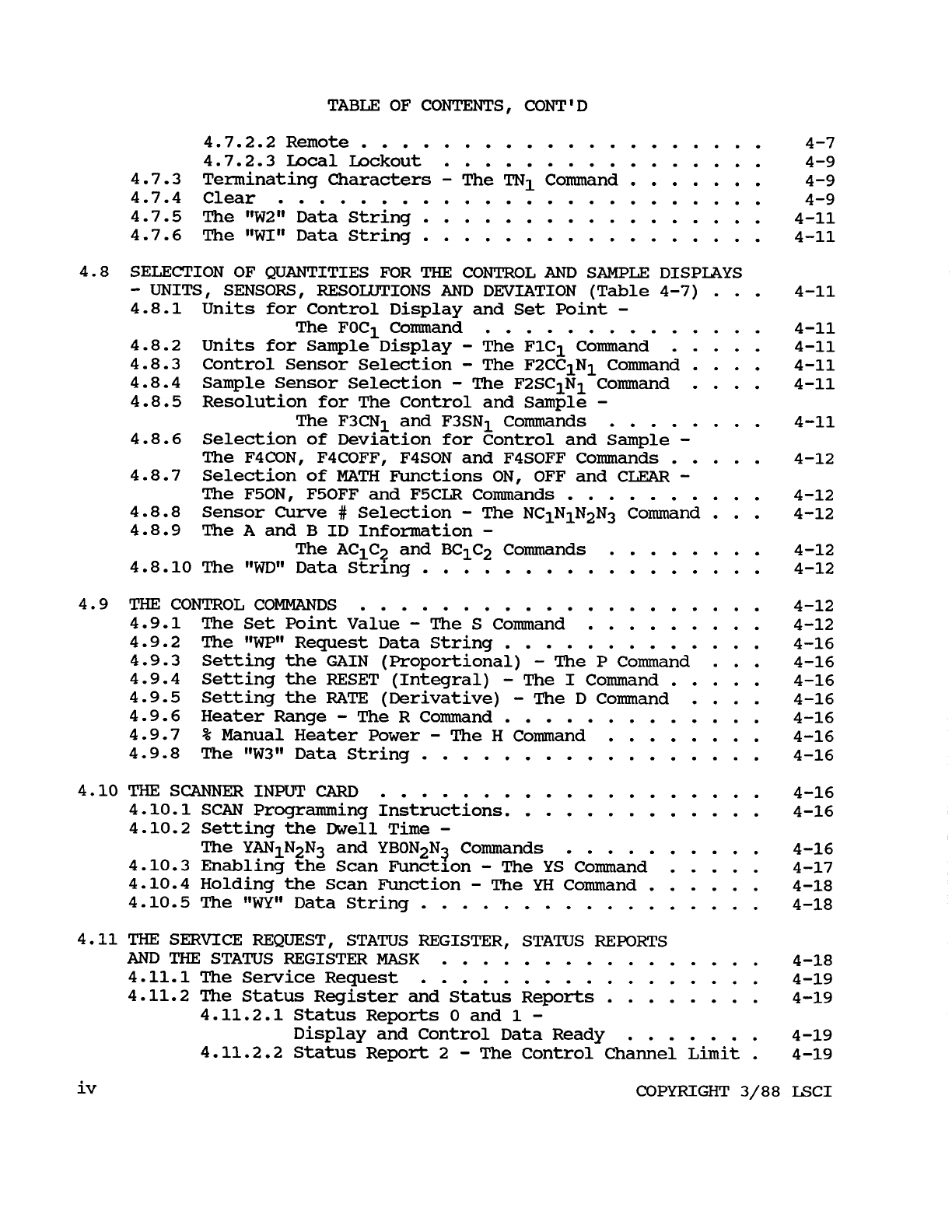
4-1. IEEE-488 INTERFACE
4.2 GENERAL IEEE SPECIFICATIONS
AND
OPERATION 4-1
...................
4-2
4.3 INTERFACE CAPABILITIES
..........
4.4 DRC-93C IEEE-488 ADDRESS SWITCH
...............
4-3
4.4.1 Terminating Characters (delimiters) 4-3
4.4.2 Talker and/or Listener Configuration 4-3
4.4.3 The IEEE-488 INTERFACE bus address 4-5
4.5 IEEE-488
BUS
COMMANDS
....................
4-5
.........
.........
..........
................
4-5
4-5
4-5
4-6
4.5.5 Device-Dependent Commands
..............
4-6
4-6
4.5.1 The Uniline Commands
4.5.2 The Universal Commands
...............
4.5.3 The Addressed Commands
...............
4.5.4 The Unaddress Commands
...............
4.5.6 Talker and Listener Status
..............
4.6.1 Commands and Requests
................
4.6 PROGRAMMING INSTRUCTIONS
..................
4-7
4.7 INSTRUMENT SETUP
COMMANDS
AND
REQUESTS 4-7
4-7
...........
.............
4
-7
EOI Status
-
The ZN1 Command 4-7
....................
4-7
4.7.2.1 Local
COPYRIGHT 3/88 LSCI

iii
4.7.1
4.7.2 Interface Mode
-
The MN1 Command
...........
TABLE OF CONTENTS, CONT'D
....................
4.7.2.2 Remote 4-7
4.7.2.3 Local Lockout 4-9
4.7.4 Clear
........................
4-9
................
4.7.3 Terminating Characters
-
The
TN,
Command
.......
4-9
4.7.5 The “W2” Data String
.................
4-11
4.7.6 The
“WI”
Data String
.................
4-11
4.8 SECTION OF QUANTITIES FOR
THE
CONTROL
AND
SAMPLE
DISPLAYS
-
UNITS.
SENSORS.
RESOLUTIONS
AND
DEVIATION (Table 4-7)
...
4-11
4.8.1 The FOC1 Command
..............
4-11
4.8.2 Units for Sample Display
-
The FlC1 Command
.....
4-11
4.8.3 Control Sensor Selection
-
The F2CC1N1 Command
....
4-11
4.8.4 Sample Sensor Selection
-
The F2SC1N1 Command
....
4-11
4.8.5 Resolution for The Control and Sample
-
The F3CN1 and F3SN1 Commands
........
4-11
4.8.6 Selection of Deviation for Control and Sample
-
The F4CON, F4COFF,F4SON and F4SOFF Commands
.....
4-12
4.8.7 Selection
of
MATH
Functions
ON.
OFF and CLEAR
-
The F50N, F5OFF and F5CLR Commands
..........
4-12
4.8.8 4-12
4.8.9 The A and B ID Information
-
4.8.10 The
“WD”
Data String
.................
4-12
4.9.1 The Set Point Value
-
The
S
Command
.........
4-12
4.9.2 The
“WP”
Request Data String
.............
4-16
4.9.4 Setting the RESET (Integral)
-
The
I
Command
.....
4-16
4.9.5 Setting the
RATE
(Derivative)
-
The D Command
....
4-16
4.9.6 Heater Range
-
The R Command
.............
4-16
4.9.7
%
Manual Heater Power
-
The
H
Command
........
4-16
4.9.8 The “W3” Data String
.................
4-16
4.10.1
SCAN
Programming Instructions
.............
4-16
4.10.2 Setting the Dwell Time
-
The YAN1N2N3 and YBON2N3 Commands
..........
4-16
4.10.3 Enabling the Scan Function
-
The
YS
Command
.....
4-17
4.10.4 Holding the Scan Function
-
The
YH
Command
......
4-18
4.10.5 The
WY"
Data String
.................
4-18
Units for Control Display and Set Point
-
Sensor Curve
#
Selection
-
The NC1N1N2N3 Command
...
The AC1C2 and BC1C2 Commands
........
4-12
4.9
THE
CONTROL COMMANDS
....................
4-12
4.9.3 Setting the GAIN (Proportional)
-
The P Command
...
4-16
4.10
THE
SCANNER
INPUT
CARD
...................
4-16
4.11
THE
SERVICE REQUEST. STATUS REGISTER. STATUS REPORTS
AND
THE
STATUS REGISTER
MASK
................
4-18
4.11.1 The Service Request
.................
4-19
4.11.2 The Status Register and Status Reports
........
4-19
4.11.2.1 Status Reports
0
and
1
-
Display and Control Data Ready
.......
4-19
4.11.2.2 Status Report 2
-
The Control Channel Limit
.
4-19
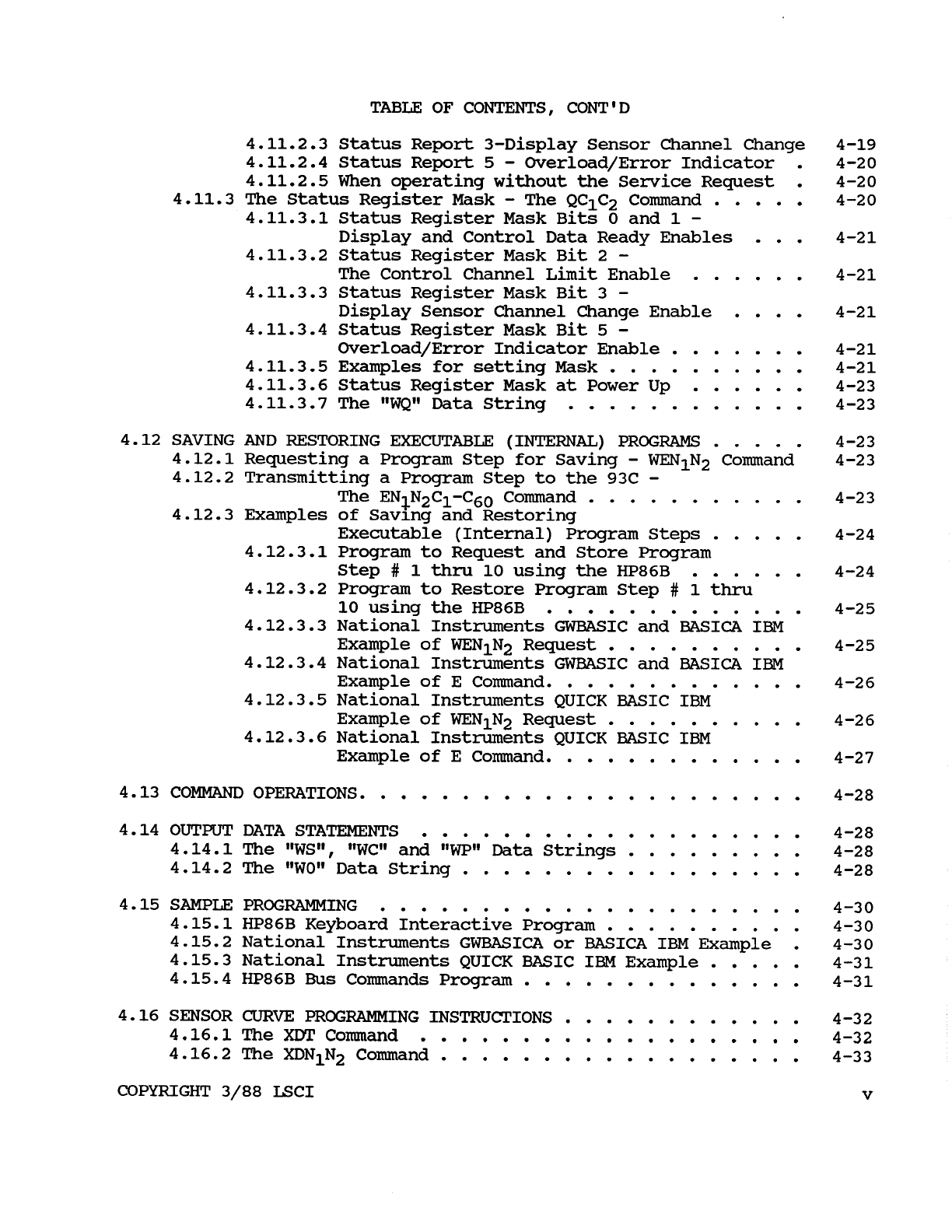
iv
COPYRIGHT 3/88 LSCI

TABLE
OF
CONTENTS. CONT'D
4.11.2.3 Status Report 3-Display Sensor Channel Change 4-19
4.11.2.4 Status Report 5
-
Overload/Error Indicator
.
4-20
4.11.2.5 When operating without the Service Request
.
4-20
4-20
4.11.3.1 Status Register Mask Bits
0
and 1
-
4.11.3.2 Status Register Mask Bit 2
-
4.11.3.3 Status Register Mask Bit
3
-
4.11.3.4 Status Register Mask Bit
5
-
4.11.3.5 Examples for setting Mask
..........
4-21
4.11.3.7 The “WQ” Data String
............
4-23
4.12 SAVING AND RESTORING EXECUTABLE (INTERNAL)
PROGRAMS
.....
4-23
4-23
The ENN2
C1
-C60 Command
...........
4-23
4.11.3 The Status Register Mask
-
The QC1C2 Command
.....
Display and Control Data Ready Enables
...
4-21
The Control Channel Limit Enable
......
4-21
Display Sensor Channel Change Enable
....
4-21
Overload/Error Indicator Enable
.......
4-21
4.11.3.6 Status Register Mask at Power Up
......
4-23
4.12.1 Requesting a Program Step for Saving
-
WEN1N2 Command
4.12.2 Transmitting a Program Step to the 93C
-
4.12.3 Examples
of
Saving and Restoring
Executable (Internal) Program Steps
.....
4-24
4.12.3.1 Program to Request and Store Program
Step
#
1
thru
10 using the HP86B
......
4-24
4.12.3.2 Program to Restore Program Step
#
1 thru
10 using the HP86B
.............
4-25
4.12.3.3 National Instruments GWBASICand BASICA IBM
Example
of
WEN1N2 Request
..........
4-25
4.12.3.4 National Instruments GWBASIC and
BASICA
IBM
Example
of
E Command
.............
4-26
4.12.3.5 National Instruments QUICK BASIC IBM
Example
of
WEN1N2 Request
..........
4-26
4.12.3.6 National Instruments QUICK BASIC IBM
Example
of
E Command
.............
4-27
4.13 COMMAND OPERATIONS
......................
4-28
4.14
OUTPUT
DATA STATEMENTS
...................
4-28
4.14.1 The “WS”
,
“WC” and
“WP”
Data Strings
.........
4-28
4.14.2 The “WO” Data String
.................
4-28
4.15.1HP86B Keyboard Interactive Program
..........
4-30
4.15.2 National Instruments GWBASICA or BASICA IBM Example
.
4-30
4.15.3 National Instruments QUICK BASIC IBM Example
.....
4-31
4.15.4 HP86B
Bus
Commands Program
..............
4-31
4.16.1
The
XDTComand
...................
4-32
4.16.2 The XDN1N2 Command
..................
4-33
COPYRIGHT 3/88 LSCI
V
4.15 SAMPLE PROGRAMMING
.....................
4-30
4.16 SENSOR
CURVE
PROGRAMMING INSTRUCTIONS
............
4-32
TABLE
OF
CONTENTS, CONT'D
4.16.3
The XDA Command
...................
4-36
4-36
4-37
4.16.6
The
XKN1N2*
Command
.................
4-37
4.16.4
The
XCN1N2
Command
..................
4.16.5
The
XEN1N2
Command
..................
4.16.7
The
XAC1C2=N1N2*
and
XBC1C2=N1N2*
Commands
......
4-37
SECTION
V
-
MAINTENANCE
5.1
INTRODUCTION
........................
5-1
5.2
GENERAL
MAINTENANCE..
...................
5-1
5.3
FUSE REPLACEMENT
......................
5-1
5.4
LINE VOLTAGE SELECTION
...................
5-1
5.5
PERFORMANCE VERIFICATION
..................
5-2
5.5.1
Performance Verification Connector
..........
5-2
5.5.2
Performance Verification Procedure
..........
5-2
5.6.1
Input Card Calibration
................
5-2
5.6.2
Set Point Voltage Calibration
............
5-2
5.6.3
Calibration
of
GAIN, RATE and RESET
.........
5-3
5.6.4
Calibration
of
Power Output
.............
5-3
5.6
CALIBRATION.
.........................
5-2
5.7
TROUBLESHOOTING.
.......................
5-4
SECTION
VI
-
PROGRAMMING
INSTRUCTIONS
6.1
INSTRODUCTION
........................
6-1
6.2
PROGRAM STEPS
AND
SIZE
...................
6-1
6.3
PROGRAM
STEP FORMAT
.....................
6-1
6.4
SUMMARY
OF
COMMANDS
.....................
6-1
6.5
INTERNAL
PROGRAM
ENTRY
...................
6-3
6.5.1
Starting the Program Edit Mode
............
6-3
6.5.2
Program Step Selection
................
6-3
Entering the Program Command and
JUMP
VECTOR,
REPEAT COUNT or
RAMP
COUNT
..............
6-4
6.5.5
Entering Other Parameters
..............
6-4
6.5.6
Entering the Timer Value
...............
6-4
6.5.3
6.5.4
Entering the Setpoint, Gain, Rate and Reset
.....
6-4
6.5.7
Entering
the
Program
Step
into
Memory
........
6-4
6.5.8
Ending or Aborting the Programming Mode
.......
6-4
vi COPYRIGHT
3/88
LSCI
TABLE
OF
CONTENTS, CONT'D
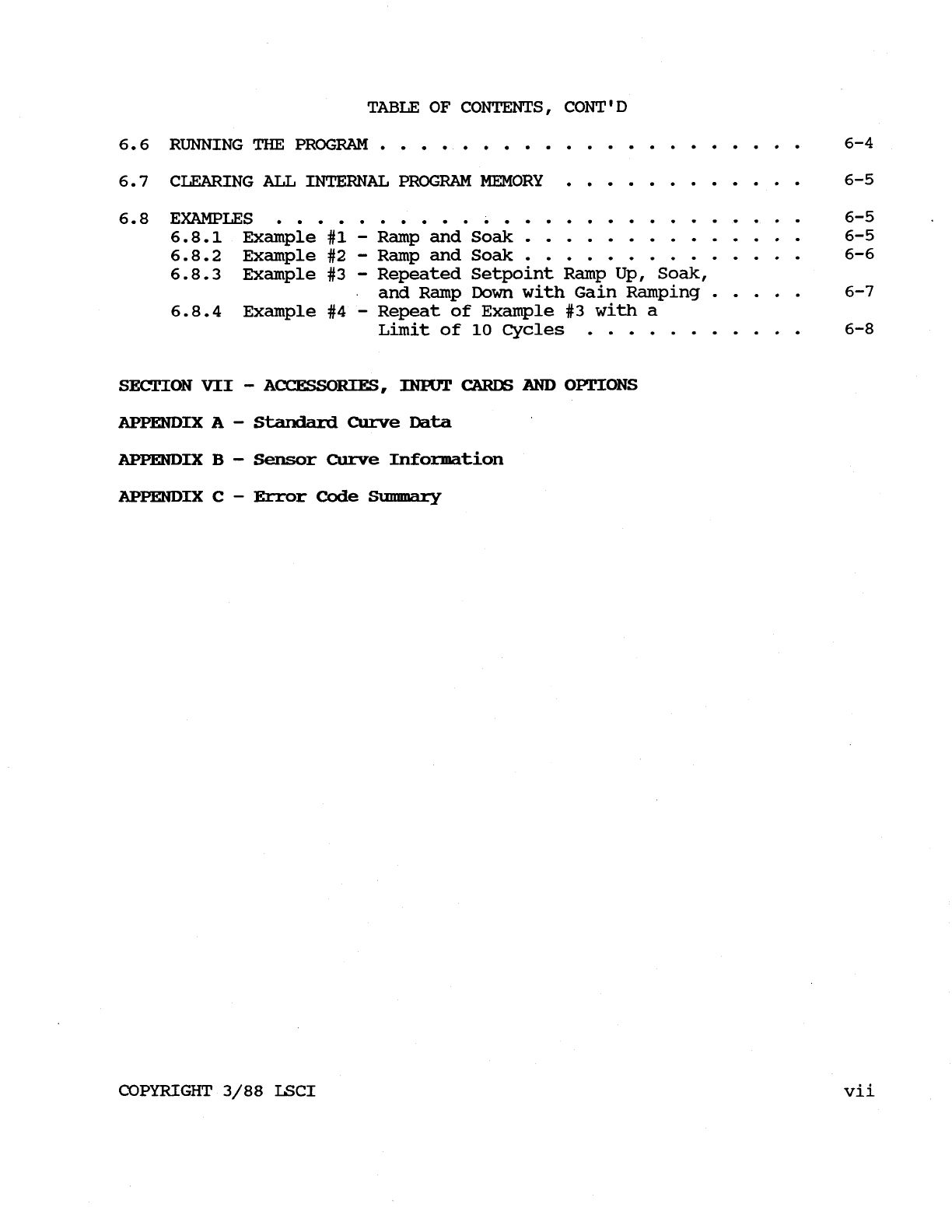
6.6
RUNNING
THE
PROGRAM.
....................
6-4
6.7 CLEARING
ALL
INTERNAL PROGRAM MEMORY
............
6-5
6.8
EXAMPLES
6-5
6.8.1 Example
#1
-
Ramp and
Soak
..............
6-5
6.8.2 Example #2
-
Ramp and
Soak
..............
6-6
and Ramp
Down
with Gain Ramping
.....
6-7
Limit
of
10
Cycles
...........
6-8
..........................
6.8.3 Example
#3
-
Repeated Setpoint Ramp Up, Soak,
6.8.4 Example #4
-
Repeat
of
Example
#3
with a
SECTION
VII
-
ACCESSORIES,
INPUT
CARDS
AND
OPTIONS
APPENDIX
A
-
Standard
Curve
Data
APPENDIX
B
-
Sensor
Curve
Information
APPENDIX
C
-
Error
Code
Summary
COPYRIGHT
3/88
LSCI vii