manuals.online logo
Brands
  1. Home
  2. •
  3. Brands
  4. •
  5. Lantronix
  6. •
  7. Motherboard
  8. •
  9. Lantronix xPico 240 User manual

Lantronix xPico 240 User manual

Other manuals for xPico 240

2

Other Lantronix Motherboard manuals

Lantronix xPico 240 User manual

Lantronix

Lantronix xPico 240 User manual

Lantronix xPico 110 User manual

Lantronix

Lantronix xPico 110 User manual

Lantronix xPico 250 User manual

Lantronix

Lantronix xPico 250 User manual

Lantronix SiRFstarIV EVA2200-A User manual

Lantronix

Lantronix SiRFstarIV EVA2200-A User manual

Lantronix xPico User manual

Lantronix

Lantronix xPico User manual

Lantronix PremierWave User manual

Lantronix

Lantronix PremierWave User manual

Lantronix xPico 200 Series User manual

Lantronix

Lantronix xPico 200 Series User manual

Lantronix xPico 240 User manual

Lantronix

Lantronix xPico 240 User manual

Lantronix WiPort User manual

Lantronix

Lantronix WiPort User manual

Lantronix PremierWave User manual

Lantronix

Lantronix PremierWave User manual

Lantronix MatchPort Series User manual

Lantronix

Lantronix MatchPort Series User manual

Lantronix xPico Wi-Fi Series User manual

Lantronix

Lantronix xPico Wi-Fi Series User manual

Lantronix xPico 110 User manual

Lantronix

Lantronix xPico 110 User manual

Lantronix xport pro User manual

Lantronix

Lantronix xport pro User manual

Lantronix PNT-SG3FS-EVAL User manual

Lantronix

Lantronix PNT-SG3FS-EVAL User manual

Popular Motherboard manuals by other brands

Gigabyte MNJ190I-FH user manual

Gigabyte

Gigabyte MNJ190I-FH user manual

Biostar HI-FI-Z87X-3D Setup manual

Biostar

Biostar HI-FI-Z87X-3D Setup manual

Atmel SAM9753PIA-DK user guide

Atmel

Atmel SAM9753PIA-DK user guide

Coapt GEN2 Handbook

Coapt

Coapt GEN2 Handbook

Supero SUPER P4DL6 user manual

Supero

Supero SUPER P4DL6 user manual

Cypress CY3210-PSoCEVAL1 quick start guide

Cypress

Cypress CY3210-PSoCEVAL1 quick start guide

ASROCK B660M-HDV manual

ASROCK

ASROCK B660M-HDV manual

Fujitsu D2831 Short description

Fujitsu

Fujitsu D2831 Short description

Industrial Computers ADE-6050 user manual

Industrial Computers

Industrial Computers ADE-6050 user manual

Asus TUF Z270 MARK 2 manual

Asus

Asus TUF Z270 MARK 2 manual

DFI NB71-BC user manual

DFI

DFI NB71-BC user manual

ASROCK H61 Pro BTC user manual

ASROCK

ASROCK H61 Pro BTC user manual

Norco POS-7893 user manual

Norco

Norco POS-7893 user manual

Intel DG965MS specification

Intel

Intel DG965MS specification

Asus B85M-VIEW PAKER user manual

Asus

Asus B85M-VIEW PAKER user manual

Asus P5G41T-M LX V2 user manual

Asus

Asus P5G41T-M LX V2 user manual

Gigabyte GA-K8VT800-RH user manual

Gigabyte

Gigabyte GA-K8VT800-RH user manual

Gigabyte Z790M AORUS ELITE user manual

Gigabyte

Gigabyte Z790M AORUS ELITE user manual

manuals.online logo
manuals.online logoBrands
  • About & Mission
  • Contact us
  • Privacy Policy
  • Terms and Conditions

Copyright 2025 Manuals.Online. All Rights Reserved.

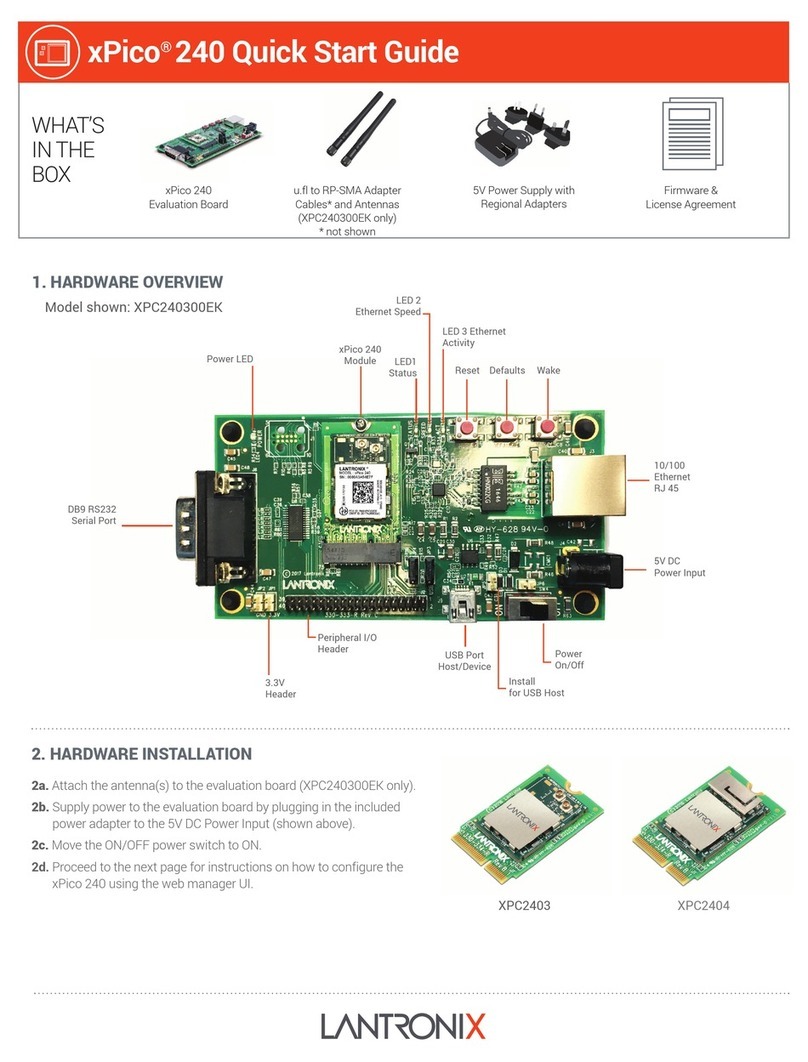
xPico® 240 Quick Start Guide
WHAT’S
IN THE
BOX xPico 240
Evaluation Board
Firmware &
License Agreement
u.fl to RP-SMA Adapter
Cables and Antennas
(XPC240300EK only)
(cables not shown)
5V Power Supply with
Regional Adapters
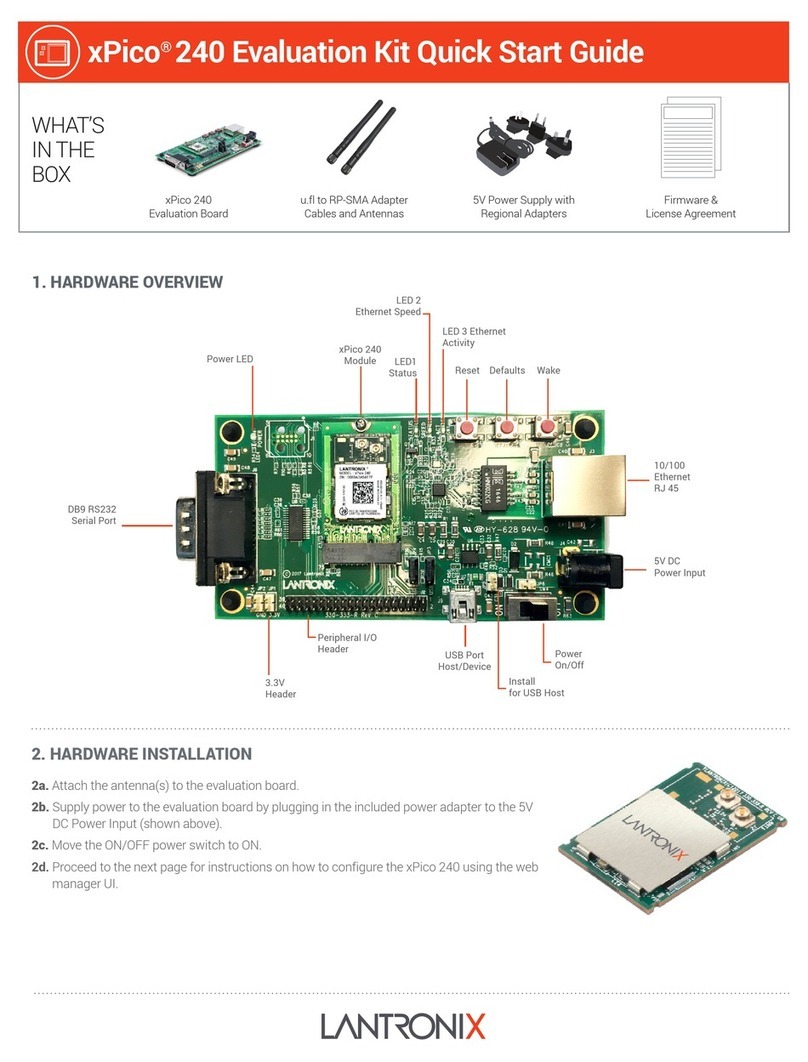
2. HARDWARE INSTALLATION
2a. Attach the antenna(s) to the evaluation board (XPC240300EK only).
2b. Supply power to the evaluation board by plugging in the included
power adapter to the 5V DC Power Input (shown above).
2c. Move the ON/OFF power switch to ON.
2d. Proceed to the next page for instructions on how to configure the
xPico 240 using the web manager UI.
1. HARDWARE OVERVIEW
DB9 RS232
Serial Port
3.3V
Header
Peripheral I/O
Header USB Port
Host/Device
Install
for USB Host
5V DC
Power Input
Power
On/Off
10/100
Ethernet
RJ 45
Wake
LED1
Status
xPico 240
Module
Power LED
Defaults
Reset
LED 3 Ethernet
Activity
LED 2
Ethernet Speed
Model shown: XPC240300EK
XPC2403 XPC2404
LATEST FIRMWARE
For the latest firmware downloads,
visit http://www.lantronix.com/support/downloads
TECHNICAL SUPPORT
For technical support queries, visit http://www.lantronix.com/
support or call (800) 422-7044 Monday – Friday from
6:00 a.m. – 5:00 p.m., Pacific Time, excluding holidays.
©2017 Lantronix, Inc. All rights reserved. Lantronix and xPico are registered trademarks of Lantronix, Inc. All other trademarks are the property of their respective owners. Specication are subject to
change without notice. 900-800-R Rev B
4b. On the Quick Connect Page, the wireless client interface
can be configured. The xPico 240 can now connect to a
network from the list of available wireless networks.
4a. Once logged in, click the Quick Connect menu to
continue with the configuration of the xPico 240 and
connect to the Wi-Fi network.
5. COMPLETE THE CONFIGURATION
Continue with the rest of the unit configuration using the Web Managment Interface (UI). Context-sensitive help is available in-line
within the Web UI. The unit can also be configured using the Command Line Interface (CLI). The CLI is accessible via the serial port. For
detailed instructions, please refer to the xPico 200 Series User Guide:
docs.lantronix.com/products/xpico-200/
4. INITIAL CONFIGURATION
3. CONNECT TO WEB MANAGEMENT CONSOLE
The steps below outline how to access the web management console to begin configuring the xPico 240 gateway.
3a. Connect to the network using the unique xPico 240 SSID.
This number refers to the last 6 digits of the serial number
printed on the module. See highlighted section. The default
password for this Wi-Fi Soft AP is PASSWORD (case sensitive).
KEEP YOUR DEVICE SECURE. Please change the default Soft AP SSID password and administrator password before
proceeding further. From the “Network” menu in the Web UI, follow this path: ap0 Link Configuration to set the AP
password. Click OK to apply these new settings. Next, from the “User” menu in the Web UI, select admin user and enter a
new password. Click OK to apply these new settings. Reboot and continue with the rest of the configuration.
!
Username
Password
192.168.0.1
3b. Connect to 192.168.0.1 using your web browser. The
default USER ID = admin and PASSWORD = PASSWORD
(both case sensitive).
Network 1
xPico 240 XXX-XXX
Network 2
Network 3
Network 4
xPico® 240 Quick Start Guide