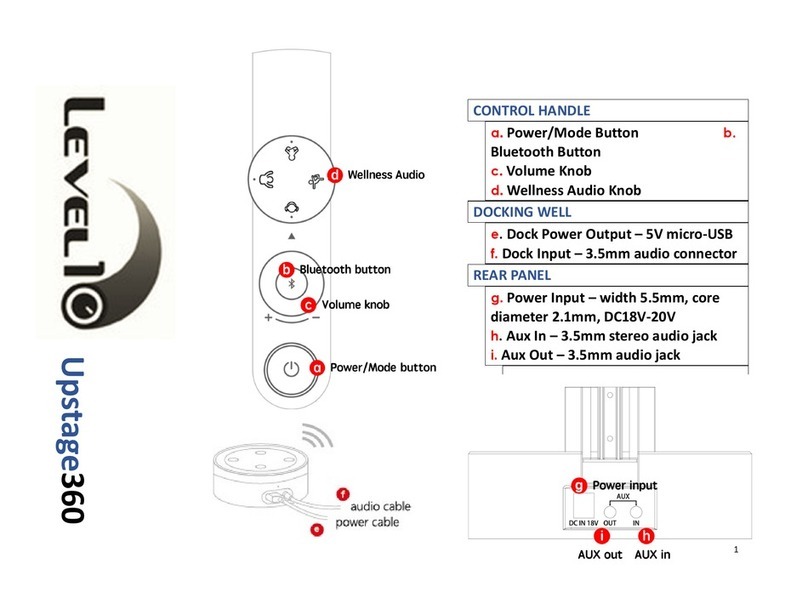
UPstage360 Wireless 3-way Speaker
FEDERAL COMMUNICATIONS COMMISSION INTERFERENCE STATEMENT
This equipment has been tested and found to comply with the limits for a Class B digital device, pursuant to part 15 of the FCC Rules. These limits are designed to provide reasonable protection against harmful interference in a residential installation. This equipment generates, uses and can radiate
radio frequency energy and, if not installed and used in accordance with the instructions, may cause harmful interference to radio communications. However, there is no guarantee that interference will not occur in a particular installation. If this equipment does cause harmful interference to radio
or television reception, which can be determined by turning the equipment off and on, the user is encouraged to try to correct the interference by one or more of the following measures: -Reorient or relocate the receiving antenna. -Increase the separation between the equipment and receiver.
-Connect the equipment into an outlet on a circuit different from that to which the receiver is connected. -Consult the dealer or an experienced radio/ TV technician for help.
CAUTION:
Any changes or modifications not expressly approved by the grantee of this device could void the user's authority to operate the equipment.
This device complies with Part 15 of the FCC Rules. Operation is subject to the following two conditions:
(1) this device may not cause harmful interference, and
(2) this device must accept any interference received, including interference that may cause undesired operation.
http://www.level-ten.com
Soundmatters
TB Speaker
Engineered by
Connection: Bluetooth, Aux-in, Echo Dot, Chromecast
Amplifier: 4 X 30 watt
Transducers: 2 X 3”woofer、4 X passive radiators、1 X 2”mid-range、1 X 1”tweeter
Frequency Range: 40 Hz - 40k Hz (-3dB)
Total Harmonic Distortion: < 0.02%
Impedance: 4 ohms
Power Supply: 100 - 240 V
Dimensions: 5.12 X 5.12 X 18.7 inches / 130 X 130 X 475 mm
Weight: 6.95 lbs (3.16 kgs)
Battery: 2600 mAh、6 - 10 hrs Playtime
Specification
270°
ON OFF
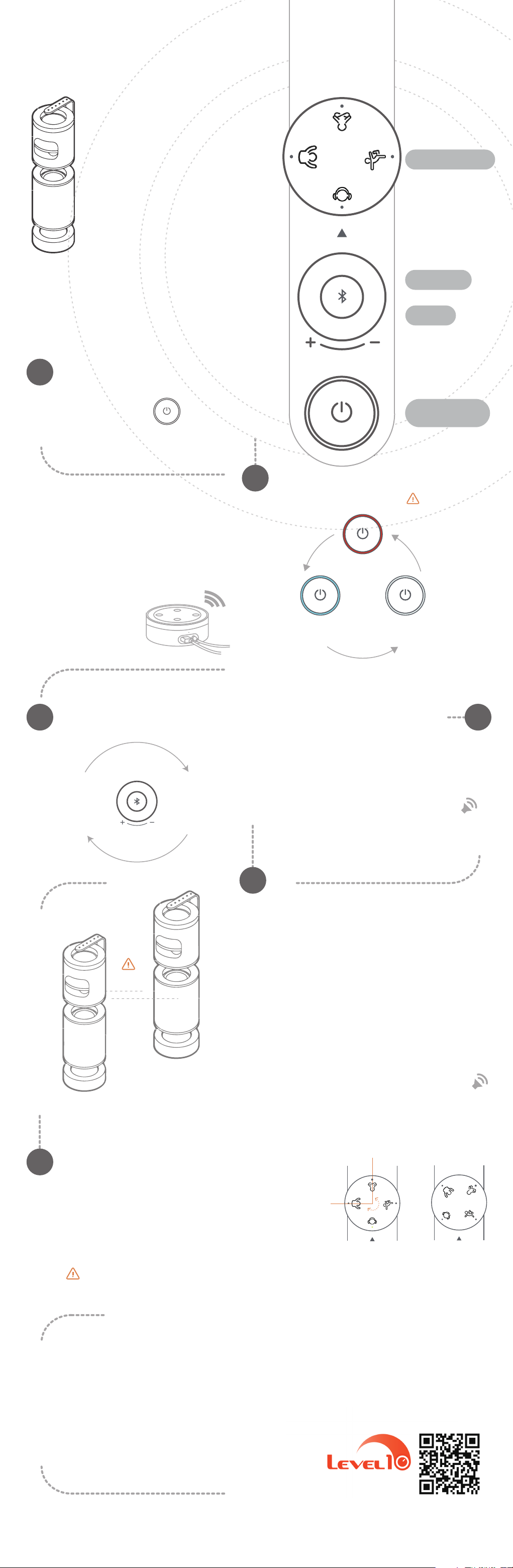
1)To play the mood scenarios, rotate the knob so the
pointer is aligned with the corresponding icon on the
mode knob.
2)To turn off the mood scenarios, totate the knob so the
pointer is pointing between two icons.
3)These mood scenarios can be listened to by them-
selves, or in conjunction with any other input sources.
ALERT: The Mood Scenario knob can only rotate 270° (Mind the
force while twisting).
Mood Scenarios
1)DO NOT CONNECT TO AN AUDIO SOURCE (i.e. PHONE) UNTIL
FINISHED LINKING THE TWO UPSTAGES (L & R).
2)Press the Bluetooth button on the left Upstage for 2s, and then
press the Bluetooth button on the right Upstage for 2s.
NOTE:The second Bluetooth button has to be pressed within 10s after
the first one is pressed.
3)Hearing "Doop Doop Doop Doop" three times means the link is
successful.
4)The two upstage360 speakers will automatically link up when
powered on, after pairing for the first time.
Doop!
Doop!
Wireless linking two
UPstage360 units for
separate L + R stereo
L
R
10s
Beep !
1)Briefly press the Bluetooth button to enter pairing
mode and search for (and pair to) a device. THIS IS
ONLY NECESSARY THE FIRST TIME YOU PAIR WITH A
DEVICE.
2)Hearing a “Beep” sound means connection is
successful.
Bluetooth Pairing
06
05
0403
02
01
Power/
Input Scroll Button
Volume Knob
Mood Scenario Knob
Bluetooth
Volume Adjustment
Turn volume knob
clockwise to
increase volume.
Knob LED flashes
twice at maximum
volume
Turn volume knob
counterclockwise to
decrease volume.
Knob LED flashes
twice at minimum
volume
Bluetooth/
Blue Illumination
AUX (3.5mm/ default input) /
White Illumination
Smart Dock/
Red Illlumination
Wait 60s for the
Echo Dot to boot.
Connect to Amazon Echo Dot
while under Dock mode.
Wait 60s for the Echo Dot to boot
for the first time.
Amazon Echo Dot
Use Short Presses (1 sec) to Toggle through Input Sources.
Input Selection
audio cable
power cable
ON: Long Press (2 sec) /
OFF: Long Press (2 sec)
Power On/Off
TIPS:
1)When initially powered on, the
UPstage360 power LED will flash for 60s
in mute mode, waiting for the Echo Dot to
boot.
2)The sequence of the audio input
modes: Dock → Bluetooth → AUX.
3)The power LED flashes when the
battery runs low or is charging.
4)Upstage360 will remain in the last input
selected the next time it is turned on.
For more information/user tips visit
www.level-ten.com/support.
Quick Start Guide
Level10 UPstage360