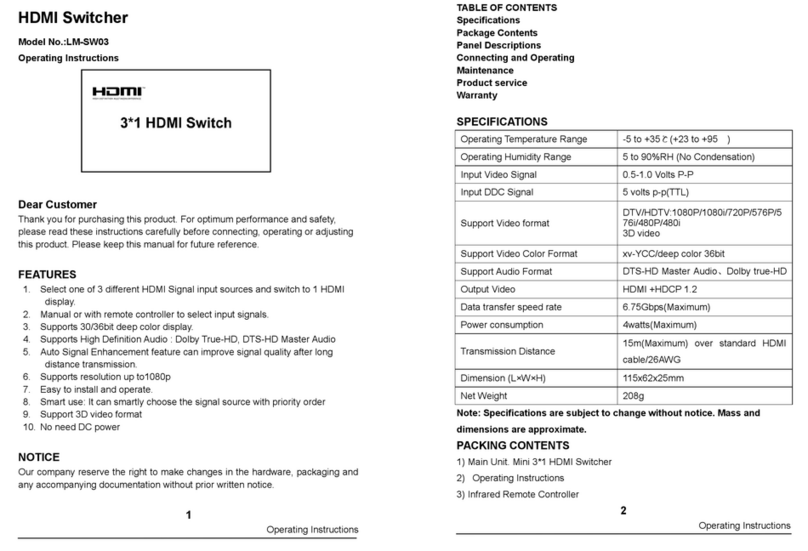
Button operation instructions:
+/PIP Key: 1)short pressing,to adjust the audio power amplifier——Volume+.
2)long pressing about 5 seconds,appear PIP mode,via “select” button to choose the HDMI
inputs,and then press “+/PIP” for sure.
-/5.1H Key: Adjust audio power amplifier,— —volume-;When press this button about 5 seconds, can
switch the audio channel between 5.1 and 2.1.
SELECT Key: when in non-PIP mode ,for input resources selection and switch audio among R/L
input,optical input and the HDMI input from HDMI1~HDMI3.When in PIP
mode,switch the input resources only.
Remote control operation instructions:
2.1H Key:Switch 2.1 audio channel output
5.1H Key:Switch 5.1 audio channel output
Select Key:when in non-PIP mode,for input resources selection and switch
audio among R/L input,optical input and the HDMI input from
HDMI1~HDMI3
OK/PIP Key :Press the key,it appears PIP mode,then choose HDMI inputs
through “CH+” and “CH- ” then confirm by “OK”
Volume Key:Adjust audio power amplifier, which means volume +/-
Bass Key:Adjust heavy bass volume +/-