manuals.online logo
Brands
  1. Home
  2. •
  3. Brands
  4. •
  5. Linksys
  6. •
  7. Docking Station
  8. •
  9. Linksys MCCI40 - Docking Station For iPod User manual

Linksys MCCI40 - Docking Station For iPod User manual

Other manuals for MCCI40 - Docking Station For iPod

3

Other Linksys Docking Station manuals

Linksys MCCI40 - Docking Station For iPod User manual

Linksys

Linksys MCCI40 - Docking Station For iPod User manual

Linksys MCCI40 - Docking Station For iPod User manual

Linksys

Linksys MCCI40 - Docking Station For iPod User manual

Popular Docking Station manuals by other brands

Durr Dental VISTACAM2 Installation and operating instructions

Durr Dental

Durr Dental VISTACAM2 Installation and operating instructions

DLO TransDock Direct user manual

DLO

DLO TransDock Direct user manual

Lenovo USB-C Mini Dock user manual

Lenovo

Lenovo USB-C Mini Dock user manual

Sony Dream Machine XDR-DS12iP user manual

Sony

Sony Dream Machine XDR-DS12iP user manual

ATEN UC-2000 user manual

ATEN

ATEN UC-2000 user manual

Xcellon HDD-202 user manual

Xcellon

Xcellon HDD-202 user manual

Dok CR09 user guide

Dok

Dok CR09 user guide

Philips BTM630/12 quick start guide

Philips

Philips BTM630/12 quick start guide

IOGear Travel Pro GUD3C09 quick start guide

IOGear

IOGear Travel Pro GUD3C09 quick start guide

iHome iP15 instruction manual

iHome

iHome iP15 instruction manual

VITURE ONE MOBILE DOCK quick start guide

VITURE ONE

VITURE ONE MOBILE DOCK quick start guide

CipherLab 8001 quick guide

CipherLab

CipherLab 8001 quick guide

Pyle PIPDSP2 owner's manual

Pyle

Pyle PIPDSP2 owner's manual

Targus DOCK315EUZ user guide

Targus

Targus DOCK315EUZ user guide

Philips DC190/79 user manual

Philips

Philips DC190/79 user manual

Akasa DuoDockX3 AK-DK08U3-BK user manual

Akasa

Akasa DuoDockX3 AK-DK08U3-BK user manual

Sirius Satellite Radio SUBX2082808a Installation and user guide

Sirius Satellite Radio

Sirius Satellite Radio SUBX2082808a Installation and user guide

OWC Thunderbolt Dock user guide

OWC

OWC Thunderbolt Dock user guide

manuals.online logo
manuals.online logoBrands
  • About & Mission
  • Contact us
  • Privacy Policy
  • Terms and Conditions

Copyright 2025 Manuals.Online. All Rights Reserved.

LINKSYS~by
Cisco • I II • I II •
CISCO.
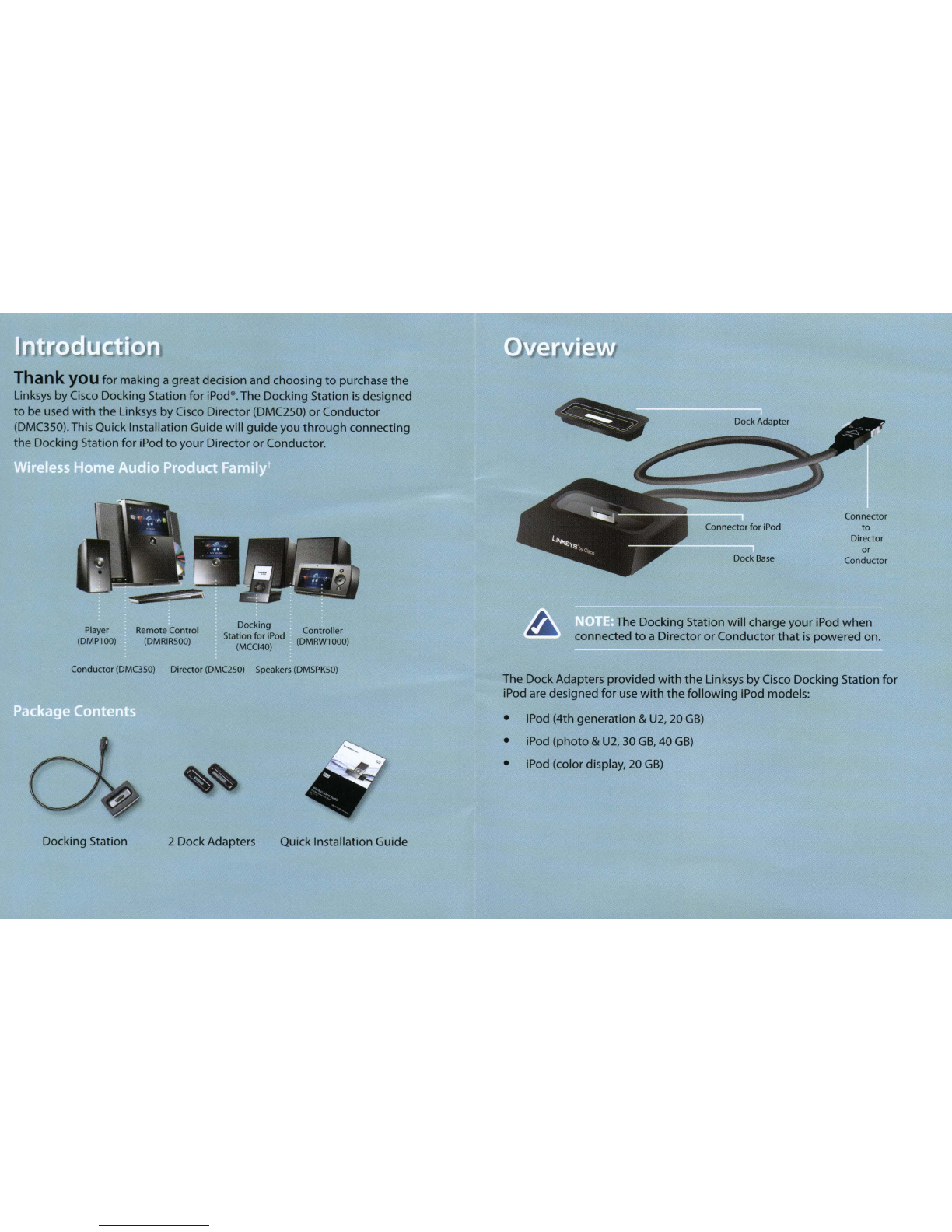
Takyou
for
making agreatdecision and choosing
to
purchase
the
Linksys
by
Cisco Docking Station
for
iPod8•The Docking Station
is
designed
to
be used
with
the
Linksys
by
Cisco Director (DMC250)
or
Conductor
(DMC350).This Quick Installation Guide
will
guide
you
through
connecting
the
Docking Station
for
iPod
to
your
Director
or
Conductor.
Connector
to
Director
or
Conductor
Dock Adapter
Dock
Base
Connector
for
iPod
The Docking Station
will
charge
your
iPod
when
connected
to
aDirector
or
Conductor
that
is
powered on.
Controller
(DMRW1000)
Docking
Station
for
iPod
(MCCI40)
Remote Control
(DMRIRSOO)
Player
(DMP100)
Conductor (DMC3S0) Director (DMC2S0) Speakers
(DMSPKSO)
The DockAdapters provided
with
the
Linksys
by
Cisco Docking Station
for
iPod are designed
for
use
with
the
following
iPod models:
•iPod (4th generation &
U2,
20
GB)
•iPod
(photo
&U2, 30
GB,
40
GB)
•iPod (color display, 20
GB)
Docking Station 2Dock Adapters Quick Installation Guide
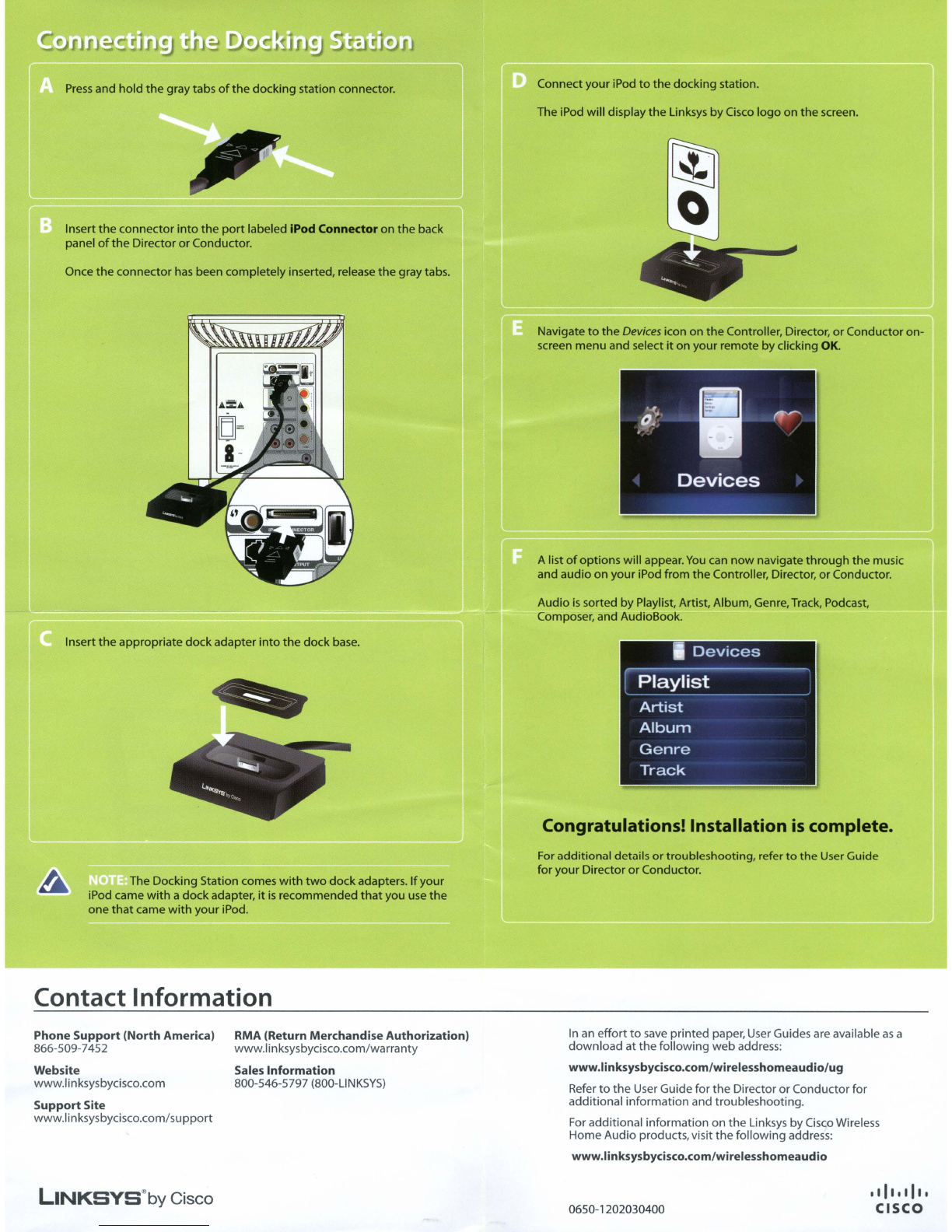
Alist
of
options will appear.
You
can
now
navigate through the music
and audio on your iPod from the Controller, Director,
or
Conductor.
Navigate
to
the
Devices
icon on
the
Controller, Director,
or
Conductor on-
screen menu and select
it
on your remote
by
clicking
OK.
The iPod will display
the
Linksys by Cisco logo on
the
screen.
Connect your iPod
to
the docking station.
Press
and hold
the
graytabs
of
the
docking station connector.
Once
the
connector
has
been completely inserted, release
the
gray tabs.
Insert the connector
into
the
port
labeled iPod Connector on the back
panel
of
the Director or Conductor.
Audio
is
sorted by Playlist, Artist, Album, Genre, Track, Podcast,
Composer, and AudioBook.
Insert
the
appropriate dockadapter
into
the
dock
base.
Congratulations! Installation
is
complete.
The Docking Station comes
with
two
dockadapters. If your
iPod came
with
adockadapter,
it
is
recommended
that
you
use
the
one
that
came
with
your iPod.
For additional details
or
troubleshooting, refer
to
the
User Guide
for your Director
or
Conductor.
Contact Information
Phone Support (North America)
866-509-7452
Website
www.linksysbycisco.com
Support Site
www.linksysbycisco.com/support
RMA (Return Merchandise Authorization)
www.linksysbycisco.com/warranty
Sales Information
800-546-5797
(800-L1NKSYS)
In
an
effort
to
save
printed paper,
User
Guides are available
as
a
download at the following web address:
www.linksysbycisco.com/wirelesshomeaudio/ug
Refer
to
the
User Guide for
the
Director orConductor for
additional information and troubleshooting.
For
additional information on
the
Linksys by Cisco Wireless
Home Audio products,visit the following address:
www.linksysbycisco.com/wirelesshomeaudio
LINKSYS@by Cisco 0650-1202030400
Made
For
Below are the iPod8models currently compatible
with
the Docking Station.
~
iPod
~
iPod
4th generation 5th generation (video)
20GB
60GB
80GB
~
iPod
~
iPod
nanD
4th generation
1st
generation
40GB
1GB
2GB
4GB
;iPod
~
iPod
nanD
4th generation (color display) @2nd generation (aluminum)
20GB
30GB
2GB
4GB
8GB
;iPod
~
iPod nano
4th generation (color display) 3rd generation (video)
40GB
60GB
4GB
8GB
~
iPod DiPod touch
5th generation (video)
30GB
8GB
16GB
Copyright
andTrademarks
Linksys, Cisco and
the
Cisco Logo are registered trademarks
or
trademarks
of
Cisco
Systems, Inc.
and/or
its affiliates in
the
U.s. and certain
other
countries.
Other
brands
and
product
names are trademarks
or
registered trademarks
of
their
respective
holders.
Copyright
©2008 Cisco Systems, Inc. All rights reserved.
iPod
is
a
trademark
of
Apple Inc., registered in
the
U.s.
and
other
countries.
"Made
for
iPod"means
that
an electronic accessory has been designed
to
connect
specifically
to
iPod and has been certified by
the
developer
to
meet
Apple
performance standards.
Apple
is
not
responsible
for
the
operation
of
this device
or
its compliance
with
safety
and regulatory standards.
tThe
maximum
performance
for vvireless
is
derived
from
IEEE
Standard 802.1 1specifications. Actual
performance
can
vary.
including
lower
wireless
network
capacity, data
throughput
rate, range and coverage. Performance
depends
on
many
factors,
conditions
and
variables,
including
distance
from
the
access POint,
volume
of
network
traffIC.
building
mateflals
and
construction,
operating
system used,
mix
of
wireless
products
used,
interference
and
other
adverse condItions
8112010NC-RR 3240-00541
LINKSYS@byCisco IIII •I II •
CISCO
Supplemental Information
•Specifications
•Warranty
•Regulatory
Wireless
Home
Audio
Docking
Station
for
iPod®
Wi
red
Accessory
MCCl40
Supplemental Information
Table
of
Contents
Table
of
Contents
Specifications 2
Warranty
3
Regulatory 6
Online Resources
Website addresses in this
document
are listed
without
http://
in
front
of
the
address because most current
web
browsers
do
not
require it.
If
you
use an older web browser, you may have
to
add
http://
in front
of
the
web
add
ress.
Copyright and Trademarks
Linksys, Cisco and
the
Cisco Logo are registered trademarks ortrademarks
of
Cisco Systems, Inc. and/or its affiliates in
the
U.S.
and certain
other
countries.
Other
brands and
product
names are trademarks or registered trademarks
of
their
respective holders. Copyright ©2008 Cisco Systems, Inc. All rights reserved.
iPod
is
atrademark
of
Apple Inc., registered in
the
u.s.
and
other
countries.
IIMade for iPod"means
that
an
electronic accessory has been designed
to
connect
specifically
to
iPod and has been certified by
the
developer
to
meet
Apple
performance standards.
Apple
is
not
responsible for
the
operation
of
this device
or
its compliance
with
safety and regulatory standards.
Docking Station for iPod
Specifications
Specifications
Model
Ports
Power supply
Cables
Certification
OperatingTemp.
StorageTemp.
Operating
Humidity
Storage
Humidity
2
Su
pplementaIInformation
MCCI40
24-Pin connector
None (Power supplied via 24-pin
connector from
DM(250/350)
Attached 24-pin
FCC,
CE,
Made for iPod
32
to
1040F
(0
to
400
C)
-4
to
1580F(-20
to
700
C)
10
to
850/0
Noncondensing
5
to
900/0
Noncondensing
Docking Station for iPod
Su
pplementa
II
nformation
Warranty
Warranty
Limited Warranty
Linksys warrants this Linksys hardware product against defects in
materials and workmanship undernormal
use
for
the
Warranty
Period, which begins on
the
date
of
purchase by
the
original end-user
purchaser and lasts for
the
period specified below:
•One (1) year for new product
•Ninety
(90)
days for refurbished
product
This limited warranty
is
non-transferable and extends only
to
the
original end-user purchaser. Your exclusive remedy and Linksys'entire
liability underthis limited warranty
will
be for Linksys, at its option,
to
(a)
repair
the
product
with
new
or
refurbished parts, (b) replace
the
product
with
areasonably available equivalent
new
or
refurbished
Linksys product, or
(c)
refund the purchase price
of
the
product
less
any
rebates. Any repaired
or
replacement products will be warranted for
the
remainder
of
the original Warranty Period
or
thirty
(30)
days,
whichever
is
longer. All products and parts
that
are replaced become the property
of
Linksys.
Exclusions and Limitations
This limited warranty does
not
apply if:
(a)
the
product
assembly
seal
has been removed or damaged, (b)
the
product
has
been altered
or
modified, except by Linksys,
(c)
the
product
damage was caused by
use
with
non-Linksys products,
(d)
the
product
has
not
been installed,
operated, repaired,
or
maintained in accordance
with
instructions
supplied by Linksys,
(e)
the
product
has been subjected
to
abnormal
physical
or
electrical stress, misuse, negligence,
or
accident, (f)
the
serial
number
on the Product
has
been altered, defaced, or removed,
or
(g)
the
product
is
supplied or licensed for beta, evaluation, testing
or
demonstration purposes for which Linksys does
not
charge apurchase
price
or
license
fee.
Docking Station for iPod 3

Warranty Supplemental Information
ALL
SOFTWARE
PROVIDED
BY
L1NKSYS
WITH
THE
PRODUCT,
WHETHER
FACTORY
LOADED
ON
THE
PRODUCT
OR
CONTAINED
ON
MEDIA
ACCOMPANYING
THE
PRODUCT,
IS
PROVIDED
liAS
lSI/WITHOUT
WARRANTY
OF
ANY
KIND.
Without limiting the foregoing, Linksys
does
not
warrant that the operation
of
the product or software will be
uninterrupted or error free.
Also,
due
to
the continual development
of
new techniques for intruding upon and attacking networks, Linksys
does
not
warrant that the product, software or any equipment, system
or network on which the product or software
is
used will
be
free
of
vulnerability
to
intrusion
or
attack.The product may include
or
be
bundled
with
third party software or service offerings.This limited
warranty shall not apply
to
such
third party software or service offerings.
This limited warranty does
not
guarantee any continued availability
of
athird party's service for which this product's
use
or operation may
require.
TOTHE
EXTENT
NOT
PROHIBITED
BY
LAW,
ALL
IMPLIED
WARRANTIES
AND
CONDITIONS
OF
MERCHANTABILITY,
SATISFACTORY
QUALITY
OR
FITNESS
FOR
A
PARTICULAR
PURPOSE
ARE
LIMITED
TO
THE
DURATION
OF
THE
WARRANTY
PERIOD.
ALL
OTHER
EXPRESS
OR
IMPLIED
CONDITIONS,
REPRESENTATIONS
AND
WARRANTIES,
INCLUDING,
BUT
NOT
LIMITED
TO,
ANY
IMPLIED
WARRANTY
OF
NON-INFRINGEMENT,
ARE
DISCLAIMED.
Some jurisdictions do
not
allow limitations on
how
long
an
implied warranty
lasts,
so
the above limitation may
not
apply
to
you.
This limited warranty gives you specific legal rights, and you may also
have other rights which vary byjurisdiction.
TO
THE
EXTENT
NOT
PROHIBITED
BY
LAW,
IN
NO
EVENT
WILL
L1NKSYS
BE
LIABLE
FOR
ANY
LOST
DATA,
REVENUE
OR
PROFIT,
OR
FOR
SPECIAL,
INDIRECT,
CONSEQUENTIAL,
INCIDENTAL
OR
PUNITIVE
DAMAGES,
REGARDLESS
OF
THE
THEORY
OF
LIABILITY
(INCLUDING
NEGLIGENCE),
ARISING
OUTOF
OR
RELATED
TO
THE
USE
OF
OR
INABILITYTO
USE
THE
PRODUCT
(INCLUDING
ANY
SOFTWARE),
EVEN
IF
L1NKSYS
HAS
BEEN
ADVISED
OF
THE
POSSIBILITY
OF
SUCH
DAMAGES.
IN
NO
EVENT
WILL
LIN
KSYS'
LIABILITY
EXCEED
THE
AMOUNT
PAID
BY
YOU
FOR
THE
PRODUCT.
The foregoing limitations will apply even
if
any warranty
or remedy provided underthis limited warranty fails
of
its essential
purpose. Some jurisdictions
do
not allow the exclusion or limitation
of
incidental or consequential damages,
so
the above limitation or
exclusion may
not
apply
to
you.
4Docking Station for iPod
Supplemental Information Warranty
Obtaining Warranty Service
Ifyou have aquestion
about
your
product
or experience aproblem
with
it, please go
to
www.linksysbycisco.com/support where you
will find avariety
of
online
support
tools and information
to
assist
you
with
your product.
If
the
product
proves defective
during
the
Warranty Period, contact Linksys Technical Support for instructions
on
how
to
obtain warranty service.The telephone
number
for Linksys
Technical Support in your
area
can be found in the
product
User Guide
and at www.linksysbycisco.com. Have your product serial
number
and
proof
of
purchase on hand
when
calling. A
DATED
PROOF
OF
ORIGINAL
PURCHASE
IS
REQUIRED
TO
PROCESS
WARRANTY
CLAIMS.
If
you are requested
to
return
your
product, you will be given aReturn
Materials Authorization
(RMA)
number.
You
are responsible for properly
packaging and shipping your
product
to
Linksys at your cost and risk.
You
must include the
RMA
number
and acopy
of
your dated
proof
of
original purchase when returning your product. Products received
without
a
RMA
number
and dated
proof
of
original purchase will
be
rejected. Do
not
include any
other
items
with
the
product
you are
returning
to
Linksys. Defective
product
covered by this limited warranty
will be repaired or replaced and returned
to
you
without
charge.
Customers outside
of
the
United States
of
America and Canada are
responsible for all shipping and handling charges, custom duties,
VAT
and
other
associated taxes and charges. Repairs or replacements
not
covered under this limited warranty will be subject
to
charge at Linksys'
then-current rates.
Technical Support
This limited warranty
is
neither aservice nor asupport contract.
Information about Linksys' current technical support offerings and
policies (including any fees for
support
services)
can
be found at:
www.linksysbycisco.com/support.
This limited warranty
is
governed by
the
laws
of
the jurisdiction in which
the
Product
was
purchased by you.
Please
direct
all inquiries to:
Linksys,
P.O.
Box 18558, Irvine,
CA 92623.
Docking Station for iPod 5