Initial operation
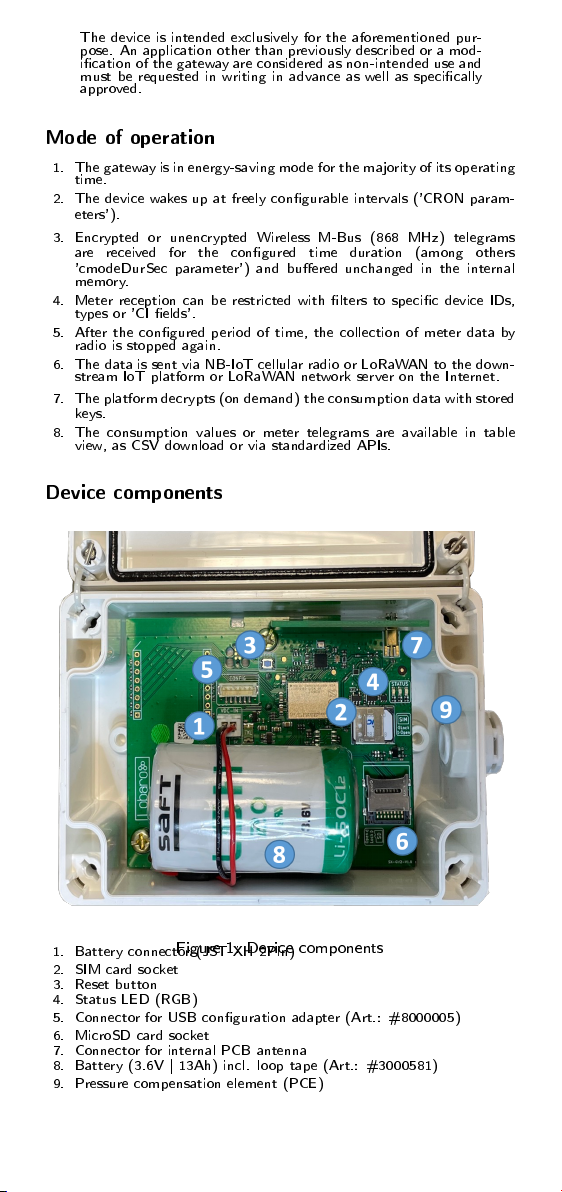
To commission the gateway, a suitable SIM card must be inserted in the
socket at position (2) if mobile radio is to be used for data upload instead
of LoRaWAN. To do this, rst slide the cover lock of the socket to the
right and then open it upwards. During insertion, it is essential to ensure
that the battery (1) is not connected. After inserting the SIM card, the
cover must be folded down and the lock must be closed again by sliding
it to the left.
The associated battery is equipped with loop tape, which is to be attached
to the velcro hooks of the device at position (8) when inserting it. Make
sure that the connecting cable of the battery is routed around the battery
body as shown in Fig.1. Then connect the plug connector of the battery
to the reverse polarity protected socket at position (1).
If the device was without power for more than 24 hours, e.g. at delivery,
it starts with the pre-congured parameters after connecting the battery
and initiates an initial collection of metering data with downstream upload
of the data via LoRaWAN or mobile radio. The device conguration of
the delivery state can be viewed via the downstream platform or was
transmitted in advance in the form of a digital delivery note.
The reset button (3) can be used at any time to reproduce the same
behavior as with the aforementioned connection of the battery after 24
hours without voltage, e.g. to start a control readout during installation
or when changing the battery.
By means of the status LEDs (4) dierent operating modes of the rmware
can be read. The dierent blinking patterns are described in the online
manual, available at
https://doc.lobaro.com
.
The socket for an SD card (6) is suitable for holding a corresponding
memory card. The locking mechanism works analogously to the SIM
card.
,
Only 3.6V batteries approved by Lobaro may be used with the
gateway. The use of other batteries, especially without velcro
u, is not permitted, as there would be no sucient protection
of the battery in the housing.
,
Only antennas approved by Lobaro may be connected to the
MMCX antenna connector (7)!
ð
The storage functionality for SD cards (6) may not be supported
by all rmware versions.
ð
The SIM card used must be activated for NB-IoT or LTE-M1
networks. The gateway conguration of the LTE connection
(operator, APN, band) must match the SIM card used!
Gateway conguration
Reading and adjusting the gateway conguration is possible via the 6-pin
conguration connector (5) and the separately available Lobaro USB con-
guration adapter in combination with the free PC-based 'Lobaro Main-
tenance Tool' for Windows, Linux and MacOS.
Alternatively, if the network parameters are congured correctly, the con-
guration changes can also be made 'over-the-air' via the Lobaro IoT
platform.
ð
Details of the gateway conguration and available parameters
can be found in the online manual at
https://doc.lobaro.com
.
Proper mounting and housing dimensions
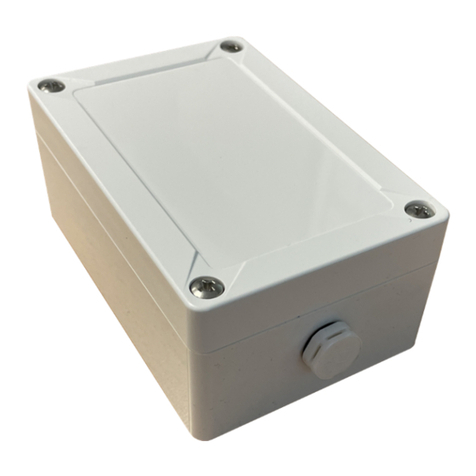
The cover of the gateway is secured via four quick-release screws. These
screws are loosened or tightened via a 90
°
turn. In addition, the housing
has a lid loss protection.
The gateway is securely fastened to a wall or ceiling with the cover open
using the four fastening points marked in red in Figure 3 and 4 mm anchor
screws. For example, in a solid brick wall, 4 mm anchor screws with a
length of 50 mm can be used with 38 mm long dowels with a diameter of
6 mm to ensure a good hold.
After successful wall mounting, the cover must be closed again.