9
Cleaning
Caution! Parts of the extruder get hot! Wear gloves and eye protection!
It is recommended to thoroughly clean the extruder after use, or right
before the next use, for the most consistent extrusion. Polymer melt on
the screw due to heat creep after shutdown can cause issues when
restarting the extruder. Leave the extruder temperature zones on during
cleaning.
1. Either run the extruder until the feed port is empty or use a vacuum
cleaner to remove the remaining pellets. Continue running the
extruder until polymer stops extruding from the nozzle.
2. If you are using a filter nozzle, stop the extruder, remove it, and
replace it with a standard nozzle with a minimum hole size of 1.5mm.
Purge damages the filter. Fill the steel angled feed tube
approximately halfway with extruder purge compound while running
the extruder at approximately 20RPM. Do not change the
temperatures from the polymer that was run to run purge. NOTE:
Use high temp purge for temps over 300°C. It is possible to remove
and clean the screw without using purge material, but the process
can be significantly more difficult and is not recommended.
3. Continue running the extruder until
purge stops extruding from the
nozzle, or add more if the residual
polymer is still visible in the purge.
NOTE: Running the extruder “dry”
with no polymer in the feed will
cause excess wear on the screw
over time. Avoid running the
extruder while empty for more
than a few minutes at a time.
4. After all the purge has been
extruded, stop the extruder and
remove the nozzle.
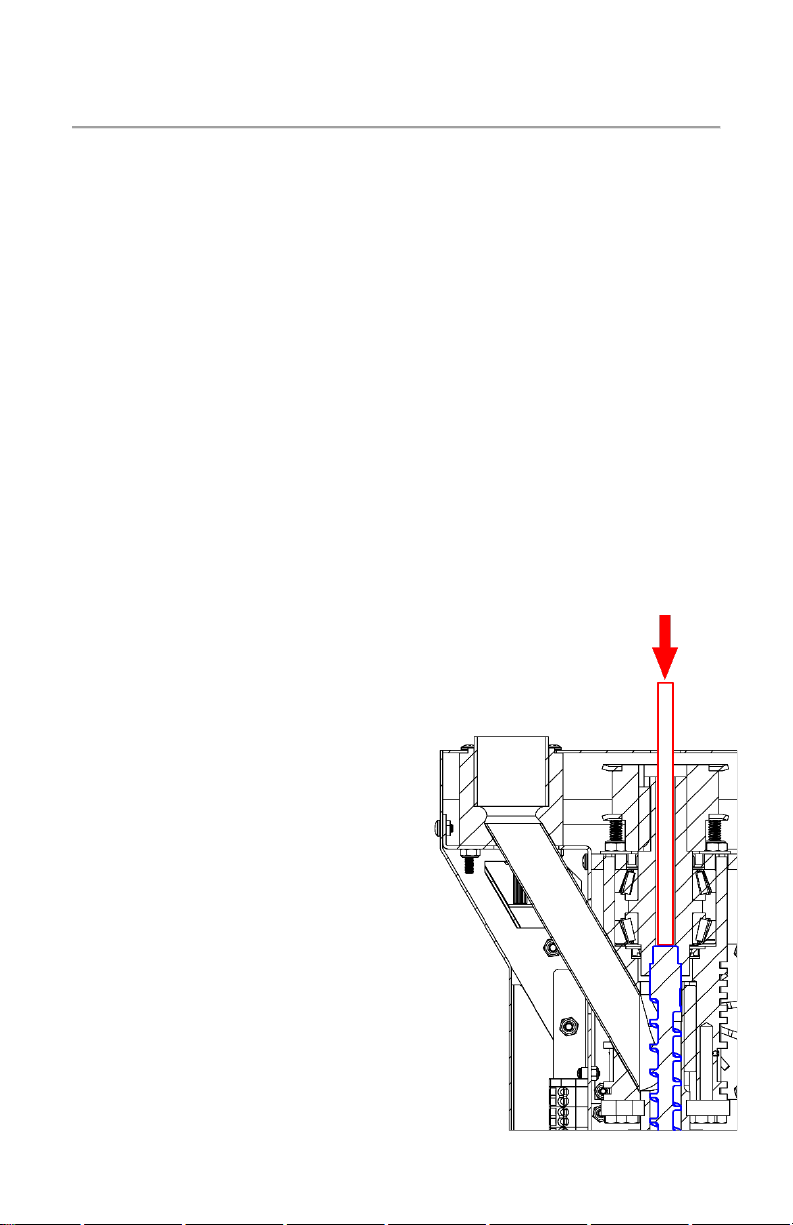
5. Remove the magnetic screw
retainer rod and insert the tube
cleaner extension rod to push the
screw forward and out from the
end of the barrel.