Security Products
TM
©1998 Digital Security Controls Ltd.
1645 Flint Road, Downsview, Ontario, Canada M3J 2J6
(416) 665-8460 • Fax (416) 665-7498 • 1-800-387-3630 Printed in Canada 29001509 R3
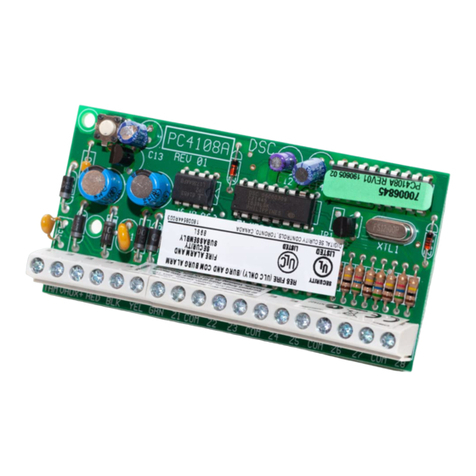
Zones 1-8 (PC4010)/1-16 (PC4020) are located on the main
control panel. Additional zones are added in sequence.
For example, if two PC4108Azone expanders are enrolled,
the first one enrolled will be assigned zones 17 to 24 and
the second will be assigned zones 25 to 32. To confirm
which zones are assigned to which expander, press the
arrow key when the enrollment confirmation message is
displayed.
For more information regarding module enrollment, see
the control panel Installation Manual.
5. Programming the Module
To access PC4010/4020 programming, enter [*][8] followed
by the Installer’s code. The zones connected to the module
must be added to a partition and programmed for
operation. The programming worksheet located on this
sheet indicates which sections must be programmed. For
more information regarding zone programming, see the
control panel Installation Manual.
NOTE: The zone types and attributes listed below are
for PC4010/4020 v3.0. For zone programming for
previous software versions, see the corresponding
programming manual.
System Partition
Zone 1 2 3 4 5 6 7 8 Zone Label Zone Type A1 A2 A3 A4 A5 A6 A7 A8
1. _ _ _ I
______I______I______I______I______I______I______I______II
______I______I______I______I______I______I______I______I______I______I______I______I______I______II
______I______II
______I______I______I______I______I______I______I______I
2. _ _ _ I
______I______I______I______I______I______I______I______II
______I______I______I______I______I______I______I______I______I______I______I______I______I______II
______I______II
______I______I______I______I______I______I______I______I
3. _ _ _ I
______I______I______I______I______I______I______I______II
______I______I______I______I______I______I______I______I______I______I______I______I______I______II
______I______II
______I______I______I______I______I______I______I______I
4. _ _ _ I
______I______I______I______I______I______I______I______II
______I______I______I______I______I______I______I______I______I______I______I______I______I______II
______I______II
______I______I______I______I______I______I______I______I
5. _ _ _ I
______I______I______I______I______I______I______I______II
______I______I______I______I______I______I______I______I______I______I______I______I______I______II
______I______II
______I______I______I______I______I______I______I______I
6. _ _ _ I
______I______I______I______I______I______I______I______II
______I______I______I______I______I______I______I______I______I______I______I______I______I______II
______I______II
______I______I______I______I______I______I______I______I
7. _ _ _ I
______I______I______I______I______I______I______I______II
______I______I______I______I______I______I______I______I______I______I______I______I______I______II
______I______II
______I______I______I______I______I______I______I______I
8. _ _ _ I
______I______I______I______I______I______I______I______II
______I______I______I______I______I______I______I______I______I______I______I______I______I______II
______I______II
______I______I______I______I______I______I______I______I
Zone Assignment
[Partition Area > Add/Edit Par]
XX= Partitions 01-08 (PC4020) 01-04 (PC4010)
[0100XX0300] Add New Zone
[0100XX0301] Edit Zone
[0100XX0302] Delete Zone “ZONE XXX”
Zone Attribute Defaults A1 A2 A3 A4 A5 A6 A7 A8
[00] Standard Delay ............................. YNY YNYNN
[01] Auxiliary Delay............................. YNYYYYNN
[02] Instant ............................................. YNY YNYNN
[03] Interior ............................................ YNYNNYNN
[04] Interior Delay ................................ YNYNNYNN
[05] Int Stay Away................................ YNYNYYNN
[06] Delay Stay Away .......................... YNYNYYNN
[07] Standard Fire ................................. YYNNNNNN
[08] Delayed Fire .................................. YYNNNNNN
[09] Auto Ver Fire ................................. YYNNNNNN
[10] Waterflow ...................................... YYNNNNNN
[11] Fire Supervis.................................. NYNNNNNN
[12] 24 Hr Bell ....................................... YNY NNNNN
[13] 24 Hr Bell/Buzz ............................ YNY NNNNN
[14] 24 Hr Buzzer.................................. YNY NNNNN
[15] 24 Hr Technical ............................. NNNNNNNN
[16] 24 Hr Gas ....................................... YNY NNNNN
[17] 24 Hr Heat ..................................... YYNNNNNN
[18] 24 Hr Medical ................................ NNY NNNNN
[19] 24 Hr Emergency .......................... YNY NNNNN
[20] 24 Hr Water ................................... YNY NNNNN
[21] 24 Hr Freeze .................................. YNY NNNNN
[22] 24 Hr Holdup ................................ NNNNNNNN
[23] 24 Hr Panic .................................... NNNNNNNN
[24] Latching 24 Hr .............................. YNNNNNNN
[25] Momentary Arm ........................... YNN NNNNN
[26] Maintained Arm ........................... YNNNNNNN
[27] Forced Answer .............................. NNY NYNNN
[28] Links Supervis............................... NNY NYNNN
[29] Links Answer ................................ NNY NYNNN
Zone Attributes:
A1=Bell Audible
A2=Bell Pulsed
A3=Bypass Enabled
A4=Chime Function
A5=Force Arm
A6=Swgr Shut Down
A7=TX Delay
A8=Waterflow Del
FCC COMPLIANCE STATEMENT
CAUTION: Changes or modifications not expressly approved by Digital Security
Controls Ltd. could void your authority to use this equipment.
This equipment generates and uses radio frequency energy and if not installed and used
properly, in strict accordance with the manufacturer’s instructions, may cause interfer-
ence to radio and television reception. It has been type tested and found to comply with
the limits for Class B device in accordance with the specifications in Subpart “B” of Part
15 of FCC Rules, which are designed to provide reasonable protection against such
interference in any residential installation. However, there is no guarantee that interfer-
ence will not occur in a particular installation. If this equipment does cause interference
to television or radio reception, which can be determined by turning the equipment off
and on, the user is encouraged to try to correct the interference by one or more of the
following measures:
•Re-orient the receiving antenna
•Relocate the alarm control with respect to the receiver
•Move the alarm control away from the receiver
•Connect the alarm control into a different outlet so that alarm control and receiver are
on different circuits.
If necessary, the user should consult the dealer or an experienced radio/television
technician for additional suggestions. The user may find the following booklet
prepared by the FCC helpful: “How to Identify and Resolve Radio/Television
Interference Problems”. This booklet is available from the U.S. Government
Printing Office, Washington, D.C. 20402, Stock # 004-000-00345-4.
This Class B digital apparatus meets all requirements of the Canadian interfer-
ence-causing equipment regulations.Cet appareil numérique de la Classe B
respecte toutes les exigences de règlement sur le matériel brouilleur du Canada.