manuals.online logo
Brands
  1. Home
  2. •
  3. Brands
  4. •
  5. McLED
  6. •
  7. Remote Control
  8. •
  9. McLED ML-910.521.22.0 User manual

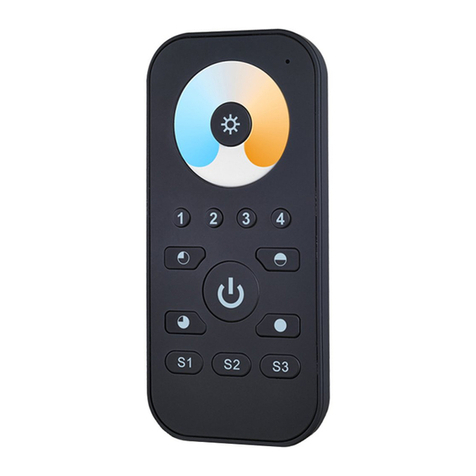
McLED ML-910.521.22.0 User manual

Other McLED Remote Control manuals

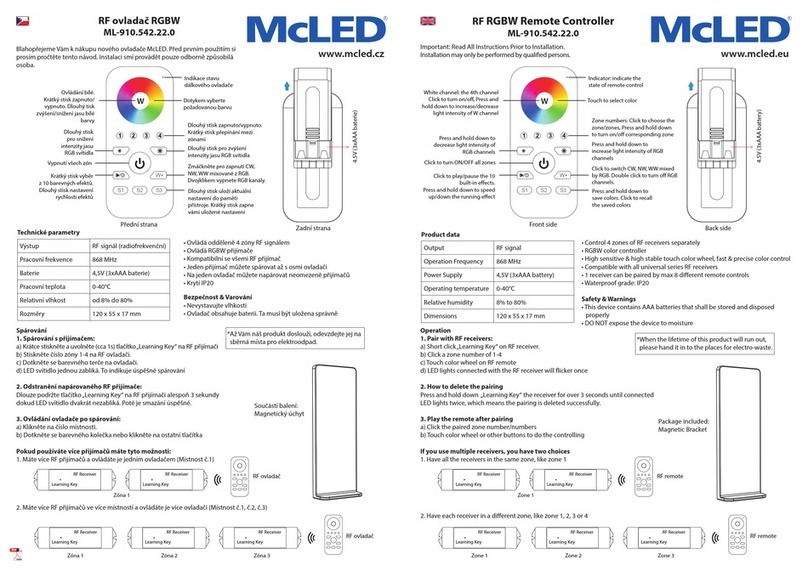
McLED ML-910.542.22.0 User manual

McLED

McLED ML-910.542.22.0 User manual

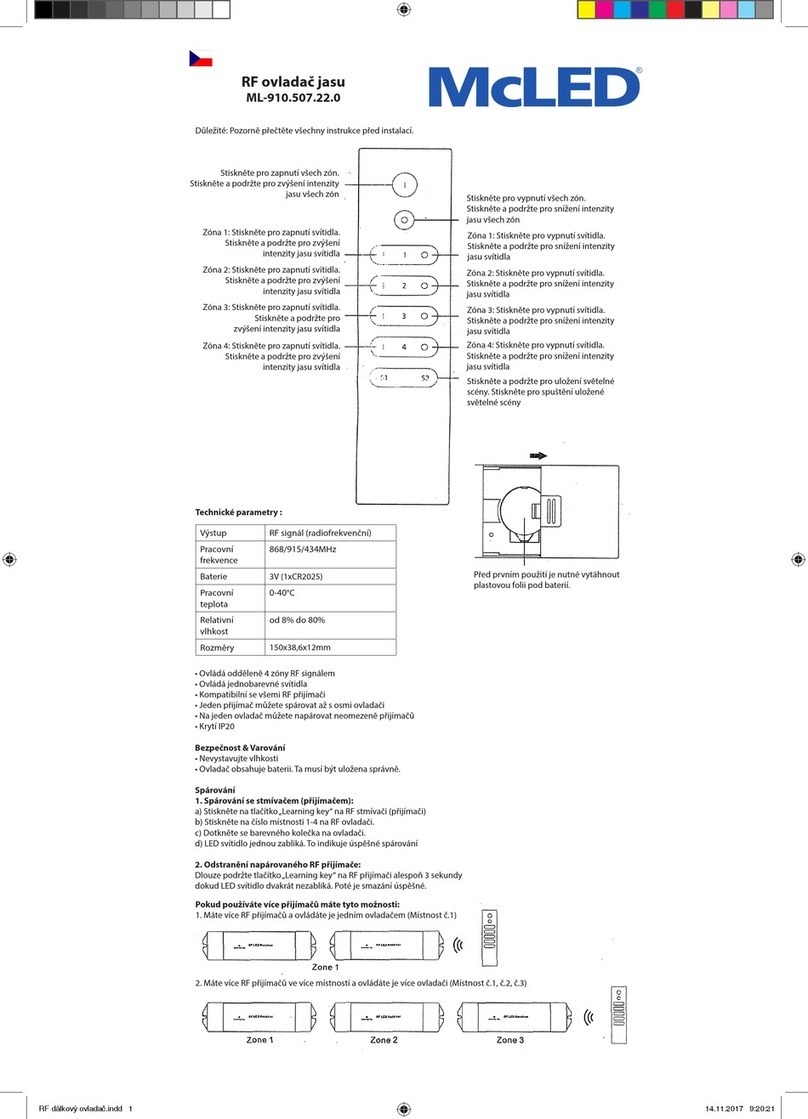
McLED ML-910.507.22.0 User manual

McLED

McLED ML-910.507.22.0 User manual

McLED ML-910.542.22.0 User manual

McLED

McLED ML-910.542.22.0 User manual

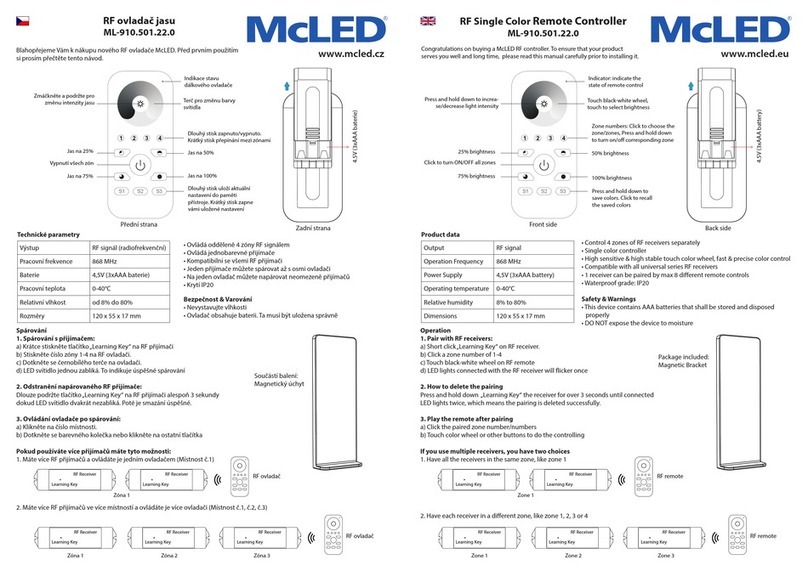
McLED ML-910.501.22.0 User manual

McLED

McLED ML-910.501.22.0 User manual

McLED ML-910.521.22.0 User manual

McLED

McLED ML-910.521.22.0 User manual

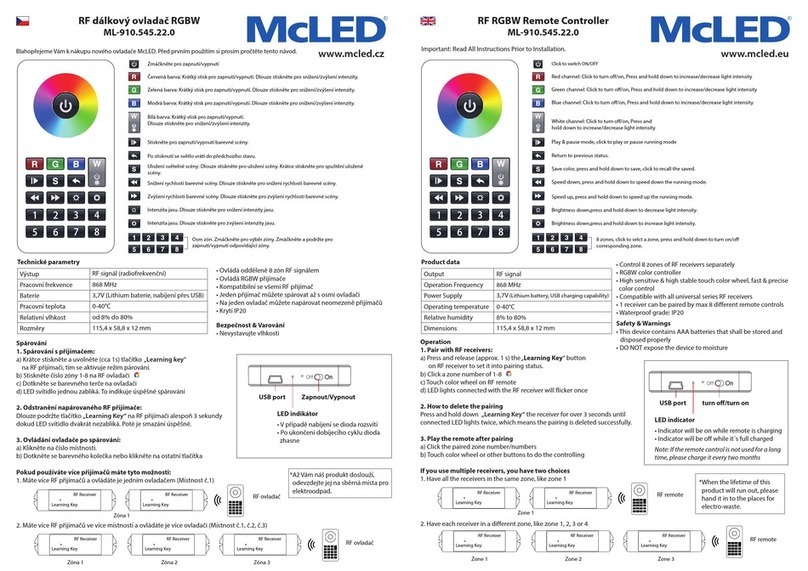
McLED ML-910.545.22.0 User manual

McLED

McLED ML-910.545.22.0 User manual

Popular Remote Control manuals by other brands

Bircher Reglomat RC Duo 2 user guide

Bircher Reglomat

Bircher Reglomat RC Duo 2 user guide

Emerson RCBT100 owner's manual

Emerson

Emerson RCBT100 owner's manual

BILDA Element-6 user manual

BILDA

BILDA Element-6 user manual

Absima CR7P manual

Absima

Absima CR7P manual

Mitsubishi Electric PAR-32MAAG Instruction book

Mitsubishi Electric

Mitsubishi Electric PAR-32MAAG Instruction book

RCA RCRTBL08BE1 quick start guide

RCA

RCA RCRTBL08BE1 quick start guide

US Electronics NOVARI user guide

US Electronics

US Electronics NOVARI user guide

Panasonic EUR7622KB0 Operation guide

Panasonic

Panasonic EUR7622KB0 Operation guide

Bang & Olufsen Beo4 user manual

Bang & Olufsen

Bang & Olufsen Beo4 user manual

Marantz RC101 user guide

Marantz

Marantz RC101 user guide

FUTABA 9ZAP - PART2 manual

FUTABA

FUTABA 9ZAP - PART2 manual

HR Matic HR MULTI 3 quick start guide

HR Matic

HR Matic HR MULTI 3 quick start guide

Anritsu MP1777A Operation manual

Anritsu

Anritsu MP1777A Operation manual

Niles WVC100 Installation & operating guide

Niles

Niles WVC100 Installation & operating guide

Bang & Olufsen BEO6 Getting started

Bang & Olufsen

Bang & Olufsen BEO6 Getting started

GE 94901 instruction manual

GE

GE 94901 instruction manual

FUTABA R7108SB Full manual

FUTABA

FUTABA R7108SB Full manual

Invacare G91S user manual

Invacare

Invacare G91S user manual

manuals.online logo
manuals.online logoBrands
  • About & Mission
  • Contact us
  • Privacy Policy
  • Terms and Conditions

Copyright 2025 Manuals.Online. All Rights Reserved.

Spárování
1. Spárování s přijímačem:
a) Krátce stiskněte a uvolněte (cca 1s) tlačítko„Learning Key“ na RF přijímači
b) Stiskněte číslo zóny 1-4 na RF ovladači.
c) Dotkněte se barevného terče na ovladači.
d) LED svítidlo jednou zabliká. To indikuje úspěšné spárování
2. Odstranění napárovaného RF přijímače:
Dlouze podržte tlačítko„Learning Key“ na RF přijímači alespoň 3 sekundy
dokud LED svítidlo dvakrát nezabliká. Poté je smazání úspěšné.
3. Ovládání ovladače po spárování:
a) Klikněte na číslo místnosti.
b) Dotkněte se barevného kolečka nebo klikněte na ostatní tlačítka
Pokud používáte více přijímačů máte tyto možnosti:
1. Máte více RF přijímačů a ovládáte je jedním ovladačem (Místnost č.1)
2. Máte více RF přijímačů ve více místností a ovládáte je více ovladači (Místnost č.1, č.2, č.3)
Operation
1. Pair with RF receivers:
a) Short click „Learning Key“ on RF receiver.
b) Click a zone number of 1-4
c) Touch color wheel on RF remote
d) LED lights connected with the RF receiver will icker once
2. How to delete the pairing
Press and hold down „Learning Key“ the receiver for over 3 seconds until connected
LED lights twice, which means the pairing is deleted successfully.
3. Play the remote after pairing
a) Click the paired zone number/numbers
b) Touch color wheel or other buttons to do the controlling
If you use multiple receivers, you have two choices
1. Have all the receivers in the same zone, like zone 1
2. Have each receiver in a dierent zone, like zone 1, 2, 3 or 4
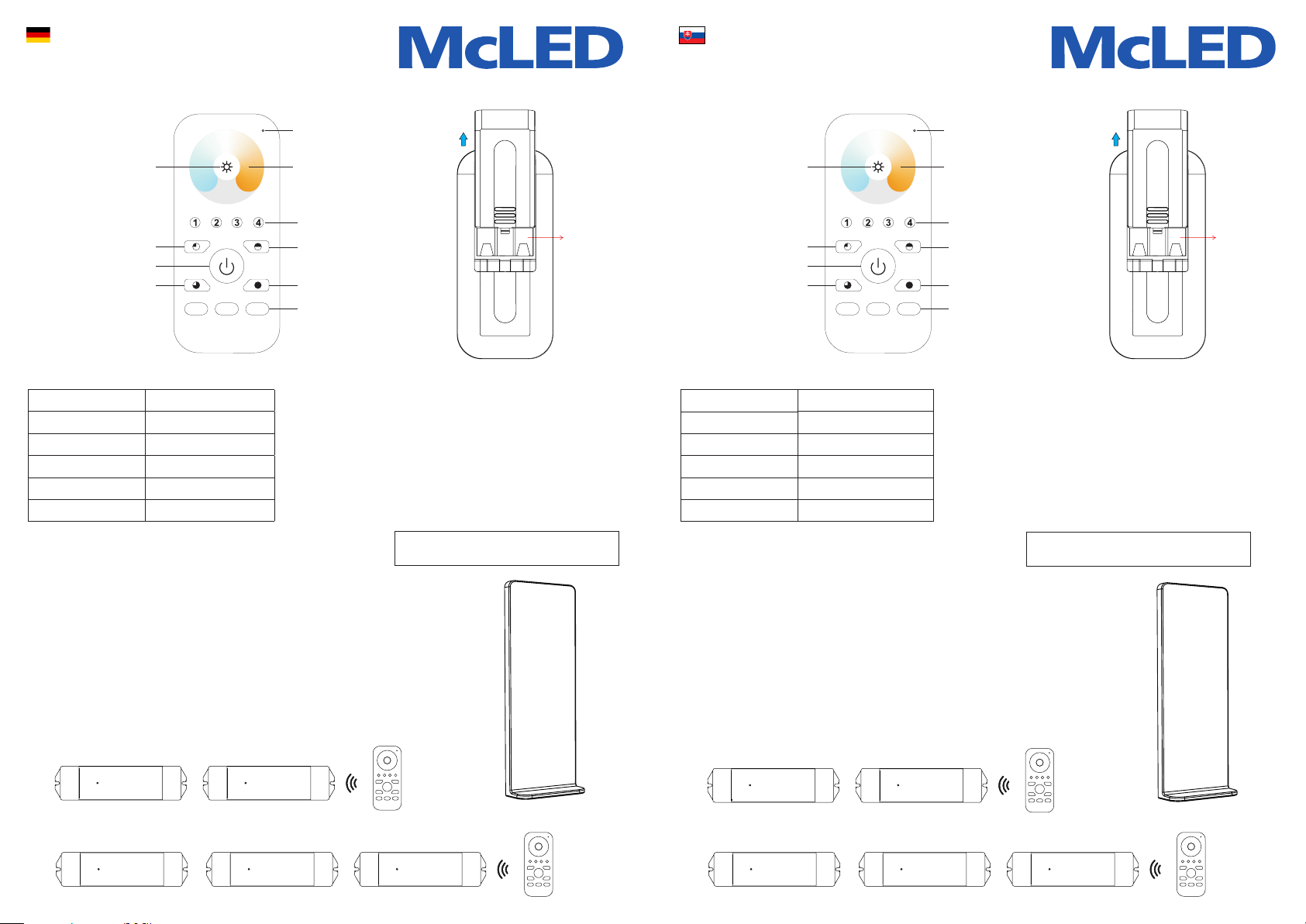
Indikace stavu
dálkového ovladače
Indicator: indicate the
state of remote control
Barevný terč
pro změnu barvy svítidla
Touch color wheel, touch to
select color temperature
Dlouhý stisk zapnuto/vypnuto.
Krátký stisk přepínání mezi zónami
Zone numbers: Click to choose the
zone/zones, Press and hold down
to turn on/o corresponding zone
Jas na 50% 50% brightness
Jas na 100% 100% brightness
Dlouhý stisk uloží aktuální
nastavení do paměti
přístroje. Krátký stisk zapne
vámi uložené nastavení
Press and hold down to
save colors. Click to recall
the saved colors
Zmáčkněte a podržte pro
změnu intenzity jasu Press and hold down to increa-
se/decrease light intensity
Jas na 25% 25% brightness
Vypnutí všech zón Click to turn ON/OFF all zones
Jas na 75% 75% brightness
• Ovládá odděleně 4 zóny RF signálem
• Ovládá CCT přijímače
• Kompatibilní se všemi RF přijímači
• Jeden přijímač můžete spárovat až s osmi ovladači
• Na jeden ovladač můžete napárovat neomezeně přijímačů
• Krytí IP20
Bezpečnost & Varování
• Nevystavujte vlhkosti
• Ovladač obsahuje baterii. Ta musí být uložena správně
• Control 4 zones of RF receivers separately
• CCT color controller
• High sensitive & high stable touch color wheel, fast & precise color control
• Compatible with all universal series RF receivers
• 1 receiver can be paired by max 8 dierent remote controls
• Waterproof grade: IP20
Safety & Warnings
• This device contains AAA batteries that shall be stored and disposed
properly
• DO NOT expose the device to moisture
Zóna 1 Zone 1
Learning Key Learning Key
RF Receiver RF Receiver
RF Receiver RF ReceiverRF Receiver RF Receiver
Learning Key Learning KeyLearning Key Learning KeyLearning Key Learning Key
Learning Key Learning Key
Zóna 1 Zone 1Zóna 2 Zone 2
RF ovladač RF remote
Součástí balení:
Magnetický úchyt Package included:
Magnetic Bracket
Přední strana Front side
Zóna 3 Zone 3
4.5V (3xAAA baterie)
4.5V (3xAAA battery)
Zadní strana Back side
®
RF ovladač CCT
ML-910.521.22.0
www.mcled.cz
®
RF Remote Controller CCT
ML-910.521.22.0
www.mcled.eu
Výstup RF signál (radiofrekvenční)
Pracovní frekvence 868 MHz
Baterie 4,5V (3xAAA baterie)
Pracovní teplota 0-40°C
Relativní vlhkost od 8% do 80%
Rozměry 120 x 55 x 17 mm
Output RF signal
Operation Frequency 868 MHz
Power Supply 4,5V (3xAAA battery)
Operating temperature 0-40°C
Relative humidity 8% to 80%
Dimensions 120 x 55 x 17 mm
Technické parametry Product data
S1
S2
S3 S1
S2
S3
Blahopřejeme Vám k nákupu nového ovladače McLED. Před prvním použitím si
prosím pročtěte tento návod. Instalaci smí provádět pouze odborně způsobilá
osoba.
Important: Read All Instructions Prior to Installation.
Installation may only be performed by qualied persons.
*When the lifetime of this product will run out,
please hand it in to the places for electro-waste.
*Až Vám náš produkt doslouží, odevzdejte jej na
sběrná místa pro elektroodpad.
®
RF Regler CCT
ML-910.521.22.0
www.mcled.at
Paarung
1. Paarung mit dem Empfänger
a) Betätigen Sie die Taste „Learning Key“ am RF Empfänger
b) Betätigen Sie die Zonennummer 1-4 am RF Regler
c) Berühren Sie die farbige Zielscheibe am Regler.
d) Die LED Leuchte blinkt einmal auf Das zeigt die erfolgreiche Paarung an
2. Beseitigung des gepaarten RF Empfängers:
Halten Sie die Taste„Learning Key“ am RF Empfänger zumindest 3 Sekunden,
bis die LED Leuchte zweimal aueuchtet.
Anschließend ist der Empfänger erfolgreich gelöscht.
3. Betätigung der Reglers für die Paarung:
a) Klicken Sie die Nummer des Raums an.
b) Berühren Sie den farbigen Kreis bzw. die übrigen Tasten
Im Falle, dass sie mehrere Empfänger benutzen, haben Sie folgende Möglichkeiten:
1. Sie haben mehrere RF Empfänger und betätigen Sie mit einem Regler (Raum Nr. 1)
2. Sie haben mehrere RF Empfänger in mehreren Räumen und betätigen Sie mit mehreren Reglern (Raum Nr. 1, Nr. 2, Nr. 3)
• Betätigt getrennt 4 Zonen mit RF Signal
• Steuert das CCT des Empfängers
• Mit allen RF Empfängern kompatibel
• Ein Empfänger kann mit bis 8 Reglern gepaart werden
• Mit einem Regler kann eine unbegrenzte Zahl der Empfänger gepaart werden
• Schutzart IP20
Sicherheit & Warnung
• Nicht Feuchtigkeit aussetzen
• Der Controller inhalts ein Batterie. Achten Sie auf die richtige Polarität
Zone 1
Learning Key
RF Receiver
RF Receiver
RF Receiver
RF ReceiverRF Receiver
Learning Key Learning Key Learning Key
Learning Key
Zone 1 Zone 2
RF Fahrer
RF Fahrer
Inkl:
Magnethalterung
Zone 3
4.5V (3xAAA Batterie)
Rückseite
Ausgang RF Signal (Radiofrequenz)
Arbeitsfrequenz 868 MHz
Batterie 4,5V (3xAAA Batterie)
Arbeitstemperatur 0-40°C
Relative Feuchtigkeit von 8% bis 80%
Abmessungen 120 x 55 x 17 mm
Technische Parameter
®
RF ovládač CCT
ML-910.521.22.0
www.mcled.sk
Spárovanie
1. Spárovanie s prijímačom:
a) Krátko stlačte (cca 1s) tlačidlo„Learning Key“ na RF prijímači.
b) Stlačte číslo zóny 1 – 4 na RF ovládači.
c) Dotknite sa farebného terča na ovládači.
d) LED svietidlo raz zabliká. To indikuje úspešné spárovanie
2. Odstránenie spárovaného RF prijímača:
Dlho podržte tlačidlo„Learning Key“ na RF prijímači aspoň 3 sekundy,
pokým LED svietidlo dvakrát nezabliká.
Potom je zmazanie úspešné.
3. Ovládanie ovládača po spárovaní:
a) Kliknite na číslo miestnosti.
b) Dotknite sa farebného kolieska alebo na ostatné tlačidla.
Ak používate viac prijímačov, máte tieto možnosti:
1. Máte viac RF prijímačov a ovládate ich jedným ovládačom (Miestnosť č. 1)
2. Máte viac RF prijímačov vo viacerých miestnostiach a ovládate ich viacerými ovládačmi (Miestnosť č. 1, č. 2, č. 3)
• Ovláda oddelene 4 zóny RF signálom
• Ovláda CCT prijímače
• Kompatibilný so všetkými RF prijímačmi
• Jeden prijímač môžete spárovať až s ôsmymi ovládačmi
• S jedným ovládačom môžete spárovať neobmedzený počet prijímačov
• Krytie IP20
Bezpečnosť a varovania
• Nevystavujte vlhkosti
• Ovládač obsahuje batériu. Tá musí byť uložená správne.
Zóna 1
Learning Key
RF Receiver
RF Receiver
RF Receiver
RF ReceiverRF Receiver
Learning Key Learning Key Learning Key
Learning Key
Zóna 1 Zóna 2
RF ovládač
RF ovládač
Súčasťou balenia:
magnetický držiak
Predná strana
Zóna 3
4.5V (3xAAA batéria)
Zadná strana
Výstup RF signál (rádiofrekvenčný)
Pracovná frekvencia 868 MHz
Batéria 4,5V (3xAAA batéria)
Pracovná teplota 0-40°C
Relatívna vlhkost od 8% do 80%
Rozmery 120 x 55 x 17 mm
Technické parametre
Statusanzeige des Fernreglers Indikácia stavu diaľkového ovládača
Farbziel zur Veränderung der Farbe
des Beleuchtungskörpers
Farebný terč na zmenu farby
svietidla
Langer Tastendruck eingeschaltet/
ausgeschaltet. Kurzer Tastendruck
Umschaltung zwischen den Zonen
Dlhé stlačenie na zapnutie/vypnu-
tie. Krátke stlačenie na prepínanie
medzi zónami
Helligkeit auf 50% Jas na 50 %
Helligkeit auf 100% Jas na 100 %
Ein langer Tastendruck speichert
die aktuelle Einstellung in den Ge-
rätespeicher. Ein kurzer Tastendruck
schaltet die von Ihnen gespeicherte
Einstellung ein
Dlhé stlačenie uloží aktuálne nasta-
venia do pamäte prístroja. Krátke
stlačenie zapne vami uložené
nastavenie.
Drücken und halten Sie zur
Veränderung der Helligkeitsin-
tensität gedrückt
Stlačte a podržte na
zmenu intenzity jasu
Helligkeit auf 25% Jas na 25 %
Ausschaltung aller Zonen Vypnutie všetkých zón
Helligkeit auf 75% Jas na 75 %
Vorderseite
S1
S2
S3 S1
S2
S3
Wir beglückwünschen Sie zum Einkauf Ihrer neuen Fernbedienung McLED Lesen Sie
vor der ersten Benutzung diese Anleitung durch. Die Installation dürfen nur qualizier-
te Personen durchführen.
Blahoželáme Vám k nákupu nového ovládača McLED. Pred prvým použitím si prosím
prečítajte tento návod. Inštaláciu môžu vykonávať iba kvalikované osoby.
*Bringen Sie das ausgediente Produkt bitte zu
einer Sammelstelle für Elektroschrott.
*Keď Vám náš produkt doslúži, odovzdajte ho
prosím na zberné miesto pre elektrický odpad.