manuals.online logo
Brands
  1. Home
  2. •
  3. Brands
  4. •
  5. N.R. AUTOSEATS
  6. •
  7. Automobile Accessories
  8. •
  9. N.R. AUTOSEATS Top User manual

N.R. AUTOSEATS Top User manual

This manual suits for next models

1

Popular Automobile Accessories manuals by other brands

Magneti Marelli AC161 Installation instruction

Magneti Marelli

Magneti Marelli AC161 Installation instruction

FDI uEZ GUI Start here

FDI

FDI uEZ GUI Start here

JCROffroad JT Install instructions

JCROffroad

JCROffroad JT Install instructions

Rostra VOXXElectronics 250-1930 owner's guide

Rostra

Rostra VOXXElectronics 250-1930 owner's guide

TOP VEHICLE TECH GR3FORD5 installation manual

TOP VEHICLE TECH

TOP VEHICLE TECH GR3FORD5 installation manual

Safe Fleet PRIME DESIGN AR-2000-BLK manual

Safe Fleet

Safe Fleet PRIME DESIGN AR-2000-BLK manual

Skoda Fabia Combi 5J Fitting instructions

Skoda

Skoda Fabia Combi 5J Fitting instructions

Camcar 40077 Al Mounting instructions

Camcar

Camcar 40077 Al Mounting instructions

Camcar 40089 AL Mounting instructions

Camcar

Camcar 40089 AL Mounting instructions

Impac Tradesman 2000 installation manual

Impac

Impac Tradesman 2000 installation manual

DVB OFFROAD BRSB-01 installation manual

DVB

DVB OFFROAD BRSB-01 installation manual

Safari Snorkel SS385HF installation guide

Safari Snorkel

Safari Snorkel SS385HF installation guide

ULTIMATE SPEED 279746 Assembly and Safety Advice

ULTIMATE SPEED

ULTIMATE SPEED 279746 Assembly and Safety Advice

SSV Works DF-F65 manual

SSV Works

SSV Works DF-F65 manual

ULTIMATE SPEED CARBON Assembly and Safety Advice

ULTIMATE SPEED

ULTIMATE SPEED CARBON Assembly and Safety Advice

Witter F174 Fitting instructions

Witter

Witter F174 Fitting instructions

WeatherTech No-Drill installation instructions

WeatherTech

WeatherTech No-Drill installation instructions

TAUBENREUTHER 1-336050 Installation instruction

TAUBENREUTHER

TAUBENREUTHER 1-336050 Installation instruction

manuals.online logo
manuals.online logoBrands
  • About & Mission
  • Contact us
  • Privacy Policy
  • Terms and Conditions

Copyright 2025 Manuals.Online. All Rights Reserved.

30/3 Anamai Ngam Charoen 31 Alley,
Tha Kham, Bang Khun Thian, Bangkok, Thailand
Tel: 02-464-7717, 02-464-7718
Mobile: 089-226-2150, 081-984-2325, 086-386-3555
Scan QR Code for
Wheelchair User Guide
Automatic Wheelchair for Car User’s Manual
USER MANUAL
Index
Wheelchair specially designed for elderly
Accessories user guide
User guide for electronic wheelchair for elderly
User guide for wheelchair and handling guide
Caution in operating wheelchair for elderly
Primary inspection and diagnostic
Manual handling during automatic function error
01-02
03
04
05-08
09-10
11
12
WELCAB
WHEELCHAIR
Wheelchair for elderly OPTION A-B Electronic wheelchair for elderly, dissemble mechanic
Top Model (Option A) Electronic movement Seat lifting mechanic
Functions
Functions
- Total genuine leather cover
- Adjustable arm
- Removable metal feet rest
- High grade rubber wheel with cover
- Back wheel disk brake
- Stationary safety lock
- 180 backrest adjustability
- Adjustable head rest
- Safety chest strap
- Net weight 48 kg.
- Directional control joystick
- 6 Km./H. top speed
- 2-3 Hours battery life
- Charging support normal
output and car output
- Can be used manually
- Net weight 48 kg
- Genuine leather + PVC cover
- Adjustable back rest
- Seat detachable from car
- Cannot be dissemble for strolling
Standard model (Option B)
- Genuine leather + PVC cover
- Non-adjustable arm
- Fixed-plastic feet rest
- High grade rubber wheel, no cover
- Back wheel disk brake
- Stationary safety lock
- 180o backrest adjustability
- Adjustable head rest
- Safety chest strap
- Net weight 43 kg.
Lifting Hydraulic Mechanic for Car Transport
- Parking position sensor
- Smooth motion wheelchair lift
- Limit sensor warning different floor level while descending
- Automatic stop and warning sound when detect obstacle
- Remote controller and wired controller
- All parts assembled and installed domestically
(in house by manufacturer)
- Mechanic control system (in house by manufacturer)
- Imported hydraulic from Italy
Accessories user guide Accessories user guide, Electronic model
1
1
2
3
4
5
6
2
3
5
6
4
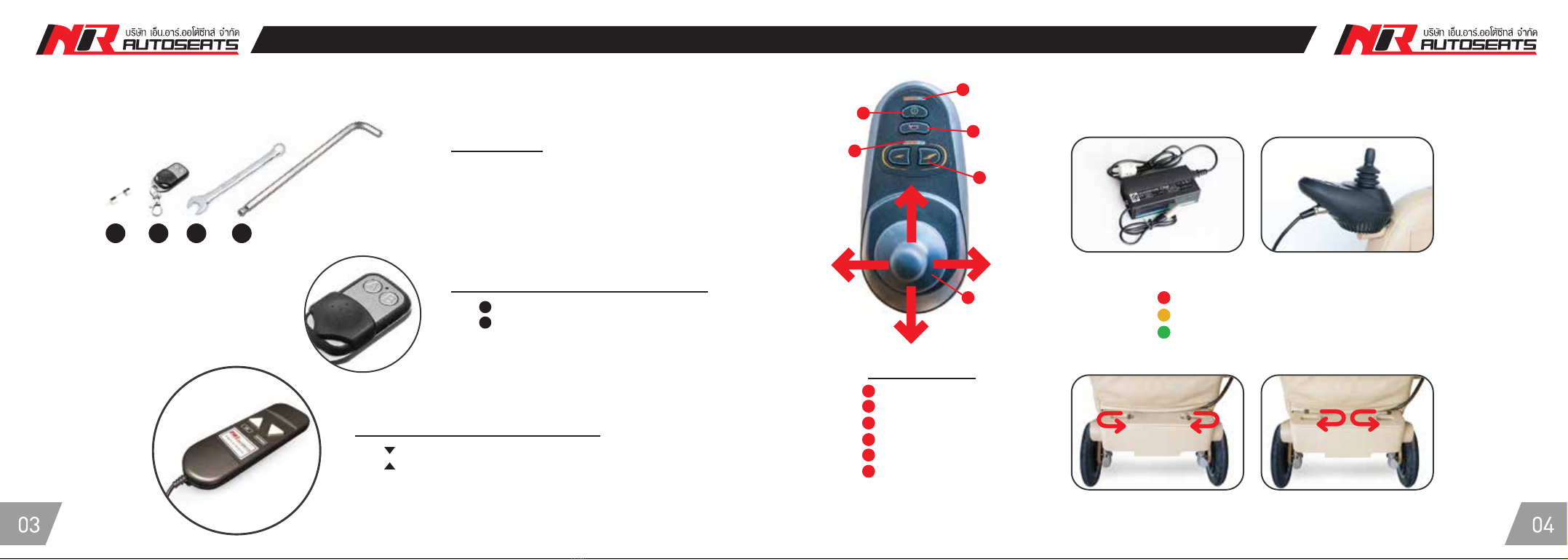
*** For electric model only ***
How to charge electric wheelchair
Joy Controller
Unlock to use
wheelchair manually function
Lock to use
electronic drive function
Connect adapter to 220V power output and connect the other end to the Joy Controller
Red indicator means wire is live
Orange indicator means charging
Green indicator means battery fully charged
Accessories
1. Fuse 5A
2. Remote controller
3. Wrench size 13
4. Hex key wrench 8 mm.
Battery status
On/Off button
Horn
Speed indicator
Speed control
Direction control joy stick
Wheelchair lift remote controller
Wheelchair lift wired controller
Hold DOWN button: Descend the wheelchair
Hold UP button: Ascend the wheelchair
*to stop wheelchair in the desired position, release button immediately.
The motion will only resume when button is pressed.
Hold A button: Descend the wheelchair
Hold B button: Ascend the wheelchair
1 2 3 4
User guide for wheelchair and handling User guide for wheelchair and handling
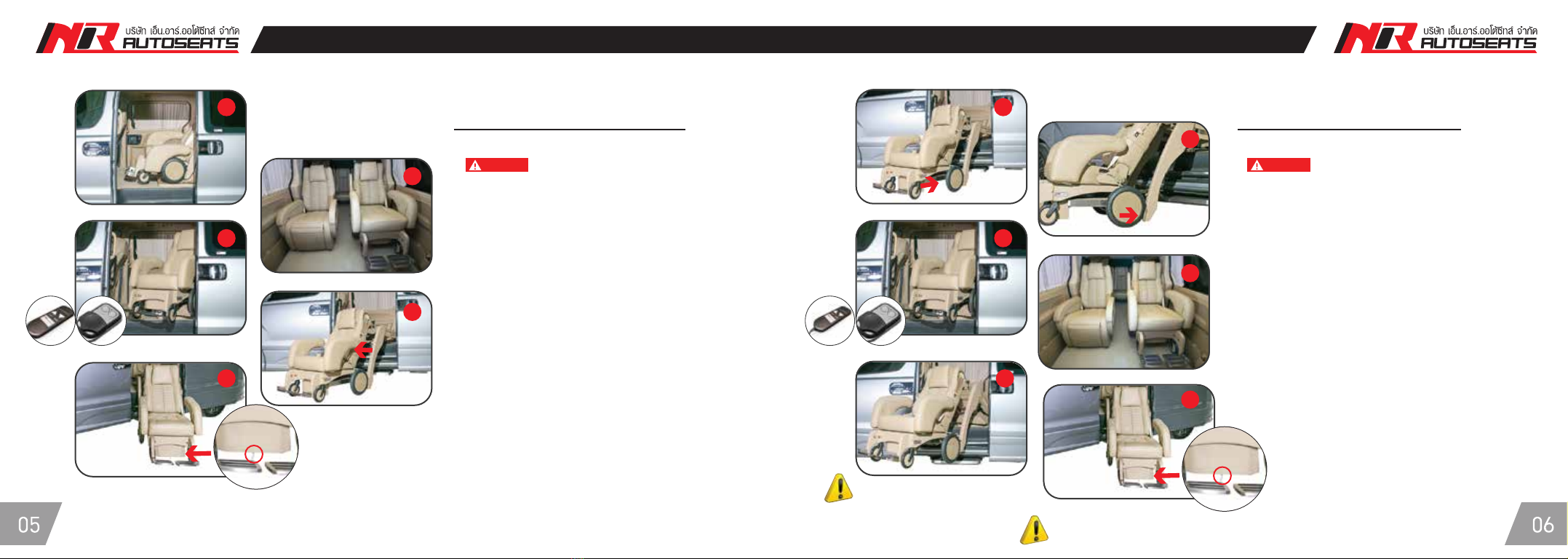
Wheelchair ascending steps
Wheelchair descending steps
1. Slide the door open to full extend (fixture 1)
2. adjust back rest by 10 degrees to clear
the head position from the ceiling.
3. Hold A or Down button to descend wheelchair.
4. While wheelchair is descending, clear all obstacle
from the rotation path
(wheelchair might stick at the adjacent seat).
5. Wheelchair can be strolled once the system indicates
steps complete sound.
6. Limit sensor will warn immediately when the height
of the floor exceeds maximum capacity.
Caution Caution
The system is reset once the limit sensor touches the floor
level and indicate with long beep sound
** sound indication if wheelchair
is not locked into position
1. Attach wheel chair to the lock in position 1
2. Both back wheel must touch
the lift system.
3. Once the wheelchair is locked into position,
Hold B or Up button until the lifting system ascend
the wheelchair to its resting position.
4. There will be indication sound every time
the step is completed.
5. If the wheel chair is not locked into position,
the system will stop mid process and
indicate 2 consecutive beep sound.
6. Hold A or Down button until the wheelchair
descends and rest on the ground in starting position
to reset the system. Once stationary, check that
the wheelchair is locked into position
and repeat step 1,2, and 3
1 1
2
3 3
4
4
5
56
6

User guide for wheelchair and handling User guide for wheelchair and handling
12
34
56
21
43
78
5
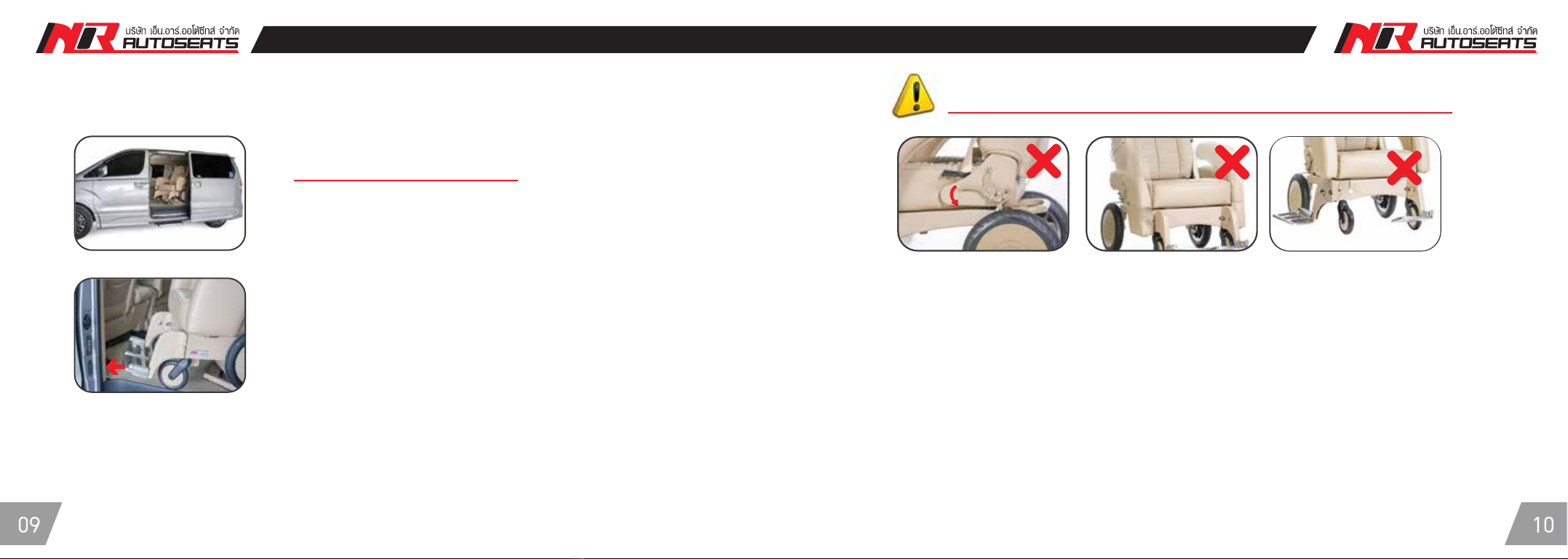
How to adjust arm rest
- Arm rest lock is positioned under the arm rest
- Pull the lock to adjust position (fixture 2)
- Pull arm rest up to adjust position
How to adjust head rest
- Head rest can be adjusted up-down and removed
Safety belt
- Using safety belt while transporting in car (fixture 3)
- Using safety belt while operating wheelchair (fixture 4)
Assistant paddle
- Stepping on assistant paddle will help lifting
the front wheel in for some circumstances
which required.
How to disassemble feet rest
- Press stainless button at position on fixture 3
and adjust feet rest to the side.
- Fee rest can be pull up or removed (fixture 4)
How to lock wheelchair
- To unlock wheel, pull the lock up to resting
position (fixture 5)
- To lock wheel, pull the lock down to resting
position (fixture 6)
How to adjust back rest
- Pull back rest adjuster and adjust to desired position.
The wheelchair support up to 180 degrees
Remark : When ascending-descending steps are completed, there will always be sound indication
* Caution : Please wait for sound indication before strolling
1. Do not lock the wheel 2. Do not slide arm rest down 3. Do not adjust feet rest to the side
Caution in operating wheelchair for elderly Caution in operating wheelchair for elderly
Caution in using wheelchair
Warning !! Before using lift function please check the following
1. Please be careful of the ceiling during lifting operation.
Adjust the back rest to clear the rest from ceiling path
2. Please be careful of the car frame during lifting operation.
Adjust the feet position before using lifting function
Primary inspection when lifting function is error
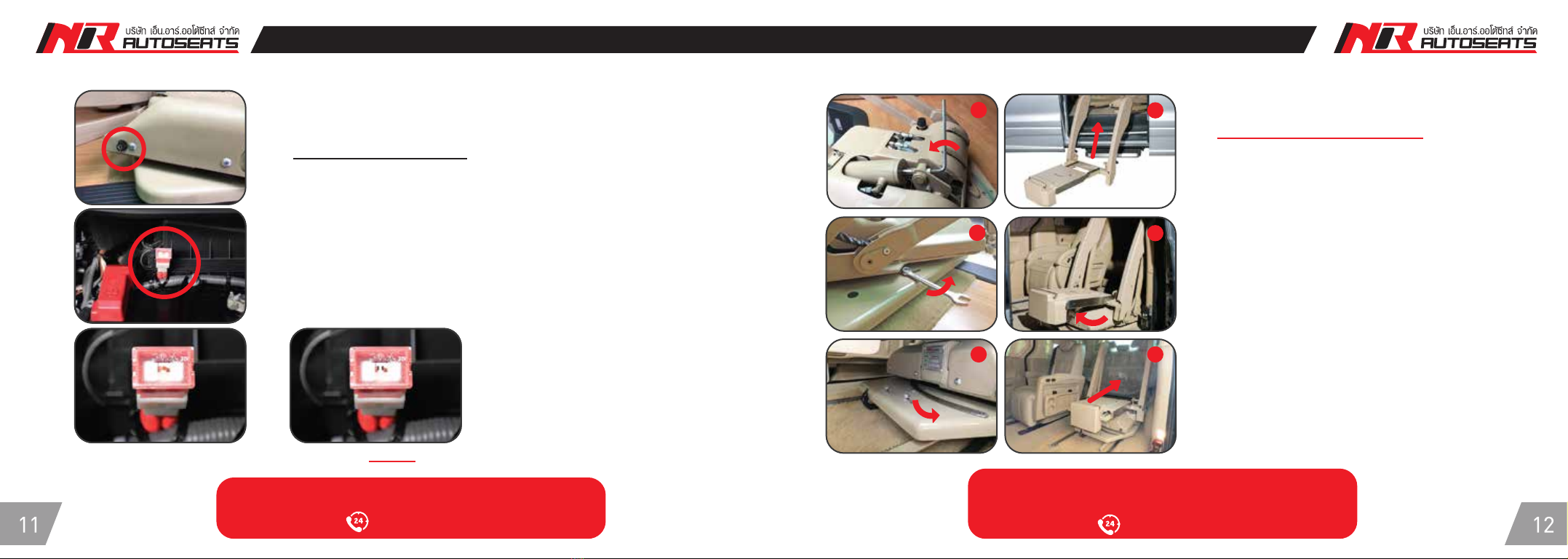
Check 2 fuse position
1. Check fuse 5A at position 1 (Fixture 1)
2. Check fuse at car battery (Fixture 2)
* If both fuses are normal, please move the mechanic
into resting position (Fixture 12)
Manually handling during
automatic function error
Status : Fuse is normal, ready for use Status : Fuse is damaged, do not use
12
34
65
1. Remove the screw from hydraulic (counter clock-wise)
using the wrench (fixture 1).
2. Adjust the mechanic part to position 2.
3. Loosen the screw using the wrench and slide the screw
to unlock position (fixture 3).
4. Adjust the mechanical part to position 4
(apply only to model with slider)
5. Loosen the screw using the wrench and slide the screw
to unlock position (fixture 5).
6. Move mechanical part back and screw all parts back.
Manual handling during automatic function errorPrimary inspection and diagnostic
1
2
For enquiry/equipment error report
095-701-7111
Before manually handling the mechanical
part, please report
095-701-7111