manuals.online logo
Brands
  1. Home
  2. •
  3. Brands
  4. •
  5. NEC
  6. •
  7. LCD TV
  8. •
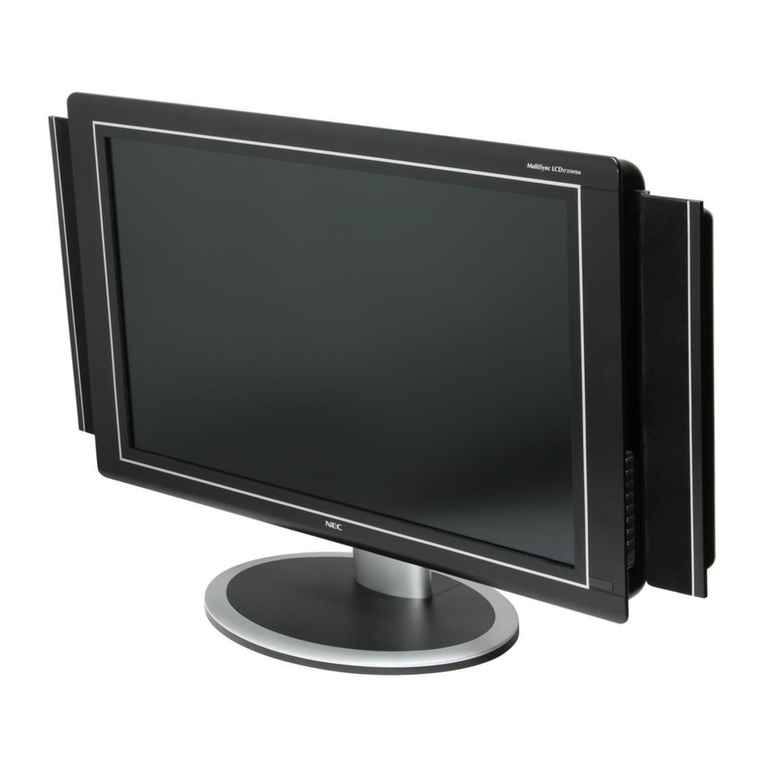
  9. NEC LCD3210-BK - MultiSync - 32" LCD Flat Panel... User manual

NEC LCD3210-BK - MultiSync - 32" LCD Flat Panel... User manual

This manual suits for next models

2

Other NEC LCD TV manuals

NEC NLT-17WF User manual

NEC

NEC NLT-17WF User manual

NEC NLT-40W User manual

NEC

NEC NLT-40W User manual

NEC NLT-32HDB4 User manual

NEC

NEC NLT-32HDB4 User manual

NEC E656 User manual

NEC

NEC E656 User manual

NEC NLT-19HDDV3 User manual

NEC

NEC NLT-19HDDV3 User manual

NEC LCD2335WXM - MultiSync - 23" LCD TV User manual

NEC

NEC LCD2335WXM - MultiSync - 23" LCD TV User manual

NEC P401 - MultiSync - 40" LCD Flat Panel... Guide

NEC

NEC P401 - MultiSync - 40" LCD Flat Panel... Guide

NEC E322 User manual

NEC

NEC E322 User manual

NEC ASPV32-AVT - AccuSync - 32" LCD TV User manual

NEC

NEC ASPV32-AVT - AccuSync - 32" LCD TV User manual

NEC P401 - MultiSync - 40" LCD Flat Panel... User guide

NEC

NEC P401 - MultiSync - 40" LCD Flat Panel... User guide

NEC PV32-AVT User manual

NEC

NEC PV32-AVT User manual

NEC NLT-23W User manual

NEC

NEC NLT-23W User manual

NEC V423 User manual

NEC

NEC V423 User manual

NEC LCD3735WXM - MultiSync - 37" LCD TV User manual

NEC

NEC LCD3735WXM - MultiSync - 37" LCD TV User manual

NEC MultiSync LCD3210  LCD3210 LCD3210 User manual

NEC

NEC MultiSync LCD3210 LCD3210 LCD3210 User manual

NEC NLT-20 User manual

NEC

NEC NLT-20 User manual

NEC LCD3735WXM - MultiSync - 37" LCD TV User manual

NEC

NEC LCD3735WXM - MultiSync - 37" LCD TV User manual

NEC P401 - MultiSync - 40" LCD Flat Panel... User manual

NEC

NEC P401 - MultiSync - 40" LCD Flat Panel... User manual

NEC NLT-15 User manual

NEC

NEC NLT-15 User manual

NEC NLT-32W User manual

NEC

NEC NLT-32W User manual

NEC E438 User manual

NEC

NEC E438 User manual

NEC NLT-26XT3 User manual

NEC

NEC NLT-26XT3 User manual

Popular LCD TV manuals by other brands

Samsung LA32E420 E-manual

Samsung

Samsung LA32E420 E-manual

ViewSonic VS12119-1M user guide

ViewSonic

ViewSonic VS12119-1M user guide

iLO CIWL3706 owner's manual

iLO

iLO CIWL3706 owner's manual

LG 32LT560C Quick reference guide

LG

LG 32LT560C Quick reference guide

Sony WEGA KLV-27HR3 operating instructions

Sony

Sony WEGA KLV-27HR3 operating instructions

Zenith Z32LC2D Specifications

Zenith

Zenith Z32LC2D Specifications

Sony KDL-32S3000R - 32" Class Bravia S-series Digital Lcd... Specifications

Sony

Sony KDL-32S3000R - 32" Class Bravia S-series Digital Lcd... Specifications

Medion MEDION LIFE X14330 quick start guide

Medion

Medion MEDION LIFE X14330 quick start guide

Vizio HDTV30A VW32L Service manual

Vizio

Vizio HDTV30A VW32L Service manual

Sharp LC-24DV250K Operation manual

Sharp

Sharp LC-24DV250K Operation manual

SOYO Dymond DYLT032A user manual

SOYO

SOYO Dymond DYLT032A user manual

Kalley K-LED40FHDST2 Service manual

Kalley

Kalley K-LED40FHDST2 Service manual

Dynex DX-L40-10A Guide de l'utilisateur

Dynex

Dynex DX-L40-10A Guide de l'utilisateur

Hisense M3300 user manual

Hisense

Hisense M3300 user manual

Toshiba 42XV600A owner's manual

Toshiba

Toshiba 42XV600A owner's manual

Panasonic TX-26LX1A operating instructions

Panasonic

Panasonic TX-26LX1A operating instructions

HP LT3200 Illustrated parts & service map

HP

HP LT3200 Illustrated parts & service map

Sharp LC-32GA8 Service manual

Sharp

Sharp LC-32GA8 Service manual

manuals.online logo
manuals.online logoBrands
  • About & Mission
  • Contact us
  • Privacy Policy
  • Terms and Conditions

Copyright 2025 Manuals.Online. All Rights Reserved.

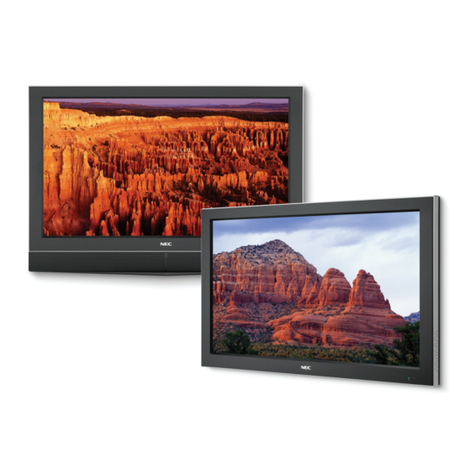
MultiSync®LCD3210
32" (31.5" VIS) LCD ideal for digital information applications
Equip your digital display applications
with the next generation technology of
the 32" (31.5" VIS) NEC MultiSync LCD3210.
This high-performance large-screen LCD’s
Digital Signage Technology Suite(DSTS)
boasts 20+ advanced features to improve
screen performance, lower total cost of
ownership and enhance display manage-
ment. The DSTS truly sets the LCD3210
apart, bringing tomorrow’s technology to
today’s large-screen applications.
High-definition capable display supports 480i,
480p, 720p and 1080i
DDC/CI enables communication between the PC and
monitor for display management, diagnostics and the
remote control
6-axis color control engine allows for precise and
simplified color, color temperature and saturation
adjustment
Self-diagnostic capabilities help detect possible
failure points via queries through DDC/CI and RS-232C
Real-time clock allows for content scheduling and
monitor sleep/wake management, improving energy
savings and extending display life
Markets Served
Digital merchandising
Airports/flight & baggage information
Corporate
Quick-service restaurants
Medical
Financial
Theaters
Tradeshows
Broadcasting
many more...
TileMatrix™ allows you to build video walls(up to 16
displays in a 4x4 matrix equalling almost 20 ft. diagonal)
Power save function puts the display in power
management mode when a sync or input signal is lost
Brightness control reduces energy consumption
and heat generation while extending display life
Screen saver function reduces the risk of image
persistence for extended display life
TileComp™ works in tandem with TileMatrix to
compensate for the bezel width and create a more
seamless video wall
LCD3210-BK (LCD3210-BK-IT)
31.5"
0.511
50 @ native resolution
500 cd/m2
600:1
176° Vert., 176° Hor. (88U/88D/88L/88R)@ CR>10
Rapid Response(18ms)
256 RGB Level, more than 16 million
760 x 450mm
16:9
31.5-91.1 KHz(15.625,15.734 kHz)(Analog)
31.5-91.1 KHz(Digital)
58-85 Hz Analog/50-85 Hz Digital
ANALOG RGB 0.7 Vp-p/75 Ohms
Separate sync: TTL Level (Positive/Negative)
Composite sync: TTL Level (Positive/Negative)
Composite sync on green:(0.3Vp-p negative
0.7Vp-p positive)
DVI-D
Analog D-sub
Analog BNC
Composite RCA or S-Video
Component BNC
Audio 1(minijack), Audio 2 and 3 Stereo(RCA)
Internal Speaker: None
RS232, DDC/CI
Daisychain RGB3
Daisychain Video1
Daisychain - Selected Audio in
RS232 for multiple monitor control
7W x 7W
720 x 400 @ 70-85 Hz
640 x 480 @ 60-85 Hz
800 x 600 @ 50-85 Hz
832 x 624 @ 74.5 Hz
1024 x 768 @ 50-85 Hz
1280 x 1024 @ 50-85 Hz
1600 x 1200 @ 60 Hz(Compressed)
1280 x 768 @ 50-85 Hz
1360 x 768 @ 50-85 Hz
NTSC/PAL,SECAM,4.43NTSC,Pal60 HDTV,480i, 480p,
720p, 1080i
1366 x 768
1360 x 768 or 1366 x 768
Power Management, Plug and Play(DDC/CI, DDC2B),
PIP(Remote), Multi-level Zoom, FullScan, TileMatrix,
TileComp, Screen Saver, Rapid Response, Video
Ready(no tuner), Infrared remote control included,
removeable stand included
Designed for integration
AC 100-120V/AC 220-240V @ 50/60 Hz
140W
<5W
31.1 x 20.1 x 7.9 in./789 x 510.3 x 200mm

31.1 x 18.9 x 5.5 in./789 x 479 x 140mm
37.5 lbs./17 kg
35.3 lbs./16 kg
200 x 200mm(8 hole)/200 x 100mm(6 hole)
5-40° C/41-104° F
20-80%
4200m/13,780 ft.
-20-60° C/-4-140° F
10-90%
12,000m/39,370 ft.
UL 1950/CSA C22.2 No. 950/TUV-GS/EN60950/
FCC-B/DOC-B/EN55022-B/EN55024/EN61000-3-
2/EN1000-3-3/CE
AC power cord,user manual, setup sheet, wireless
remote control, batteries, 15-pin RGB cable, CD-
ROM, stands
External speakers
3 years parts and labor, including backlight
24 hours/7 days
Model
Display
Viewable Size Image
Pixel Pitch
Pixels Per Inch
Brightness (typical)
Contrast Ratio (typical)
Viewing Angle (typical)
Response Time (typical)
Display Colors
Active Screen Area (W X H)
Screen Aspect Ratio
Synchronization Range
Horizontal
Vertical
Input Signal
Video
Sync
Input
RGB1
RGB2
RGB3
Video 1*
Component Video 1 (DVD/HD)*
Audio*
External Control
Output
RGB
Video*
Audio*
Control
Audio Amplifier*
Resolutions Supported
Native Resolution
Recommended Resolution
Additional Features
Touch-Capable
Voltage Rating
Power Consumption (typical)
On
Power Savings Mode
Dimensions (WxHxD)
Net (with stand)
Net (without stand)
Net Weight
(with stand)
(without stand)
VESA Hole Configuration Specifications
Environmental Conditions
Operating Temperature
Operating Humidity
Operating Altitude
Storage Temperature
Storage Humidity
Storage Altitude
Regulatory Approvals
Included Accessories
Optional Accessories
Limited Warranty
Technical Support
* not available on IT model
MultiSync is a registered trademark, and
TileMatrix and TileComp are trademarks of
NEC Display Solutions. Product specifica-
tions subject to change. 7/05 ver. 1.
©2005 NEC Display Solutions of America,
Inc. All rights reserved.
NEC Display Solutions
500 Park Boulevard, Suite 1100
Itasca, IL 60143
866-NEC-MORE
www.necdisplay.com
1. AC IN connector Connects with the supplied power cord.
2. RGB 1 IN (DVI-D) To input digital RGB signals from a computer*
* This connector does not support analog input.
3. RGB 2 IN (mini D-Sub 15 pin) To input analog RGB signals from a personal
computer or other RGB equipment.
4. RGB 3 DVD/HD [R, G, B, H, V] (BNC) To input the analog RGB signals or signals
from other RGB equipment. A Sync-on-Green signal can be connected to the
G connector.
5. RGB OUT connector (mini D-Sub 15 pin) To output the signal from the RGB 2 or
3 IN connector.
6. DVD/HD CONNECTOR (BNC) Connecting equipment such as a DVD player, HDTV
device or laser disc player.
7. AUDIO IN 1,2,3 Input audio signal from external equipment such as a computer,
VCR or DVD player.
8. AUDIO OUT Output the audio signal from the selected AUDIO IN source.
9. VIDEO INPUT/OUTPUT CONNECTOR
VIDEO IN connector (BNC and RCA): Input a composite video signal. BNC and
RCA are not available at the same time.(Use only one input).
VIDEO OUT connector (BNC): Output the composite video signal from the
VIDEO IN source.
S-VIDEO IN connector (DIN 4 pin): Input the S-video(Y/C separate signal).
10. EXTERNAL CONTROL (mini D-Sub 9 pin) RS-232C Input signal from
control equipment such as a computer.
In connector: Input signal from control equipment such as a computer or the
output from a different MultiSync LCD3210
11. EXTERNAL SPEAKER TERMINAL Outputs the audio signal from the selected
audio source.
Denotes an AV unit function.
All AV functions are enabled when the AV unit is installed.
5.5 in./140mm
2.94 in./74.6mm
7.9 in./200mm
31.1 in./789mm