manuals.online logo
Brands
  1. Home
  2. •
  3. Brands
  4. •
  5. OEM Audio
  6. •
  7. Automobile Accessories
  8. •
  9. OEM Audio JBL Enhancement Reference guide

OEM Audio JBL Enhancement Reference guide

Other OEM Audio Automobile Accessories manuals

OEM Audio Reference 400CF User manual

OEM Audio

OEM Audio Reference 400CF User manual

OEM Audio Reference 450Q User manual

OEM Audio

OEM Audio Reference 450Q User manual

OEM Audio Reference Series User manual

OEM Audio

OEM Audio Reference Series User manual

OEM Audio Reference 400CF User manual

OEM Audio

OEM Audio Reference 400CF User manual

Popular Automobile Accessories manuals by other brands

Magneti Marelli AC161 Installation instruction

Magneti Marelli

Magneti Marelli AC161 Installation instruction

FDI uEZ GUI Start here

FDI

FDI uEZ GUI Start here

JCROffroad JT Install instructions

JCROffroad

JCROffroad JT Install instructions

Rostra VOXXElectronics 250-1930 owner's guide

Rostra

Rostra VOXXElectronics 250-1930 owner's guide

TOP VEHICLE TECH GR3FORD5 installation manual

TOP VEHICLE TECH

TOP VEHICLE TECH GR3FORD5 installation manual

Safe Fleet PRIME DESIGN AR-2000-BLK manual

Safe Fleet

Safe Fleet PRIME DESIGN AR-2000-BLK manual

Skoda Fabia Combi 5J Fitting instructions

Skoda

Skoda Fabia Combi 5J Fitting instructions

Camcar 40077 Al Mounting instructions

Camcar

Camcar 40077 Al Mounting instructions

Camcar 40089 AL Mounting instructions

Camcar

Camcar 40089 AL Mounting instructions

Impac Tradesman 2000 installation manual

Impac

Impac Tradesman 2000 installation manual

DVB OFFROAD BRSB-01 installation manual

DVB

DVB OFFROAD BRSB-01 installation manual

Safari Snorkel SS385HF installation guide

Safari Snorkel

Safari Snorkel SS385HF installation guide

ULTIMATE SPEED 279746 Assembly and Safety Advice

ULTIMATE SPEED

ULTIMATE SPEED 279746 Assembly and Safety Advice

SSV Works DF-F65 manual

SSV Works

SSV Works DF-F65 manual

ULTIMATE SPEED CARBON Assembly and Safety Advice

ULTIMATE SPEED

ULTIMATE SPEED CARBON Assembly and Safety Advice

Witter F174 Fitting instructions

Witter

Witter F174 Fitting instructions

WeatherTech No-Drill installation instructions

WeatherTech

WeatherTech No-Drill installation instructions

TAUBENREUTHER 1-336050 Installation instruction

TAUBENREUTHER

TAUBENREUTHER 1-336050 Installation instruction

manuals.online logo
manuals.online logoBrands
  • About & Mission
  • Contact us
  • Privacy Policy
  • Terms and Conditions

Copyright 2025 Manuals.Online. All Rights Reserved.

JBL EnhancementTOYOTA Tundra
Procedure
Issue B 02/16/18 Page | 1
Fig. 2-2
Fig. 2-1
1. Vehicle Preparation
a. Apply parking brake.
b. Open the trunk and hood of the vehicle.
c. Disconnect the negative (-) battery cable.
d. Prepare a protective surface to place all vehicle
components on.
2. Front Door Tweeter Installation
a. Remove Door Panels
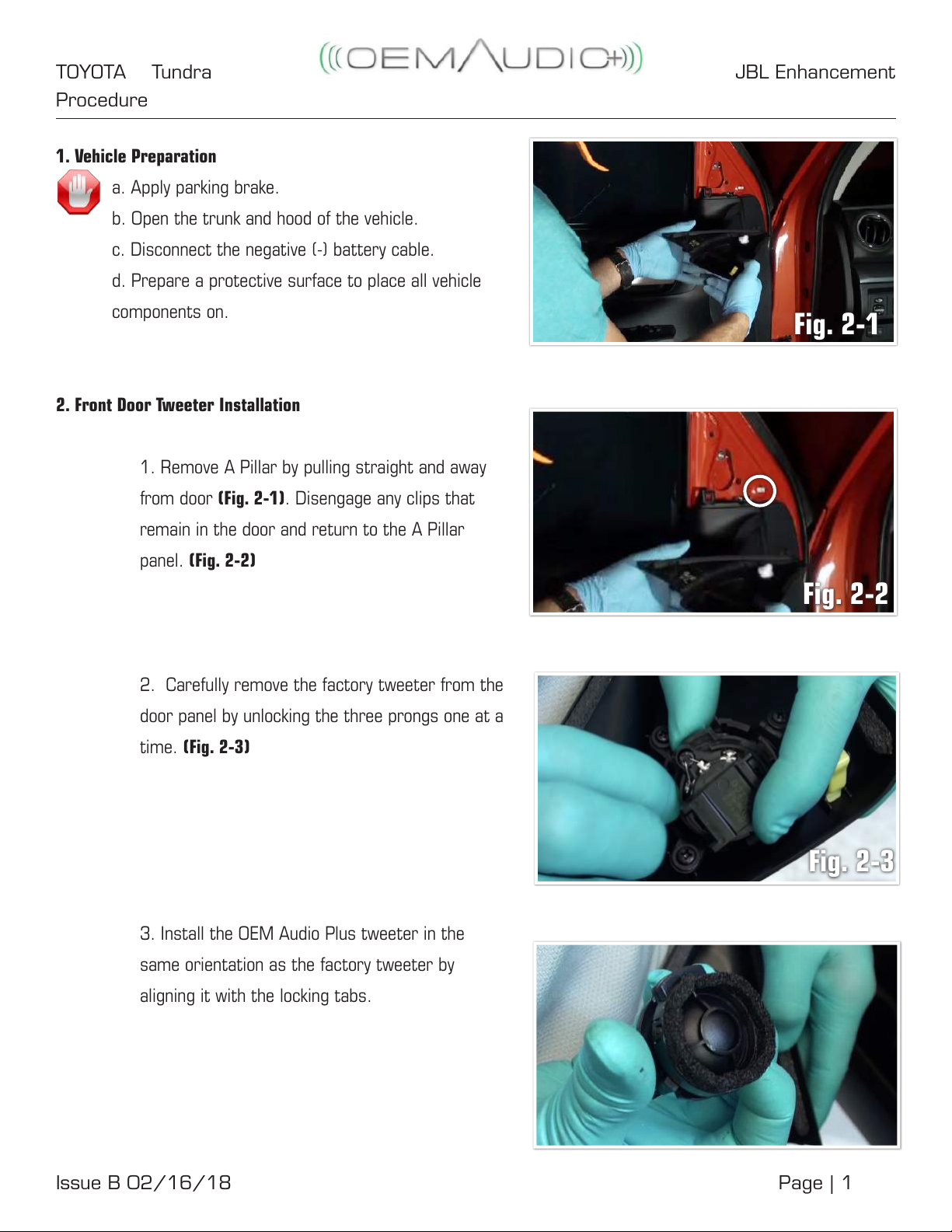
1. Remove A Pillar by pulling straight and away
from door (Fig. 2-1). Disengage any clips that
remain in the door and return to the A Pillar
panel. (Fig. 2-2)
2. Carefully remove the factory tweeter from the
door panel by unlocking the three prongs one at a
time. (Fig. 2-3)
3. Install the OEM Audio Plus tweeter in the
same orientation as the factory tweeter by
aligning it with the locking tabs.
Fig. 2-3
JBL EnhancementTOYOTA Tundra
Procedure
Issue B 02/16/18 Page | 2
Fig. 2-4
Fig. 2-5
Fig. 3-1
4. Make sure Tweeter snaps into place. (Fig. 2-4)
5. Connect the tweeter connector and make sure
it is secured with built-in locking tab.
6. Push the A Pillar back into position and apply
presure until it snaps back into place. (Fig. 2-5)
7. Repeat these steps for the other Front
tweeter.
3. Rear Tweeter Installation
a. Remove door panels
1. Remove door pillar by prying away from door
assembly. (Fig. 3-1)
2. Disengage any clips that remain in the door
and return to panel. (Fig. 3-2)
Fig. 3-2
JBL EnhancementTOYOTA Tundra
Procedure
Issue B 02/16/18 Page | 3
Fig. 3-3
Fig. 3-4
Fig. 3-5
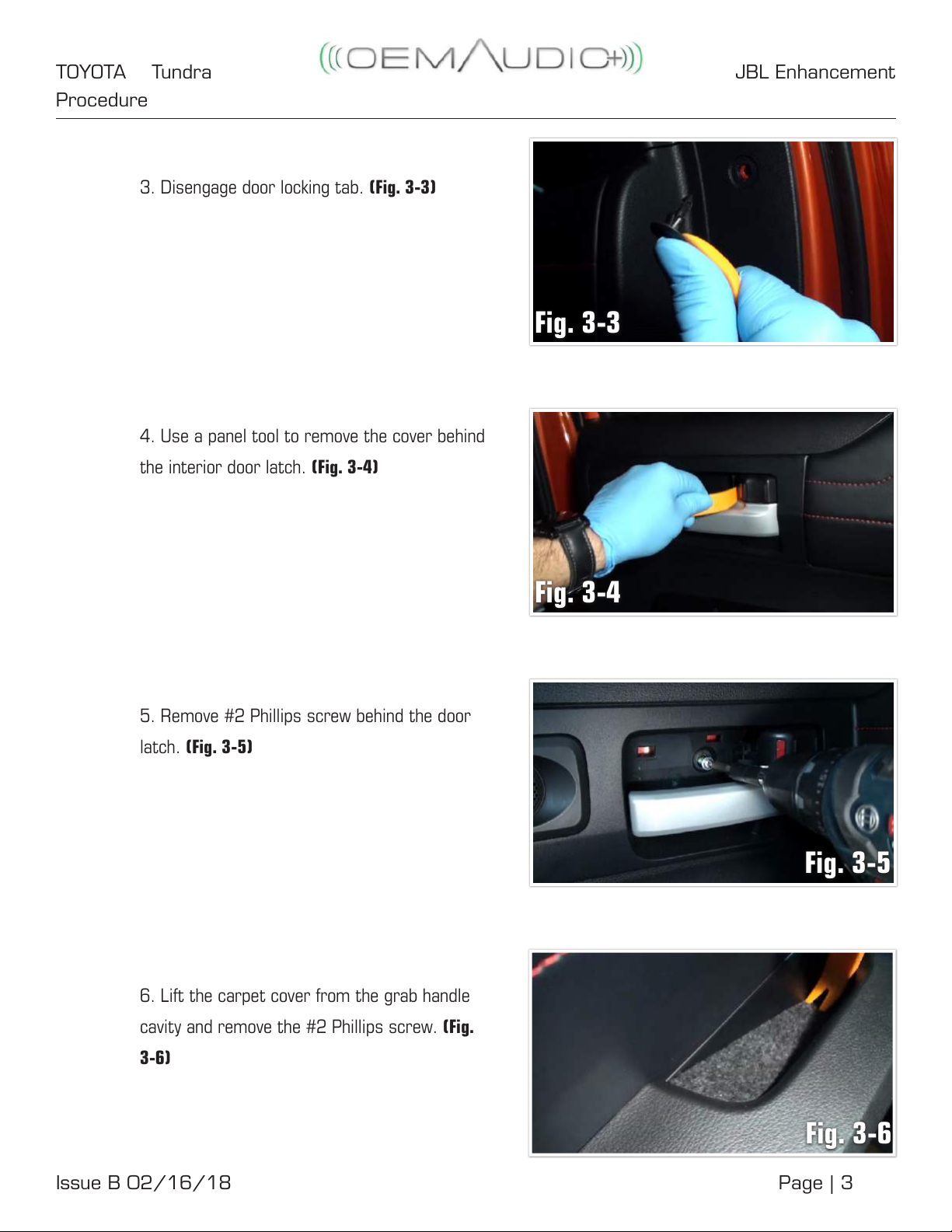
3. Disengage door locking tab. (Fig. 3-3)
4. Use a panel tool to remove the cover behind
the interior door latch. (Fig. 3-4)
5. Remove #2 Phillips screw behind the door
latch. (Fig. 3-5)
6. Lift the carpet cover from the grab handle
cavity and remove the #2 Phillips screw. (Fig.
3-6)
Fig. 3-6
JBL EnhancementTOYOTA Tundra
Procedure
Issue B 02/16/18 Page | 4
7. Use a panel tool to remove the window door
lock control panel. (Fig. 3-7)
8. Disconnect window control connectors from
the panel.
9. Use gentle force to remove door panel. Start
at the bottom, then the sides and nish at the
top.
10. Disconnect the tweeter connector. (Fig. 3-8)
11. Remove door latch assembly from the
door panel by unsnapping and lifting the door
latch connectors. Note: Connectors need to be
reassembled in the same orientation – white on
top, green on bottom. (Fig. 3-9)
12. .Carefully remove the factory tweeter from
the door panel by unlocking the three prongs one
at a time. (Fig. 3-10)
Fig. 3-7
Fig. 3-8
Fig. 3-9
Fig. 3-10
JBL EnhancementTOYOTA Tundra
Procedure
Issue B 02/16/18 Page | 5
13. Install the OEM Audio Plus tweeter in the
same orientation as the factory tweeter by
aligning it with the locking tabs. (Fig. 3-11)
14. Connect the tweeter connector and make
sure it is secured with built-in locking tab.
(Fig. 3-12)
b. Reassemble door in reverse order - taking time to
ensure all clips are engaged and all connectors are
connected. Failure to securely reinstall door panel
may result in rattles.
c. Repeat process for the other side of the vehicle.
Quick-Sync Wiring Harness (Overview):
Fig. 3-11
Fig. 3-12
JBL EnhancementTOYOTA Tundra
Procedure
Issue B 02/16/18 Page | 6
4. Quick-Sync Wiring Harness (Preparation)
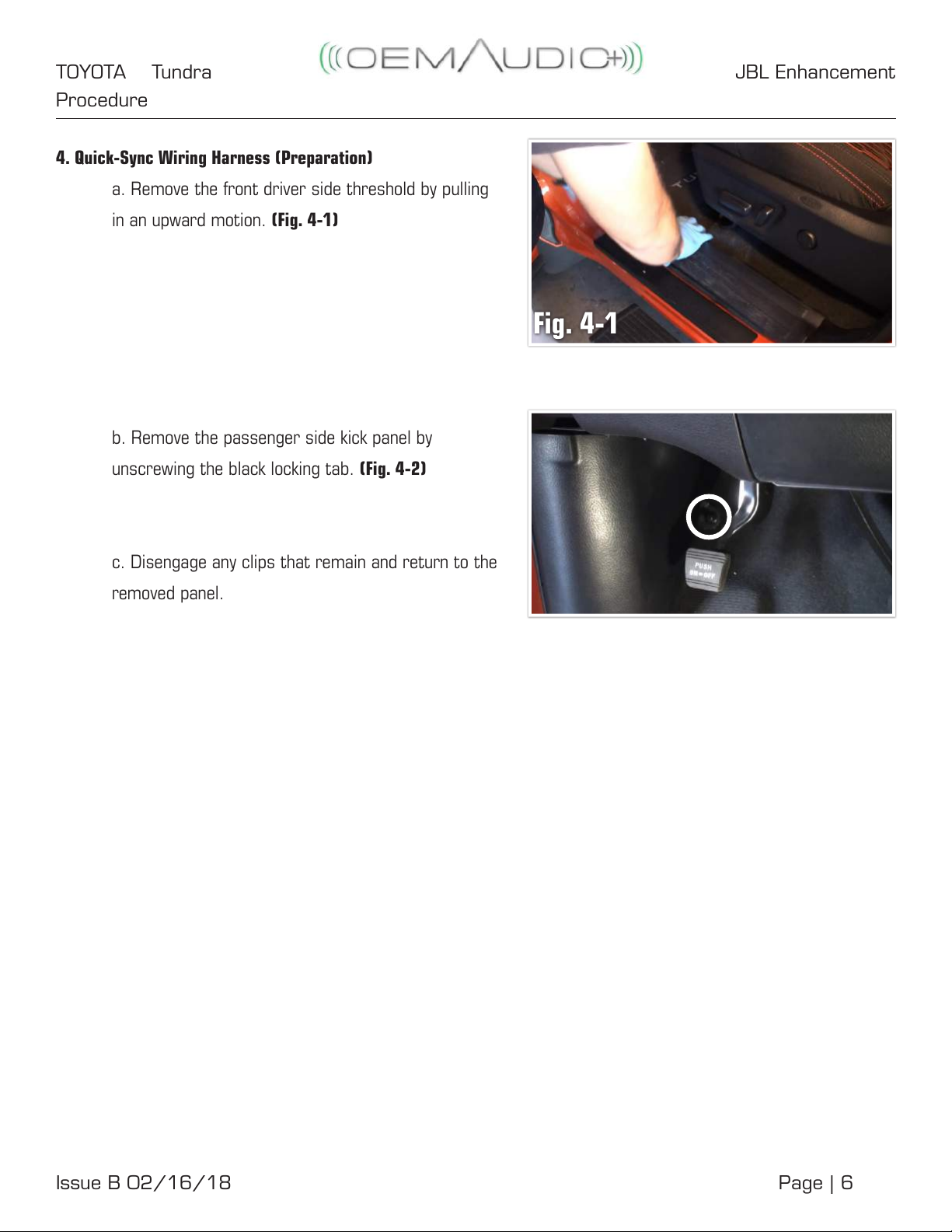
a. Remove the front driver side threshold by pulling
in an upward motion. (Fig. 4-1)
b. Remove the passenger side kick panel by
unscrewing the black locking tab. (Fig. 4-2)
c. Disengage any clips that remain and return to the
removed panel.
Fig. 4-1
JBL EnhancementTOYOTA Tundra
Procedure
Issue B 02/16/18 Page | 7
a. Remove the driver side lower seatbelt mounting
bolt cover and bolt (14mm). (Fig. 8-1)
b. Remove the driver side rear threshold.
(Fig. 8-2)
c. Loosen seatbelt trim weather-stripping by hand
and remove carefully in an outward direction on both
the front and rear driver side thresholds. (Fig. 8-3)
d. Disengage driver side seat belt trim panel by
pulling directly towards you from the lower portion of
the panel and working your way up to disengage the
clips. (Fig. 8-4)
Fig. 8-1
Fig. 8-2
Fig. 8-3
Fig. 8-4
JBL EnhancementTOYOTA Tundra
Procedure
Issue B 02/16/18 Page | 8
e. Check for white snaps that may not have came off
with the panel. Re-insert to panel if applicable.
f. Using a 17mm socket, remove the four (4) driver
side 17mm rear seat bolts. Reposition rear driver
side seat out of the way or remove from vehicle.
Take care not to scratch interior if removing seat
assembly. (Fig. 8-5)
g. Remove the lower seatbelt mounting bolt cover
and bolt (14mm) of the driver side/rear panel. (Fig.
8-6)
h. Remove the weather-stripping on the rear driver
side door and remove side/rear panel. (Fig. 8-7)
i. Disengage the white plastic clips in the front and
rear driver side threshold area.
j. Remove the factory JBL sub with a 10mm sockets
and remove the three (3) factory M6 bolts. You will
be using these same bolts for securing your O+
Subwoofer System to the vehicle. (Fig. 8-8)
Fig. 8-5
Fig. 8-6
Fig. 8-7
Fig. 8-8
JBL EnhancementTOYOTA Tundra
Procedure
Issue B 02/16/18 Page | 9
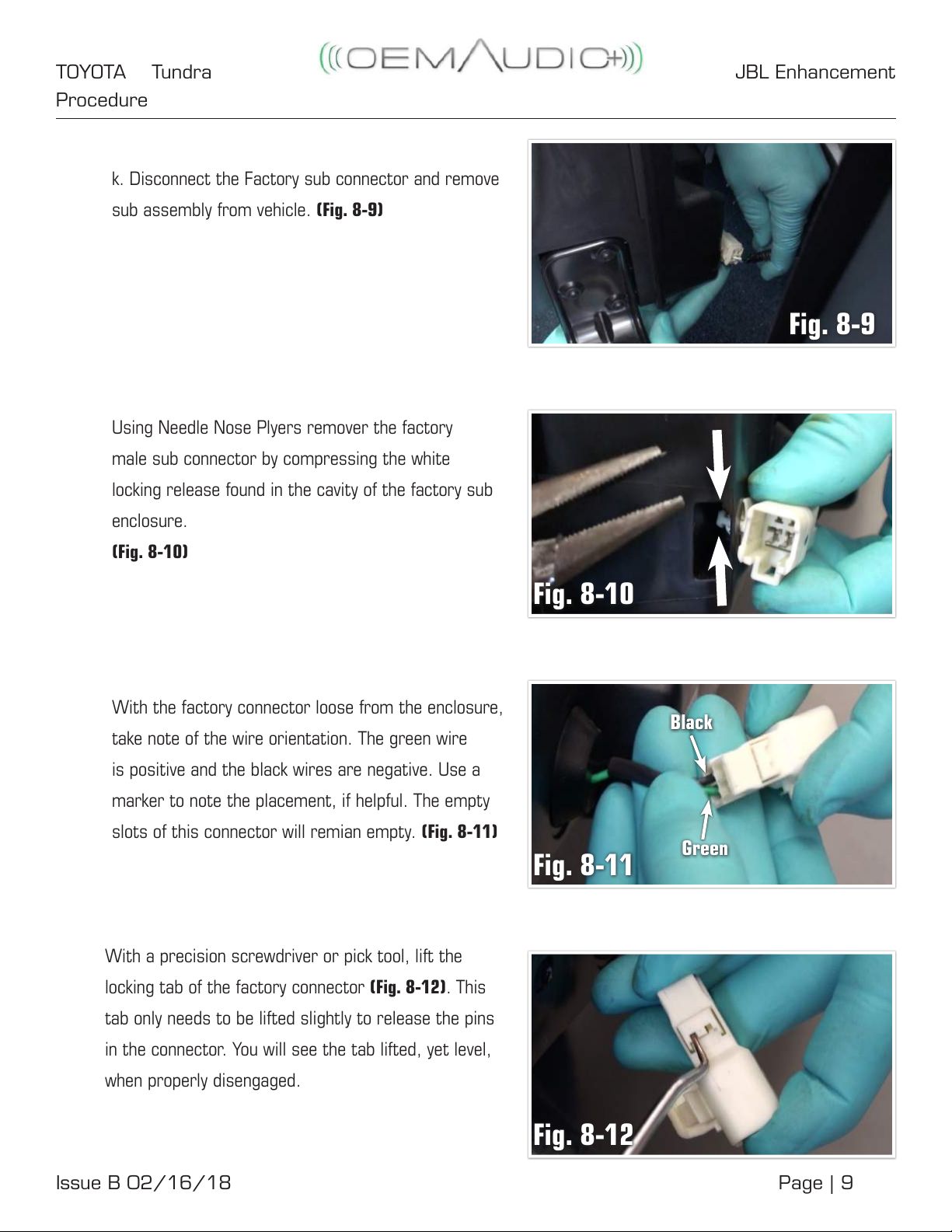
k. Disconnect the Factory sub connector and remove
sub assembly from vehicle. (Fig. 8-9)
Using Needle Nose Plyers remover the factory
male sub connector by compressing the white

locking release found in the cavity of the factory sub
enclosure.
(Fig. 8-10)
With the factory connector loose from the enclosure,
take note of the wire orientation. The green wire
is positive and the black wires are negative. Use a
marker to note the placement, if helpful. The empty
slots of this connector will remian empty. (Fig. 8-11)
With a precision screwdriver or pick tool, lift the
locking tab of the factory connector (Fig. 8-12).This
tab only needs to be lifted slightly to release the pins
in the connector. You will see the tab lifted, yet level,
when properly disengaged.
Fig. 8-9
Fig. 8-10
Fig. 8-11
Fig. 8-12
Black
Green
JBL EnhancementTOYOTA Tundra
Procedure
Issue B 02/16/18 Page | 10
With the wire you intend on removing in your grasp,
use a precision tool to disengage the locking tab
within the connector housing securing the terminal.
(Fig. 8-13)
When locking tab is disengaged, terminal will pull out
with ease. Repeat these steps for both (2) wires.
Insert the OEM Audio Plus terminals into the factory
connector housing in the same orientation as the
factory wiring. Red/Yellow = Positive andBlue/Black =
Negative. Terminals will slide into the housing and will
click when engaged. (Fig. 8-14)
Once all terminals are inserted, engage the locking
tab on the connector housing. (Fig. 8-15)
5. Quick-Sync Wiring Harness (Installation)
Connect the O+ Quick Sync Wiring Harness (now
with the transplanted sub male connector) into the
factory female sub connector in the vehicle. (Fig. 5-1)
Fig. 8-13
Fig. 8-14
Fig. 8-15
Fig. 5-1
O+ Upgrade Harness
Factory sub connector