Okin Refined RF5022 User manual

Issue Department:Bedding Division Date: 2017-8-15
System Instruction Author:
Instruction of RF5022 Edition: 1.1
Page 1 of 7
1/7
Instruction of RF5022
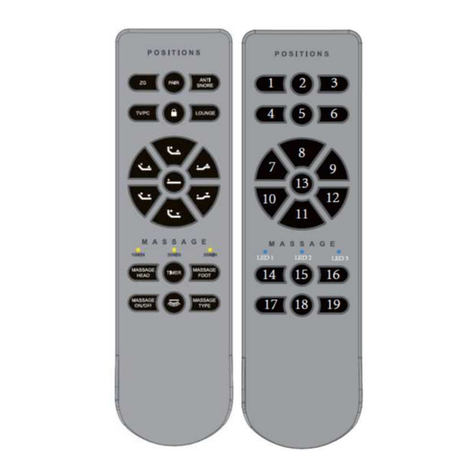
Figure1buttonofremote

Issue Department:Bedding Division Date: 2017-8-15
System Instruction Author:
Instruction of RF5022
Edition: 1.1
Page 2 of 7
2/7
1. Item
2.1 ZG button(button 1 in figure 2)
Click the ZG button, the actuator moves to ZG position, stop when click any button during the
movement;
Press and hold the ZG button for 5s, timer LED of remote flashes, the control box records
current position as ZG position;
When in the process of moving to memory positions, the head and foot actuators move first,
then the tilt and lumbar actuators move;
2.2 M1 nitton(buttton 2 in figure 2)
Click M1 button, actuators move to M1 position, stop when click any button during
movement;
Press and hold M1 button for 5s, timer LED of remote flashes, the control box records current
position as M1 position;
When in the process of moving to memory positions, the head and foot actuators move first,
then the tilt and lumbar actuators move;
2.3 AntiSnore button(button 3 in figure 2)
Click
AntiSnore
button, actuators move to
AntiSnore
position, stop when click any button
during movement;
Press and hold
AntiSnore
button for 5s, timer LED of remote flashes, the control box records
current position as
AntiSnore
position;
When in the process of moving to memory positions, the head and foot actuators move first,
then the tilt and lumbar actuators move;
2.4 TV/PC button(button 4 in figure 2)
Click
TV/PC
button, actuators move to
TV/PC
position, stop when click any button during
movement;

Issue Department:Bedding Division Date: 2017-8-15
System Instruction Author:
Instruction of RF5022
Edition: 1.1
Page 3 of 7
3/7
Press and hold
TV/PC
button for 5s, timer LED of remote flashes, the control box records
current position as
TV/PC
position;
When in the process of moving to memory positions, the head and foot actuators move first,
then the tilt and lumbar actuators move;
2.5 M2 button(button 5 in figure 2)
Click M2 button, actuators move to M2 position, stop when click any button during
movement;
Press and hold M2 button for 5s, timer LED of remote flashes, the control box records current
position as M2 position;
When in the process of moving to memory positions, the head and foot actuators move first,
then the tilt and lumbar actuators move;
2.6 LOUNGE button(button 6 in figure)
Click
LOUNGE
button, actuators move to
LOUNGE
position, stop when click any button
during movement;
Press and hold
LOUNGE
button for 5s, timer LED of remote flashes, the control box records
current position as
LOUNGE
position;
When in the process of moving to memory positions, the head and foot actuators move first,
then the tilt and lumbar actuators move;
2.7 Lumbar actuator(button 7 in figure 2)
Press and hold LUMBAR UP button of remote, lumbar actuator moves out, stop when released;
2.8 Childlock button(button 8 in figure 2)
In unlocked state, press and hold the childlock button, the red backlight of children lock
button begins to flash, after 5s, the red backlight stops flashing, remote entersl into locked
state;
Under locked state, press any button except childlock button, the red backlight of childlock
turns on, the button you pressed is invalid;

Issue Department:Bedding Division Date: 2017-8-15
System Instruction Author:
Instruction of RF5022
Edition: 1.1
Page 4 of 7
4/7
Under locked state, press and hold childlock button, red backlight of childrenlock begins to
flash,after 5s, the red backlight stops flashing, remote enters into the normal working
condition;
2.9 moving in of lumbar actuator(button 9 in figure 2)
Press and hold
LUMBAR UP buton of remote
, lumbar actuator moves out, stop when
released;
2.10 Reset all memory positions to default settings(button 1 and 16 in figure 2)
Pressa and hold ZG+FLAT buttons
(button 1 and 16 in figure 2)for
5s, timer LED of
remote flashes, the control box reset all memory positions to default settings;
2.11 Head up(button 10 in figure 2)
Press and hold
HEAD UP button of remote, head actuator moves out, stop when
released
;
2.12 Head down(button 13 in figure 2)
Press and hold HEAD DOWN button of remote, head actuator moves in, stop when released;
2.13 Foot up(button 12 in figure 2)
Pressa and hold FOOT UP button of remote, foot actuator moves out, stop when released;
2.14 foot down(button 15 in figure 2)
Press and hold FOOT DOWN button of remote, foot actuator moves in , stop when released;
When moving to flat position, lumbar actuator and tilt actuator move first, after 500ms, head and
foot actuators start moving;
2.15 moving out of tilt actuator(button 11 in figure 2)
Press anfd hold TILT UP button, tilt actuator moves out, stio when released;

Issue Department:Bedding Division Date: 2017-8-15
System Instruction Author:
Instruction of RF5022
Edition: 1.1
Page 5 of 7
5/7
2.16 moving in of tilt actuator(button 14 in figure 2)
Press and hold TILT DOWN button,, tilt actuator moves in, stop when released;
2.17 Flat(button 16 in figure 2)
Click FLAT button, the bed goes flat, stop when click any button during the process of going
flat;
2.18 Massage head(button 17 in figure 2)
Click MASSAGE HEAD button, head massage motor switches massage intensity, massage
intensityswitches among 0-1-2-3;
2.19 Massage timer(button 18 in figure 2)
If the massage motors do not work, the button is invalid, if the massage motors work, click the
button to switch the massage time, when massage time switch to 0, turn off the massage;
2.20 Massage ON/LAST(button 19 in figure 2)
Click the Massage ON / LAST button, if the massage motors are on, turn off the massage motors
and record the current massage intensity and mode of head and foot massage motors. If the
massage motor is off, turn on the massage motors and restore to the previous recorded massage
intensity and massage mode (Note: Only when press the ON / LAST button only to turn off the
massage motor, it will record the current massage intensity and massage mode, press the head and
foot massage motor button or timer button or open the massage motor, it will not not record the
status of massage motors);
2.21 Massage ON/OFF(button 20 in figure 2)
Click
Massage ON/OFF
button, if the massage motors are on, then it turns off massage
motors,if massage motors are off, then it turns on the massage motors;

Issue Department:Bedding Division Date: 2017-8-15
System Instruction Author:
Instruction of RF5022
Edition: 1.1
Page 6 of 7
6/7
2.22 Under bed light(button 21 in figure 2)
Click the under bed light button, the under bed light switch its on/off state; After the under
bed light opens, if do not manually close, it will automatically turn off after 5 minutes;
2.23 Massage Type(button 22 in figure 2)
Click massage type button, to switch the massage mode og massage motors, massage mode
switches among type0type1type2type3type0; this button can only switch the
massage mode, it can not open massage motors;
FCC Warning:
Please take attention that changes or modification not expressly approved by the party responsible
for compliance could void the user’s authority to operate the equipment.
This device complies with part 15 of the FCC Rules. Operation is subject to the following two
conditions: (1) This device may not cause harmful interference, and (2) this device must accept any
interference received, including interference that may cause undesired operation.
ISED RSS Warning:
This device complies with Industry Canada licence-exempt RSS standard(s). Operation is subject
to the following two conditions:
(1) this device may not cause interference, and
(2) this device must accept any interference, including interference that may cause undesired
operation of the device.
Le présent appareil est conforme aux CNR d'Industrie Canada applicables aux appareils
radioexempts de licence. L'exploitation est autorisée aux deux conditions suivantes :
(1) l'appareil ne doit pas produire de brouillage, et
(2) l'utilisateur de l'appareil doit accepter tout brouillage radioélectrique subi, même si le
brouillage est susceptible d'en compromettre le fonctionnement.

B.15055
JLDQ.16.263.84
B.11964
JLDQ.16.228.31
R5.410.01.009
CB.13.42.01
R5.113.00.011
R5.413.01.005
R5.504.01.250
JLDP.10.023.000
JLDP.14.027.000
JLDP.05.032.000
R5.216.01.015C
R5.217.01.016
NO.
product name Product code number
1
Head Motor
B.15055 1
2
Foot Motor
B.11964 1
3
Lumbar Motor
JLDQ.16.263.84 1
4
Tilt Motor
JLDQ.16.228.31 1
5
Massage Motor
JLDQ.9.001.130C 2
6
Massage Motor Cable
R5.410.01.009 1
7
Control Box
CB.13.42.01 1
8
Power Supply
JLDP.10.023.000 1
9
cord of Power
R5.217.01.016 1
10
Power Cord AC
R5.504.01.250 1
11
Y-Cable
R5.216.01.015C 1
12
Patch cord of LED strip/LED
R5.413.01.005 1
13
Underbed lighting /LED
R5.113.00.011 1
14
USB Chager/ USB
JLDP.05.032.000 1
15
Double USB socket
JLDP.14.027.000 2
16
22keys Remote Model /22 RF3022A
1
RF5022
FCC ID: 2AVJ8-RF5022
IC:25804-RF5022
JLDQ.9.001.130C
7/7
FCC ID: PCU-CB1342
IC:21319-CB1342
Table of contents
Other Okin Refined Remote Control manuals