Copyright © 2008 Opt - Your Desire. Our Creation.
Playing Music from the Mobile Phone through the BD825 Envy
First, make sure your mobile phone or audio device supports Bluetooth Advanced Audio
Distribution Protocol (A2DP) and Audio Video Control Protocol (AVRCP) functions (on some
phones the A2DP function may appear as AV function). The A2DP function allows the mobile
phone to stream music wirelessly to the BD825 Envy. During music play, the AVRCP function
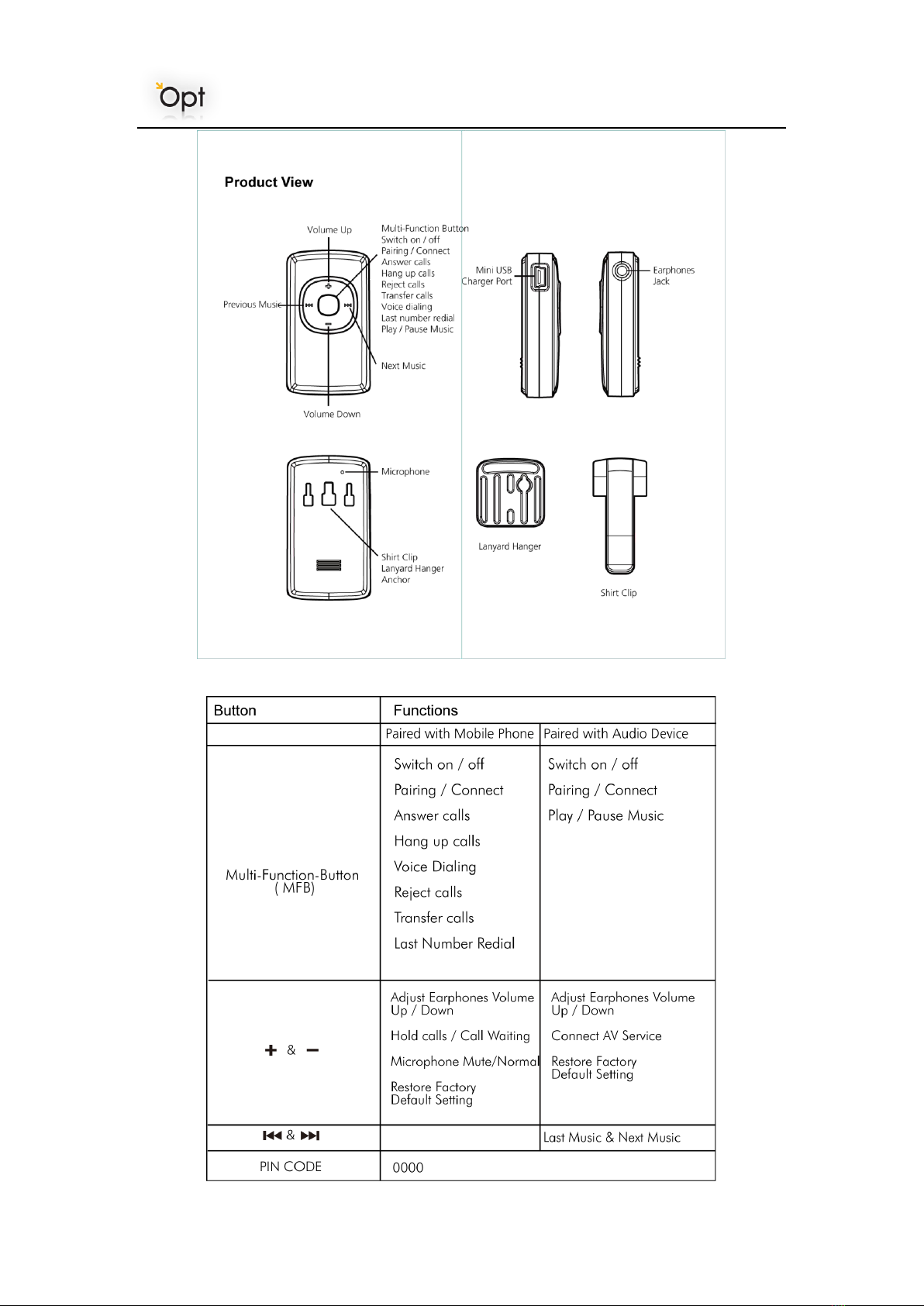
allows the MFB (multi-function-button) to be used to Play or Pause the music from the mobile
phone or audio device, can be used to select the previous or next music.
Due to variations of mobile phones, procedures to play music through the BD825 Envy are not
always the same. When the BD825 Envy is paired with a mobile phone, depending on the
software in the mobile phone, there are a number of ways to initiate music playing. For some
phones, music play through the BD825 Envy can achieved by simply pressing MFB
(multi-function-button) once; for some phones when the music player on the mobile phone is
started music will be streamed through the BD825 Envy automatically. Some mobile phones
will require that the “Mode Button” on the device be pushed to initiate the A2DP function.
Other mobile phone models will require the user to select the device used to hear the music
when the music player is started.
(Always refer to the User Guide of your mobile phone for details on playing music through A2DP)
Note:
1) To answer an incoming call while the music is playing If a call comes in while the mobile phone
is playing music through A2DP, the player will stop the music automatically. The incoming call
ring tone will be heard through the BD825 Envy. To answer the incoming call, short press the
MFB (multi-function-button) on the BD825 Envy. After the call ends, the player will resume
playing the music automatically.
2) Play or Pause Music
a) While music is playing, short press the MFB (multi-function-button) on the BD825 Envy to
pause the music
b) While in pause mode, short press the MFB (multi-function-button) on the BD825 Envy to
resume the music playing
3) Volume Adjustment
a) While music is playing, press “V+” or “V-”button on the BD825 Envy to increase or decrease
the volume.
Simultaneous Pairing to Audio Video Device and Mobile Phone
The BD825 Envy can be paired with an Audio Video device and a mobile phone at the same time,
allowing the user to play music from AV device, and make or receive phone calls on the mobile
phone using the BD825 Envy.
a) Following the pairing procedure, first pair the BD825 Envy and establish AV service to
Bluetooth A2DP and/or AVRCP enabled PMP, or AV dongle.
b) Operate the BD825 Envy or AV device to break the connection between the two and return the
BD825 Envy and the AV device to standby mode.
c) Initiate the BD825 Envy into pairing mode again and pair with mobile phone, make sure the