FILTER CARTRIDGEREPLACEMENT
• Filter cartridges the US-1000will last about500gallons or
six months before they need tobe replaced. Filter cartridge
life varies dependingon usage, and/orwater conditions.
Changes in taste, color, and ow of the water being ltered
indicate that the cartridge should be replaced.
• Read all instructions beforereplacing lter cartridges.
1. Turn o cold water supply and open the drinking water
faucet to release pressure from system.
2. Unscrew and remove bottomof lter housing. Locate and
remove large O-ring,wipe clean of lubricant, and set aside.
Repeat for second housing.
3. Discard used lter cartridges. Using a non-abrasivesponge
or cloth, scrub the bottom of lter housings, O-ringgrooves,
and caps with dish soap and warm water. Rinse thoroughly.
Fill bottomof each housing 1/3full with water. Add 1
tablespoon of household bleach and scrub to disinfect.
4. Lubricate O-ringswith silicone grease. Insert each O-ringin
grooveand press into place.
NOTE: This step is important to ensure a proper housing
seal. Make certain each O-ringis seated level in its grooveor
a leak may occur.
5. Screw bottomof housings with bleach water onto caps
without lter cartridges and hand-tighten.DONOT
OVERTIGHTEN.
6. Turn on water supply. Let faucet run for about 10seconds,
then turn o faucet and let stand for 20-30minutes.
7. Turn on faucet and allow bleach water to run out (about 3-5
minutes).
8. Turn o water supply to system and open faucet to release
pressure. Remove bottomof housings and empty of water.
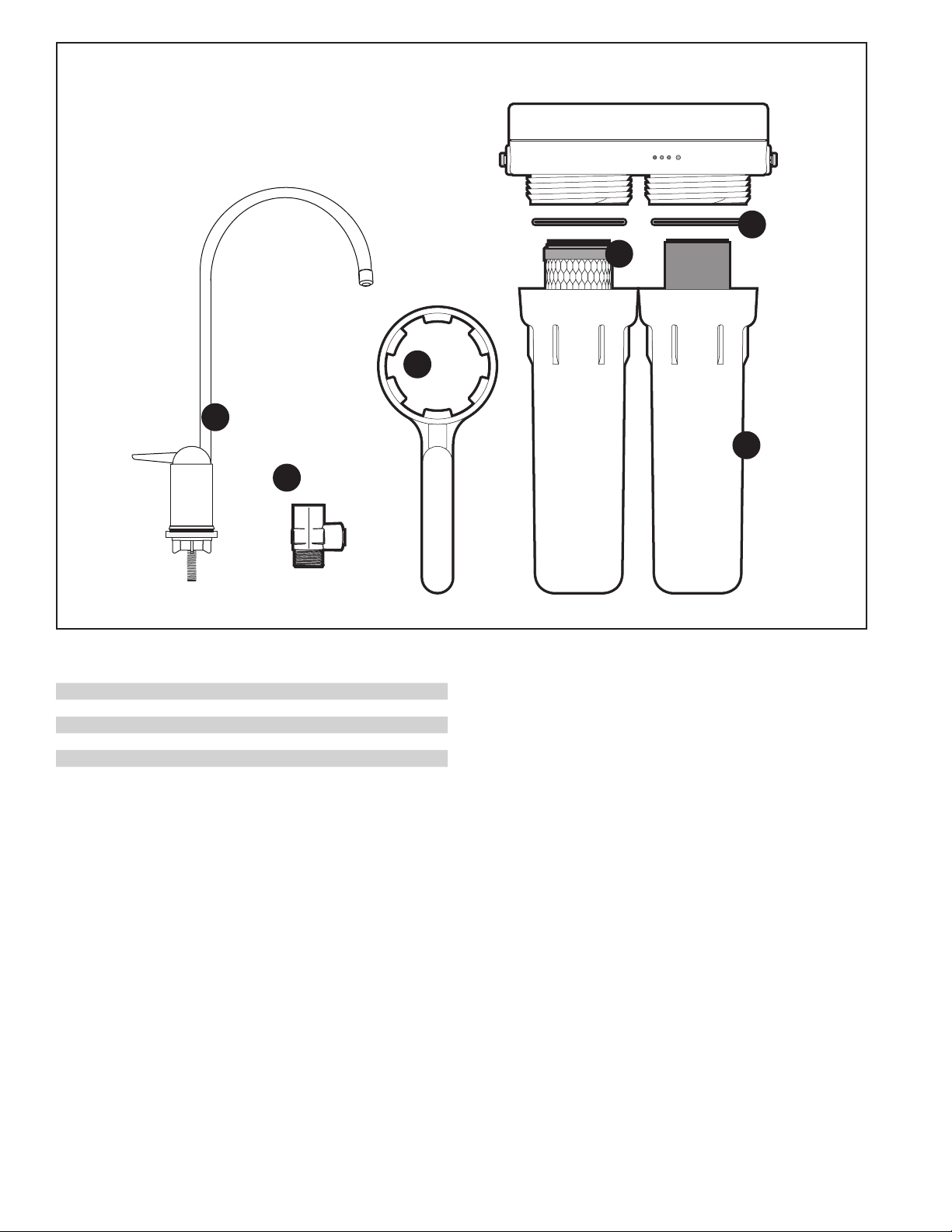
9. Insert each lter cartridge in bottomof appropriate lter
housing: P-250ACartridge Set: white with green endcaps in
left housing, gray plastic cartridge in right housing.
NOTE:The lter cartridges should be installed with the black
gasketed ends pointing up.
10.Screw bottom of housings onto caps and hand-tighten. DO
NOTOVERTIGHTEN. Make certain cap standpipeslips into
cartridge.
11.Openwater supply and turn on drinking water faucet to
release pressure in system. Let faucet run for 5 minutes to
remove trapped air and carbon nes. Check system for leaks
before leaving installation.
NOTE:
• It is recommended that yourun the tap at least 20seconds
prior to using water for drinking or cookingpurposes.
• Initially, ltered water may appear cloudy.If you set a glass
of water on a level surface, youshould be able to watch the
cloudiness disappear from the bottomof the glass upwards.
This harmless cloudiness results from the release of trapped
air within the cartridge and will disappear within a few weeks
after installation.
TROUBLESHOOTING
Leaks:
...between cap and bottomof filter housing
Turn o water supply valve and turn on drinking water faucet to
release pressure in system. Remove bottomof housing.Clean
O-ringand O-ringgroove (located directly beneath threads of
housing).Lubricate O-ringwith silicone grease and replace
securely into groove. Screw bottom of housing onto cap and
hand-tighten. DONOT OVER-TIGHTEN. Turn on water supply
valve and check for leaks.
...on systeminlet/outlet connections
Turn o water supply valve and turn on drinking water faucet
to release pressure in system. Remove tubingfrom tting
(see NOTE under Step Six: Connectingthe Supply Adapter on
p.5) and make sure end of tubingis cut squarely and free of
scratches or burrs. Reinsert tubing into quick-connectttings,
making sure to pushsecurely until tubing hits a hard stop. Turn
on water supply valve andcheck for leaks.
...on supplyadapter connection
Turn o water supply valve and turn on drinking water faucet
to release pressure in system. Loosen leaking threadedtting
on supply adapter or pull out leaking tubing from tting.
Inspect to see if plastic tubingis scratched or supplyadapter
was properly attached. If tubingis scratched, cut o 1/2"to
5/8"and reinstall per Step Six: Connecting the Supply Adapter.
Reconnect tubing or tighten compression nut with ngers, then
tighten nut snugly 1/2-turnwith wrench. Turn on water supply
valve and check for leaks.
...on faucet/tubingconnection
Turn o water supply valve and turn on drinking water faucet to
release pressure in system. Loosen and remove compression
nut tting on faucet stem. Make sure tubing is inserted rmly
into end offaucet stem, then retighten compression nut with
ngers until secure then tighten 1 turn with a wrench. Turnon
water supply valve, then turn o faucet to check for leaks.
NOTE:If leaks persist, or if there are other leaks onsystem,
turn o water supply.Call our technical support department at
800.279.9404.
LowWater Flow
1. Check ow at faucet. The US-1000system should ll a
gallon jug in approximately2 minutes. Flow rates will vary
with individualhouseholdwater pressure.
2. Check lter cartridge installation. Make certain bothlter
cartridges are properly oriented in lter housings(See
Filter Cartridge Replacement).
3. Check tobe certain that the water supply valve is completely
open (turn handle on valve counter-clockwiseas far as it
will go).
4. Check ow through empty system. Todo this, turn o water
supply valve and turn on drinking water faucet to release
pressure in system. Then remove lter cartridges from
housings and screw housings back onto caps. Turn on
faucet to check ow through empty system. Flow should be
about one to two gallons per minute. If ow is less than 0.4
gallons per minute, call Technical Support at 800.279.9404.
5. If ow throughempty system is adequate, place one lter
cartridge in system at a time and check ow tomake sure
cartridge is not clogged.Replace cloggedcartridge if
necessary.
PENTAIR US-1000Filtration System Instruction Manual • 7