General Information
Specifications
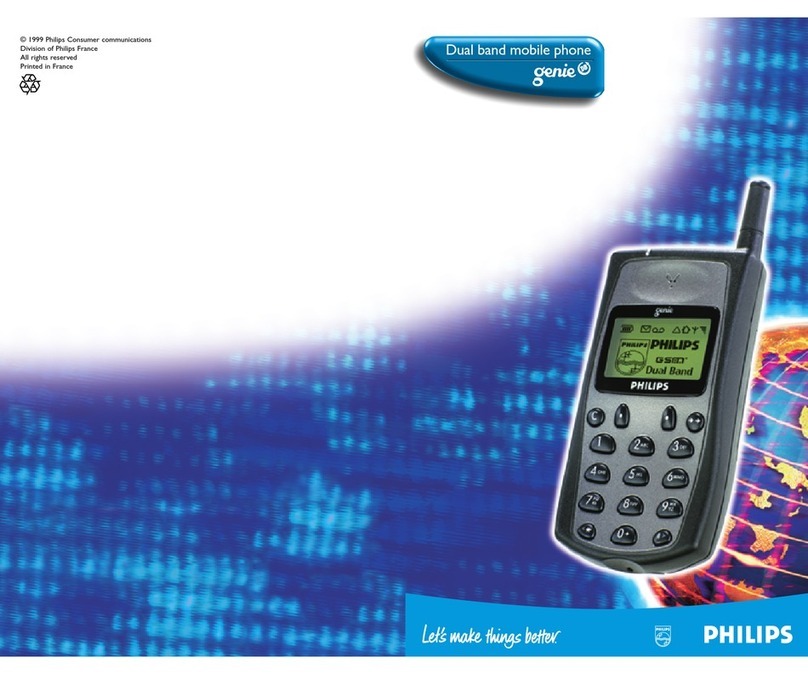
Mode GSM Phase 2, Full Rate vocoder
Frequency Band 900 MHz
Estimated
Battery
Life
*
Standard battery : 90 minutes Talktime
550 mAhLiIon 100 hours Standby Time
High capacity battery: 180 minutes Talktime
1100 mAhLiIon 200 hours Standby Time
Vibra battery 90 minutes Talktime
600 mAh Ni MH 100 hours Standby Time
Size
and
Weight :
99cc/99gr
with standard battery:
Handset
Color
Options
-Special Gold
-Black
-Yellow
-Blue
-Red
Standard Package
includes
- Handset
- Standard battery
- Rapid Charger
- User Manual
- First Choice customer service
- 1 year limited warranty
Philips
Authentic
Accessories
- Batteries: Standard, High capacity, Vibra
- Chargers: Cigarette Lighter Adapter
Desktop charger
Travel charger
- Car Kits: Full duplex with automatic volume
control, handsfree car kit
- Personal Accessories: Headset; Carry Case with Belt Clip
- Data card : PCMCIA type 2 data card
Packaging
and
Shipping
Information
Country of origin : France and Singapore
Master pack quantity : 8
Pallet quantity : 288
* Battery life measurements are approximate and depend on the operator’s
network configuration.
Specifications Provided based on Pmax, No DTx, DRx = 5
Fully Featured !
Fully Featured !
1998 Philips Consumer Communications L.P. All rights reserved. The information and specifications included are subject to change without prior notice. Philips tries to ensure that all information in this document
1998 Philips Consumer Communications L.P. All rights reserved. The information and specifications included are subject to change without prior notice. Philips tries to ensure that all information in this document
is correct, but does not accept liability for any error or omission. Savvy
is correct, but does not accept liability for any error or omission. SavvyTM
TM and Flash Dial
and Flash DialTM
TM are trademarks of Philips Consumer Communications.
are trademarks of Philips Consumer Communications.
Graphic Display
Graphic display with 5 lines of text plus 1
line of fixed icons: continuous battery level
and signal strength indicators. Also,
indicators for roaming, voicemail, SMS,...
12 Selectable Ringers
Choose from a variety of musical tones to
alert you of incoming calls.
Call History
The last 10 dialed and 10 received or
missed calls automatically stored for
redialing.
Voice dial™
You can dial the number by just saying
previously recorded names.
Organiser
Note meetings and appointments in a
diary, an alert beep will remind you about
them.
Flash Dial™
Direct access to your most frequently used
telephone numbers (you can program keys
1 to 9).
Hot keys
Long press on a digit key to activate a
particular function.
Phonebook
Alphabetic and Name Searches, Caller ID
matching, Send SMS.
Last Number Redial
Redial last number that was called.
Auto Redial
Unanswered calls can be automatically
redialed.
Numeric Scratchpad
Record number while connected, and then
call later.
Call Time and Cost Meters
Monitor the length of phone calls or how
much money it has cost with Advice of
Charge.
Keypad Lock
Prevents accidental key presses,
automatically turns off for incoming calls.
DTMF
Send touch tones from memory or key pad
to access answering machines, automatic
switchboards or other services.
Backlighting
Backlit display and keypad for easy
viewing.
GSM
GSM
900
900
Mobile
Mobile
Phone
Phone
genie
genieTM
TM
Ringer Volume
High, medium, low and silent.
Earpiece Volume
Adjust for comfort while calling.
Langages
User can select up to 21 different
languages, or picked automatically
through the SIM card.
Languages Available in Handset:
3 packs :
- West euro + Nordic
English, German, French, Dutch,
Spanish, Italian, Portuguese, Russian,
Norwegian, Finnish, Danish,
Swedish, Greek, Lithuanian
- West euro + east
English, German, French, Dutch,
Spanish, Italian, Portuguese, Russian,
Polish, Hungarian, Czech, Slovakian,
Turkish
- Asia
English, Chinese simplex, Indonesian
Services
Caller ID
CLI displays number or name of
incoming call
Call Waiting
Allows the user to receive and
manage a second call
Emergency Call
Can be made with or without a SIM
card, where available
Short Message Service (SMS)
Send, Receive and Reply to short
messages
Voicemail
Record in-coming messages and have
the ability to turn it on and off
Operator name
Operator name can be displayed on
idle mode
Cell Broadcast
Broadcast SMS from the network
SIM Lock
Keeps consumer on network for
dedicated operators and service
providers