
Phonak Lyric User manual

User Guide for hearing care professionals
LyricTM programming wand

Your Lyric programming wand is a premium-quality
product developed by Phonak, one of the world’s
leading companies in hearing technology. Please read
this manual carefully to benet from all the features
of your Lyric programming wand.
Intended use
The Lyric programming wand enables the wireless transfer
of tting data from a PC to the client’s Lyric3 and Lyric4
hearing aid.
For more information on Lyric3 and Lyric4, see the
respective user guides 029-0300-03 and 029-0836-03.
The Lyric programming wand is used in professional
healthcare facility environment.
Phonak –life is on
www.phonak.com
CE mark applied 2020
Welcome

aTip
bStatus LED
cProgramming button
left / right
dWand body
eUSB cable of 2.5 m (8 feet)
e
d
b
a
c
Description

To connect the Lyric programming wand, plug the USB-plug
into an available USB-port on your tting computer.
There is no driver installation required for the Lyric
programming wand.
After successful set-up, the status LED on the wand will
turn green to indicate that the wand is ready for use.
Please note that in this user guide, the term Lyric
hearing aid is used for Lyric3 and Lyric4 hearing aids.
Getting started
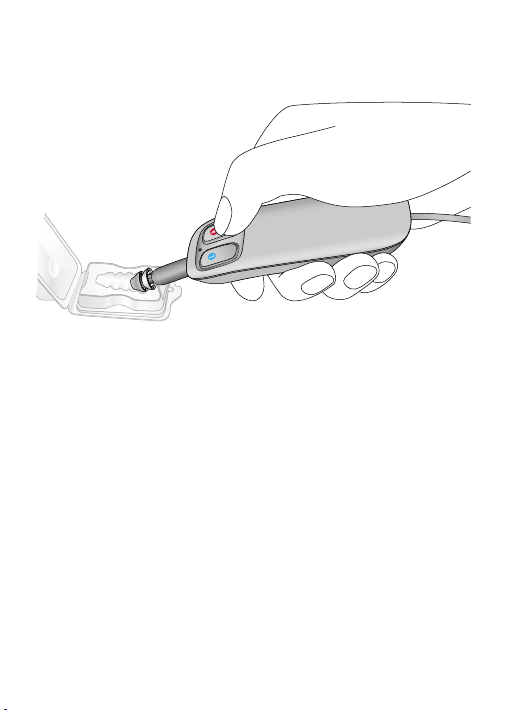
To program, hold the tip of the wand close to the lateral
end of the Lyric hearing aid and press the programming
button according to the ear you want to t. The status LED
will ash green during programming.
The status LED turns back to solid green after 3 seconds.
The wand is then ready for the next programming
procedure.
Programming

The Lyric hearing aid will play a double beep to indicate
that it has been programmed. When the Lyric hearing
aid is programmed for the rst time, it will switch from
“Ship Mode” to ON when successfully programmed.
This can be veried by listening for feedback or using a
listening stethoscope.
If programming is performed in the ear, ask the patient
to pay attention and conrm the beeps to make sure the
programming was successful.

If an error occurs during programming, the status LED
will ash orange for 3 seconds before turning back to
green. In that case repeat the programming procedure.
If any other malfunctions occur with the wand, the
status LED will turn red. In that case, reboot the wand by
disconnecting and reconnecting it to the USB-port.
The status LED will ash red when the rmware of the
wand is updated. Wait until it turns back to green before
programming. Do not disconnect the wand during the
rmware update.
Further indicators

To clean the programming tip of the wand use a
disinfectant wipe if necessary. To clean the wand body,
use a mild detergent. The wand must not be dipped
in water or other detergents. Diligent and routine care of
your Lyric programming wand contributes to outstanding
performance and a long service life. To ensure a long
service life, Sonova AG provides a minimum of a 5 years
service period after phase out of the respective Lyric
programming wand. Further information regarding product
safety, see chapter Important safety information.
Declaration of conformity
Hereby Sonova AG declares that this product meets
the requirements of the Medical Devices Regulation
2017/745. The full text of the EU Declaration of
Conformity can be obtained from the manufacturer or
the local manufacturer representative whose address
can be taken from the list on https://
www.phonak.com/us/en/certicates.html (worldwide
locations).
Care and maintenance
Compliance information

Any serious incident that has occurred in relation to the
hearing aid, should be reported to the manufacturer
representative and the competent authority of the state
of residence. A serious incident is described as any
incident that directly or indirectly led, might have led
or might lead to any of the following:
a) the death of a patient, user or other person
b) the temporary or permanent serious deterioration
of a patient's, user's or other person's state of health
c) a serious public health threat.
To report an unexpected operation or event, please
contact the manufacturer or a representative.
Emission standards: EN 60601–1-2:2015 , IEC 60601–1-2:2014,
EN 55011:2009+A1, CISPR11:2009/AMD1:2010 , CISPR22:1997, CISPR32:2012,
ISO 7637-2:2011, CISPR25:2016 , EN 55025:2017
Immunity standards: EN 60601-1-2:2015, IEC 60601-1-2:2014,
EN 61000-4-2:2009, IEC 61000-4-2:2008, EN 61000-4-3:2006+A1+A2,
IEC 61000-4-3:2006+A1+A2, EN 61000-4-4:2012, IEC 61000-4-4:2012,
EN 61000-4-5:2014, IEC 61000-4-5:2014, EN 61000-4-6:2014,
IEC 61000-4-6:2013, EN 61000-4-8:2010, IEC 61000-4-8:2009,
EN 61000-4-11:2004, IEC 61000-4-11:2004, IEC 60601-1 (§ 4.10.2):2005,
ISO 7637-2:2011

Please read the information on the following pages
before using your Lyric programming wand.
1. Hazard warnings
The Lyric programming wand contains a magnet. If a
medical device like a pacemaker is used, read the
specic user guide to clarify possible impact of the
magnetic elds to the medical device. Keep a
distance of at least 15 cm (6 inches) between the
Lyric programming wand and the medical device.
Patients implanted with magnetic externally
programmable CSF shunt valves may have a risk of
experiencing an unintended change in their valve
setting when exposed to strong magnetic elds. The
receiver (loudspeaker) of hearing aids, the Lyric
SoundLync, the Lyric programming wand and the
MiniControl contain static magnets. Keep a distance
of approx. 5 cm (2 inches) or more between the
magnets and the site of the implanted shunt valve.
Important safety information
Other manuals for Lyric
4
Table of contents
Popular Computer Hardware manuals by other brands

EMC2
EMC2 VNX Series Hardware Information Guide

Panasonic
Panasonic DV0PM20105 Operation manual

Mitsubishi Electric
Mitsubishi Electric Q81BD-J61BT11 user manual

Gigabyte
Gigabyte B660M DS3H AX DDR4 user manual

Raidon
Raidon iT2300 Quick installation guide

National Instruments
National Instruments PXI-8186 user manual











