3. FRONT PANEL FACILITIES
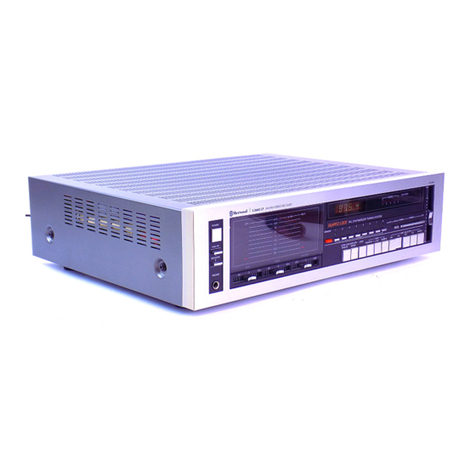
POWER
SWITCH
Flipthis
switchtothe
ONposition
tosupply
power
tothe
stereoreceiver.
Therewill bea shortdelaywhenit i; set
to ON, becausethe mutingcircuit hasbeen
actuatedto
suppressthe unpleasantnoise
thatissometimes
generated
when
the
power
isswitched
onandoff.
PHONES
JACK
Plugthe headphonesinto this jack when you want to
listen
through
yourstereoheadphones.
Release
the allSPEAKERSbuttonsif you want to listen
to thesoundthrough
your headphones
only (This
means
that
allthreebuttons
will bereleased).
SPEAKERS
BUTT
Press
the button corresponding
to thespeakers
connerrted
to theSPEAKERSterminals
(A, B,C) on therear
panel.
You can presrtwo of thesebuttonsto listen
to sound
from two pairs
of speaker
systemsat thesametime.
NOTE:
No ound utill beheardthrough the speahers
if all lhree
buttou are
p?esed
ot lhe same
time.
BALANCE
CONTROL
Usethir control to balancethe volume
of the left and
right chennels.First, however,
setthe MODE switchto
MONO, and adiust
so that the soundappears
to c,)me
from somewhere
exactly
betweenthetwo speakers.ll the
sound
appears
to be louder
on the
right,
it means
that
the
volumeof therightchannel
is
higher.TurntheBALAIICE
control to the left and adiust.
Conversely,if the sound
appears
to be louder on the left, it meansthat the
volume
of the left channelishigher.
Therefore,
turn the
BALANCE control to the right
andadiust.After adjust-
ing,returntheMODE
switchto STEREO.
POWER
METERS
Thesepower meters
allow you to read
out the rated
powerlevelwhen speakers
with a nominalimpedanceof
8 ohmsareconnectedto the receiver'sspeakerterminals.
NOTE:
These ualuesare related to the impedanceof the
speahersand they wry accprding to the frequency.
In order to find out the exactoutput leuel,connectan
8-ohmdummy loadinsteadof thespeahers.
FUNCTION
INDICATOR
MEMORYMARKERS
These
arevery
convenientfor frequenttuning
in to the
same
broadcastingstation.
MUTINGSWITCH
Set this switch to the -20d8 position
to attenuatethe
audiooutputindicated
by the
VOLUME
controlby 20d8.
There is no needto adiust
the VOLUMEcontrolif you
usethis switch when turningdown the audiooutput
temporarily and when changing
over records
or tapes.
VOLUME
CONTROL
Usethiscontrolto adlusttheoutputlevelto thespeakers
andheadphones.Turn it clockwiseto increasetheoutput
level.No sound
will beheardif you set
it to-. The
scale
is graduated
in dB which indicate
the attenuation
when
themaximum
outputlevel
is0dB.
ti
t"
tl
III
II
Irt
Iti
il
l,l
I
_rEeLE_
tw ,oi! ---- +" -..,E;l'"ia'- o^.',r E
r:f
o osss$":f^fl#"
OErEn