4
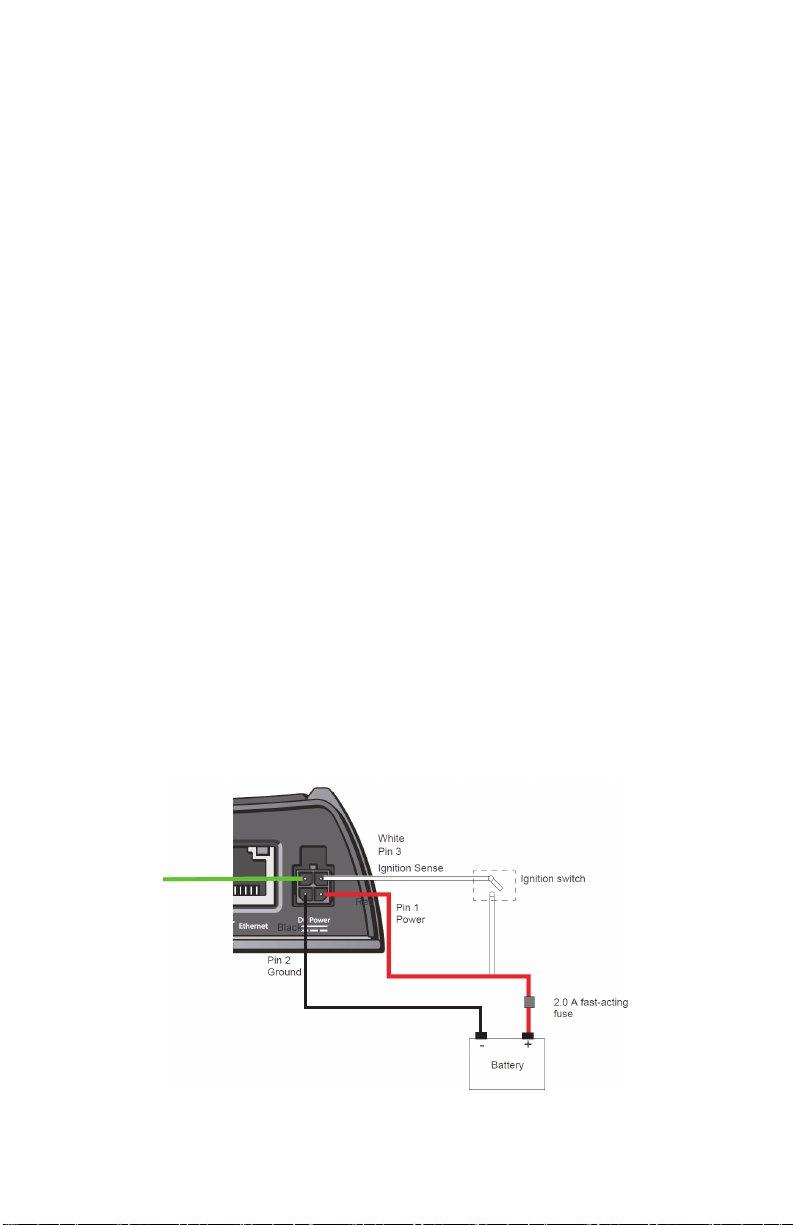
Note: If the power cable is installed as described above, the vehicle ignition
switch will control the Field Hub power-up and shutdown. When the
ignition switch is turned off, the Field Hub will perform a shutdown
sequence before powering off completely.
Warning: Failure to connect the white lead to the ignition could result in
excessive data usage, vehicle battery drain, and the inability
to receive Slingshot updates.
9. Route the 4-pin connector on the supplied power cable into the vehicle cab
and connect to the ‘Power’ plug on the back of the Field Hub.
Warning: Do not route through possible crimp points such as vehicle
windows, doors, or sharp edges.
10.Connect the appropriate Raven serial cable to the serial port on the back
of the Field Hub and route the cable to the input port on your GPS receiver.
Contact your GPS receiver manufacturer for any necessary adapter cables
or more information.
Warning: Use only Raven-approved serial cables designed specifically
for your GPS receiver, or excess data usage may occur.
Contact your local Slingshot dealer for appropriate cable part
number and ordering information.
11.Connect the supplied Ethernet cable to the ‘Ethernet’ port on the back of
the Field Hub and route to a web compatible device such as a Raven field
computer.
Note: If a Viper 4 is being used, a different Ethernet cable (P/N 115-0172-
090, 2 meters or 115-0172-210, 4 meters) other than the cable
provided in the kit is required. This cable is sold separately. Contact
your Slingshot dealer for ordering information.
12.Place the Field Hub information in a location that is easily visible as it
contains information that may be needed in the future.
Installation Checklist
Once the installation of the Field Hub is complete, verify that the Field Hub is
working properly by checking the items in the list below.
Note: The Field Hub may take up to 3 minutes to start up. Allow the Field
Hub sufficient time to power up.
• Signal LED is solid green or solid yellow.
• Network LED is solid green or flashing green/yellow.
• ACT/232 LED should be flashing yellow or red (approximately once per
second), with intermittent green flashing if a valid Slingshot RTK
subscription has been activated.
• Power LED is green with yellow flashing every four seconds if GPS is
acquired.
• Field Hub powers on/off with the ignition.
Note: The Field Hub goes through a power down sequence when the ignition
key is switched off. It is normal for the Power LED to remain on for
approximately 60 seconds after the ignition switch is turned off.