manuals.online logo
Brands
  1. Home
  2. •
  3. Brands
  4. •
  5. Rawinternational
  6. •
  7. TV Mount
  8. •
  9. Rawinternational PF2 User manual

Rawinternational PF2 User manual

Other Rawinternational TV Mount manuals

Rawinternational FL1 User manual

Rawinternational

Rawinternational FL1 User manual

Rawinternational PT1 User manual

Rawinternational

Rawinternational PT1 User manual

Rawinternational PT2 User manual

Rawinternational

Rawinternational PT2 User manual

Popular TV Mount manuals by other brands

Krüger & Matz KM1300 owner's manual

Krüger & Matz

Krüger & Matz KM1300 owner's manual

Barkan E220 manual

Barkan

Barkan E220 manual

Bauhn ACTVB-1120 installation guide

Bauhn

Bauhn ACTVB-1120 installation guide

Vantage Point Products CB01 instructions

Vantage Point Products

Vantage Point Products CB01 instructions

Ergotron Neo Flex Cantilever UHD user guide

Ergotron

Ergotron Neo Flex Cantilever UHD user guide

ECG LD 174203 instruction manual

ECG

ECG LD 174203 instruction manual

StarTech.com FPCEILBTB user manual

StarTech.com

StarTech.com FPCEILBTB user manual

VonHaus 05/038 instruction manual

VonHaus

VonHaus 05/038 instruction manual

Techlink ECHO TV manual

Techlink

Techlink ECHO TV manual

Sandstrom SSTVMC12X instruction manual

Sandstrom

Sandstrom SSTVMC12X instruction manual

Kanto RCAD590 user manual

Kanto

Kanto RCAD590 user manual

Forging Mount HY9440 instruction manual

Forging Mount

Forging Mount HY9440 instruction manual

ICW SCACC18 installation instructions

ICW

ICW SCACC18 installation instructions

LG WM-L640V owner's manual

LG

LG WM-L640V owner's manual

Gembird WM-65ST-01 user manual

Gembird

Gembird WM-65ST-01 user manual

ERARD FiTUP XXL 035320 quick start guide

ERARD

ERARD FiTUP XXL 035320 quick start guide

PEERLESS PLCK-1 Installation and assembly

PEERLESS

PEERLESS PLCK-1 Installation and assembly

GEM GEM GP001 instructions

GEM

GEM GEM GP001 instructions

manuals.online logo
manuals.online logoBrands
  • About & Mission
  • Contact us
  • Privacy Policy
  • Terms and Conditions

Copyright 2025 Manuals.Online. All Rights Reserved.

nal
rawinternational
rawinternational
rawinternational
rawinternational
rawin
nal
rawinternational
rawinternational
rawinternational
rawinternational
rawin
nal
rawinternational
rawinternational
rawinternational
rawinternational
rawin
nal
rawinternational
rawinternational
rawinternational
rawinternational
rawin
winternational
rawinternational
rawinternational
rawinternational
rawin
ational
rawinternational
rawinternational
rawinternational
rawin
winternational
rawinternational
rawinternational
rawin
ational
rawinternational
rawinternational
rawin
rawinternational
rawinternational
rawin
ational
rawinternational
rawin
rawinternational
rawin
rnational
rawin
rawin
nal
rawinternational
rawinternational
rawinte
nal
rawinternational
rawinternational
rawinternationa
nal
rawinternational
rawinternational
rawinternational
rawinte
nal
rawinternational
rawinternational
rawinternational
rawinternationa
nal
rawinternational
rawinternational
rawinternational
rawinternational
rawin
nal
rawinternational
rawinte
nal
rawinternational
rawinternationa
nal
rawintern
nal
rawinternational
nal
ra
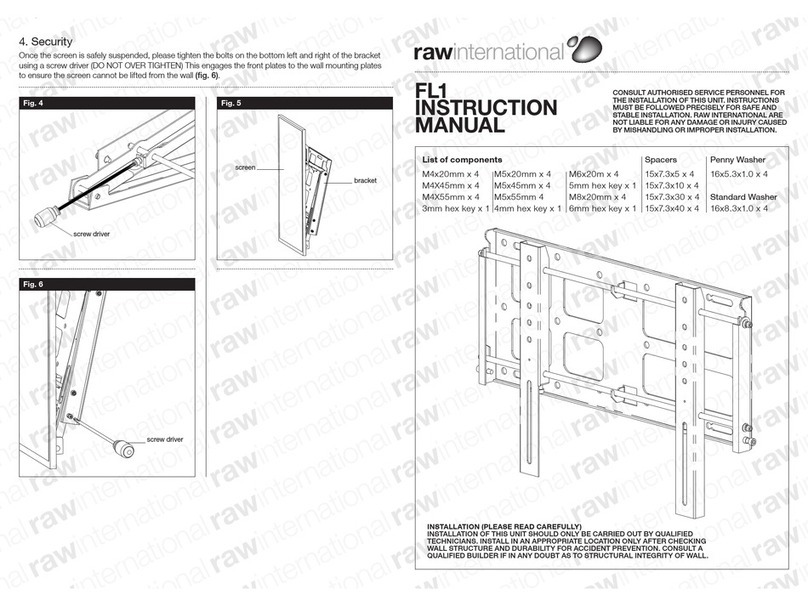
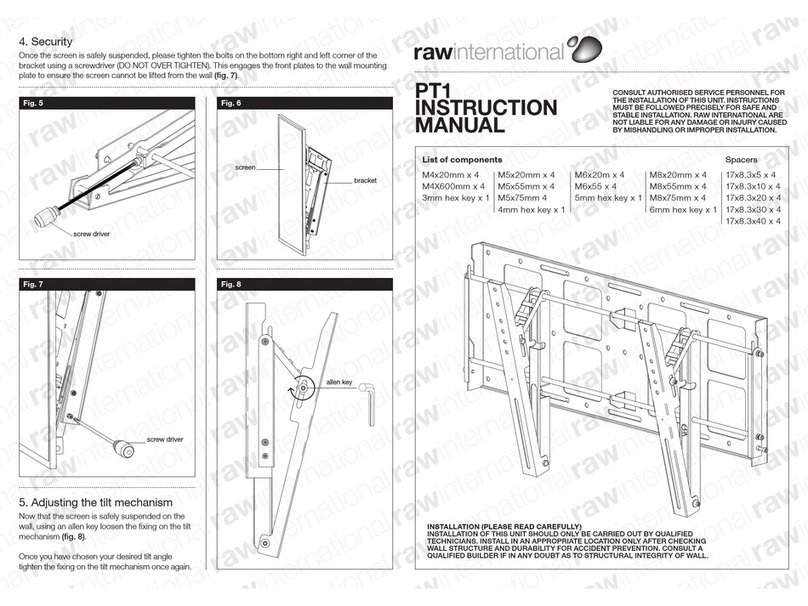
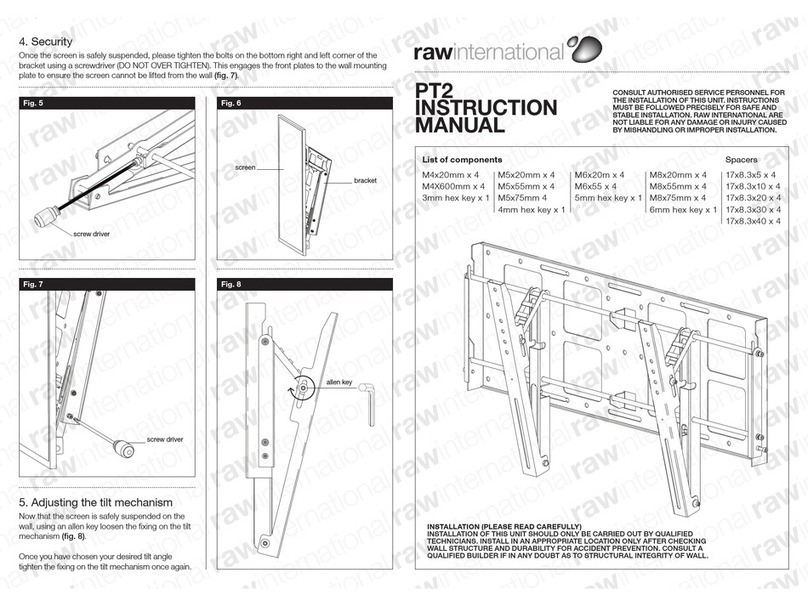
4. Security
Once the screen is safely suspended, please tighten the bolts on the bottom right and left corner of the
bracket using a screwdriver (DO NOT OVER TIGHTEN). This engages the front plates to the wall mounting
plate to ensure the screen cannot be lifted from the wall (fig. 6).
PF2
INSTRUCTION
MANUAL
rawinternational
CONSULT AUTHORISED SERVICE PERSONNEL FOR
THE INSTALLATION OF THIS UNIT. INSTRUCTIONS
MUST BE FOLLOWED PRECISELY FOR SAFE AND
STABLE INSTALLATION. RAW INTERNATIONAL ARE
NOT LIABLE FOR ANY DAMAGE OR INJURY CAUSED
BY MISHANDLING OR IMPROPER INSTALLATION.
INSTALLATION (PLEASE READ CAREFULLY)
INSTALLATION OF THIS UNIT SHOULD ONLY BE CARRIED OUT BY QUALIFIED
TECHNICIANS. INSTALL IN AN APPROPRIATE LOCATION ONLY AFTER CHECKING
WALL STRUCTURE AND DURABILITY FOR ACCIDENT PREVENTION. CONSULT A
QUALIFIED BUILDER IF IN ANY DOUBT AS TO STRUCTURAL INTEGRITY OF WALL.
List of components Spacers
M4x20mm x 4 M5x20mm x 4 M6x20m x 4 M8x20mm x 4 17x8.3x5 x 4
M4X600mm x 4 M5x55mm x 4 M6x55 x 4 M8x55mm x 4 17x8.3x10 x 4
3mm hex key x 1 M5x75mm 4 5mm hex key x 1 M8x75mm x 4 17x8.3x20 x 4
4mm hex key x 1 6mm hex key x 1 17x8.3x30 x 4
17x8.3x40 x 4
bracket
screw driver
screw driver
Fig. 4 Fig. 5
screen
Fig. 6
nal
rawinternational
rawinternational
rawinternational
rawinternational
rawin
nal
rawinternational
rawinternational
rawinternational
rawinternational
rawin
nal
rawinternational
rawinternational
rawinternational
rawinternational
rawin
nal
rawinternational
rawinternational
rawinternational
rawinternational
rawin
winternational
rawinternational
rawinternational
rawinternational
rawin
ational
rawinternational
rawinternational
rawinternational
rawin
winternational
rawinternational
rawinternational
rawin
ational
rawinternational
rawinternational
rawin
rawinternational
rawinternational
rawin
ational
rawinternational
rawin
rawinternational
rawin
rnational
rawin
rawin
nal
rawinternational
rawinternational
rawinte
nal
rawinternational
rawinternational
rawinternationa
nal
rawinternational
rawinternational
rawinternational
rawinte
nal
rawinternational
rawinternational
rawinternational
rawinternationa
nal
rawinternational
rawinternational
rawinternational
rawinternational
rawin
nal
rawinternational
rawinte
nal
rawinternational
rawinternationa
nal
rawintern
nal
rawinternational
nal
ra
1. Mounting wall plate
Remove security screw from bottom of bracket
and detach front plate (fig. 2). Mount wall plate
(fig. 1) on wall in desired position using screws/
bolts suitable to construction of the wall. (If in any
doubt please consult a qualified builder). Attach
screws/bolts through as many holes/slots as
possible. There are a total of 22 fixing holes on
the back plate, however the minimum amount of
fixings that Raw International recommend is six.
(If in any doubt as to strength of fixings please
consult a qualified builder.)
It is important that the front plates are fixed as
centrally as possible to screen. To help achieve this,
there is a 2mm hole in the centre of each of the
front plates. Line this hole up so it is equal distance
between the top and bottom fixings on the back of
the screen (fig. 2). Once it is lined up, the nearest
fixing hole on the front plates to the top fixing
on the plasma screen are the ones that should
be fixed first (fig. 3) using appropriate screws/
washers/isolators/spacers. Then fix the bottom two
fixings through the slots using appropriate screws/
washers/isolators/spacers. Please use an Allen key
to tighten all four fixings. Only use isolators if back
of screen is not flush with the front plates.
Ensure front plates are situated in a centralised
horizontal position, tighten the screws on the top of
the front plates (fig. 5 overleaf) using a screw driver.
3. Engaging Plasma with the wall
Lift the display (minimum 2 people) with front
plates attached so that the bars engage with the
angled slots on the wall mounting plate (fig. 5
overleaf), the screen is now safely suspended.
2. Attaching front plates to the
plasma screen
Place the screen face down on soft cloth (to
prevent damage) on a flat surface. The fixings you
use is dependent on the make and model of your
screen. There are different sets of fixings supplied
with the bracket. Only ONE set of fixings will be
required. In order to ascertain which set of fixings
will be required, screw fixings in the back of the
screen before attempting to attach front plates.
Only ONE set of fixings will be of the correct
diameter for your screen.
Fig. 1
Mounting holes/slots
Fig. 3
security
screw
2mm
hole
screen
equal distance to 2mm hole
fixings holes on back of screen
steel washer
nylon isolator
front plates
screen
steel fixings
Fig. 3