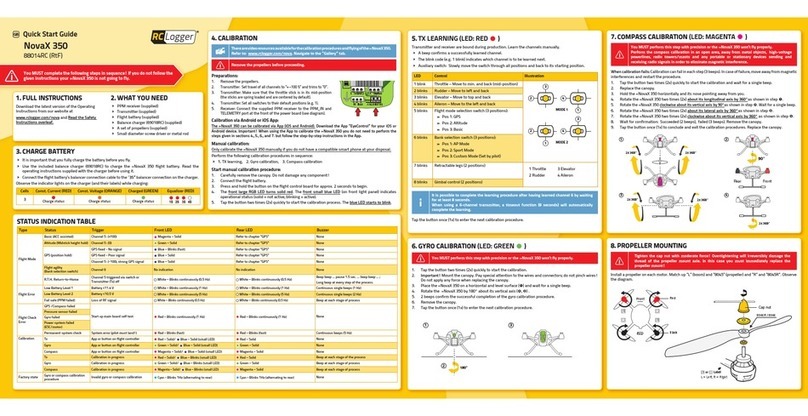
In case that the »NovaX 350 circles (GPS) or spirals down (R.T.H.),
the pilot must immediately manually land and recalibrate the
compass.
GPS
The GPS signal strength is indicated by the front and rear LED. Depending
on the GPS signal strength the solid LED light is interrupted by blinking
blue light (distinct blink patterns). Carefully study the below table so that
you can distinguish the different signals.
Basic (Magenta)
Front LED
Rear LED
Front LED
Rear LED
Front LED
Rear LED
Altitude (Green)
GPS (Blue)
Signal optimal good medium weak no signal
R.T.H. (RETURN TO HOME)
In order for R.T.H. to work, wait (1 - 10 min.) until the »NovaX 350
receives a good GPS signal before taking off.
R.T.H. (Return To Home) is a failsafe feature allowing the »NovaX 350 to
fly back to its original take-off position and is triggered automatically or
manually.
Auto triggers:
> Receiver signal loss (receiver failure)
> Operation outside operating range (approx. 300 m)
> Transmitter turned off
Manual trigger (See fig. R.T.H.):
> Deactivated: R.T.H. switch in position 0 or 1
> Activated: R.T.H. switch in position 1 or 2
The returning to home happens in a two-step procedure: the »NovaX 350
is automatically brought into a stable hover position, then returns home.
R.T.H. is a feature of S.M.A.R.T. (Software Managed Auto Return
Technology). The pilot can configure S.M.A.R.T. through the EyeControl
App. The AUTO function marks the motor start location as home and
the pilot can deactivate the function again to take back control as soon
as they see the situation under control. To learn more about S.M.A.R.T.,
refer to the product website.
For R.T.H. to work, a good GPS signal is required at all times. The
»NovaX 350 may take up to 10 min. for GPS signal acquisition the
first time you turn it on or after longer breaks. For subsequent signal
acquisition the time may be shorter (1 - 2 min.). Note that whenever you
move the »NovaX 350 to another location, the signal acquisition time
may increase again (1 - 10 min.). Depending on the GPS signal strength,
the »NovaX 350 behaves differently. The below table summarizes all
possible behaviours.
GPS signal Behaviour on triggering of R.T.H.
Good signal at take-off and when
R.T.H. is triggered »NovaX 350 returns home.
Weak signal at take-off, but
improved signal during flight
»NovaX 350 holds its position for 5 seconds,
then descends and lands.
Signal weakens during flight »NovaX 350 descends immediately.
(White) (White)
Fig. R.T.H.
Beep beep ... pause ...
Beep
Beep
Beep
> Stay away from power lines, cellphone towers and other sources of
potential interference, and restricted areas.
(Rechargeable) Batteries
> Correct polarity must be observed while inserting the batteries.
>
Remove the battery from the »NovaX 350 after every flight. Remove the
batteries from the transmitter if you do not use it for a longer period of
time. Discharged batteries may leak.
> Leaking or damaged batteries can cause acid burns when in contact
with skin. Therefore use suitable protective gloves to handle
corrupted and leaking batteries.
> Batteries must be kept out of the reach of children. Do not leave
the batteries lying around. There is a risk that children or pets may
swallow them.
> All batteries should be replaced at the same time. Mixing old and new
batteries can lead to battery leakage and device damage.
> Batteries must not be dismantled, short-circuited or exposed to
fire. Never recharge non-rechargeable batteries. There is a risk of
explosion!
> Never mix regular batteries and rechargeable batteries!
LiPo batteries
Lithium is a highly reactive chemical element with a
high energy density. In the case of overcharging, the
LiPo rechargeable battery packs might catch fire or even
explode. Therefore, LiPo rechargeable battery packs must
always be put on a fire-proof surface for charging and the
charging process must be supervised.
In no case must the maximum permissible battery
pack temperature of +60°C be exceeded Otherwise the
rechargeable battery may explode!
> Do not leave the LiPo flight battery connected when you do not use
it (e.g. during transport or storage). Otherwise, the LiPo flight battery
may be fully discharged.
> Rechargeable LiPo batteries are very susceptible to moisture due
to the chemicals they contain! Do not expose them to moisture or
liquids. Risk of explosion!
> When handling LiPo batteries, observe the special safety information
of the battery manufacturer!
> Never charge the LiPo flight battery immediately after use. Always
leave the LiPo flight battery to cool off first (at least 5-10 minutes).
> Onlycharge intact and undamagedbatteries. If the externalinsulation
of the rechargeable battery is damaged or if the rechargeable battery
is deformed or bloated, it must not be charged. In this case, there is
immediate danger of fire and explosion!
> Never damage the exterior of a LiPo flight battery. Never cut the
coveringfoil. Never stab any LiPo flight batteries with pointedobjects.
> As the charger and the rechargeable LiPo flight battery both heat up
during the charging procedure, it is necessary to ensure sufficient
ventilation. Never cover the charger or the LiPo flight battery!
> Remove the LiPo flight battery that is to be charged from the model
and place it on a fire-proof support (e.g. a plate). Keep a distance to
flammable objects.
> Disconnect the LiPo flight battery from the charger when it is fully
charged.
> The contacts of the battery may not be short-circuited, as there is
danger of fire and explosion!
> Do not expose rechargeable batteries to fire, as there is a risk of
explosion!
> Keep rechargeable LiPo batteries away from children. Store
rechargeable batteries in a dry, cool place.
> If a rechargeable battery is deformed or damaged during a crash, it
must no longer be used. The same applies for “swollen” rechargeable
batteries, or rechargeable batteries with other visible deformation or
leaks. Do not attempt to charge such rechargeable batteries! Danger
of fire and explosion!
> Dispose of such rechargeable batteries in an ecologically sound
fashion.
> The general hazard notices for handling batteries and rechargeable
batteries also apply for rechargeable LiPo batteries.
> Since discharging below 3.0 V per cell would lead to permanent
damage of the rechargeable battery pack, this total discharging is to
be prevented as far as possible.
> For safety reasons, programmable cruise controls/flight control
systems should be set in such a way that the undervoltage detection
has already responded before a voltage of 3.0 V per cell is reached
(e.g. 3.2 V). Alternatively, the optical undervoltage displays are also
recommended.
Correct dimensioning
> As the current drawn rises, the battery pack warms and the usable
capacityislowered.Theideal operating temperature during discharge
is between +20 and +40 °C and must not exceed +60 °C even under
extreme load.
> The maximum short-time discharge current is stated in the technical
data sheets or can be read directly from the battery pack. The value
“C” always refers to the capacity value of the respective battery pack.
Example:
A battery pack with a capacity of 2100 mAh and ”20 C” can
be discharged with 2100 mA x 20 = 42 A maximum.
> However, the maximum permissible continuous current is clearly
lower. If there are no precise manufacturer’s specifications, the
battery pack should not be discharged with more than approx. 50 %
of the maximum permissible surge current over a long term.
Miscellaneous
> Consultan expert whenin doubt aboutoperation,safety or connection
of the device.
> Maintenance, modifications and repairs are to be performed
exclusively by an expert or at a qualified shop.
> If you have questions which remain unanswered by these operating
instructions, contact our technical support service or other technical
personnel.
PRODUCT SUPPORT
Visit http://www.rclogger.com/support or call +852 2559 2662 for
product support. Additionally visit our Online Ticket System at http://
support.rclogger.com for any RC Logger inquiry.
88012RC_v2_0615_02_m_ArF_en_(5.1)_QSG
SAFETY INSTRUCTIONS
Read the instructions carefully and especially observe
the safety information. If you do not follow the safety
instructions and information on proper handling in this
manual, we assume no liability for any resulting personal
injury or damage to property. Such cases will invalidate
the warranty/guarantee.
Only use the supplied flight battery or a suitable spare
battery from RC Logger.
After the flight, the LiPo flight battery must be
disconnected from the »NovaX 350.
Make sure the transmitter is turned on before connecting
the battery to the »NovaX 350.
Avoid unexpected startup. This can lead to serious injury
and damage the »NovaX 350.
Persons/Product
> For safety and approval purposes (CE), you must not rebuild and/or
modify this product. If you use the product for purposes other than
those described above, the product may be damaged. In addition,
improper use can cause hazards such as short circuiting, fire, electric
shock etc. Read the instructions carefully and keep them.
> Make this product available to third parties only together with its
operating instructions.
> This product complies with the statutory national and European
requirements. All company names and product names are
trademarks of their respective owners. All rights reserved.
> The device is not a toy. Keep it out of the reach of children and pets.
> Do not leave packaging material lying around carelessly. These may
become dangerous playing material for children.
> If it is no longer possible to operate the product safely, take it out of
operation and protect it from any accidental use. Safe operation can
no longer be guaranteed if the product:
» is visibly damaged,
» is no longer working properly,
» has been stored for extended periods in poor ambient
conditions, or
» has been subjected to any serious transport-related stresses.
The product must not become damp or wet. The »NovaX 350
uses delicate electronic components which are sensitive to
temperature fluctuations and are optimised for a particular
temperature range. Operating temperatures below 0°C must
be avoided.
> Before every flight check the functional reliability of your model and
the transmitter (if provided). Watch out for any visible damage such
as defective plug connections or damaged cables and wires.
> Before each operation check the correct and secure position of the
propellers.
> Always switch on the transmitter first before connecting the battery
to the »NovaX 350.
> Set the throttle to zero before connecting the battery to the
»NovaX 350. The rotors might run unintentionally!
> When the rotors are running, make sure that neither objects nor
body parts are in the rotating and suction area of the propellers.
> Do not take any risks when operating the model! Your own safety
and that of your environment is solely down to you being responsible
when dealing with the model.
> Improper operation may cause serious injury and property damage!
Therefore make sure to keep a sufficiently safe distance to persons,
animals or objects during operation.
> Fly the »NovaX 350 only if your ability to respond is unrestricted.
The influence of tiredness, alcohol or medication can cause incorrect
responses.
> Never expose the »NovaX 350 or the transmitter to direct sunlight or
excessive heat for an extended period of time.
> In the case of a severe crash (e.g. from a high altitude) the electric
gyro sensors can be damaged and/or misadjusted. Therefore, full
functionality must be tested before flying again without fail!
> Observe the warn/safety signals emitted by the »NovaX 350 at all
times to avoid damage (e.g. discharged battery).
Outdoor flying locations
> Always and only operate the »NovaX 350 in a designated RC flying
area.
9.CONTROLS
Mode 1
Mode 2
Mode 1
Mode 2
Mode 1
Mode 2
Mode 1
Mode 2
Mode 1
Mode 2
Mode 1
Mode 2
START STOP
2 seconds
2 seconds
2 seconds
2 seconds
10. CHANNELS
Channel Function
Ch 1 Mode-dependent: Mode 1 or 2
Ch 2 Mode-dependent: Mode 1 or 2
Ch 3 Mode-dependent: Mode 1 or 2
Ch 4 Mode-dependent: Mode 1 or 2
Ch 5
Flight mode selection switch:
Pos 1: GPS (offset: -100)
Pos 2: Altitude (offset: 0)
Pos 3: Basic (offset: +100)
Ch 5 R.T.H. switch (trim: +30 %)
Ch 6
Bank selection switch:
Pos 1: AP (offset: -100)
Pos 2: Sport (offset: 0)
Pos 3: Custom (offset: +100)
Ch 7 Retractable legs
Ch 8 Gimbal control
Notes on the use of 6-channel transmitters: when using
a 6-channel transmitter, trigger R.T.H. by turning the
transmitter off. Additionally, set channel 5 to +30 % in the
‘fail safe’ status. Refer to the user instructions of your
transmitter and receiver.
Programming the R.T.H. switch (Ch 5)
1. Assign an aux. 2-position-toggle switch to channel 5.
2. Set an offset large enough so that the channel
offset will be (+/-) 30 % after R.T.H. is triggered. For
overwriting GPS and Altitude modes, set a positive
offset, and a negative offset for overwriting the Basic
flight mode. See below figure.
3. Now test your settings. Move the 2-position-toggle
switch (R.T.H. switch) to its default position (position
0 or 1 respectively). Switch the channel 5 switch (flight
modes) through all positions and check for required
offsets: GPS (-100 %), Altitude (0), and Basic (+100 %).
4. Switchthe R.T.H. switch to position 1 or 2, respectively.
Checkfor required channel offset: (+/-) 30 % for channel
5 and R.T.H.
-100%
GPS (-100)
Altitude (0)
R.T.H
Basic (+100)
-50%
+50%
Ch 5 Ch 5 Ch 5
0
+100%
Enabled Disabled
A- Normal flight B- R.T.H.