
Rhosonics SDM Series User manual

SDM SERIES - SLURRY DENSITY METER
MANUAL

SDM –Slurry Density Meter
2 www.rhosonics.com
TABLE OF CONTENTS
1. PREFACE 5
1.1 PURPOSE 5
1.2 SYMBOLS AND CONVENTIONS 5
1.3 ABOUT THIS MANUAL 5
1.3.1 CONVENTIONS 5
1.4 DOCUMENT ISSUE 6
2. INSTALLATION 6
2.1 INTRODUCTION 6
2.2 SELECTING THE SDM LOCATION 9
2.2.1 VERTICAL PIPE MOUNTING 10
2.2.2 HORIZONTAL PIPE MOUNTING 10
2.2.3 ANALYZER HEAD ROTATION 11
2.3 INSTALLATION OF THE SPOOL (SDM-1) 12
2.3.1 SEALING MATERIAL 12
2.3.2 GASKET SEALING 12
2.3.3 BOLTING PATTERN AND TORQUE 12
2.3.4 INSTRUCTIONS 13
2.3.5 4 AND 8BOLT FLANGES 13
2.3.6 12 BOLT FLANGES AND MORE 13
2.4 WELDOLET INSTALLATION (SDM-2 OR SDM-3) 14
2.5 INSTALLATION OF THE WAFER (SDM-4 OR SDM-5) 15
2.5.1 WAFER (UHMWPE) 16
2.5.2 WAFER (METAL,I.E.AISI 316) 19
2.6 INSTALLATION OF THE SDM TO THE PROCESS ADAPTOR 19
2.7 ELECTRICAL CONNECTIONS SDM 19
2.7.1 USB PORT 21
2.7.2 CONNECTION 24 VDC POWER AND HART 21
2.7.3 HART INSTALLATION CONFIGURATIONS 23
2.7.4 HART CONNECTING THE SECONDARY MASTER TO THE ANALYZER 24
2.7.5 CONNECTION USB-PORT TO A PC 26
3. OPERATION 28
3.1 INTRODUCTION 28
3.1.1 FUNCTIONALITY PER USER INTERFACE 29
3.2 LCD SCREEN 30
3.2.1 SCHEDULE OPERATION LCD SCREEN 30
3.2.2 CONVENTION 31
3.2.3 STATUS ANALYZER 32
3.3 OPERATION VIA HART 34
3.4 USB-PORT 34
3.4.1 SOFTWARE UPDATE 34
3.4.2 RHOSONICS SERVICE APPLICATION (RHOSONICS SA 9D) 35
4. CONFIGURATION 36

SDM –Slurry Density Meter
3 www.rhosonics.com
TABLE OF CONTENTS
4.1 INTRODUCTION 36
4.2 LCD SCREEN 36
4.2.1 START PAGE /MEASURED VALUES 36
4.2.2 MAIN MENU 37
4.2.3 DECAY TIME 37
4.2.4 BACK-LIGHT 37
4.2.5 ACCESS CODE 38
4.2.6 ADVANCED FUNCTION 38
4.2.7 LIQUID SELECT 38
4.2.8 CHECK FUNCTION 39
4.2.9 OUTPUT MARANGE 39
4.3 HART COMMUNICATION 40
4.3.1 SETTING THE PRIMARY VARIABLE /ASSIGNING 4-20MAOUTPUT 40
4.3.2 CONFIGURE 4-20 MAOUTPUT 41
4.4 USB-PORT 43
4.4.1 CONFIGURATION 43
5. CALIBRATION LCD SCREEN 45
5.1 CALIBRATION MENU 45
5.1.1 SET TEMPERATURE 45
5.1.2 S.G. X 1000 CALIBRATION 45
5.1.3 FIELD CALIBRATION 47
6. MAINTENANCE 48
6.1 REPLACING /MOUNTING A SENSOR 48
7. DIAGNOSTICS & SERVICE 51
7.1 DIAGNOSTICS MENU 51
7.1.1 SYSTEM STATUS 51
7.1.2 RESTORE CALIBRATIONS 51
7.1.3 SET CLOCK AND DATE 52
7.1.4 LOGGING AND SETTINGS FOR DIAGNOSTICS &EVALUATION 52
7.1.5 COLLECT LOG DATA USING USB 53
7.1.6 ERASE LOG 54
8. DISTRIBUTORS CALIBRATION (FOR RHOSONICS AND DISTRIBUTORS ONLY) 55
8.1 USB-PORT (ONLY DISTRIBUTORS AND FACTORY) 55
8.2 MATRIMMING 56
8.3 TEMPERATURE 56
8.4 SGX1000 CALIBRATION 58
8.4.1 SGX1000 OFFSET CALIBRATION 58
8.4.2 SGX1000 SPAN CALIBRATION 59
9. TECHNICAL SPECIFICATIONS 60

SDM –Slurry Density Meter
4 www.rhosonics.com
TABLE OF CONTENTS
9.1 OPERATION CHARACTERISTICS 60
9.2 SDM HOUSING 60
9.3 SDM SENSOR 61
9.4 SPOOL /WELDOLET /WAFER 61
10. APPENDICES 62
10.1 LIST OF SPARE PARTS 62
10.2 OPTIONS 62
10.3 APPENDIX A: SOUND SPEED OF WATER AT 0TO 100 °C 62
10.4 APPENDIX B: DENSITY OF WATER AT 0TO 100 °C 63
10.5 APPENDIX C: FLOW DD (HART) 64

SDM –Slurry Density Meter
5 www.rhosonics.com
PREFACE
1. Preface
1.1 Purpose
This manual explains the installation, configuration, operation and calibration of your Slurry Density
Meter (SDM), whenever settings are general for more models the SDM is called analyzer.
For ease of reading and understanding, the manual is organized in logical steps, divided over several
chapters and sections. Where necessary, the manual provides additional information about the above
mentioned issues, and gives you all the answers regarding ultrasonic inline concentration analysis in the
added section with Frequently Asked Questions.
1.2 Symbols and conventions
The following words and symbols indicate special messages:
This symbol indicates that failure to follow directions in the warning message could result in bodily harm.
This symbol indicates that failure to follow directions could result in damage to the equipment or loss of
information.
IMPORTANT:
This word indicates that the text that follows contains clarifying information or specific instructions.
NOTE:
This word indicates that the text that follows contains comments, sidelights or interesting points of
information.
1.3 About this manual
1.3.1 Conventions
The symbols ●, ○ and 1. indicate a step to be performed or other instructions
Text represented as [Bold] indicates the button below the screen display to be pressed
Text in ITALIC refers to text displayed on the screen display
Pages on the screen display are represented as figures.
The picture shown in the manual might differ from the picture shown on the display.
WARNING:
CAUTION:

SDM –Slurry Density Meter
6 www.rhosonics.com
INSTALLATION
1.4 Document Issue
Document name (Rhosonics): 3A0-031-C56
Date
Issue
Description
11-11-2015
1
Concept
10-10-2016
A
Manual released
01-11-2016
B
Added chapter 9.3
05-12-2016
C
Compatible with software version V07.01.02.02
24-07-2017
C1
Updated operation for added functionality
2. Installation
2.1 Introduction
Purpose:
Installation of SDM unit, SDM adapters and cables.
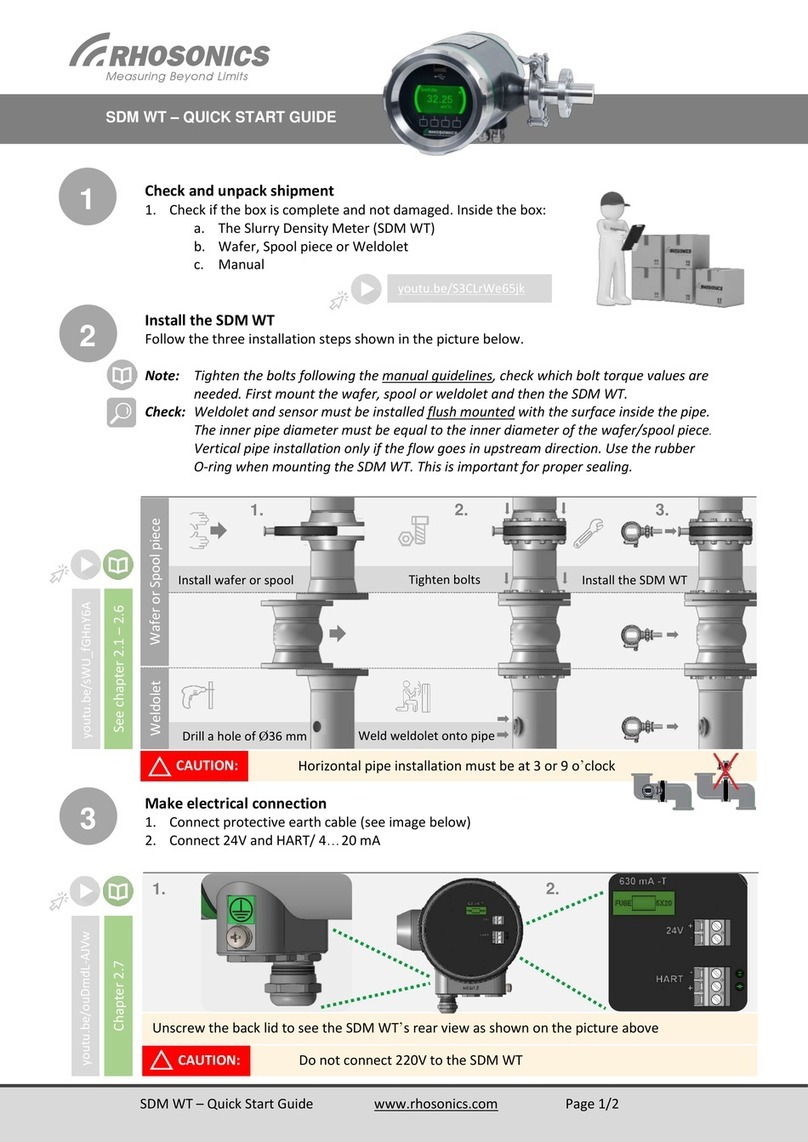
The SDM is a 24 VDC powered standalone sensor with 4-20 mA output and HART protocol
Installation should be performed by skilled installation technicians (mechanical and electrical).
The SDM, which is installed in a specially prepared spool section, wafer section or is used in conjunction
with a pipe adapter (weldolet) has a ceramic sensor face which should be in contact with a representative
portion of the slurry to be measured.
IMPORTANT:
The surface of the ceramic front face must be aligned with the inside pipe diameter. Otherwise the SDM
will fail to measure correctly.
Installation:
In chapter 2.1 and 2.2 there are common instructions for mounting the SDM adapter in a process
line. This chapter is valid for all sensor adapter types.
In chapter 2.3 to chapter 2.5 the different SDM adapters mounting instructions are described. In
“Provided by Rhosonics” a description of the different types of SDM adapters.
In chapter 2.6 the SDM mounting instructions are described.
CAUTION:

SDM –Slurry Density Meter
7 www.rhosonics.com
INSTALLATION
In chapter 2.7 the electrical mounting instructions of the SDM are described.
Must be provided on site:
Mounting hardware e.g. bolts, nuts, washers, gasket sealing
Power 24 VDC
Power cable for 24 VDC
HART/4-20mA cable
OR
Combined cable for Power 24 VDC and HART

SDM –Slurry Density Meter
8 www.rhosonics.com
INSTALLATION
A density SDM system consists of the following components:
SDM (included mounting hardware to the adapter)
SDM, split version (e.g. 52 mm tip)
Process entry hardware for SDM
This adapter exist in five different types:
oSDM-1: Spool for 16 mm sensor tip, see chapter 2.3
SDM-1 Spool 16 mm tip
Mounting flange to
weldolet, wafer or spool
O-ring sealing
(not visible in
this drawing)
SDM housing
Cable entry cable gland(s) or
blind stop(s). Standard: M16x1.5
Tip length
Triclamp

SDM –Slurry Density Meter
9 www.rhosonics.com
INSTALLATION
oSDM-2: Weldolet for 34 mm sensor tip, see chapter 2.4
oSDM-3: Weldolet for 52 mm sensor tip, see chapter 2.4
SDM-2 Weldolet 34 mm tip SDM-3 Weldolet 52 mm tip
oSDM-4: Wafer (UHMWPE or metal) for 146 mm sensor tip, see chapter 2.5
oSDM-5: Wafer (UHMWPE or metal) for 200 mm sensor tip, see chapter 2.5
SDM-4 wafer 146 mm tip SDM-5 wafer 200 mm tip
2.2 Selecting the SDM location
The following guidelines apply to all SDM:
Install the SDM with 5xD length of straight pipe length upstream and 3xD of straight pipe length
downstream.
Avoid installation in a pipe section where the SDM tip may wear fast
Avoid installation near dosing valves.
Vertical pipe installation is preferred when the flow goes in upstream direction, see chapter
2.2.1.
Horizontal pipe installation: Sensor must be installed sidewise, see chapter 2.2.2.

SDM –Slurry Density Meter
10 www.rhosonics.com
INSTALLATION
2.2.1 Vertical pipe mounting
(Only if the flow goes in upstream direction.)
In a vertical pipe any orientation is possible. Make sure you mount the SDM with the display in the correct
position and the cable glands pointing downwards to prevent intruding liquids.
Vertical mounting (i.e. wafer)
2.2.2 Horizontal pipe mounting
Some considerations need to be taken into account in case of installation in a horizontal pipe.
The preferred installation in a horizontal pipe is shown below. The SDM must be installed either on the
left or the right hand side of the pipe.
90° Horizontal pipe mounting (i.e. wafer)
This manual suits for next models
5
Table of contents
Other Rhosonics Measuring Instrument manuals




Popular Measuring Instrument manuals by other brands

Powerfix Profi
Powerfix Profi 278296 Operation and safety notes

Test Equipment Depot
Test Equipment Depot GVT-427B user manual

Fieldpiece
Fieldpiece ACH Operator's manual

FLYSURFER
FLYSURFER VIRON3 user manual

GMW
GMW TG uni 1 operating manual

Downeaster
Downeaster Wind & Weather Medallion Series instruction manual

Hanna Instruments
Hanna Instruments HI96725C instruction manual

Nokeval
Nokeval KMR260 quick guide

HOKUYO AUTOMATIC
HOKUYO AUTOMATIC UBG-05LN instruction manual

Fluke
Fluke 96000 Series Operator's manual

Test Products International
Test Products International SP565 user manual

General Sleep
General Sleep Zmachine Insight+ DT-200 Service manual





