
Roobo DDKC7Q1 User manual

ROOBO Smart Audio Dev Kit DDKC7Q1
User Guide

COPYRIGHT © 2018 Intelligent Steward Co., Ltd.
All rights reserved. No part of this document may be modified, transmitted, transcribed, or
translated into any language in any form or by any means without the written permission of
Intelligent Steward Co., Ltd.
TRADEMARKS
ROOBO is a trademark of Intelligent Steward Co., Ltd. All other trademarks and registered
trademarks are property of their respective companies.
DISCLAIMER
Intelligent Steward Co., Ltd. owns the right to make improvements and/or changes in this
document at any time.
ROOBO provides this product to help accelerate the development of customizable in-home
assistants, in-car assistants, smart speaker, IoT devices, or other voice-enabled devices, but
not for other purposes.
Figures, photos, schematics and other information are included in this document to show
the technical specifications and/or tools instructions. If interested in mass production,
please contact ROOBO to obtain additional documents that require an NDA. ROOBO makes
no representations or warranties with respect to the accuracy or completeness of the
contents presented in this document.

Content
1.Introduction ................................................................................................................4
1.1 In the Box .........................................................................................................4
1.2 Dev Kit Specification ........................................................................................5
1.2 Circular 7-Mic Array .........................................................................................6
1.2.1 Mic Array Specs.....................................................................................6
1.2.2 Mic Array Board Sample and layout .....................................................6
1.3 Core Board Sample and Layout........................................................................7
1.4 Audio Data Path ...............................................................................................9
2. Development Environment........................................................................................9
2.1 QCOM USB driver installation (e.g. Windows 10)............................................9
2.2 Dev Kit Set up.................................................................................................10
2.3 ADB Debug tool..............................................................................................11
2.4 Vysor...............................................................................................................11
3. NDK compile.............................................................................................................12
4. ROM Upgrade...........................................................................................................13
5. Record and Playback ................................................................................................14
6. WiFi Config...............................................................................................................14
7. Program guide..........................................................................................................15
7.1 Mic LEDs program ..........................................................................................15
7.2 UART program................................................................................................17
7.3 GPIO program.................................................................................................18
7.4 KEY..................................................................................................................19
7.5 I2C program....................................................................................................19
NOTE ............................................................................................................................20

1.Introduction
This Dev kit (referred to as “DDK” later in this document) is designed For Microsoft Speech
Services Complete, end-to-end system reference design.
This Circular 7-Mic array Dev Kit is a pre-tuned end-to-end reference design that enables the
commercial device manufacturers to efficiently build high-quality speech enabled devices
using Microsoft Speech Services. Developers can integrate the Microsoft Speech
Services into smart speakers, set-top boxes, and other IoT devices with this kit and leverage
premium Microsoft voice recognition technology. It can also be easily configured into a Star
4-Mic array by disabling 3 mics, for evaluating it as a lower cost device.
With the Microsoft Speech Devices SDK, it enables a range of advanced features such as
- Multi-mic array, beam forming, noise suppression, echo cancellation.
- Customizable Key Word Spotting.
- Integration with the world-class Microsoft Speech Services and Bot Framework, and more.
1.1 In the Box
•1x 6+1 digital microphone array board
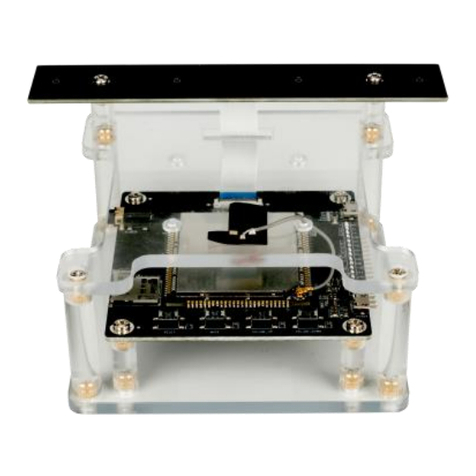
•1x mainboards held by acrylic stand
•1x Gain antenna
•1x USB Power cable

1.2 Dev Kit Specification
Items
Specs
CPU
Qualcomm APQ8009 Quad core A7 1.1GHz CPU
GPU
Adreno304
OS
Android 5.1
WIFI
802.11b/g/n
Bluetooth
NA
RAM
LPDDR3+eMMC, 1GB + 8GB
MIC Array
7 circular array (6+1)
Audio Line out
1 x 3.5mm Line out
Data Interface
1 x Micro USB Interface
Power Interface
1 x Micro USB Interface
UART
1 x UART
I²C
1 x I²C
GPIO
3 x GPIOs
TF Card
Support, up to 128GB(FAT32)
Key
4 x Keys(Reset, Mute, Volume Up, Volume Down)
Power Indicator
Support Power Indicator
Mic Array Indicator
12xRGB LEDs
Work Temperature
-4~131℉(-20~55℃)
Certification
FCC ID

1.2 Circular 7-Mic Array
1.2.1 Mic Array Specs
Items
Performance
Array Type
7 circular array (6+1)
Mic Quantity
7 digital MEMS microphone (I2S)
Dimension
Mics are placed horizontally and evenly in a circle and
microphone ports face upward
Array Distance
42.5mm
Wakeup Distance
<10m
Listening Range
<5m (Room environment)
Signal to Noise Ratio
65dBA
Sampling Rate
16K
Sensitivity
>-26dBV @94dB 1kHz
1.2.2 Mic Array Board Sample and layout

Items
Description
Digital MEMS Microphone
Pick up the audio from bottom,Sensitivity:-26dB
ADC
I2S interface, 24bit ADC
FPGA
Used to pack data
Audio output
Pin pitch 0.5mm, 24 pins, Connected to core board
LED Driver
Driver RGBx12 LED
RGB LED
12xRGB LED
1.3 Core Board Sample and Layout

Items
Description
Antenna Terminal
2.4GHz Wi-Fi antenna terminal
Line out
3.5mm Audio interface
USB Debug Interface
USB 2.0 Device
Audio input
Pin pitch 0.5mm, 24 pins, Connected to mic array board
TF card socket
Insert TF card
APQ8009 Core
APQ8009 Core board
Reset key
Press and hold the button for 2 Seconds for reset
Mute key
Key for mute
Volume up key
Key for system volume up
Volume down key
Key for system volume down
Power supply
Micro USB 5V 2A supply(at least 5V 1A)
User interface
Io,uart,i2c,power interface
Notes:
We strongly recommend using high quality speakers for a better experience. If you have
noticed any static noise when the speaker is connected to the dev kit’s AUX interface, please
switch to a higher quality speaker or use the USB port of the computer to power the dev kit.
The static noise generally occurs when an adapter is used to power the dev kit, and the

quality of the speaker is low. If you want recommendations for speakers, please contact us
1.4 Audio Data Path
2. Development Environment
2.1 QCOM USB driver installation (e.g. Windows 10)
1. Run setup.exe

2. Follow the installation wizard to complete the installation
2.2 Dev Kit Set up
Plug in the 5V 2A power adapter with USB, the dev kit should start running automatically.
Table of contents
Other Roobo Microcontroller manuals
Popular Microcontroller manuals by other brands
AMS
AMS AS7261 Demo Kit user guide

Novatek
Novatek NT6861 manual
Espressif Systems
Espressif Systems ESP8266 SDK AT Instruction Set

Nuvoton
Nuvoton ISD61S00 ChipCorder Design guide

STMicrolectronics
STMicrolectronics ST7 Assembler Linker user manual

Texas Instruments
Texas Instruments Chipcon CC2420DK user manual






Texas Instruments
Texas Instruments TMS320F2837 D Series Workshop Guide and Lab Manual

CYPRES
CYPRES CY14NVSRAMKIT-001 user guide
Texas Instruments
Texas Instruments INA-DUAL-2AMP-EVM user guide

Espressif Systems
Espressif Systems ESP8266EX Programming guide

Abov
Abov AC33M8128L user manual

Laird
Laird BL654PA user guide