1. The O tgoing messages (OGM A1/A2) can be a maxim m of 120
seconds (2 min tes) in length.
2. The maxim m time available for recording incoming messages (ICM) is
40 min tes total. Each incoming message has a maxim m record time
of 120 seconds (2 Min tes per message). D ring an incoming call the
caller will receive a “beep” tone after 115 seconds to indicate that they
have 5 seconds left to complete their message. After 120 seconds the
answering machine will disconnect the line and hang- p even if the
caller is still talking. Therefore, it is recommended that in yo r o tgoing
(OGM A1/A2) greeting message that yo tell the caller that they have
120 seconds (2 min tes) in which to complete their message.
Complete the following steps to record your messages:
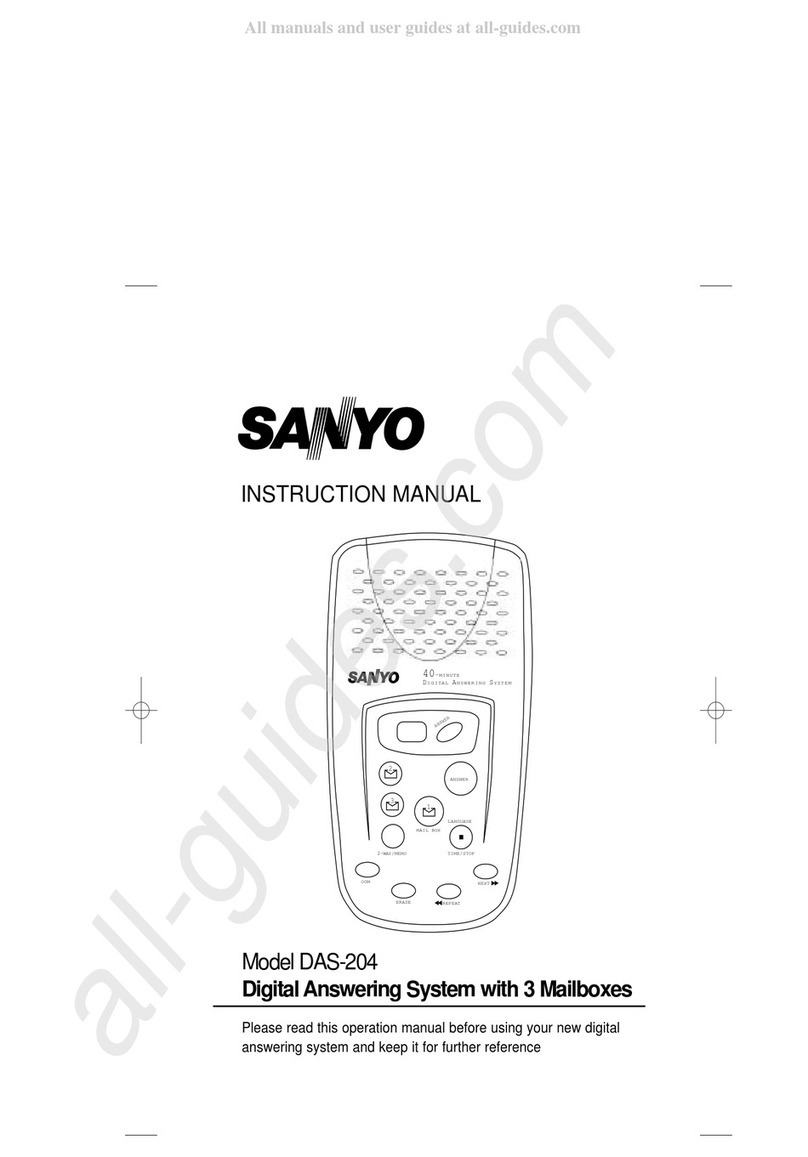
1. Press the ANSWER key and hold for approximately 2 seconds and
release. The display will indicate A1 or A2. If the other OGM is preferred,
press TIME/STOP/LANG AGE , then ANSWER for approximatey 2
seconds.
2. Once the desired o tgoing message is selected, press OGM for
approximately 2 seconds. A1 or A2 is displayed followed by a long beep.
3. Speak in a clear voice directly into the microphone located at the bottom
center area of the DAS-204. The LED display shows time co nt down in
seconds.
4. When yo have completed yo r recording, press TIME/STOP/
LANG AGE , and yo r message will playback.
5. If yo are satisfied with yo r recording, press
TIME/STOP/LANG AGE If yo are not, press OGM for 2 seconds and
repeat this process.
E. Playing outgoing messages (OGM)
Press the OGM key. The answering system will play the recorded
message (OGM1 or OGM2) according to the existing mode of the DAS-204
and ret rn to normal mode after the message is played.
F. Recording a memo
The Memo f nction allows yo to leave a message for another member of
yo r b siness or ho sehold. Complete the following steps to record yo r
Memo message:
1. Press the 2WAY/MEMO key and hold it for 2 seconds. All mailbox keys
will flash.
2. Press the desired mailbox key. Memo will start recording after a long
beep. The corresponding mailbox key lights.
3. Stop recording by pressing TIME/STOP/LANG AGE key. The nit
stops a tomatically after 1 min te.
G. Recording a 2-way conversation
The 2-Way Record f nction allows yo to record conversations yo have
on the telephone. Complete the following steps to se the 2-way record
f nction. The maxim m 2-way recording time is 15 min tes per call.
1. Press the 2WAY/MEMO key for 4 seconds. ntil oo flashes in the LED
Release the key, all mailbox LEDs will flash.
2. Press the desired mailbox key. 2-way recording will begin. The corre-
sponding mailbox LED will light.
3. A beep will be heard after 15 seconds to remind sers they are sing
2-way recording.
4. Recording is ended by pressing the TIME/STOP/LANG AGE key.
H. Playing memos and 2-Way conversations
To play memos, press the flashing MAILBOX key. Memos (and messages)
will be played seq entially from the mailbox.
I. Selecting outgoing message to be played to callers
A1: Conventional message req esting the caller to leave a message.
A2: Answer-only message for not accepting messages.
Press the ANSWER b tton and hold for 2 seconds ntil A1 or A2 appears
in the display. If the other OGM is preferred, press TIME/STOP/
LANG AGE , then ANSWER for 2 seconds. Once the desired OGM is
selected, the DAS-204 will play yo r message to callers.
J. Ring and toll saver (settings cannot be changed by user)
The DAS-204 will normally answer an incoming call after the second ring.
However, if there are no new messages on the system, the nit will not
answer ntil after the fo rth ring. This feat re allows yo to call yo r
answering system and determine, witho t a toll, if there are any new
messages. (ie. If the phone rings three times, yo have not received any
new messages.). Press the ANSWER key for 6 seconds to set the toll
saver on or off. With the Saver on, the LED will display “tS”, and with Saver
off the LED will display “r4”.
K. Recording incoming calls (ICM)
When a call is received in Answer-Record (A1) mode, the nit will play
OGM1, then start recording. The proced re for recording and MAILBOX
selection is as follows:
1. The DAS-204 answers the call and then plays OGM1. For a caller to
leave a message in a partic lar mailbox, the caller is req ested to press
“0” for mailbox 1, “1” for mailbox 2, “2” for mailbox 3. If one of the keys
(0, 1 or 2) is pressed d ring the OGM play, or within 5 seconds from the
start of the ICM recording, the nit selects the corresponding mailbox.
The defa lt mailbox is mailbox 1.
2. A long beep will so nd, then ICM recording starts.
8 9