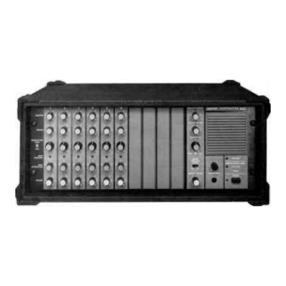
Two simple methods of localizing problems without
opening the console are as follows. These methods can
be used to find the abnormal console section with or with-
out test equipment. (The methods are not needed
if
the
problem is obvious: SHUTDOWN, no POWER indication,
etc.)
With test equipment: Set all console controls to full
clockwise, REVERB RETURN control to full counterclock-
wise, and PAN (700) and EQ controls to center. Do not
connect a speaker or headphone load. Apply a 0.5 mV,
1 kHz test signal across pins 2 and 3 of one of the BAL LO
IMP input connectors. Normal voltmeter readings taken
at each speaker, rear-panel PATCH BLOCKTMand front-
panel HEADPHONES connector are given in Table
1.
The top row of figures indicates the voltage ineach stage
from input to output. Similarly, a 5 mV signal inserted ina
HI IMP input will check these same voltages. The other
listed inputs givevoltage indications only for those circuits
following the inserted signal. Ac voltages may vary t30%
from the values shown.
Without test equipment: Using only a microphone and
speaker, it isoften possible to isolate problem areas using
the PATCH BLOCK rear panel. The ability to bypass cer-
tain circuits and interchange channel signals provides a
No DB PEAK/frequen-
cybandLEDindicators
flashing (console
output normal)
Noconsole output;
no DB PEAK LED
indicatorsflashing
Loudnoiseor
clickswhen certain
microphonesor
cablesare used
No monitor output
(programoutput
normal)
Sound quality poor
(weak orthin)
simple but powerful tool for troubleshooting. For example,
in
a 700 console a suspected channel A equalizer
can
be
checked by patching between the A MIX OUTPUT and
A PA INPUT jacks. The signal bypasses the equalizer, and
a talk test will immediately indicate whether the problem
has been eliminated.
Similarly, a potentially defective channel B mix ampli-
fier can be verified by patching the A MIX OUTPUT to the
B MIX OUTPUT. The presence of a "clean" signal from
channel A to the B speaker output indicates that the prob-
lem precedes the B MIX OUTPUT jack. Further patching
betweenthe EFFECTS OUTPUT and B MIX OUTPUT jacks
will isolate the problem to the B MIX amplifier.
1.
Make certain FEEDBACK
FINDER switch is set to A, B,
ON or OFF (not between posi-
tions).
1. Check PATCH BLOCKTM rear
panel for improper patching.
2.
Check for improper connec-
tions to EQ or PA INPUT.
3. Check settings of channel
VOLUME and MASTERvolume
controls.
1. SIMPLEX 24V switch is on
(when not needed).
2.
Unbalanced cable used when
SIMPLEX 24V switch is on.
3. Check for defective micro-
phone cables.
1. Check MONITOR OUTPUT
connection to EQ or PA INPUT,
or external amplifier.
2. Make sure MONITOR and
MONITOR MASTER controls
are turned up.
3. Monitor speaker volume con-
trol (if present) may be turned
down.
1. Excessive equalization on
graphic equalizers.
2.
Defective input or patching
cables.
TABLE
1.
NOMINALTEST VOLTAGES
I
7-
OUTPUTS
I
I
INPUT
I
Head-
'Tip
or
ring
to
sleeve.
Bal
Lo
Imp 0.5 mV
Hi
Imp 5 mV
Aux
(700) 0.15V
AUX
(706) 64 mV
Eq
0.54V
PA
0.54V
The above methodsare extremely useful for saving time
inlocalizing problem areas. Inaddition, they may allow use
of the console in an emergency until repairs can be made.
Internal servicing should only be performed by qualified
service personnel.
Monitor
CIRCUIT
OPERATION
Effects
Mix
3.8V
3.8V
-
-
-
-
Most of the PRO MASTERTM circuitry uses conventional
operational amplifier technology, and can be serviced
using standard voltage-measurement procedures. How-
ever, certain circuits are unusual and may not be familiar
to many servicemen. This section describes these circuits
as an aid to servicing (see Figures 5-38).
PA
OVERLOAD LED INDICATORS
The PA OVERLOAD LEOS (01109) are designed to
respond to error signals in their respective differential
amplifiers. The overload circuit is comprised of transistor
Q607 and associated resistors with the LED connected
across the collector and emitter of Q607.
The power amplifier assembly input is the differential
amplifier Q605-Q606, which amplifies the difference of the
signalsat the bases (the input signal to Q605 and the nega-
tive feedback signal to Q606). With small error signals
(normal power amplifier operation), the dc voltage drop
across R611 is approximately 1.6V, sufficient to keep Q607
turned on. Q607's collector-emitter voltage drop is very
low (approximately O.IV), and as long as Q607 is on, the
associated overload LED is turned off.
When the differential amplifier input signals differ
greatly (such as when clipping or V-l protection takes
place), the ac signal across R611 increases rapidly. At
about 1% distortion, the large ac signal through R611
causes Q607 to turn off. With Q607 turned off, the current
flow is through the associated LED and R616 to ground,
lighting the LED.
Aux
2.7V
2.7V
-
-
-
-
Mic
0.54V
0.54V
0.54V
0.54V
-
-
Eq
0.54V
0.54V
0.54V
0.54V
-
-
Speaker
7.0mV
7.0mV
7.0mV
7.0mV
-
-
phones*
0.54V
0.54V
0.54V
0 54V
0.54V
-
18.OV
18.OV
18.OV
18.OV
18.0V
180V
11.5V
11.5V
11.5V
11.5V
11.5V
11.5V