Silvercrest SKS 15 B1 Instruction sheet


V 1.41
English.............................................................................................................. 2
Hrvatski..........................................................................................................14
Română..........................................................................................................26
Български .....................................................................................................38
Ελληνικά.........................................................................................................51
Deutsch ..........................................................................................................64

SilverCrest SKS 15 B1
2 English
Content
Introduction ........................................................................................................ 3
Intended Use ...................................................................................................... 3
Supplied items .................................................................................................... 3
Technical specifications ....................................................................................... 4
Safety instructions .............................................................................................. 4
Operating environment ....................................................................................................................4
Power supply.....................................................................................................................................5
Cables ...............................................................................................................................................5
Children.............................................................................................................................................6
Before Getting Started........................................................................................ 6
Option 1: only connecting one television for image and sound output........................................7
Option 2: Connecting a TV Set for video and stereo system for audio........................................8
Connecting a DVD player................................................................................................................8
Connecting the microphones ...........................................................................................................8
Connecting to the mains power supply...........................................................................................8
Getting Started ................................................................................................... 9
Maintenance / Cleaning.................................................................................... 10
Environmental Considerations and Recycling.................................................... 10
Notes on CE conformity..................................................................................... 10
Troubleshooting................................................................................................ 11
Warranty Information ...................................................................................... 12

SilverCrest SKS 15 B1
English 3
Introduction
Thank you for purchasing the SilverCrest SKS 15 B1 karaoke kit.
Before using this device for the first time, always read the following instructions and pay attention to
all warnings, even if you are familiar with handling electronic devices. Keep this manual safe for
future reference. If you sell the device or pass it on, always include this manual.
Intended Use
This is a consumer electronics device. It is a karaoke kit designed for connection to a DVD player
and television.
It is only designed for private use and not for industrial or commercial purposes. Furthermore, the
device may not be used outdoors or in tropical climates. When connecting peripheral devices al-
ways ensure that the cables are not too short and that they do not exert strain on the connectors!
Supplied items
Karaoke kit SilverCrest SKS 15 B1
Mains adapter type Taiytech TYTE050900010EU
(in UK Taiytech TYTE050900010UK)
2 SilverCrest SKS 15 B1 microphones
2 audio/video cables
1 SCART adapter (Input)
1 SCART adapter (Output)
1 karaoke DVD
1 user manual

SilverCrest SKS 15 B1
4 English
Technical specifications
Power supply: Taiytech TYTE050900010EU
(in UK Taiytech TYTE050900010UK)
Primary: 100 - 240 V AC, 50/60 Hz, 0.2 A
Power consumption during operation: 1.5 W max
Power consumption in standby: 0.15 W
Secondary: 9 V
100 mA
Dimensions (approx.) in cm: 17.1 x 11.5 x 4.3
Approx. weight: 254 g
Sockets: 2 x Audio Line In
2 x Audio Line Out
1 x Video Composite In
1 x Video Composite Out
1 x DC In
2 x Microphone
Microphones : Dynamic microphones
Operating temperature: 15 - 35 °C
Safety instructions
Operating environment
Place the device on a stable, even surface and do not place any heavy objects on the device. The
device is not designed for use in environments with a high temperature or humidity (e.g. bath-
rooms), and must be kept free from dust. Operating temperatures and operating air humidity: 15
°C to 35 °C, max. 85 % rel. air humidity. Always make sure that
air can always circulate freely (do not place the device on shelves, on a thick carpet or a bed,
and always leave at least 10 cm clearance on all sides);
no direct heat sources (e.g. heating) can affect the device;
no direct sunlight or bright artificial light reaches the device;

SilverCrest SKS 15 B1
English 5
contact with sprayed and dripping water and corrosive liquids is prevented and the device is
never operated near water; in particular it should never be immersed (do not place any objects
filled with liquids such as vases or drinks on or near the device);
no fire sources (e.g. burning candles) are placed on or near the device;
no foreign objects penetrate the device;
the device is not subjected to any extreme temperature fluctuations, as this may result in mois-
ture caused by condensation and therefore a short circuit;
the device is never be subjected to excessive shocks and vibrations.
Power supply
The power switch of this device does not fully disconnect the device from the mains. The device
consumes electricity in Standby mode. To completely disconnect the device from the mains power
supply, the mains adapter must be removed from the mains socket. For this reason the device
should be positioned so that direct and unobstructed access to the mains socket is ensured and the
mains adapter can be immediately pulled out in an emergency. To prevent a fire hazard if the
mains adapter is not in use for a prolonged period (e.g. during holidays), it should always be dis-
connected from the mains socket. Before stormy weather when there is the risk of lightning, discon-
nect the device from the mains power supply. Only use the supplied mains adapter type Taiytech
TYTE050900010EU (in the UK Taiytech TYTE050900010UK) to prevent overheating, deformation
of the housing, fire, electric shock, explosions and other hazards. Never connect this mains adapter
to other devices.
Cables
Always hold cables by the plug and never pull on the cable itself. Never touch the power supply
cable with wet hands as this may cause a short circuit or electric shock. Never place the device,
furniture or other heavy objects on the cable and take care that the cable is not kinked, especially
near the plug and connection sockets. Never make knots in the cable and do not tie it together with
other cables. All cables should be positioned so that nobody can trip over them and they cannot
cause an obstruction. A damaged power supply cable can cause fire or an electric shock. Inspect
the power supply cable from time to time. Never use adapter plugs or extension cables that do not
comply with the current safety regulations and do not make any modifications to the power supply
cables and the mains adapter yourself!

SilverCrest SKS 15 B1
6 English
Children
Electrical appliances do not belong in the hands of children! Do not allow children to use electrical
devices when unsupervised. Children may not recognise potential risks. Small parts can constitute a
choking hazard. Always keep plastic packaging away from children. Risk of suffocation!
Before Getting Started
First familiarise yourself with the different sockets and controls.
The sockets on the back panel of your SilverCrest SKS 15 B1 from left to right are:
Group of three RCA sockets (Input) (yellow for video, red for the right audio channel and white
for the left audio channel)
Group of three RCA sockets (Output) (yellow for video, red for the right audio channel and
white for the left audio channel)
Power supply socket
AUTO STANDBY switch: Turn this switch to the "ON" position to save energy. If the device
does not recognise a microphone signal after approx. 3-4 hours the device will switch itself to
standby mode. In standby mode the Power LED is orange. To deactivate the standby function
turn the switch to the "OFF" position.

SilverCrest SKS 15 B1
English 7
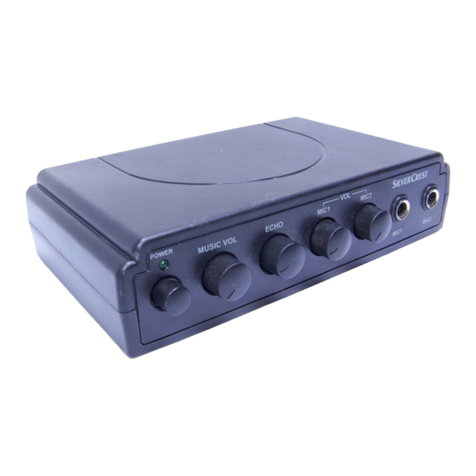
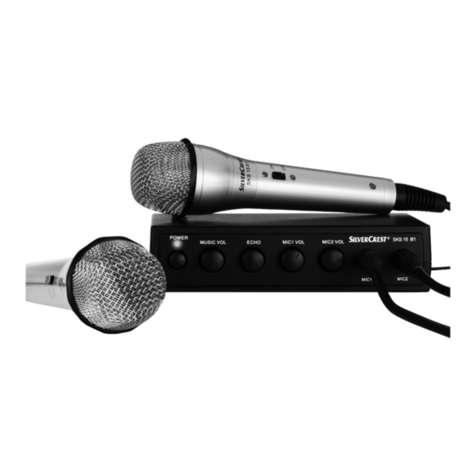
The sockets and controls located on the front panel of the SilverCrest SKS 15 B1 from left to right
are:
Power LED and the On/Off button below
Music volume control (MUSIC VOL)
Echo control (ECHO)
Microphone 1 gain control (MIC1 VOL)
Microphone 2 gain control (MIC2 VOL)
Input socket for microphone 1 (MIC1)
Input socket for microphone 2 (MIC2)
A DVD player is required as signal source to use your SilverCrest karaoke kit SKS 15 B1. There are
two playback options: either use a TV set for video and audio playback, or use a TV set for video
and a stereo system for audio playback. The second option naturally provides a higher sound qual-
ity. The following section describes both connection options.
Option 1: only connecting one television for image and sound
output
Connect one of the supplied audio/video cables to the group of three RCA sockets (Output) on
your SilverCrest SKS 15 B1. The different cables and sockets are colour-coded for easier connec-
tion. If your TV set features a corresponding group of three sockets for the audio and video signals,
you can connect the cable that you previously connected to the Output sockets of your SilverCrest
SKS 15 B1 here. If your TV set only features a SCART socket, use the supplied SCART adapter
(INPUT). The adapter also features the same colour code.

SilverCrest SKS 15 B1
8 English
Option 2: Connecting a TV Set for video and stereo system for
audio
Carefully separate the yellow wire of the audio/video cable so you can plug it to the TV set sepa-
rately. If your TV set has a RCA socket for video input, you can connect the yellow RCA connector
to this socket. Otherwise proceed as for Option 1 and use the SCART adapter (INPUT). In this case
the red and white sockets for audio input are not used on the TV set. Instead of connecting the
corresponding cables to the adapter, connect them to your stereo system. Use a suitable input (oth-
er than Phono).
Connecting a DVD player
Connect one of the supplied audio/video cables to the group of three RCA sockets (Input). The
different cables and sockets are colour-coded for easier connection. If your DVD player also fea-
tures a corresponding group of three sockets for audio and video signals, you can connect the
cable directly to these. If your DVD player only features a SCART socket, use the supplied SCART
adapter (OUTPUT). The adapter also features the same colour code.
Connecting the microphones
Now you can connect one or both microphones. To do so insert the jack plug of the microphone
cable into one of the microphone inputs (MIC1 or MIC2) of the SilverCrest SKS 15 B1. It is irrele-
vant which of the two sockets you use. You only have to remember that each input socket is as-
signed to one of the two microphone gain controls.
Connecting to the mains power supply
First connect the mains adapter to your SilverCrest SKS 15 B1 and then to an easily accessible
mains socket. The device is then ready for operation.
Other manuals for SKS 15 B1
1
Table of contents
Languages:
Other Silvercrest Karaoke System manuals
Silvercrest
Silvercrest SKES 2 A1 User manual
Silvercrest
Silvercrest SKS 15 B1 Instruction sheet

Silvercrest
Silvercrest SKES 2 A1 User manual
Silvercrest
Silvercrest KH 2404 User manual

Silvercrest
Silvercrest SKES 2 A1 User manual
Silvercrest
Silvercrest TM-220 Instruction sheet
Silvercrest
Silvercrest SKES 2 A1 User manual
Silvercrest
Silvercrest TM-210 User manual
Silvercrest
Silvercrest SKS 15 A1 Operating instructions
Silvercrest
Silvercrest TM-220 Instruction sheet