manuals.online logo
Brands
  1. Home
  2. •
  3. Brands
  4. •
  5. Sony
  6. •
  7. Speakers
  8. •
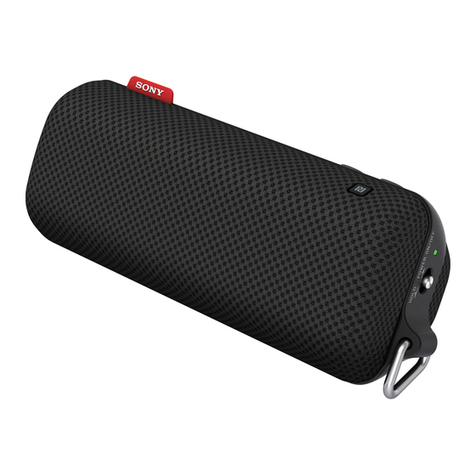
  9. Sony SRS-NB10 User manual

Sony SRS-NB10 User manual

Other manuals for SRS-NB10

5

Other Sony Speakers manuals

Sony XS-A1023 Product guide

Sony

Sony XS-A1023 Product guide

Sony SRS-XV900 User manual

Sony

Sony SRS-XV900 User manual

Sony SA-NS400 User manual

Sony

Sony SA-NS400 User manual

Sony SCA-S30 User manual

Sony

Sony SCA-S30 User manual

Sony RDP-XA700iPN User manual

Sony

Sony RDP-XA700iPN User manual

Sony GTK-PG10 User manual

Sony

Sony GTK-PG10 User manual

Sony XS-7603 User manual

Sony

Sony XS-7603 User manual

Sony SA-NS400 User manual

Sony

Sony SA-NS400 User manual

Sony XS-MP1610B User manual

Sony

Sony XS-MP1610B User manual

Sony SS-K90ED User manual

Sony

Sony SS-K90ED User manual

Sony XS-HS4 Product guide

Sony

Sony XS-HS4 Product guide

Sony XS-F6924 User manual

Sony

Sony XS-F6924 User manual

Sony SRS-Z30 Use and maintenance manual

Sony

Sony SRS-Z30 Use and maintenance manual

Sony SRS-XB501G User manual

Sony

Sony SRS-XB501G User manual

Sony RDP-XF300iPN User manual

Sony

Sony RDP-XF300iPN User manual

Sony XS HA1327 Product guide

Sony

Sony XS HA1327 Product guide

Sony SDP-E300 User manual

Sony

Sony SDP-E300 User manual

Sony SRS-XB23 User manual

Sony

Sony SRS-XB23 User manual

Sony SA-D10 User manual

Sony

Sony SA-D10 User manual

Sony SA-VE835ED User manual

Sony

Sony SA-VE835ED User manual

Sony RDP-X500IP Use and maintenance manual

Sony

Sony RDP-X500IP Use and maintenance manual

Sony SS-X70ED Marketing User manual

Sony

Sony SS-X70ED Marketing User manual

Sony HT-CT800 User guide

Sony

Sony HT-CT800 User guide

Sony SRS-XE300 User manual

Sony

Sony SRS-XE300 User manual

Popular Speakers manuals by other brands

Electro-Voice LR4S engineering data

Electro-Voice

Electro-Voice LR4S engineering data

Definitive Technology Sound Cylinder user guide

Definitive Technology

Definitive Technology Sound Cylinder user guide

AudioSource LS545 user manual

AudioSource

AudioSource LS545 user manual

Paso C402-T Instructions for use

Paso

Paso C402-T Instructions for use

Altec Lansing 416-8C LF SPEAKER manual

Altec Lansing

Altec Lansing 416-8C LF SPEAKER manual

Kenwood KFC-1072 Servise manual

Kenwood

Kenwood KFC-1072 Servise manual

Peavey ProSys 112 user guide

Peavey

Peavey ProSys 112 user guide

JBL Control Contractor 60 Series installation instructions

JBL

JBL Control Contractor 60 Series installation instructions

Aura STORM-8 owner's manual

Aura

Aura STORM-8 owner's manual

Oontz ANGLE 3 PLUS quick start guide

Oontz

Oontz ANGLE 3 PLUS quick start guide

Electro-Voice LR4A engineering data

Electro-Voice

Electro-Voice LR4A engineering data

Rave RK-650-ICA-B owner's manual

Rave

Rave RK-650-ICA-B owner's manual

Flux Reference Series installation manual

Flux

Flux Reference Series installation manual

Lanzar AQAWBS64BK installation manual

Lanzar

Lanzar AQAWBS64BK installation manual

DAPAudio DCS-6230 manual

DAPAudio

DAPAudio DCS-6230 manual

Aluratek ABS03F quick start guide

Aluratek

Aluratek ABS03F quick start guide

Kenwood KES-5A instruction manual

Kenwood

Kenwood KES-5A instruction manual

Sonance ORIGINAL SERIES instruction manual

Sonance

Sonance ORIGINAL SERIES instruction manual

manuals.online logo
manuals.online logoBrands
  • About & Mission
  • Contact us
  • Privacy Policy
  • Terms and Conditions

Copyright 2025 Manuals.Online. All Rights Reserved.

SRS-NB10 IN (GB) 5-030-724-41(1)
SRS-NB10
5-030-724-41(1)
©2021 Sony Corporation
Printed in China
https://www.sony.net/
Wireless Neckband Speaker
Reference Guide
English Wireless Neckband Speaker
Before operating the unit, please read this guide thoroughly and retain it for future reference.
Please access the following URL and read the contents of the END USER LICENSE AGREEMENT.
https://rd1.sony.net/help/speaker/el21/h_zz/
CAUTION
Do not expose the appliance to naked flame sources (for example, lighted candles).
Do not install the appliance in a confined space, such as a bookcase or built-in cabinet.
To reduce the risk of fire or electric shock, do not expose this unit to rain or moisture.
To reduce the risk of fire or electric shock, do not expose this unit to dripping or splashing, and do not
place objects filled with liquids, such as vases, on the unit.
Do not expose the batteries (battery pack or batteries installed) to excessive heat such as sunshine, fire
or the like for a long time. Do not subject the batteries to extreme low temperature conditions that may
result in overheating and thermal runaway. Do not dismantle, open or shred secondary cells or batteries.
In the event of a cell leaking, do not allow the liquid to come in contact with the skin or eyes. If contact
has been made, wash the affected area with copious amounts of water and seek medical advice.
Secondary cells and batteries need to be charged before use. Always use the correct charger and refer
to the manufacturer's instructions or equipment manual for proper charging instructions. After
extended periods of storage, it may be necessary to charge and discharge the cells or batteries several
times to obtain maximum performance. Dispose of properly.
Do not place this product close to medical devices
This product (including accessories) has magnet(s) which may interfere with pacemakers, programmable
shunt valves for hydrocephalus treatment, or other medical devices. Do not place this product close to
persons who use such medical devices. Consult your doctor before using this product if you use any
such medical device.
This equipment has been tested and found to comply with the limits set out in the EMC regulation using
a connection cable shorter than 3meters.
Caution on charging
Inserting the USB plug while it is wet may cause a short circuit due
to foreign matter or liquid (tap water, salt water, soft drinks, etc.)
getting on the main unit or the USB cable. This may cause
malfunctions or abnormal overheating.
Never insert the USB plug while the main unit or
the USB cable is wet.
Precautions
On safety
• Important information such as the model name is located on the bottom of the unit.
• If you experience discomfort while using the unit, stop using it immediately.
• Be sure to stay awake while wearing the unit.
• If you experience a skin problem, such as itchiness, a rash, or redness, while wearing the unit, stop use
of the unit. If wearing the unit seems to disagree with your skin, stop use of the unit early on and
consult with your doctor or dealer.
• Wear the unit in a proper manner where you do not feel the vibrations of the unit on the sides of your
neck to avoid a health issue or poor health.
• Do not keep listening at a loud volume for an extended period of time. Hours of listening at an
ear-splitting volume level may damage your hearing. To protect your hearing, keep the volume at an
appropriate level.
• Keep the volume low at first. Sudden loud sound may damage your hearing. It is advised that you
gradually turn up the volume.
• Do not use the unit while walking, driving or cycling. Doing so may cause traffic accidents.
• Do not use at a dangerous place unless the surrounding sound can be heard.
On static electricity
• Static electricity accumulated in the body may cause mild tingling around your neck. To reduce the
effect, wear clothes made from natural materials, which suppress the generation of static electricity.
On placement
• To eliminate the risk of malfunctions, avoid the following locations when placing or leaving this unit.
– A place subject to high temperatures, such as under direct sunlight or lighting equipment, near a
heat source, or in a sauna
– Inside a vehicle with the windows closed (especially in summertime)
– A place subject to excessive dust
– A place subject to strong vibration
– A place where cosmetics, such as a sunscreen, as well as chemical products, such as a bug spray, are
stored
• Place this unit on a flat, level surface. When placed on a sloped surface, the unit may fall over or fall off
the surface due to its own vibration, resulting in injuries, malfunctions, or performance degradation.
• Depending on the conditions where this unit is placed, it may fall off the surface. Do not leave any
valuables near the unit.
• This unit is not anti-magnetic. Keep objects susceptible to magnetism (recorded tapes, watches, cash
cards and credit cards with magnetic coding, etc.) away from the unit. When you carry around the unit,
keep this in mind as well.
On charging the unit
• When charging, the unit cannot be turned on and the Bluetooth® function cannot be used.
• When the ambient temperature is extremely high or low, charging stops for safety reasons.
• Even if you do not intend to use the unit for a long time, charge the battery to its full capacity once
every 6 months to maintain its performance.
• Make sure to close the USB Type-C® port cap securely after charging. Perspiration or water may cause
damage.
Others
• Do not use or leave the unit in an extremely cold or hot environment (temperature outside the range
of 5 °C – 35 °C). If the unit is used or left in outside the above range, the unit may automatically stop to
protect internal circuitry.
On Copyrights
• Android is a trademark of Google LLC.
• The BLUETOOTH® word mark and logos are registered trademarks owned by Bluetooth SIG, Inc. and
any use of such marks by Sony Corporation is under license.
• WALKMAN and WALKMAN logo are registered trademarks of Sony Corporation.
• iPhone, iPod touch and Mac are trademarks of Apple Inc., registered in the U.S. and other countries.
• Microsoft and Windows are registered trademarks or trademarks of Microsoft Corporation in
the United States and/or other countries.
• USB Type-C® and USB-C® are registered trademarks of USB Implementers Forum.
• Other trademarks and trade names are those of their respective owners.
• ™ and ® marks are omitted in the documents.
SRS-NB10 IN (GB) 5-030-724-41(1)
Notes on water resistant feature
(Read before using the unit)
The supplied accessories are not water resistant.
Water resistant performance of the unit
The unit, with the cap closed securely, has a water resistant specification of IPX4*1as specified in
“Degree of protection against splashing water” of the IEC60529 “Ingress Protection Rating (IP Code)*2.”
However, the unit is not completely waterproof. Do not drop the unit into hot water in a bathtub or
purposely use it in water.
Liquids that the water resistant performance specifications apply to
Applicable fresh water, tap water
Not applicable liquids other than the above (soapy water, water with detergent or bath agents,
shampoo, pool water, hot spring water, salt water, etc.)
*1IPX4 (Degree of protection against splashing water): Protected against water splashing from any
direction.
*2The supplied accessories and the connectors of this unit (USB) are not water resistant. To reduce the
risk of fire or electric shocks, do not expose the unit to water or droplets while using either or both of
the connectors (USB). Do not place a vase or any other liquid-filled container on the unit.
The water resistant performance of the unit is based on our measurements under the conditions
herein described. Note that malfunctions as a result of water immersion caused by misuse by the
customer are not covered by the warranty.
To avoid the deterioration of the water resistant performance
Check the following and use the unit correctly.
• This unit does not have a design that is resistant to water pressure. Do not put the unit in the water or
directly under the water gushing out of the faucet to avoid a malfunction.
• Do not pour high-temperature water or blow hot air from a hair dryer or any other appliance on the
unit directly. Also never use the unit in a place subject to high temperatures, such as in a sauna or near
a heat source.
• Handle the cap with care. The cap plays a very important role in maintenance of the water resistant
performance. When using the unit, make sure that the cap is closed completely. When closing the cap,
be careful not to allow foreign objects inside. If the cap is not closed completely, the water resistant
performance may deteriorate and may cause a malfunction of the unit as a result of water or dust
entering the unit.
Cap
How to care for the unit
You can use the unit more comfortably and for a longer period of time by following the maintenance
procedure below.
Keep the unit from being exposed to chemical ingredients of a product, such as a bug spray or a
tanning oil. When the unit is soiled on the surface, remove the soil by gently dabbing at it with a dry,
soft cloth or a well-wrung cloth dipped in tap or lukewarm water before the surface is stained with the
soil. Depending on the type of soils, however, this may fail to remove the soil.
Be sure to wipe off the moisture after using the unit. If the unit is left wet, it may be soiled by water
stains, molds, or the like.
The sound quality may change when water enters the speaker section of the unit. This, however does
not indicate a malfunction.
Wipe off the moisture on its surface, and put the unit on a dry soft cloth to drain the collected water
inside the unit. Then, dry the unit in an airy place until no moisture remains.
Note
• If the surface of the unit gets dirty, do not use detergent, thinner, benzine, alcohol, etc. to clean the
unit because it will affect the water repellent function of the fabric part of the unit.
• Especially in cold regions, be sure to wipe off the moisture after using the unit. Leaving moisture on its
surface may cause the unit to freeze and malfunction.
• If sand grains, etc. enter the fabric or other part of the unit, remove them carefully. Never use a vacuum
cleaner, etc. on the unit. It may cause damage of the speaker section or other part of the unit.
Disclaimer regarding services offered by third parties
Services offered by third parties may be changed, suspended, or terminated without prior notice.

Sony does not bear any responsibility in these sorts of situations.

Specifications
Speaker section
Full range unit Approx. 14 mm × 18 mm (2)
Enclosure type Passive radiator model
BLUETOOTH
Communication system
BLUETOOTH Specification version 5.1
Maximum communication range
Line of sight*1approx. 30 m
Frequency band
2.4 GHz band (2.4000 GHz - 2.4835 GHz)
Modulation method
FHSS (Freq Hopping Spread Spectrum)
Compatible BLUETOOTH profiles*2
A2DP (Advanced Audio Distribution Profile)
AVRCP (Audio Video Remote Control Profile)
HSP (Headset Profile)
HFP (Hands-free Profile)
Supported codecs*3
SBC (Subband Codec)
AAC (Advanced Audio Coding)
Transmission range (A2DP)
20 Hz - 20 000 Hz (Sampling frequency 44.1 kHz)
Note
Depending on the network environment, there may be an interruption at the high bitrate transmission.
Microphone
Type MEMS (Micro Electronics Mechanical System) type
Directional characteristic
Omni directional
Effective frequency range
100 Hz - 8 000 Hz
General
Power Built-in lithium-ion rechargeable battery
DC 5 V 0.5 A (500 mA): When charged using USB
Lithium-ion battery life (with playback via a BLUETOOTH connection)
Approx. 20 hours*4 *5
Approx. 7 hours*4 *6
Time required for charging the built-in rechargeable battery*7
Approx. 4 hours
(10 minutes of charging provide approximately 60 minutes of music playback.)*4 *5
Dimensions (including projecting parts and controls)
Approx. 191 mm × 49 mm × 185 mm (w/h/d)
Mass Approx. 113 g including battery
Supplied accessories
USB Type-C cable (USB-A to USB-C)*8(1)
*1The actual range will vary depending on factors such as obstacles between devices, magnetic fields
around a microwave oven, static electricity, reception sensitivity, antenna’s performance, operating
system, software application, etc.
*2BLUETOOTH standard profiles indicate the purpose of BLUETOOTH communications between devices.
*3Codec: Audio signal compression and conversion format
*4Actual performance time may vary from the listed time due to the volume, songs played, surrounding
temperature, and usage conditions.
*5Measured value acquired by playing our specified music source with the volume level of the unit set
to 22.
*6Measured value acquired by playing our specified music source with the volume level of the unit set
to the maximum.
*7Time required for the empty battery to be fully charged (100%) when the ambient temperature is in
the range of 15 °C - 35 °C.
*8A charging cable exclusively designed for the unit. Do not use the cable for any other purposes.
System requirements for charging battery using USB
Using a commercially-available USB AC adaptor capable of feeding in DC 5 V 0.5 A (500 mA).
Design and specifications are subject to change without notice.