6
Displays
In the pedometer mode the watch uses G-Sensor technology to track and record your daily activities.
You must be in this mode to activate the G-Sensor and track activity. Within this mode you will be able to
cycle through 3 dierent displays using the UP button - Step/Time, Step/Activity Time, Calorie/Mileage.
These displays are shown below:
User Prole
To more accurately measure your step count, calorie burn and distance travelled you can set up an
individual user prole. This will tailor the watch to you and your needs.
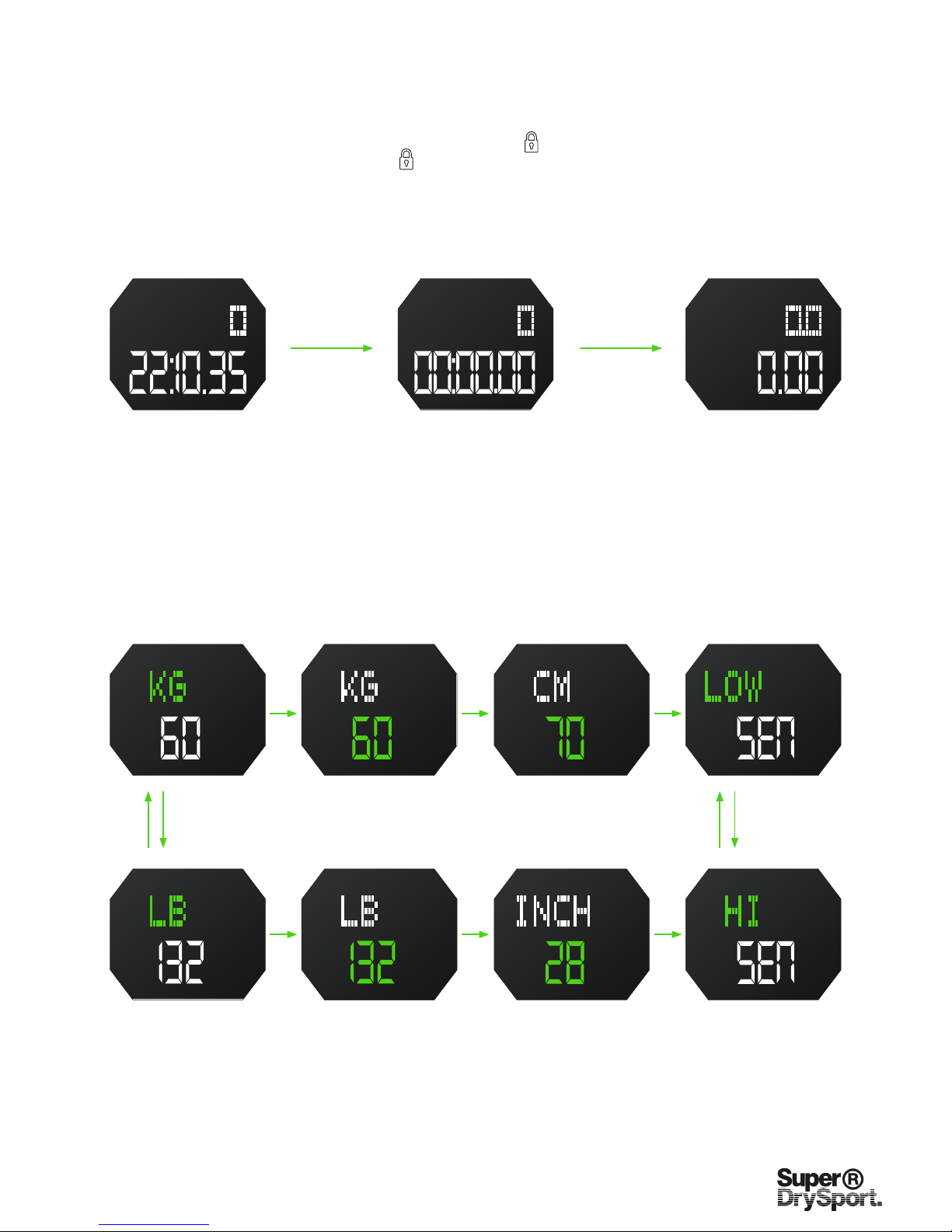
- In pedometer mode, hold MODE button until KG/LB indicator starts to ash.
- Press UP or DOWN button to adjust the ashing value.
- Press MODE button to cycle through settings, as below diagram.
Metric/Imperial - Default is metric. Press UP or DOWN to switch between metric & imperial.
Weight - Default weight is 60kg (132lb). Adjustable range is 20-200kg / 66-440lb.
Stride Length - Default stride length is 70cm (28in). Adjustable range is 30-150cm / 12-59in.
Sensitivity of G-Sensor - Default MIDDLE. Recommendation: LOW - Jogging / HI - Fast running.
4. Pedometer Mode
STEPS STEPS KCAL
KM
Step / Time Step / Activity Time Calorie / Mileage
Press UP
Metric / Imperial Weight (Kg)
Cycle between
with UP or
DOWN
Press MODEPress MODE
Press MODEPress MODE
Press MODEPress MODE
Cycle between
with UP or
DOWN
To change each setting press UP or DOWN buttons accordingly.
Sensitivity Low
Sensitivity High
Stride Length (cm)
Weight (lb) Stride Length (in)
Metric / Imperial
Press UP
NOTE: The ashing unit is the one which will change - shown below in GREEN.
NOTE: You must be in pedometer mode to track activity continuously. Steps will not be recorded if you leave this mode. To remain
in Pedometer mode, use the lock function by holding the UP button until (
)
appears. Battery life can be reduced with regular
use. To exit lock function, hold the UP button until ( ) disappears.